Lifecycle marketing
 Customer data management
 Email campaign production
 Search marketing
 CMS development
 Who we are
 How we work
 Case studies
 Testimonials
 Salesforce Marketing Cloud
 Braze
Braze HubSpot
 Marketo
 Pardot
 DataBricks
 Snowflake
 HighTouch
 RudderStack
 Segment by Twilio
 Videos

The divide between knowledge and application can manifest itself in curious ways. For seasoned professionals and experts, it’s usually quite narrow. However, there are instances when this gap suddenly becomes much wider.
You may have found yourself awkwardly straddling expertise and experience, too. But the “Somehow I manage” road will lead you to a pile-up. The only feasible option is to take a different road: that of innovation in your marketing strategy.
That’s how we did it, faced with the challenge of handling increasing campaign complexity, followed by never-ending feedback loops, delayed execution, and so on…
Orchestrating seamless and effective email campaigns is both an art and a science. In fact, that’s the “original divide.” For one of our Salesforce Marketing Cloud (SFMC) clients, we recently successfully traversed this divide, eradicating bottlenecks and executing the campaigns to spec. Keep reading!
Table of Contents
The challenge: Excel sheet bloat
The solution: A CloudPage journey
Streamlining campaign setup
Simplifying data management
Empowering stakeholders
Elevating content creation
Email previewing redefined
Real-time visualization
Desktop & mobile compatibility
URL validation & interactive elements
Going beyond convenience
The challenge: Excel sheet bloat
Imagine managing multiple email campaigns, each with its own intricate details and stakeholders, using cumbersome Excel sheets.
This was the challenge we encountered with one of our clients.
Every campaign had its own Excel sheet containing everything from subject lines to content blocks and recipient details. As campaigns grew, so did their complexity, resulting in tedious updates, multiple feedback rounds, and an increased risk of errors.
Many of our clients rely on Excel sheets to manage and share campaign details, such as content, data segmentation rules, and stakeholder information for seed testing. One client had a similar process where each campaign’s information was spread across multiple worksheets in an Excel file. These worksheets included:
- Cover Sheet: Campaign and audience segmentation details
- Design Flow: High-level overview of the journey structure
- Template Structure: Specifications on which email should include specific content blocks
- Content: Details of email content for different touchpoints
- Seed Testing: Stakeholder information for receiving test emails for final approval
Whenever there was a need to change email content due to human error or stakeholder feedback, the client updated the relevant worksheet in the Excel file and shared it with us for implementation. This process involved significant effort and led to extensive back-and-forth communication.
After content approval, the final Excel file was converted to CSV using macros, uploaded to FTP, and processed through File Drop Automation. This automated process imported email content from the CSV file into a Data Extension and dynamically created emails with specified content blocks based on unique email names from the Excel file.
However, managing this entire process was cumbersome and time-consuming, particularly with multiple rounds of stakeholder feedback requiring frequent updates to the Excel file.
The solution: A CloudPage journey
To overcome these challenges and maximize the potential of Salesforce Marketing Cloud (SFMC), we innovated by designing a CloudPage setup flow. This user-friendly interface revolutionized the way campaigns were conceptualized, created, and tested.
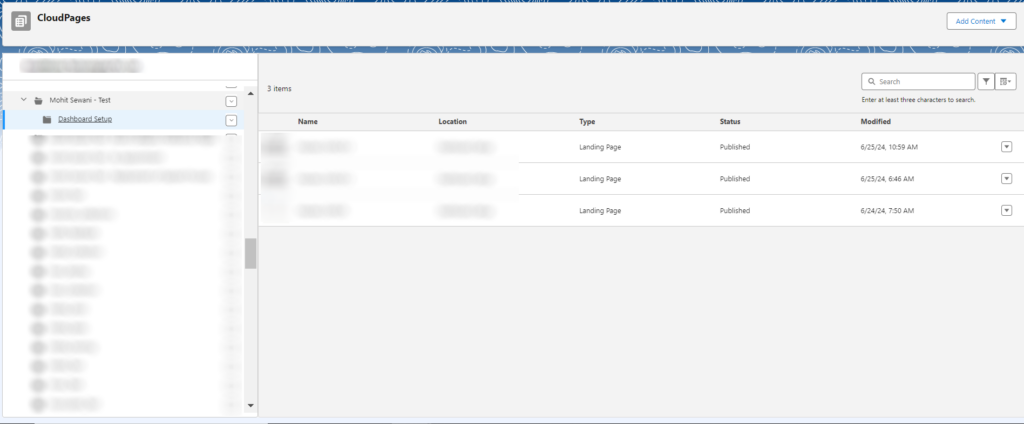
1. Streamlining campaign setup
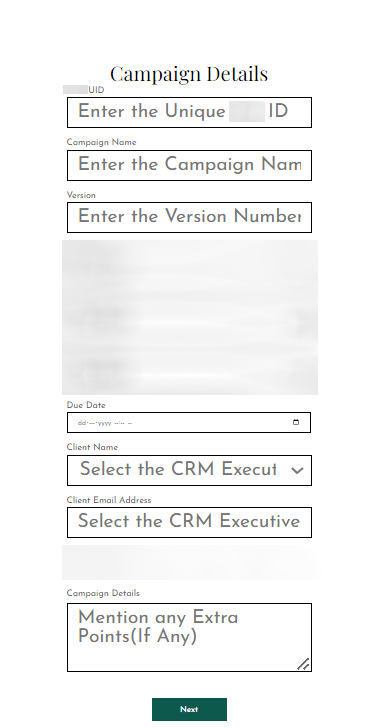
Our CloudPage journey starts by capturing essential campaign details to ensure clarity and alignment from the beginning. Unique campaign IDs, stakeholder information, and due dates are seamlessly integrated, creating a solid foundation for collaboration.
2. Simplifying Data Management
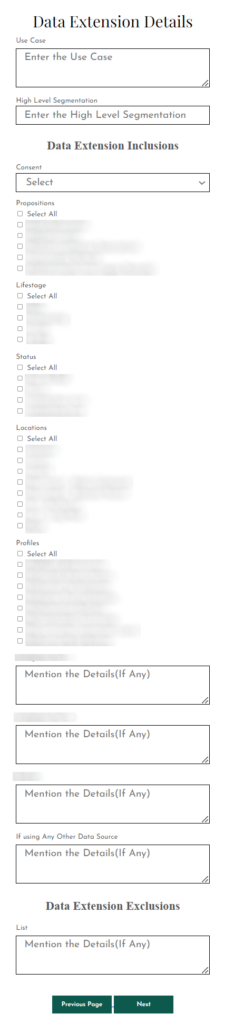
The Data Extension Details page streamlines data management, allowing marketers to easily define audience segments, consent preferences, and campaign use cases. With advanced segmentation and detailed insights, targeting the right audience is made simple.
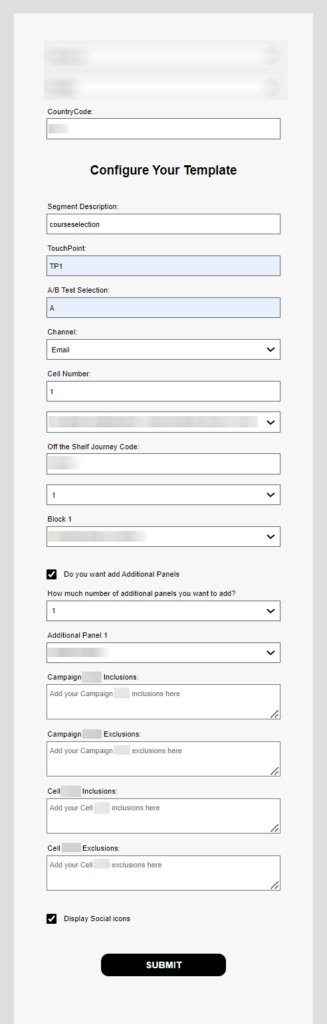
3. Empowering Stakeholders
One of the key features is the Template Selection Details page (see below image), which allows stakeholders to choose templates, select content blocks, and configure A/B testing variants. This collaborative approach fosters creativity while ensuring alignment with campaign objectives.
4. Elevating Content Creation
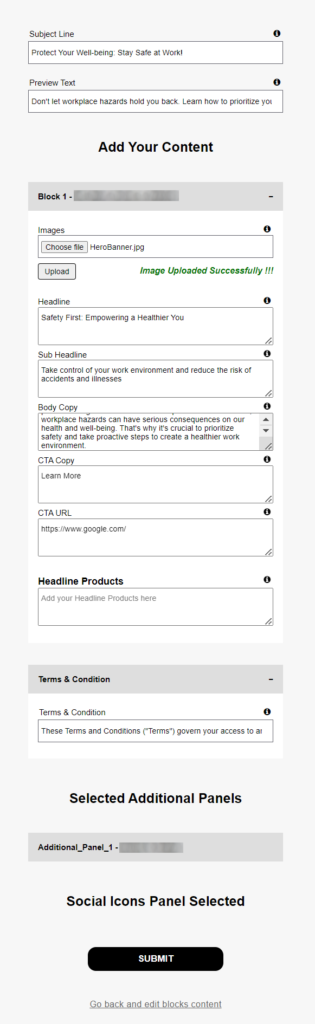
The Content Addition page enhances content creation with intuitive fields for subject lines, pre-headers, content blocks, and images. Character limitations ensure email compatibility across platforms, providing a seamless end-user experience. The below screenshot shows the steps involved.

Email Previewing Redefined
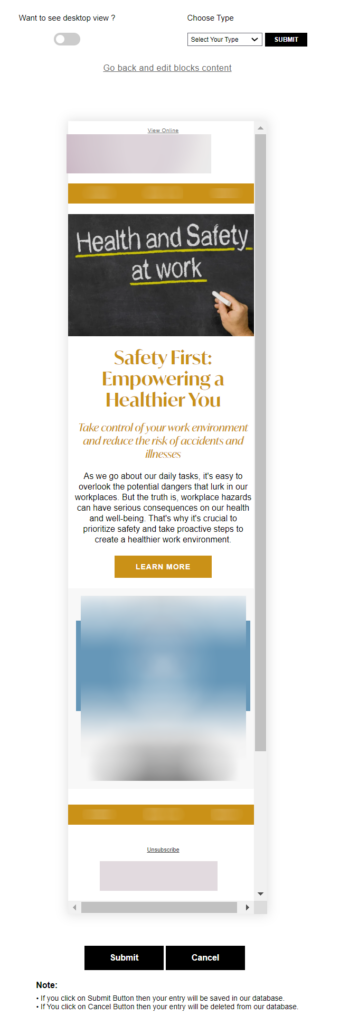
Imagine a world where you can preview an email before it’s even created in Content Builder, with seamless desktop and mobile views.
We set out to explore this possibility, knowing that real-time email previews would revolutionize how campaigns are crafted and perfected. Our journey led us to create a Preview Page that defies traditional boundaries.
1. Real-time visualization
The Preview Page provides a dynamic preview of the email, allowing stakeholders to see exactly how it will look in Content Builder and in end-user inboxes.
This real-time visualization ensures accuracy and alignment with brand standards before the email is even assembled.
2. Desktop & mobile compatibility
A key feature is the ability to seamlessly switch between desktop and mobile views. This empowers stakeholders to evaluate the email’s responsiveness across devices, ensuring a flawless user experience on any platform.
In the following screenshots, the first shows a mobile preview, and the second a desktop preview of an email.

3. URL validation & interactive elements
The Preview Page goes beyond static previews by validating URLs and interactive elements within the email. This thorough inspection ensures links work correctly and interactive features enhance engagement, providing a complete view of the email’s functionality.
Going beyond convenience
This innovative feature goes beyond convenience; it empowers agencies to deliver excellence. With a comprehensive preview experience, stakeholders can confidently iterate and fine-tune emails, eliminating guesswork and significantly reducing time-to-market.
Our journey continues with plans for further enhancements, including a searchable content repository based on unique IDs, automated notifications to marketing managers upon content submission, and improved UI/UX for all pages. These innovations streamline processes and enable agencies to deliver exceptional results for their clients.
Unlocking possibilities with Mavlers!
At Mavlers, we are committed to leveraging the full power of Salesforce Marketing Cloud to foster innovation, efficiency, and excellence in email marketing. The latest experiment with CloudPages in Salesforce Marketing Cloud (SFMC) is yet another instance of how expertise and experiment can join forces on the frontier of technology.
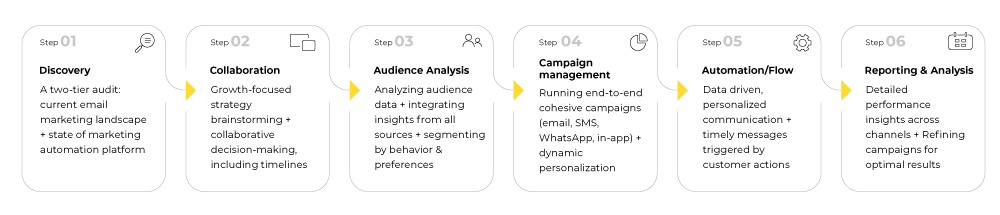
Need help getting started with Salesforce Marketing Cloud? Get in touch with our Salesforce Marketing Cloud (SFMC) experts and join our 900+ satisfied clients in taking email marketing to the next level. Our six-tier email marketing framework will be our launching pad.