Lifecycle marketing
 Customer data management
 Email campaign production
 Search marketing
 CMS development
 Who we are
 How we work
 Case studies
 Testimonials
 Salesforce Marketing Cloud
 Braze
Braze HubSpot
 Marketo
 Pardot
 DataBricks
 Snowflake
 HighTouch
 RudderStack
 Segment by Twilio
 Videos
Enterprise customer data rarely lives in one place. They might be split across multiple Salesforce orgs, data warehouses, marketing platforms, commerce systems, Amazon S3 buckets, and legacy applications. The gap between what a business knows collectively and what any single system can surface is where AI falls apart.
Most enterprise AI failures are therefore data failures.
In this context, the role of Salesforce Data Cloud becomes pre-eminent.
What Data Cloud actually does
Data Cloud functions as what its architects call a central nervous system for your business data. It connects to the data wherever it already lives through zero-copy technology, so that cloud data warehouses can be queried directly without any ETL pipeline or data duplication.
Once connected, Data Cloud harmonizes disparate schemas into a consistent model.
Agents don’t just need raw data. They need data that’s meaningful, contextual, and instantly usable. And that’s precisely what a unified profile provides.
That harmonization then feeds into identity resolution i.e. the process of determining that two records from two different systems are, in fact, the same person. Administrators define match rules (shared email addresses, phone numbers, internal identifiers) and conflict resolution logic (which source takes precedence when fields disagree), and Data Cloud churns out a unified individual record complete with a single unified ID. It’s that ID, not any system-specific identifier, that becomes the key Agentforce uses to federate queries across all the connected data.
Critically, Data Cloud ingests both structured data and unstructured data. That second category makes up roughly 80% of enterprise data by volume.
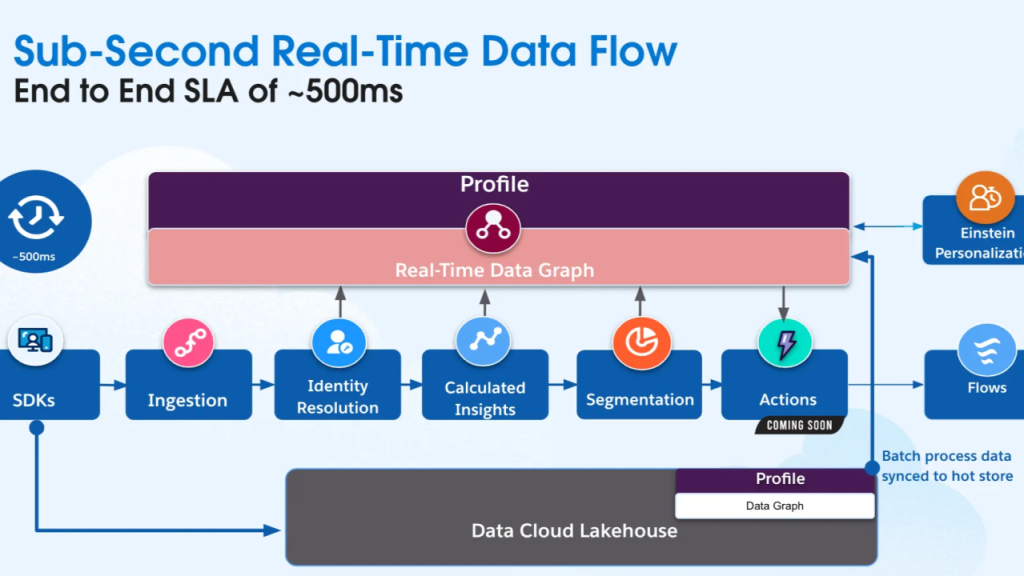
Along with Segment Membership, they form the 3 layers of unified intelligence.
The 3 layers of unified intelligence
Like we said, Agentforce draws on three distinct categories of data when devising a response. Their combination produces what is known as contextual intelligence:
- Structured data: Transactional history, CRM records, purchase behavior, contact details, and calculated metrics like CLV or propensity-to-churn scores. This gives the agent factual grounding as to who the customer is, what they’ve done, and what they might do next.
- Unstructured data: Product descriptions, knowledge articles, transcripts, emails, warranty documents, and video content. This gives the agent contextual depth from the nuanced, narrative information that can’t be reduced to a database field but often contains the most relevant answer to a customer’s question.
- Segment Membership: Dynamic audience groupings (marathon runners, brand loyalists, recall-affected customers, high-value households) that tell the agent not just who someone is, but where they sit in their relationship with your brand. Crucially, these segments are live. As a result, as Data Cloud receives new signals, Segment Membership updates, and the agents respond to the latest state.
Together, these layers allow an agent to recognize that a customer asking about running shoes is also in a product-recall segment, is a documented marathon runner, and shares a household with another loyal customer, and respond accordingly.
| Data Cloud + Agentforce: Use Cases | ||
|---|---|---|
| Industry | Role of Data Cloud | Agent Action |
| Retail & commerce | Connects recall segments and marathon-running profiles | Offers return labels before the customer asks and suggests targeted replacements |
| Financial services | Harmonizes CRM records with third-party fund data | Allows reps to query complex portfolio metrics using natural language |
| Hospitality | Unifies guest profiles across Salesforce, Azure, and AWS | Resolves queries across reservation systems and preferences via a single interface |
| Service & support | Surfaces interaction history, purchases, and active product alerts | Prepares the full context before a rep joins, significantly cutting handle time |
How unstructured data gets into the loop
Unstructured data is not always machine-readable.
Data Cloud addresses this challenge through a vector database, which converts reams of text into multi-dimensional mathematical representations called embeddings. Each chunk of content gets plotted in high-dimensional space according to its semantic meaning, which then allows the system to find contextually similar material in response to a user’s question.
The process involves 3 stages:
- Chunking breaks large documents into manageable, semantically coherent chunks
- Embedding converts each chunk into a vector, and
- Indexing organizes those vectors for retrieval
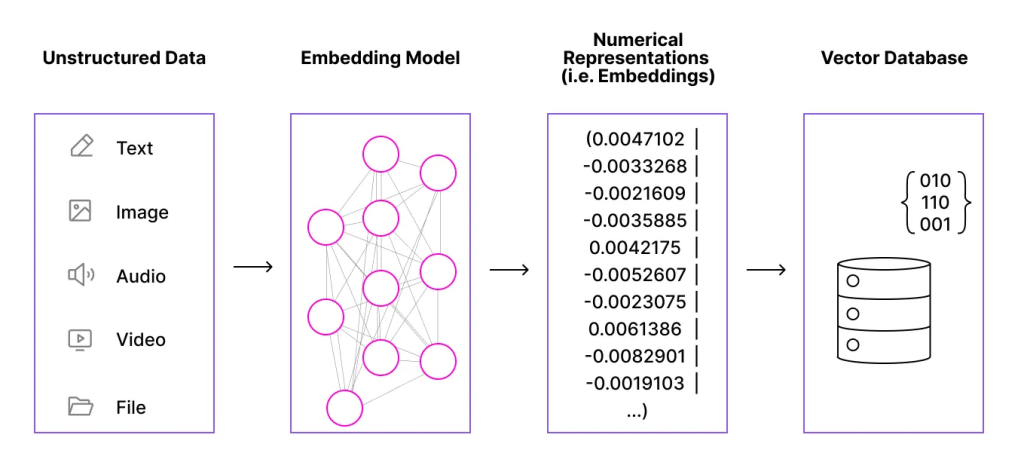
Source: Salesforce Ben
So when a prompt arrives, it undergoes the embedding process, and the system runs a distance calculation to find the stored chunks whose meaning is closest to what the user asked.
For most queries, a pure vector search works. But when specific terminology matters, a hybrid search combines the semantic vector match with a traditional keyword search, ensuring that the precise terms aren’t lost in translation.
Importantly, this capability now extends beyond text. Woo-hoo!
Data Cloud can ingest audio and video files, transcribe them automatically, and vectorize the resulting text, opening up earnings calls, customer service recordings, product demos, and training videos as searchable knowledge sources. Not every agent use case needs to be customer-facing, either; an internal agent that summarizes a just-completed call and enriches a case record with key takeaways is a compelling use case on its own.
Two Paths for Unstructured Data
Einstein Data Libraries are the fast lane. A few clicks to create a vector database from uploaded files or knowledge records, with a default retriever built in. Ideal for POCs and smaller knowledge repositories.
Unstructured Data Lake Objects are the enterprise path, connecting directly to S3 buckets or existing ingested data sources, with full configurability. However, Lake Objects require Lambda scripts to notify Data Cloud of the file changes, which adds a developer step that Data Libraries skip entirely.
Real-time data: The importance of data freshness
In the context of lifecycle marketing, we have discussed the significance of real-time data before. Event-driven architecture is where it lies.
Batch ingestion handles large volumes of historical data, processing them in bulk and making them available as deep context. Streaming ingestion captures events as they happen, processing one record at a time and making new information available almost immediately. Now, as data flows in through either path, Data Cloud performs real-time transformation and standardization by cleaning, enriching, and normalizing records before they become available downstream.
Salesforce refers to this as a “clean as you go” approach, which is highly critical for Agentforce orchestration.
The role of Data Graphs
When data models grow large and span dozens of related objects, querying is not an ideal option in the sub-second windows that agentic interactions require.
Data Cloud addresses this through data graphs. Data graphs are highly optimized, pre-flattened views of related data built around a primary record like a unified individual. (See below)
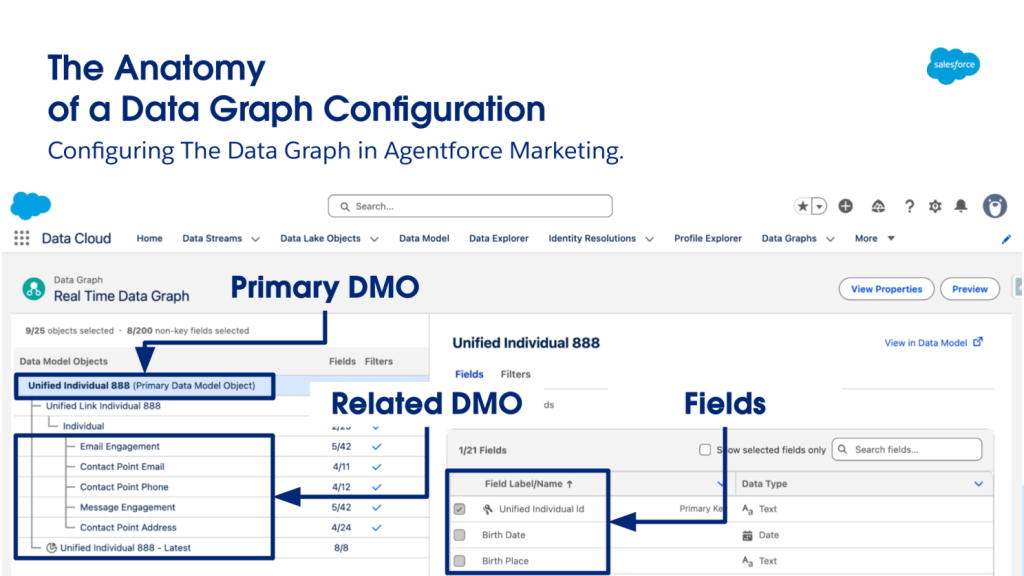
The structure is deliberately simple. Think of a data graph as a two-column table: one column holds the primary key (a unified individual ID), and the other holds a deeply nested JSON object containing all the relevant related data for that person.
Thus, the agent retrieves a single pre-built record, as opposed to lighting up a chain of queries.
Data graphs are particularly well-suited to scenarios where you know in advance what customer data an agent is likely to need, and where volume or response-time requirements make on-demand queries impractical. They’re also credit-efficient. Because the data is indexed by the individual ID, retrieval typically happens on a single row rather than scanning across millions.
For organizations operating at enterprise scale, that distinction adds up quickly.
What getting started looks like
Now, coming to implementation, here’s a question we commonly hear: Do I have to implement Data Cloud to use Agentforce?
The short answer is yes. And no.
Agentforce can operate using CRM data alone, and for simpler use cases like basic case deflection, that’s sometimes sufficient. But the honest answer is that the ceiling of what agents can do is substantially lower without Data Cloud.
But at the same time, getting Data Cloud is not the same as implementing it.
When an organization purchases Salesforce, they receive a fully licensed version of Data Cloud with a generous allocation of data services credits. Data Cloud will begin storing agent audit and feedback data automatically. But building out the unified data layer i.e. connecting sources, harmonizing schemas, running identity resolution, building segments, configuring retrievers, is a separate, intentional implementation effort.
But Data Cloud is also designed to be low-code to no-code for the vast majority of its setup:
- Data streams are configured through a connector UI with over 270 native connectors
- Schema harmonization is point-and-click
- Identity resolution rules are built visually, and
- Segments are defined through a drag-and-drop builder (Data Cloud segmentation)
Developers come along when accessing data graphs, connecting unsupported external sources, or building custom agent actions that interact with Data Cloud objects through Flow.
Read more: When to use Salesforce Flow vs. Agentforce: A journey-level perspective
The bottom line
Agentforce is undoubtedly amazing. But without the unified intelligence that Data Cloud provides, it’s operating with a limited view, constrained to whatever data happens to live inside a single CRM org, and unable to draw on the full picture of a customer that exists across the enterprise.
For everyday use cases, that may be enough. However, if you are an organization that is serious about AI-driven customer experience across the board, it doesn’t cut it.
If you need specialized guidance, we can help. With over 10 years of experience in serving more than 800 SFMC clients, we can be your go-to execution partner.
Book a free, no-obligation call with one of our SFMC experts.