Lifecycle marketing
 Customer data management
 Email campaign production
 Search marketing
 CMS development
 Who we are
 How we work
 Case studies
 Testimonials
 Salesforce Marketing Cloud
 Braze
Braze HubSpot
 Marketo
 Pardot
 DataBricks
 Snowflake
 HighTouch
 RudderStack
 Segment by Twilio
 Videos

If you’ve used SQL Query Activities in Salesforce Marketing Cloud (SFMC), chances are you’ve run into this message more often than you’d like:
“The SQL Query Activity has timed out.”
or
“Query failed: Timeout.”
It’s frustrating, especially when you know your SQL is correct, yet SFMC still throws an error.
Through our work with 800+ Salesforce customers, we’ve observed this pattern emerge time and again in practice. But here’s the truth: it’s not (always) your query—it’s SFMC.
SFMC SQL Query Activities have a strict timeout limit of 30 minutes. You can’t extend it, you can’t override it, and Salesforce won’t increase it on request. That means the only real solutions are to optimize your query or break the job into smaller, faster-running pieces.
So, how do you do that? Let’s find out.
Table of Contents
Why SFMC SQL queries time out
SFMC SQL query optimization: How to fix timeouts
Boost SQL query performance with the new Query Activity Optimizer
Need help with Salesforce Marketing Cloud query timeouts?
Why SFMC SQL queries time out
SFMC operates on a shared, multi-tenant database. To ensure fair performance and keep all automations running efficiently, Marketing Cloud applies a strict rule:
Every SQL activity has a maximum execution limit of 30 minutes.
If your query pulls too much data or is logically inefficient, it will cross that limit and fail.
Common causes of timeouts include:
- Large data volumes that take too long to process
- Heavy joins
- Overuse of functions in the WHERE clause
- Using UNION or DISTINCT on massive datasets
- “Do-everything-in-one-query” designs
- Querying system Data Views instead of indexed Data Extensions
SFMC SQL query optimization: How to fix timeouts
Build strong Data Extensions with Primary keys
To improve query performance and data consistency in Salesforce Marketing Cloud, it’s essential to structure your data extensions with well-defined primary keys. Keep these best practices in mind:
- Use one clear unique identifier per dataset.
- Avoid assigning too many primary keys as this slows down inserts and updates.
- SFMC automatically indexes Primary Keys, Sendable Relationship fields, and other highly used columns.
- Use the same Primary Key field across related DEs to enable faster joins.
Optimize field length & data type
Optimizing field length and data types plays a significant role in improving query performance and ensuring cleaner, faster joins. Keep the following best practices in mind:
- Keep field lengths as small as necessary (e.g., StateCode = 2 chars, not 50)./
- Avoid varchar(max) / nvarchar(max) — they reduce performance.
- Limit row width to < 4,000 characters.
- Only join on columns that share the same data type.
- Ensure source and target DE fields use the same data type to avoid implicit conversions.
- Reduce your Data Extension fields to only those you actually need, both in terms of columns and the number of fields in your target DE.
Manage data quantity & retention
How you handle data volume and retention directly affects query speed, resource usage, and overall system performance. Here are some practices to keep in mind:
- Query only the data you actually need (e.g., last 24 hours instead of 30 days).
- Query only new or changed data using fields like ModifiedDate.
- Move fast-changing fields to their own DE so other automations don’t slow down.
- If a DE has a history of many deleted columns, rebuild it; it improves performance.
- Choose the appropriate write method: Append for event logs, Overwrite for most general use cases (fastest), and Update only when necessary (slowest).
- Keep Data Extensions under 100 million records; once approaching 1 billion records, DEs become essentially unusable and even data extracts may fail.
Write SARGable queries
Searchable arguments, also known as SARGable queries, are operators that can use indexes. To make your query run faster, use searchable arguments when possible:
- Avoid using OR, NOT, <, >, NOT IN, NOT LIKE, NOT EXISTS, or functions on the left side of a column (such as LOWER(), CONVERT(), or DATEDIFF()) in the WHERE clause.
- Rewrite non-searchable logic into SARGable logic as shown below.
| Non-Searchable Argument | Searchable Argument |
| AND datediff(day, convert(DATE, calculated_subscription_start_dtm), GetDate()) = 26 | AND calculated_subscription_start_dtm >= DATEADD(DAY, -26, CAST(GETDATE() AS DATE)) AND calculated_subscription_start_dtm < DATEADD(DAY, -25, CAST(GETDATE() AS DATE)) |
Prevent concurrent activities
A concurrent activity occurs when multiple processes attempt to access the same data at the same time, which can cause queries to fail or time out. For instance, two processes simultaneously attempt to write to the same dataset, or a process is actively writing to a dataset that another process attempts to read. Consider the following hacks:
- Run only one SQL Query per step in an automation.
- Stagger automation times (don’t schedule everything at :00).
- Use separate DEs for simultaneous processes to avoid locks.
- Avoid writing to a DE while another automation is reading from it.
Leverage data staging
You can stage your data by dividing a large query with multiple joins into small queries that are more performant. This method is especially effective for long-running queries that could otherwise time out. To avoid timeouts from large joins:
- Break the logic into small, fast sub-queries.
- Write each result into staging/holding DEs.
- Run a final merge query to combine the staged data.
This method drastically reduces runtime and prevents timeouts.
If your query consistently runs longer than 10 minutes, Salesforce recommends using a different tool, such as the Salesforce Customer Data Platform, to transform your data.
Still getting timeouts?
When your dataset is extremely large, even well-written queries can fail or time out.
One of the simplest and most reliable ways to avoid this is to split the query into smaller, equal parts using a modulo (%) expression.
Modulo is useful when your SQL activity struggles to complete due to:
- Frequent query timeouts
- Very large data extensions
- Heavy joins and filters
- A single query attempting to process too many rows at once
How to use the modulo method to prevent SQL timeouts in SFMC
Step 1: Decide the number of splits: For example, split the load into 3 parts.
Step 2: Write the same query for each batch with one added condition
Select a stable, unique, and non-changing column (such as SubscriberKey, CustomerID, or any primary key). Then apply:
- Batch 1 → WHERE ABS(CHECKSUM(ColumnName)) % 3 = 0
- Batch 2 → WHERE ABS(CHECKSUM(ColumnName)) % 3 = 1
- Batch 3 → WHERE ABS(CHECKSUM(ColumnName)) % 3 = 2
Each batch retrieves a different one-third of the total data.
Step 3: Run each batch in a separate automation
- Automation 1 (Overwrite) → Batch 1
- Automation 2 (Update/Add) → Batch 2
- Automation 3 (Update/Add) → Batch 3
All automations write to the same target DE. The final result is identical to running one big query — but without the timeout.
Now, why does this method work?
A massive single query can time out when it tries to process too much data at once, but breaking it into smaller queries (⅓ each), runs faster and completes successfully.
Note that this approach doesn’t change the logic or the output; it simply divides the workload into more manageable parts. Agility is key to implementing Salesforce Marketing Cloud successfully.
Boost SQL query performance with the new Query Activity Optimizer
Salesforce’s Winter Release brings one of the most useful upgrades for every SFMC developer and automation user: the SQL Query Activity Optimizer.
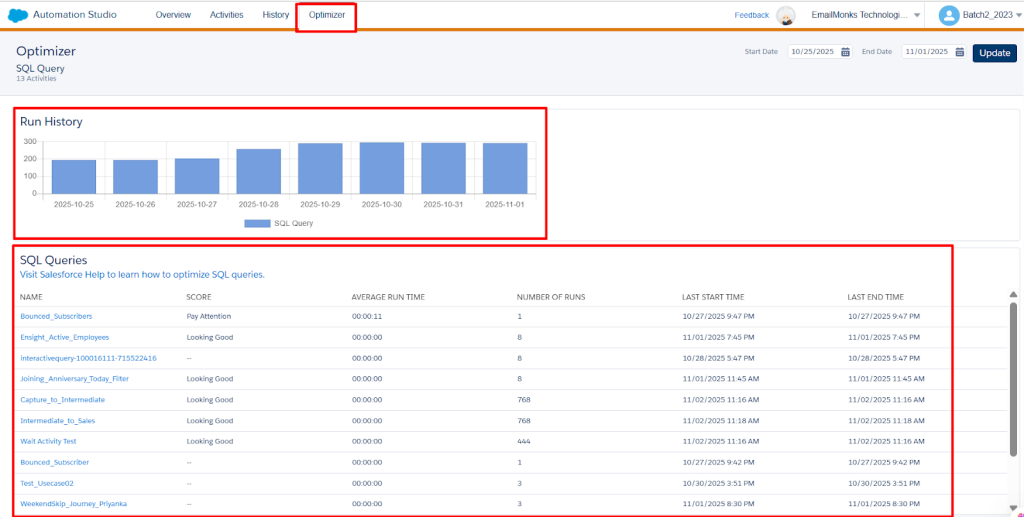
How to access the optimizer:
- Open Automation Studio.
- Click on Optimizer from the top navigation tabs.
- Use the search bar to locate the query you want to analyze.
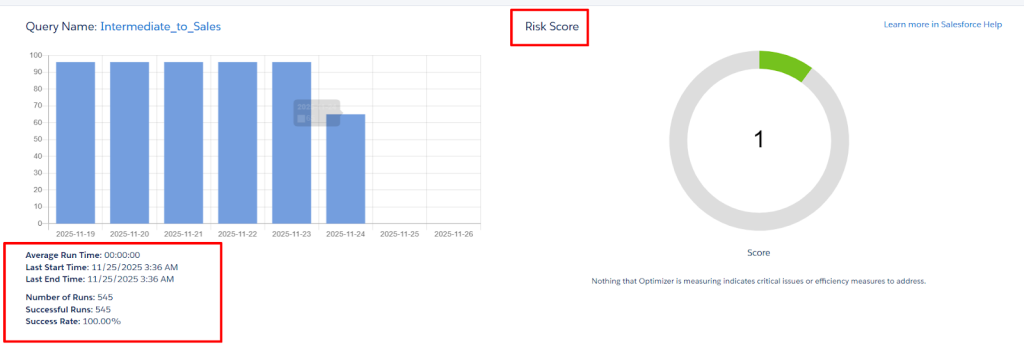
- Select the query to view risk scores, warnings, and actionable recommendations
What to check?
- Identify slow or risky queries before they timeout
- Get tips to optimize joins, filters, and data volume
- Reduce errors and improve run times across all automations
- Make complex workflows more reliable, even during peak loads
You’ll see the risk score (low, medium, or high), warnings and recommendations (such as non-SARGable filters, wide DEs, or heavy joins), and query details including execution history, run time trends, and data volume.
Get a Deeper Look at Your Automation Data
- Automation data retention has increased from 31 days to 6 months.
- Track trends over a longer period, troubleshoot issues more effectively, and gain better insights into your automation history.
Timeout errors in SFMC aren’t random—they’re a clear signal that a query is too heavy, joins are too complex, or the job is trying to do more than SFMC can handle at once.
While system limits can’t be increased, you can work smarter: write SFMC-friendly SQL, split heavy workloads, and respect the platform’s constraints. Doing so ensures your automations run faster, cleaner, and without unexpected failures.
Need help with Salesforce Marketing Cloud query timeouts?
If you’re dealing with recurring timeouts, data bottlenecks, or complex SQL jobs that keep failing, you don’t have to solve it alone.
At Mavlers, a Salesforce Consulting Partner, we help brands tackle real-world Marketing Cloud challenges every day, from SQL query optimization and data modeling to automation cleanup, modular redesign, and platform-wide performance improvements. We don’t just fix failing queries—we address the underlying structure, so our teams can scale confidently and ensure automations run as intended.