Lifecycle marketing
 Customer data management
 Email campaign production
 Search marketing
 CMS development
 Who we are
 How we work
 Case studies
 Testimonials
 Salesforce Marketing Cloud
 Braze
Braze HubSpot
 Marketo
 Pardot
 DataBricks
 Snowflake
 HighTouch
 RudderStack
 Segment by Twilio
 Videos

Data Cloud is used within Marketing Cloud as the central intelligence layer that unifies customer data, resolves identities, and continuously determines who should be contacted and how journeys should adapt over time, while Marketing Cloud focuses on executing communications across email, SMS, push, and other channels.
Since data is the lifeblood of Salesforce Marketing Cloud, you first have to make Data Cloud actionable in SFMC. But how do you do that? By and large, the process involves 3 core steps:
- Unifying customer data
- Defining audiences
- Activating Data Cloud
So, let’s go through each of these steps. By the end of our post, you’ll have a clear understanding of how to leverage Data Cloud for marketing. Let’s get started.
How to use Data Cloud for marketing
1. Unify customer data
The first step is to ingest customer data from multiple systems that typically do not speak to each other in real time, such as e-commerce platforms, customer support tools, and CRM systems.
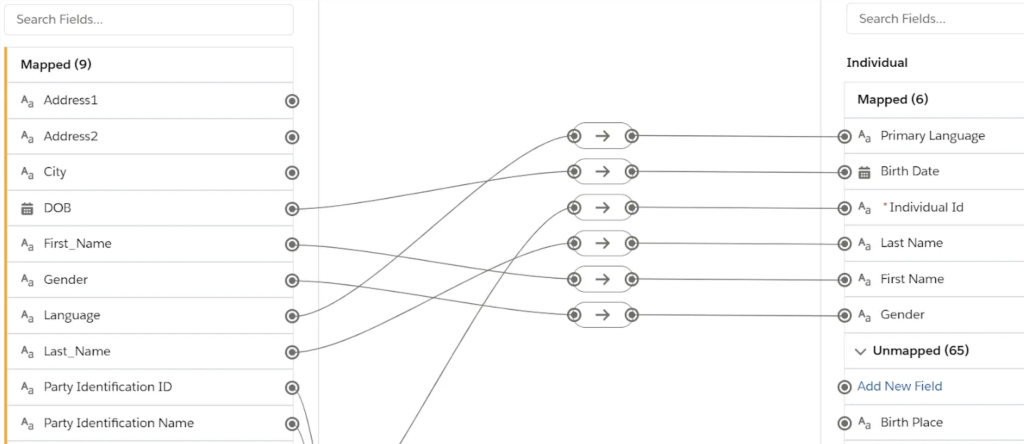
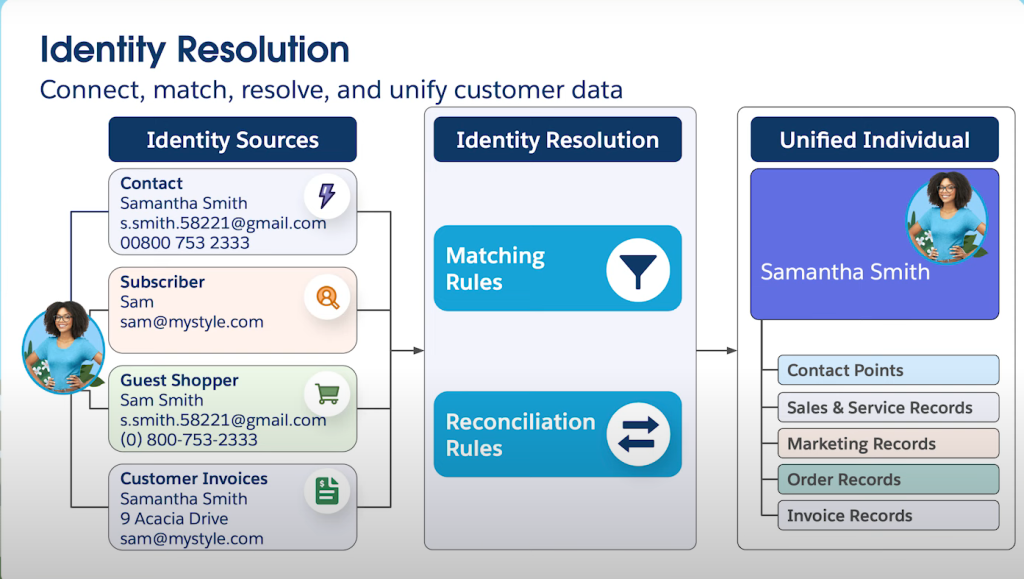
Data Cloud brings this data together by mapping it to a standardized unification model that centers on the Individual, with linked objects representing email addresses, phone numbers, and system identifiers. Through this process, Data Cloud determines that multiple records across systems belong to the same person and creates a Unified Individual profile that can be safely activated downstream.
This step is critical because Marketing Cloud by itself cannot resolve identities across systems, which often leads to fragmented engagement history and inconsistent personalization.
Understanding Data Model Objects
Central to the mapping process are three core data model objects:
- Individual object: It represents a single person and collects attributes such as first name, last name, and other unique identifiers.
- Contact Point objects: These objects capture the different channels, like email, phone, and physical address.
- Party Identification object: This object stores external identifiers from source systems, enabling consistent identification of individuals across sources.
Each of these objects includes a party field that links back to the Individual object, allowing Data Cloud to connect records from different sources.
Source: Ateko
Now, when it comes to mapping, it is essential to bear a few things in mind:
- Take your time in the design phase: Understand your data before mapping and ingestion. Making changes after initial configuration is significantly more complex due to downstream impacts and relationship dependencies.
- Primary keys must be unique: Your primary key should be unique to both the user and the source. A common pattern is concatenating a source identifier with a user ID. This prevents conflicts when the same ID exists across multiple systems.
- Party fields enable unification: Every contact point object must have its “party” field correctly mapped to the individual’s unique identifier. If these IDs don’t match across objects, Data Cloud cannot unify the profiles.
- Custom fields are supported: When standard DMO fields don’t match your data needs, you can create custom fields directly within the mapping interface. This is common for industry-specific attributes or unique business requirements.
Sometimes your source data doesn’t include all the required fields for DMO mapping. Common solutions include:
Formula Fields: Create calculated fields that concatenate values, transform data types, or apply business logic before mapping.
Normalized vs. Denormalized Data: Consider whether your data structure matches Data Cloud’s relational model. You may need to split or combine data during ingestion.
Identity resolution
A critical step in this process is identity resolution, which uses matching and reconciliation rules to merge records into unified customer profiles.
Source: SFDC Gym
Matching rules define the criteria used to determine when records from different sources refer to the same individual. A few key principles guide how this works:
- More Criteria = Fewer Matches: Adding more conditions to a single match rule makes it harder to find matches, resulting in fewer unified profiles.
- More Rules = More Matches: Having multiple match rules with different criteria increases the likelihood of unification, as profiles can match through any qualifying rule.
Common match rule patterns include:
- Fuzzy name matching + exact email + account number
- Exact first/last name + normalized address + account number
- Exact first/last name + normalized address + phone number
- Party identification number + fuzzy name + email
Choose between exact matching, fuzzy matching, and exact normalized matching based on your data quality and business requirements.
Coming to reconciliation rules, these determine which values represent the unified profile when conflicts exist across different sources. Below are a few reconciliation strategies:
- Source Priority: This ranks your data sources from most trustworthy to least trustworthy. When there’s a conflict, Data Cloud picks the value from the highest-ranked source.
- Field-Level Overrides: This lets you break your default source priority for specific fields where a different source is more authoritative.
- Most Frequent: this strategy looks at all the values across all matched profiles and picks whichever value appears most often.
Now, the next step is defining your audiences.
2. Define audiences
Once data is unified, Data Cloud becomes the place where marketers define who qualifies for communication, using logic that spans systems and reflects real customer behavior rather than isolated attributes.
There are two main ways Data Cloud supplies audiences to Marketing Cloud:
- Using segments
- Using Calculated Insights and Data Actions
Let’s quickly understand each of these ways.
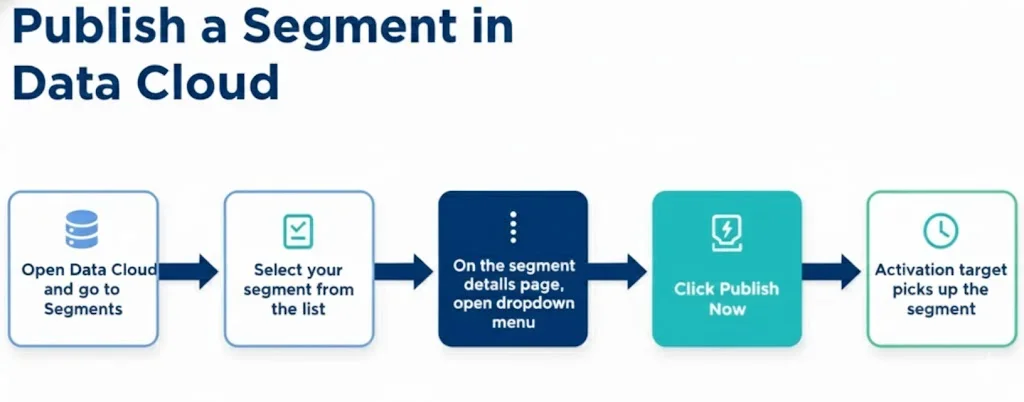
1. Using Data Cloud Segments for scheduled audience delivery
Data Cloud Segments are best used when marketers need to create audiences based on unified profile attributes and refresh them on a predictable cadence.
Source: Salesforcegeek
For example, a subscription-based SaaS company might want to identify users who:
- Have completed account registration
- Have logged into the platform multiple times
- Have not yet activated a core feature that indicates product adoption
This logic can be defined in a Data Cloud segment built on the Unified Individual, ensuring that usage data, CRM data, and marketing identifiers are all evaluated together.
Once the segment is activated:
- Data Cloud sends the audience to Marketing Cloud
- A shared Data Extension is automatically created and refreshed
- Marketing Cloud can use this audience as a journey entry source
This approach works especially well for onboarding, re-engagement, and lifecycle programs that evolve over hours or days.
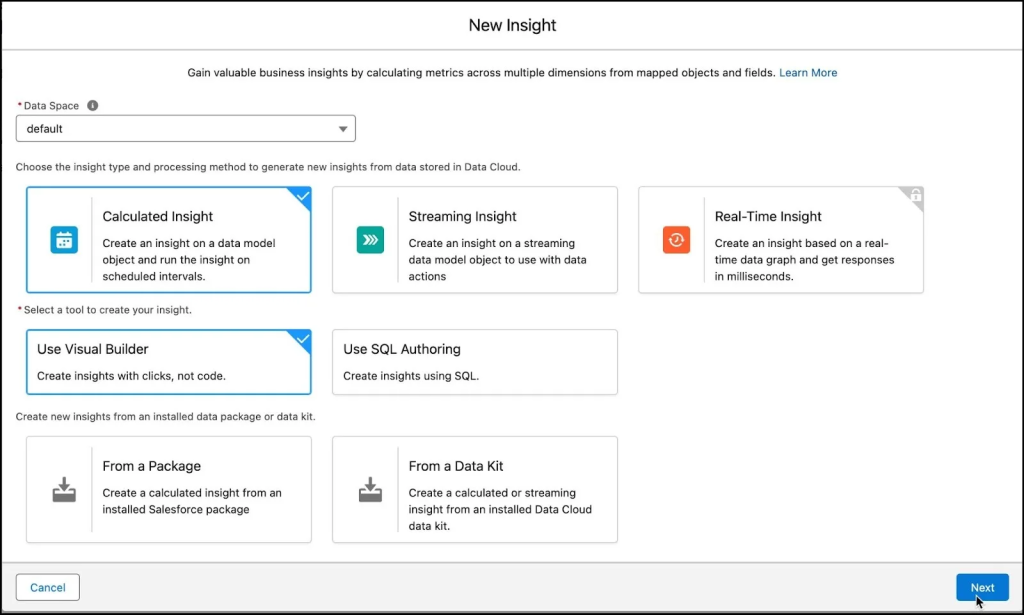
2. Using Calculated Insights and Data Actions for real-time journeys
Calculated Insights are used when audience qualification depends on aggregated behavior or thresholds and when activation needs to happen close to real time.
Source: Trailhead
Using the same SaaS example, a Calculated Insight might calculate:
- Total number of feature interactions per user
- Time since last meaningful action
- Trial usage intensity score
When a user crosses a defined threshold, Data Cloud can immediately trigger a Data Action that sends the individual directly into a Marketing Cloud journey via an API Entry Event.
This pattern allows Marketing Cloud to respond dynamically to customer behavior.
3. Activate Data Cloud inside Marketing Cloud
Once audiences and attributes flow into Marketing Cloud, Data Cloud continues to play a role in how journeys behave.
Journey entry defined by unified logic
Marketing Cloud journeys use the defined audiences as their entry source, which ensures that all entry decisions are based on unified, cross-system data. This significantly improves targeting accuracy and reduces the need for complex SQL-based audience logic inside Marketing Cloud.
Personalization using Data Cloud attributes
Attributes sent from Data Cloud are immediately available for personalization across channels.
From a marketer’s perspective, these attributes behave exactly like native Marketing Cloud fields, even though they originate from multiple upstream systems and are continuously refreshed. This enables deeper personalization without creating additional data extensions.
Dynamic journey decisioning using refreshed data
A key advantage of using Data Cloud within Marketing Cloud is the ability to make journeys react to changes that happen after entry. Marketing Cloud journeys normally rely on the data snapshot taken at entry, which limits their ability to respond to evolving customer behavior. But by exposing Data Cloud attributes through custom contact attributes, journeys can evaluate fresh data at decision points days or weeks later.
For example, a journey can check whether a user has activated a feature, upgraded a plan, or contacted support since the last message, and automatically adjust the next step or exit the user from the journey entirely.
Data Cloud plays a critical role in ensuring that Marketing Cloud communicates with a single, consistent identity per customer. That’s where the analytics come into play.
When customer data originates from systems that do not share a common identifier, Data Cloud resolves these identities and maps them to a stable Subscriber Key before activation. This prevents duplicate sends, fragmented engagement history, and inconsistent suppression logic in Marketing Cloud. As a result, Marketing Cloud becomes more reliable and easier to manage operationally.

Practical considerations for successful implementation
To effectively use Data Cloud within Marketing Cloud, teams must:
- Start with a thorough data inventory: Audit all data sources, understand relationships, identify key identifiers, evaluate data overlap, and assess data governance requirements before any technical configuration.
- Understand field-level data quality: Determine accuracy, decide which objects and fields to map, identify primary keys, and consider whether data needs transformation.
- Build your audiences starting from the Unified Individual: This ensures cross-system visibility and consistent identity resolution.
- Ensure contact point objects are correctly linked: Verify that party fields consistently reference the same individual identifiers across all related objects.
- Plan for data model changes carefully: Configuration mistakes are much harder to fix after implementation due to downstream dependencies and relationships.
- Choose between Segments and Calculated Insights based on latency, complexity, and cost: Segments work well for scheduled refreshes, while Calculated Insights enable real-time activation.
- Validate your identity resolution configuration: Use Profile Explorer to verify that matching rules create expected unified profiles before building segments or activations.
- Understand that Data Cloud governs data quality and eligibility, whereas Marketing Cloud governs orchestration and messaging: This separation of concerns clarifies team responsibilities and technical boundaries.
Special considerations
When mapping Salesforce account objects, the approach depends on your business model:
- Person Accounts: These represent individuals and should map to the Individual DMO along with contact point objects.
- Business Accounts (B2B): Use the Account DMO for organizations. There’s also an Account Contact DMO for specific use cases.
- Understanding your data model determines the correct mapping strategy.
Identity resolution can run up to four times within 24 hours and automatically runs once daily. Manual triggers are available but subject to these limits.
Plan your refresh cadence based on your business requirements and these constraints.
Need expert support for Salesforce Marketing Cloud data integration? We got you covered!
Data Cloud is increasingly crucial to Salesforce.
As Lukas Lunow has pointed out, “Data Cloud is the new backbone, with products like Marketing Cloud Growth and Advanced built directly on top of it.” Marketers can now unify customer data in real time and build more precise segments, while relying on SFMC as the execution layer.
This “hybrid model” combines Marketing Cloud’s mature automation strengths with the real-time intelligence and AI-powered insights delivered by Agentforce on Data Cloud.
As per Lunow’s predictions, the renewed focus on Data Cloud signals several shifts:
- As Data Cloud is now a clear strategic priority, marketers need to become comfortable with it quickly—particularly with how it integrates with Salesforce Marketing Cloud.
- SFMC will increasingly operate alongside Data Cloud and other Marketing Cloud products, making readiness for hybrid architectures highly essential.
- Finally, understanding how Data Cloud connects with Agentforce will be critical.
If you need specialized guidance, we can help. With over 10 years of experience in serving more than 800 Salesforce Marketing Cloud clients, we can be your go-to execution partner.