How to manage consent in Marketing Cloud Next for creating better customer experiences
A practical guide to understanding how consent, subscriptions, contact points, and preference management work together in Marketing Cloud Next.
By Mohit Kumar Sewani
12 minutes
May 22, 2026
Marketing is a privilege, not a right, and consent is where you start creating value. How and when a customer agrees to hear from a brand directly influences trust, engagement, and long-term loyalty. In fact, stronger consent practices are closely tied to better marketing performance, with over 40% of organizations reporting benefits that are at least twice their investment in privacy and consent technology.
Marketing Cloud Next helps organizations stay compliant with regulatory requirements while respecting customer preferences. It provides a structured way to manage contact data, organize communication subscriptions, and give customers control through preference pages.
This blog post explains the key components of consent management and how they work together in Marketing Cloud Next. Let’s get started.
Key concepts in consent management
Understanding a few core components will help you manage consent effectively in Marketing Cloud Next. These include:
Channel type
Communication subscription
Contact point
Unified Individual
Consent check
Let’s look at each of these components in some detail. (You might want to first check out the differences between consent and preference).
Consent vs preferences
Consent
Preferences
Foundational permission that allows an organization to communicate with an individual.
Granular choices that determine what types of content an individual wants to receive.
Establishes whether communication is permitted at all.
Refines communication based on user interests and choices.
Covers data collection, data processing, communication permissions, and allowed channels.
Covers specific content categories or topics.
May evolve as organizational data practices or legal requirements change.
Can frequently change based on user interests or engagement.
Requires tracking of consent versions to know what terms an individual agreed to.
Typically does not require formal version tracking.
Critical for legal and regulatory compliance.
Primarily supports personalization and customer experience.
Partially supported through Communication Subscriptions, but lacks native consent versioning support.
Supported through Communication Subscriptions for managing subscription-level choices.
No native support for full consent versioning like the Salesforce Privacy Data Model.
Fewer structural limitations compared to consent management.
Channel type
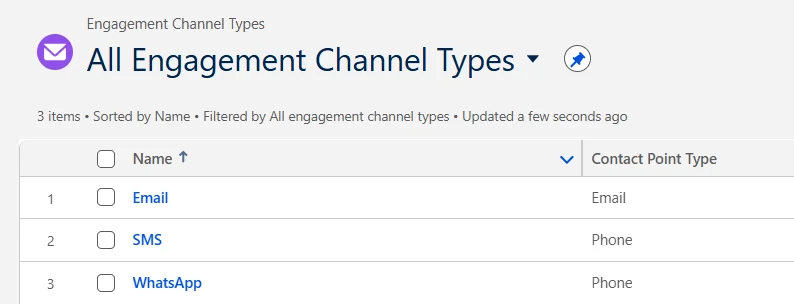
A Channel type refers to the communication medium used to send messages. These include SMS, email, or WhatsApp. Keep in mind that consent is managed separately for each channel, allowing customers to choose how they want to be contacted. For example, a customer may opt in to receive promotional SMS messages but choose not to receive marketing emails.
Communication subscription
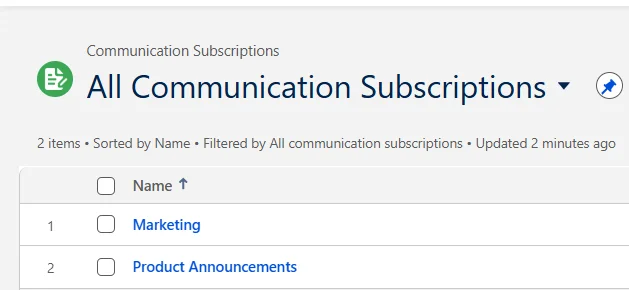
A Communication Subscription defines the type of content a customer has agreed to receive. Examples include:
Product announcements
Weekly newsletters
Promotional offers, and
Event invitations
This functionality is similar to the Preference Center or Publication Lists available in Salesforce Marketing Cloud Engagement (MCE).
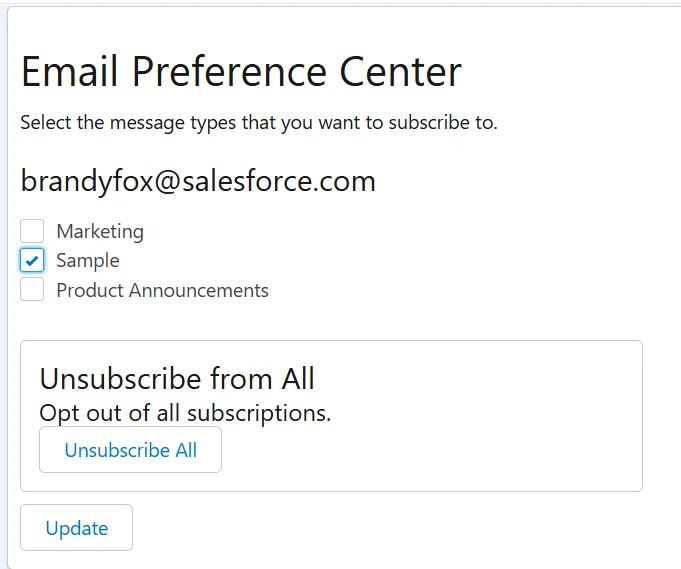
A Preference Page enables subscribers to manage their communication preferences. Customers can access this page through the Preference Manager link included in emails.
Marketing Cloud Next includes a default Marketing Communication Subscription, but organizations can create additional subscriptions to better categorize and manage their consent records.
Deleting a communication subscription also permanently deletes all related consent records. Once consent data has been collected, subscriptions should never be deleted. Before any deletion is attempted, the subscription must first be removed from all associated preference pages via the Preference Manager.
How to create a new communication subscription?
To create a new communication subscription in Marketing Cloud Next, follow these steps:
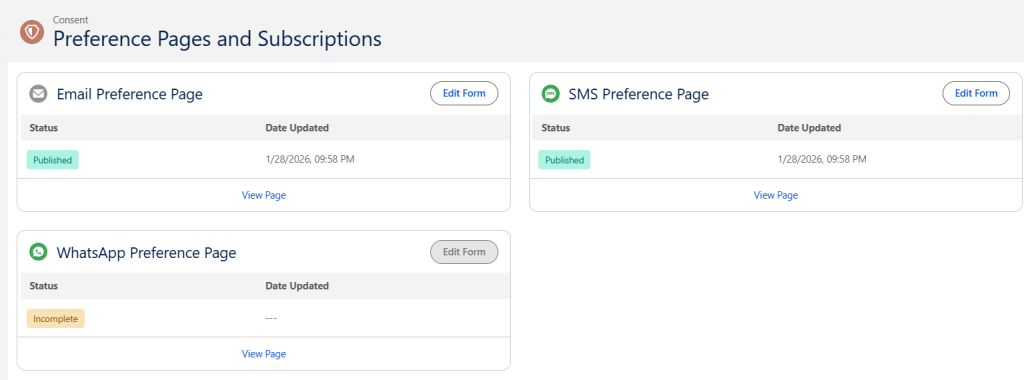
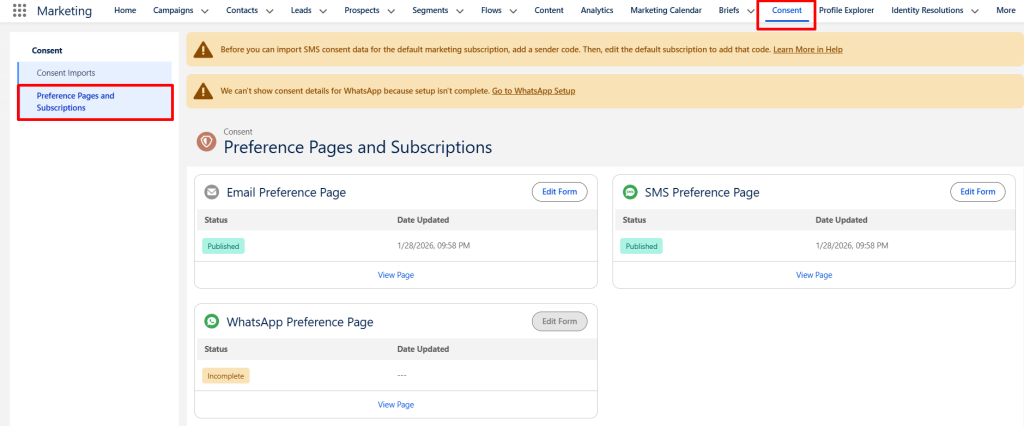
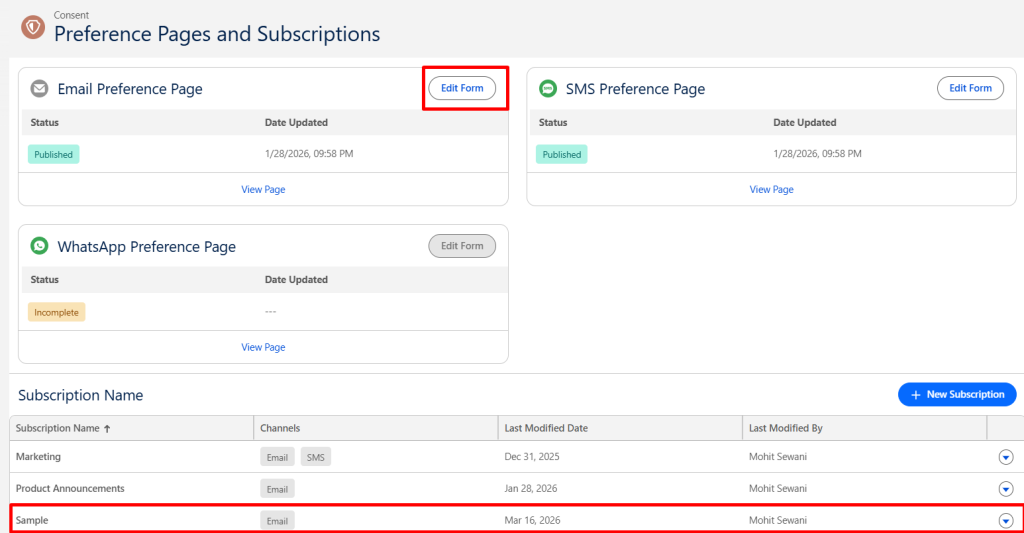
Navigate to the Consent page, select Preference Pages and Subscriptions.
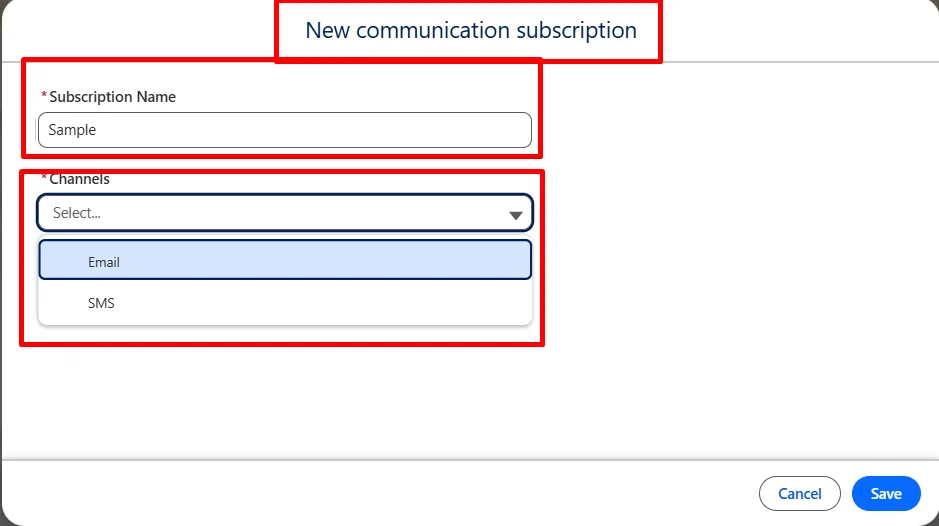
Click New Subscription. (Each subscription can be associated with one or multiple communication channels, allowing organizations to manage consent based on both message type and channel.)
Give it a name and select the channels on which the subscription should appear.
Add the Subscription to a Preference Page
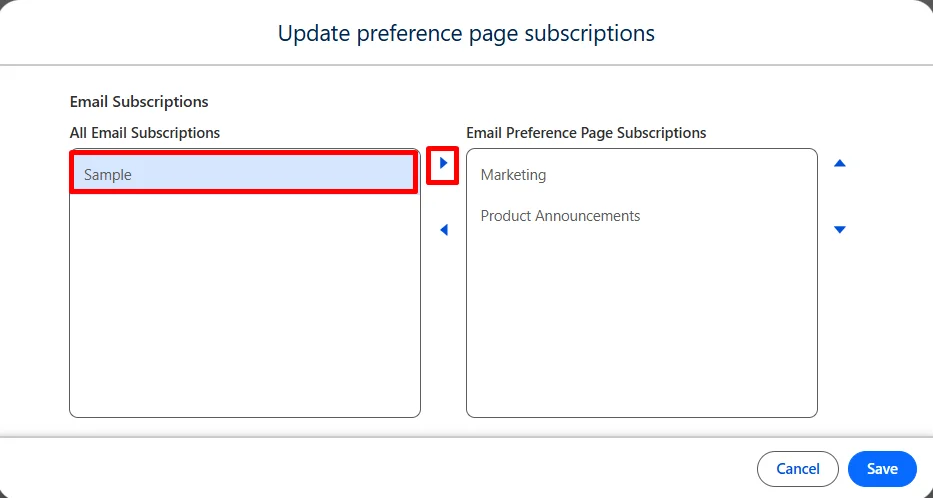
Click Edit Form on the preference page.
Drag and add the newly created subscription component to the form and save the changes.
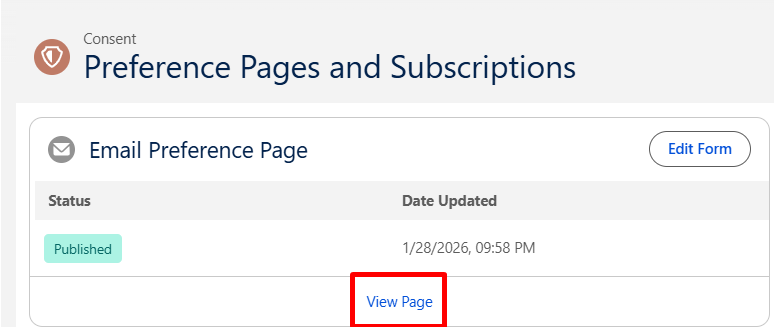
Click View Page.
Confirm that the subscription options are displayed correctly. Once recipients click this link, they are directed to a preference page where they can manage their subscriptions.
How to add a preference manager link in emails?
To add a preference manager link in your emails, follow these steps:
Open or create a promotional email.
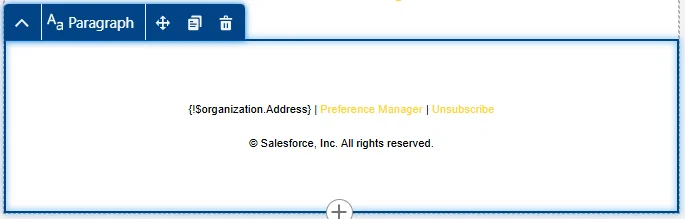
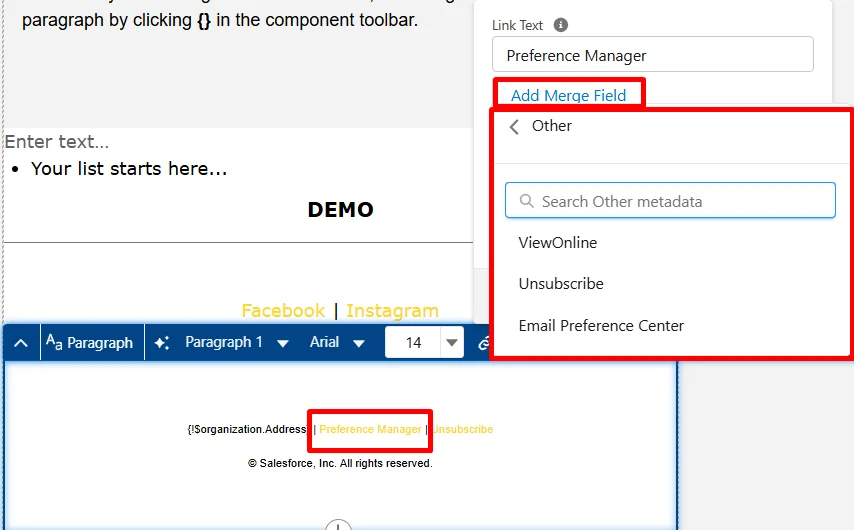
On the email canvas, add a Text Component such as a paragraph or heading. Enter descriptive link text such as: “Preference Manager”
Click the Merge Field opinion in the toolbar. Select Link.
Choose Preference Center.
Save the email.
Contact point
A Contact point refers to the specific contact detail used to send communications, such as:
Email address
Phone number
A single individual can have multiple contact points, such as multiple email addresses or phone numbers. Consent is maintained at the contact point level rather than the individual record. This ensures that permissions are tracked separately for each communication method.
If a person’s email address changes, a new consent record must be created for the updated address. The old consent does not automatically transfer.
Unified Individual
A Unified Individual represents a single person in the system whose information may come from multiple records.
For example, a person may exist as:
A Lead
A Contact
A Prospect
Marketing Cloud Nextuses identity resolution rules to group these records into a single Unified Individual profile. This allows consent, preferences, and communication history to be managed centrally across all associated records.
A Unified Individual can be linked to several email addresses. In such cases, organizations must decide how to determine the individual’s overall consent status. For example, some organizations may consider a single opted-in email address sufficient. Others may require all linked email addresses to be opted in. There is no universally correct approach. The right decision depends on your organization’s compliance requirements and communication strategy.
Consent check
A Consent Check ensures that messages are sent only to customers who have opted in.
Before a marketing message is delivered, the system verifies whether the contact point has valid consent for the selected subscription.
Consent checks apply to:
Promotional emails
SMS
WhatsApp
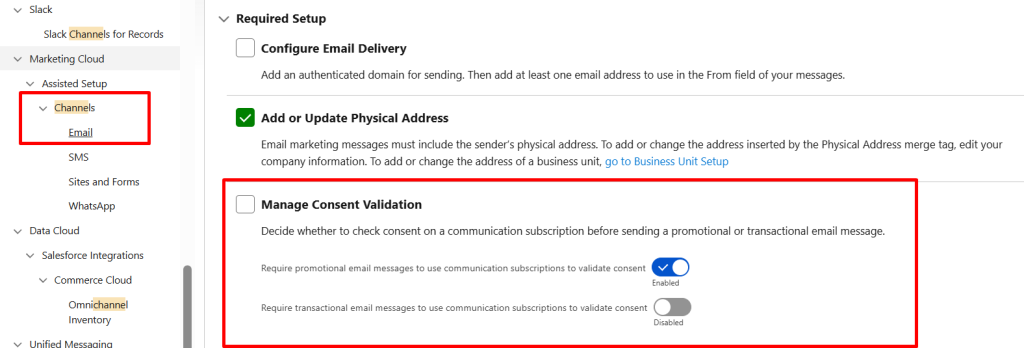
Transactional emails typically do not require consent checks by default. However, marketing administrators can modify these settings in Salesforce Setup.
When an email is sent, the system first checks the cache for the recipient’s consent record. If a cached record exists, it is used directly. If no record is found, the system queries the Communication Subscription Consent data and then populates the cache. Once stored, the cached value can persist for up to 90 days unless refreshed.
It is important to note that not all consent update methods automatically refresh the cache. The following methods do refresh it correctly:
Manual updates from Lead and Contact layouts
Clicks on unsubscribe or preference center links
CSV imports
For Flow-based updates, only the native Create Consent activity officially guarantees a cache refresh.
By contrast, directly writing to the Communication Subscription Consent DMO does not refresh the cache. As a result, organizations may see updated consent values in the data model while the cache continues to reflect the previous consent state for up to 90 days.
Verifying the organization address
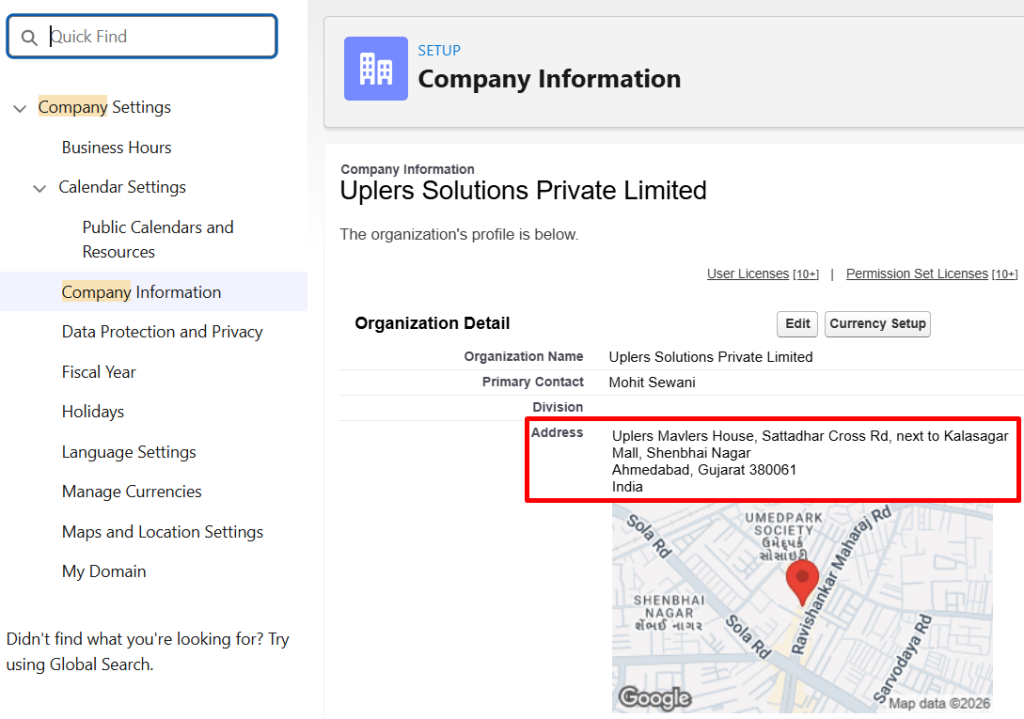
Another important step is verifying the organization’s physical address. This address is the primary address used across Salesforce. Organizations should also verify their physical company address, which is used across Salesforce. To review or edit the address:
Go to Setup.
In the Quick Find box, enter Company Information.
Review or update the address field.
Importing consent data
If you collect consent data outside of Marketing Cloud Next, import it as a CSV. Each import corresponds to a single marketing channel, communication subscription, and consent status.
Before you import consent data, make sure that each person’s contact points, such as email and phone number, already exist in Marketing Cloud Next. A consent import adds and updates consent information for existing contact points, but it doesn’t create new leads or contacts or update other fields.
To import consent data into Marketing Cloud Next, follow these steps:
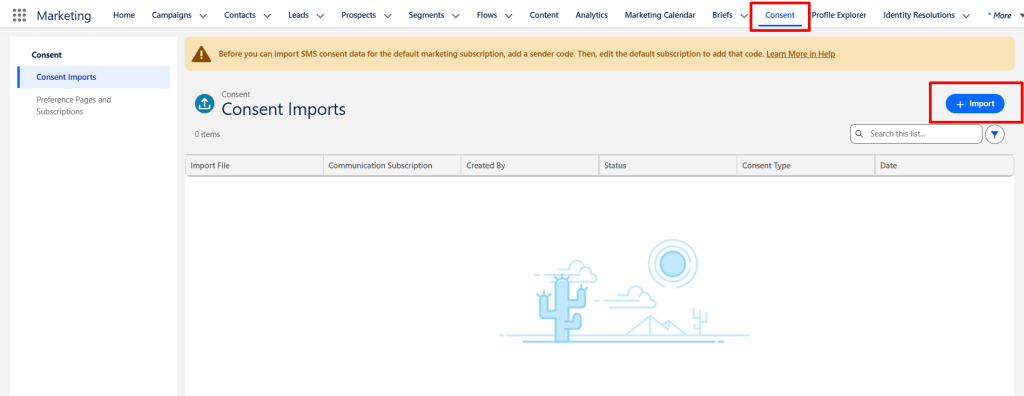
From the Consent page, select Consent Imports, and then click Import.
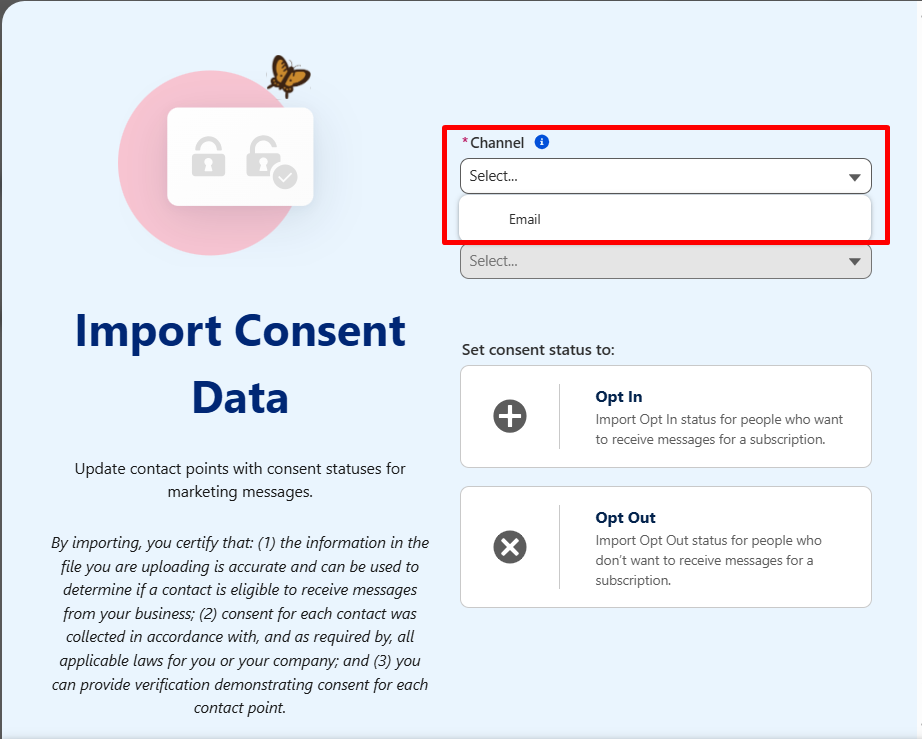
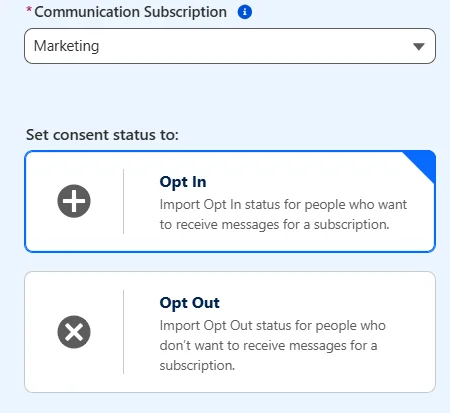
Select a channel and a communication subscription.
For SMS consent imports, enter the Sender Code that you plan to use with the subscription.
Select a consent status to apply to all of the items in your import, and then click Next.
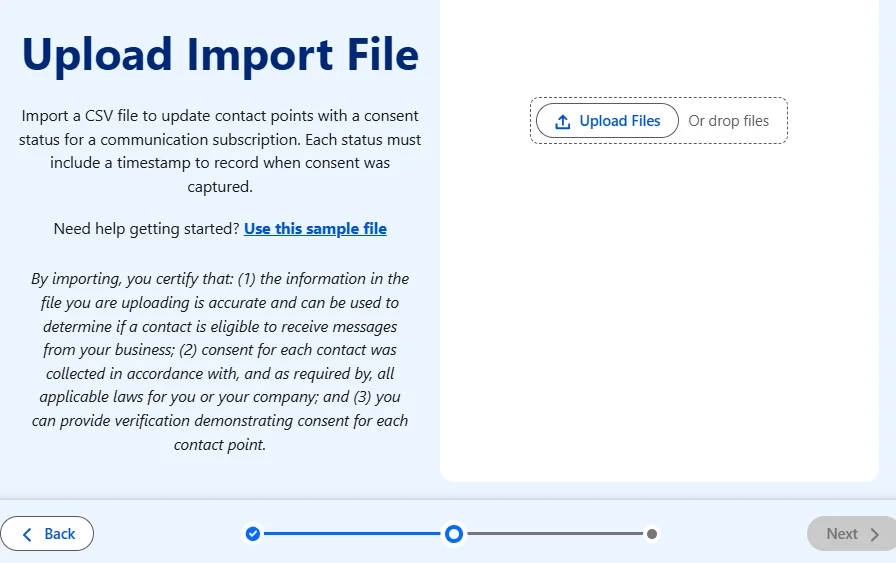
Upload your CSV, and then click Next.
On the preview step, review the sample fields from your file. To complete your import, click Import.
Important considerations in consent management
Consent imports
To update the consent status for existing prospects, leads, and contacts, import consent data from the Consent tab.
Consent imports update the consent status and consent date for each contact point included in the import file. To create or update prospects, leads, or contacts, use the Prospects, Leads, or Contacts tabs instead.
After consent data is updated in Marketing Cloud Next, the changes sync to Data 360. It may take some time for these updates to appear on prospect, lead, and contact records.
Subscriptions and preferences
Organizations are responsible for complying with any laws or regulations applicable to their business.
Deleting a communication subscription also deletes all related consent data. Therefore, it is recommended not to delete communication subscriptions after consent data has been collected.
Before deleting a communication subscription, ensure that it is removed from any preference pages where it is currently used. If a subscription is part of a preference page, it must first be removed from the consent template in Preference Manager in order to remove it from the page.
Additionally, the Preference Manager merge field does not work with custom preference pages.
Disabling consent confirmation
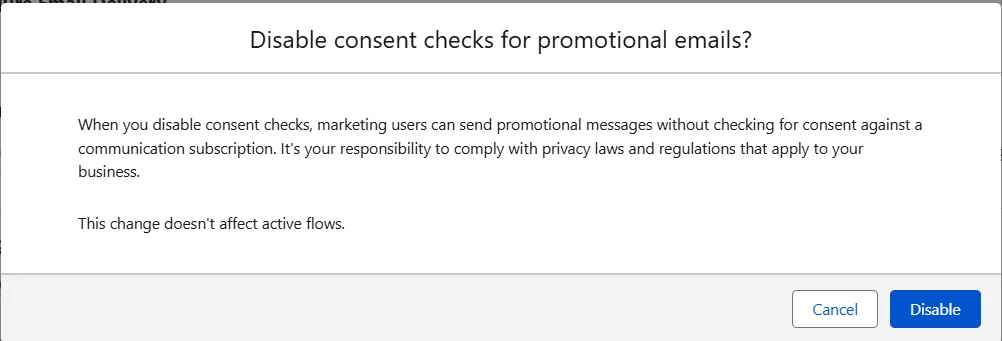
In some cases, organizations manage consent outside Salesforce. In such scenarios, Consent Checks can be disabled. Here’s how to adjust the settings:
In the Salesforce Setup page, toggle the consent confirmation setting to Disabled.
A popup will appear; confirm the action to disable consent confirmation.
By default, the settings are as follows:
Promotional Emails: Enabled
Transactional Emails: Disabled
Once disabled, you can re-enable it at any time.
Final thoughts
Consent management in Marketing Cloud Next plays a vital role in helping organizations maintain regulatory compliance while respecting customer communication preferences.
When planning your consent management setup, it helps to answer three important questions early on:
Which communication subscriptions will you create? Organize subscriptions based on how your business groups communications. This is important because subscriptions cannot be easily removed after consent records are linked to them.
When will opt-ins be created? Decide how and when consent will be collected. For example, through forms, imports, or automated flows. The process should be intentional and clearly documented.
How will you migrate existing consent data? If you are moving from systems like Marketing Cloud Engagement or Salesforce CRM, you will need a plan to map existing consent records into Marketing Cloud Next’s subscription model.
Effective consent management not only supports legal and regulatory requirements but helps build trust, transparency, and stronger customer relationships by giving customers clear control over how and when they receive communications.
Mohit Kumar Sewani
Subject Matter Expert (SME)
Salesforce Marketing Cloud specialist, certified Marketing Cloud Engagement Consultant, and Administrator. Expert in AMPScript, SQL, Journey Builder, and audience segmentation, building data-driven lifecycle campaigns across retail, gaming, wealth management, and more.
Susmit Panda
Content Writer
Specializes in writing on email marketing, CRM, and marketing automation platforms. Combines strong writing expertise with deep domain knowledge to create clear, insight-led content on lifecycle strategy, campaign optimization, and martech ecosystems.

 Lifecycle marketing
 Customer data management
 Email campaign production
 Search marketing
 CMS development
 Who we are
 How we work
 Case studies
 Testimonials
 Work samples
 Salesforce Marketing Cloud
 Braze
Braze HubSpot
 Marketo
 Pardot
 DataBricks
 Snowflake
 HighTouch
 RudderStack
 Segment by Twilio