Lifecycle marketing
 Customer data management
 Email campaign production
 Search marketing
 CMS development
 Who we are
 How we work
 Case studies
 Testimonials
 Work samples
 Salesforce Marketing Cloud
 Braze
Braze HubSpot
 Marketo
 Pardot
 DataBricks
 Snowflake
 HighTouch
 RudderStack
 Segment by Twilio

Doing more with less is a living reality in the agentic era we inhabit today. It is debatable to what extent Agentforce has really made an impact on Account Engagement or Pardot. But since before the AI/agentic revolution, Pardot has been embodying the idea of doing more with less. And the most popular example of that is of course Pardot dynamic content.
Dynamic content in Pardot is a personalized block inside an email which changes depending on the user who receives the email.
It’s a more powerful sibling of merge tags, if you will. You can swap out content blocks, banner images or hero images, CTAs, and signatures based on who is receiving the email.
Given that personalized emails clock 41% higher CTRs than non-personalized emails, the role of dynamic content is especially critical. Let’s find out how to use it in Pardot.
Pardot dynamic lists: For segmentation
Dynamic lists are rule-based and self-maintaining. Prospects are automatically added when they match the criteria and removed when they no longer do. To create one, navigate to the Prospects tab, then Segmentation, then Lists, and add a new list with the Dynamic List checkbox enabled.
This unlocks a rules builder where you can define your membership criteria.
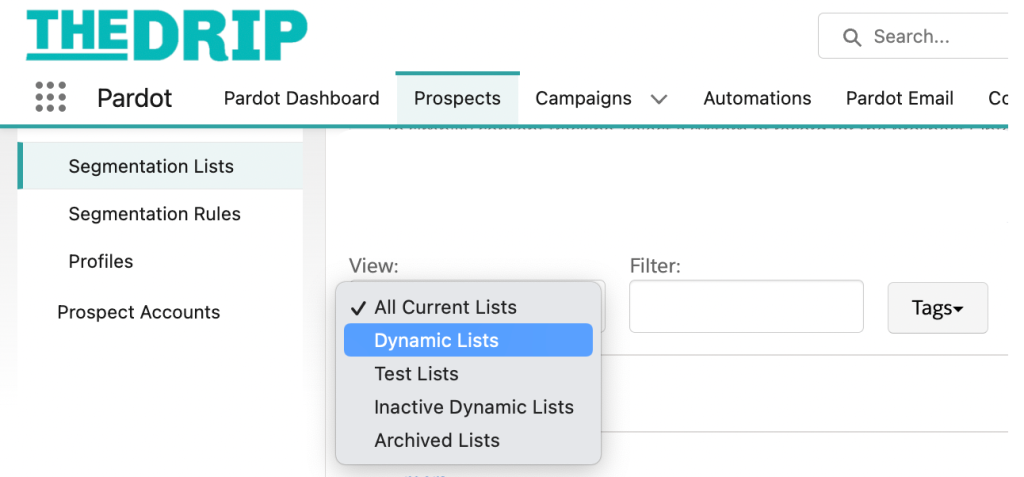
Rules can draw on default fields, account fields synced from Salesforce, CRM campaign status, activity data such as last active date, and more. You can combine rules using AND/OR logic, and you can use rule groups to create more complex nested logic.
As a best practice for starter lists, build these three foundational Pardot dynamic lists:
- Current prospects
- Current customers
- Former customers
From there, you can layer in product-line segments, territory splits, engagement tiers, and so on.
Dynamic lists can be made public and surfaced on your email preference center. They also play a key role in re-engagement campaigns. By defining rules such as “last activity days ago > 365,” you can continuously identify dormant prospects and enroll them into re-engagement programs.
How dynamic content works in emails
When you create a dynamic content block in Pardot, you define a default version and a series of variations. Each variation is tied to a specific field value on the prospect record like industry, job title, region, customer status, etc. Then, when Pardot sends the email, it evaluates the recipient’s record and injects the matching variation. If no variation matches, the default content appears.
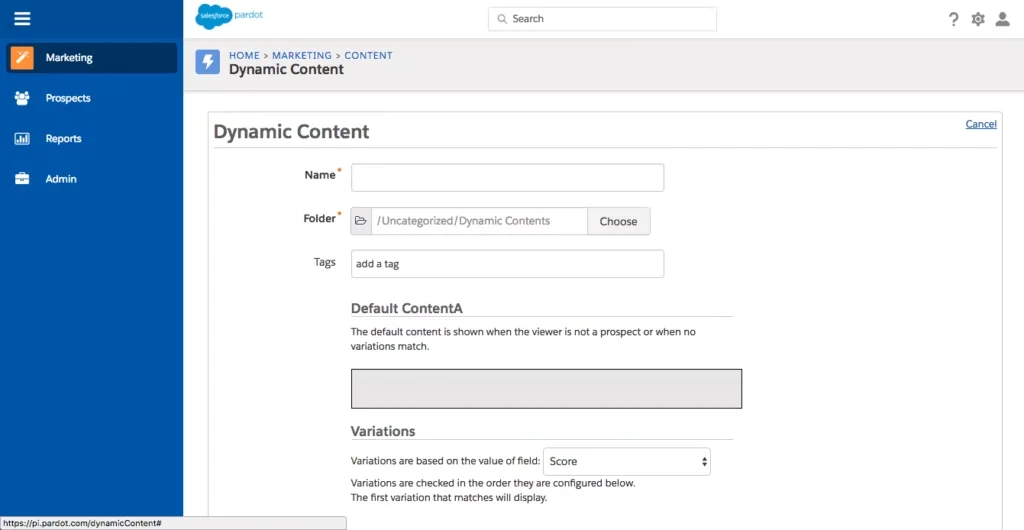
This makes the default content critically important.
Now, a meaningful chunk of your list may not have the field value you’re targeting, either because the data is missing or because the prospect has cleared their cookies.
So a well-written default is critical for keeping the email coherent for everyone.
Dynamic content can be used inside image source URLs, not just as standalone text blocks. By placing the dynamic content variable within the src attribute of an image tag, you can swap out the hero images based on industry or any other field.
How to set up Pardot dynamic content for email
Here are the steps to configure, implement, and validate your dynamic content blocks:
- Give the block a descriptive name. Write the default version. A meaningful default is key, because a major proportion of your list may have missing/unrecognized field values.
- Next, select the prospect field. This can be a default field or a custom prospect field. The field must live on the prospect record itself.
- For each field value you want to target, add a variation and write the content. You can use HTML within the content editor if you need formatted output. Take care of the alignment since HTML inside dynamic content can occasionally produce spacing issues depending on how it sits within the surrounding email template.
- Save and retrieve the snippet. This is what you embed in your email. In a custom HTML template, you paste the variable tag where you want the content to appear. Note that in the email template editor, the placeholder will display only the ID number of the dynamic content block, not the content. Keep a note of IDs to ensure you’re placing the right block in the right location.
- Before sending, use Pardot’s preview mode and select a prospect whose field value matches one of your variations. Confirm the right content appears. Then check a prospect who won’t match any variation to confirm the default renders correctly too. Always test thoroughly; CSS on the surrounding page can affect how the dynamic block renders, and this won’t always be obvious until you preview. Third-party testing tools can’t help.
A single email template can contain up to 10 dynamic content blocks. Prioritize the elements that will have the most impact; that’s typically the hero image, the headline, and the primary CTA.
Speaking of, check out the use cases of Pardot dynamic content in the following table.
| Pardot dynamic content examples/use cases | |||
|---|---|---|---|
| Use case | Description | How dynamic content is applied | Benefit |
| Personalizing the hero image | Displays different hero images based on the prospect’s industry. | Dynamic content variable is inserted into the image src URL (using triple curly braces to avoid encoding issues). | Enhances visual relevance without changing the email template. |
| Tailoring the headline and CTA | Customizes messaging and CTAs based on company, industry, or lifecycle stage. | Dynamic content replaces headline and CTA text based on prospect data. | Improves engagement with more contextually relevant messaging. |
| Adjusting signatures and closings | Localizes email sign-offs based on the recipient’s geography. | Dynamic content swaps only the signature block while keeping the rest of the email unchanged. | Enables regional personalization without duplicating emails. |
| Positive reinforcement & funnel signals | Acknowledges user actions such as completing a step or accessing a resource. | Dynamic content is triggered by field flags indicating user progress or status. | Creates a guided, personalized experience that reinforces engagement. |
| Gated content via a single form | Serves different gated assets using one form and template setup. | Hidden form fields capture asset data via URL parameters; dynamic content controls thank-you and follow-up emails. | Streamlines operations by scaling multiple assets through a single workflow. |
The role of Handlebar Merge Language
Whenever we’re talking about dynamic content in Pardot, we need to discuss the role and place of Handlebar Merge Language (HML). Where dynamic content swaps out whole blocks of content based on field values, HML works at the inline level, inserting or conditionally showing specific pieces of text, links, or HTML depending on whether a field has a value or not.
HML follows a simple if/else/close-if pattern. This makes it ideal for handling situations where you want to personalize content but also need a graceful fallback when data is missing. For example, an email can show a prospect’s assigned sales rep name, phone number, and email if they have an assigned owner in Salesforce, and fall back to a general CTA if they don’t.
Handlebar Merge Language also has a number of other applications:
- Personalize email subject lines and preview text
- Dynamically control URLs within CTA buttons
- Use a single email template for multiple content downloads using hidden fields
- Deliver requested content based on user interaction
- Show or hide sections of an email based on user behavior or attributes
Now this brings us to the question: Handlebars or dynamic content? Which one should you use? Here’s how they stack up in terms of their capabilities and potential applications.
| HML vs Dynamic content | ||
|---|---|---|
| HML | Dynamic content | |
| Best for | Inline personalization within existing content | Swapping larger content sections |
| Typical uses | Adjusting greetings, conditional text, field-based logic | Personalizing images, paragraphs, or CTAs |
| Level of control | High control over layout and design | Limited to block-level rendering |
| Conditional logic | Strong support (e.g., field present/blank conditions) | Basic rule-based variations |
| Scalability | Supports up to 200 merge tags per email | Limited to 10 blocks per email |
| Newsletter suitability | Preferred for complex personalization | Less flexible for intricate layouts |
| Rendering approach | Wrap content in conditional tags | Predefined variation blocks |
Whether you use HML or dynamic content, their value lies in driving operational efficiency.
The traditional approach to content distribution involves a separate form, form handler, and email template for each asset. That’s manageable when you’re producing a case study every few months. But when you begin to scale to two or three a month, the overhead becomes significant.
The alternative is to consolidate around a single form and a single email template, using hidden fields and dynamic content to differentiate the experience at the point of delivery. The prospect’s journey looks identical from the outside. But behind the scenes, there’s one form to maintain, one email to update, and one place to go when something breaks.
This approach also makes it significantly easier to train new team members. A well-documented single-template process is easier to pass along than a sprawling collection of assets.
When using HML to insert user-submitted data like a first name or company name into an email, remember that people don’t always capitalize consistently. You can use CSS text-transform properties to capitalize or uppercase the output, which corrects for common human error without needing to scrub the underlying data.

Tracking & reporting considerations
Because a single email with dynamic content is still a single email in Pardot’s reporting view, click and open data is aggregated across all variations.
In a word, you can’t natively see which variant performed better through standard email reporting.
A common workaround is to use distinct URLs per variation. Even if the destination is the same page, appending a unique query parameter to each dynamic content link creates separate trackable events. Pardot records each unique URL as a distinct click, enabling you to analyze which variation drove more engagement. This approach does require some upfront planning, but it pays off when you need to validate whether personalization is actually moving the needle.
Best practices for Pardot dynamic content in email
Using dynamic content requires a disciplined approach that integrates strategy, data quality, and execution. Here are a few best practices you might find helpful going forward:
- Start with a clear goal. Determine what behavior or outcome you’re trying to drive before building any variations.
- Build the data foundation first. Dynamic content is only as effective as the completeness and accuracy of the prospect fields driving it.
- Keep the default content strong since the majority of your list will view the default.
- Keep individual variations simple and focused. Dynamic content works best when each variation does one clear thing.
- Treat dynamic content as a “living system.” Field values change, personas evolve, and content gets old. Make sure to build in a regular review cycle.
- Focus on the content itself rather than trying to control styling through the block; the block will inherit the styling of the surrounding email template.
- Use only HTML or plain text within variation content. Avoid mixing types within the block.
- Test right before launch. Field data can change between test time and send time.
Getting started with Pardot dynamic content
Access to dynamic content in Pardot is determined by both account tier and user role. On the account side, dynamic content is available on Plus-tier accounts and above; it is not included in lower-tier plans, so confirm your account level before anything else.
At the user level, the ability to create/manage dynamic content can be granted through admin access, a standard marketer role, or a custom role with the appropriate permissions.
If you need guidance with Salesforce Marketing Cloud, we can help. With over 10 years of experience in serving more than 800 SFMC clients, we can be your go-to execution partner.