Lifecycle marketing
 Customer data management
 Email campaign production
 Search marketing
 CMS development
 Who we are
 How we work
 Case studies
 Testimonials
 Salesforce Marketing Cloud
 Braze
Braze HubSpot
 Marketo
 Pardot
 DataBricks
 Snowflake
 HighTouch
 RudderStack
 Segment by Twilio
 Videos

Launching a campaign in Marketing Cloud Next Growth and Advanced Edition is not just a case of the same old shuffle.
This is not just “send an email and hope.” This is execution with structure, data, and governance baked in from the start.
The real shift begins with Marketing Cloud Next campaign creation.
Yes, audiences matter. Journeys matter. Timing matters. But without a clean asset foundation, the rest is just choreography with a broken stage.
This guide walks through the practical path: brand setup, asset creation, builder components, personalization, testing, and compliance.
If you want your first Marketing Cloud Next campaign creation flow to land cleanly, this is where it starts.
Let’s cut to the chase.
What does campaign creation actually mean in Marketing Cloud Next?
Campaign creation in this environment is bigger than one email. It is the process of building reusable, brand-aligned assets that can feed journeys, channels, and variations without falling apart.
That is why the Content Workspace matters so much. It is the center of gravity for email content, SMS and WhatsApp messages, media files, and reusable blocks.
The newer platform is more connected to data, which makes it feel less like a file cabinet and more like an operating system.
You can no longer rely solely on Marketing Cloud Engagement. The Marketing Cloud Next has features that shape the future of your business strategies.
Content is no longer static. It is something the system can shape, reuse, and route with intent. So, your Marketing Cloud Next campaign creation strategy needs to be spot on.
Here is a tabular representation of the same.
| Asset type | Use case | Why it matters |
| Email template | Campaign sends | Scalable personalization |
| SMS / WhatsApp | Fast touchpoints | Direct response |
| Forms / Landing pages | Capture and conversion | Entry into journeys |
| Media uploads | Creative and assets | Reusable content delivery |
The point is simple. Content is not a finishing step here. It is the foundation.
How do you set the foundation before building anything?
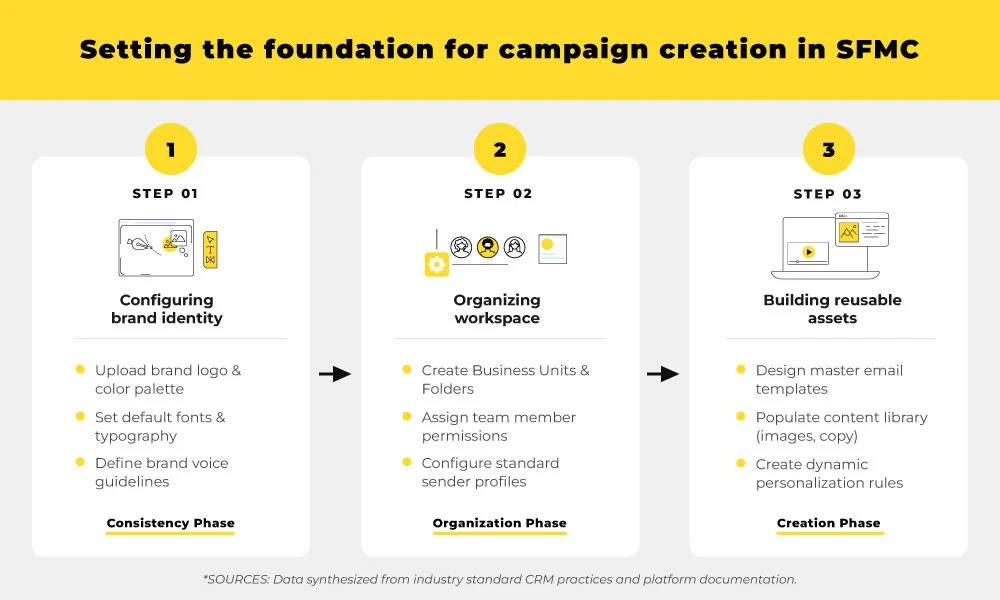
Strong campaign execution starts with brand selection and workspace structure. If your brand standards are not locked in first, every asset becomes a small opportunity for inconsistency.
1. Select your brand first
The Select Brand feature on the right-hand side is not decorative. It applies your brand’s color palette, typography, button styles, and tonal defaults before the build even begins.
That saves time. More importantly, it prevents drift.
When the system knows the brand, marketers do not need to keep reinventing it every time they build. That is the difference between scalable governance and creative chaos.
2. Understand the Content Workspace
The Content Workspace is where the true work dwells. This is where your email assets, media files, reusable blocks, and channel-specific content live together in one place.
That tighter connection to data is what makes the workspace powerful. Older systems often kept content and intelligence in separate rooms.
The Marketing Cloud Next email builder brings them closer together, enabling teams to move faster.
How do you create your first content asset?
The first asset built in Marketing Cloud Next follows a simple sequence: add content, choose the type, define the asset, and set compliance details early. This keeps the campaign usable later across journeys and channels.
Here is a quick campaign setup process to give you a head start.
Step 1: Add new content
Start with the Add button. Select Content from the dropdown.
It sounds basic because it is. But basic is good when you are building something you will reuse later.
Step 2: Choose the content type
You will see several options. For this walkthrough, choose the Email template.
Other options include SMS and WhatsApp content, forms and landing pages, and media uploads. The important thing is to choose the right asset type for the job, not the one that merely looks convenient.
Step 3: Set the essentials
Name the email clearly. Set the API Reference Name with discipline, because the future will absolutely ask for it.
Then define the CAN-SPAM classification. Promotional or transactional. Do not leave this as an afterthought; compliance does not tolerate improvisation.
What makes the Content Builder powerful?
The Content Builder is modular by design, allowing marketers to assemble complex email assets from reusable components rather than starting from scratch each time. That modularity is what makes scale possible.
The Marketing Cloud Next drag-and-drop editor is not just about convenience. It is about speed without losing control.
Marketing Cloud Next gives you components that can be combined, swapped, and reused. That means you are not building one email. You are building a system of parts.
Basic components
- Buttons can route to URLs or Salesforce CMS content, and they can even behave conditionally.
- Dividers, headings, and paragraphs keep the structure readable.
- The HTML component exists for legacy code or advanced custom work.
Layout and structure
The Section component controls layout and responsiveness.
Its “Stack columns on mobile” option matters because nobody wants a desktop design trapped inside a phone, like it lost its passport.
The Content Block component is where the platform starts to feel smart.
You can combine, save, and reuse these blocks, which is exactly the kind of discipline marketing teams need when campaigns multiply.
The power of the Repeater component
The Repeater is the quiet genius in the room. It connects to a data source, such as an event object or a Data Graph attribute, and renders multiple items automatically in a single layout.
That is the UI-based successor to old-school LookupOrderedRows logic. The feeling is the same. The execution is cleaner.
“Reusability is the difference between scaling campaigns and endlessly rebuilding them.” – SFMC Implementation Expert
How do you personalize subject lines and preheaders?
Hyper-personalization in Marketing Cloud Next campaign creation uses AI and data graph logic to tailor subject lines and preheaders to real audience context. The result is more relevant engagement before the email is even opened.
Einstein AI can generate and optimize subject lines, saving time and giving teams more testing power. That is useful. But the more interesting layer is how data can be used to shape the message before the inbox ever sees it.
That is where Data Graph comes in. It helps drive dynamic email content and Salesforce strategies by linking content logic to customer context.
Building variations
You create a New Variation for subject lines. Then define conditional logic, such as “Take action when” to decide which version should surface.
If multiple conditions are true, priority rules decide which one wins. That matters because Marketing Cloud Next (MCN) subject line personalization without hierarchy is just a polite mess.
The right subject line should feel like the natural next sentence, not a random branch in a logic tree.
How do you test and validate before publishing?
Preview and testing protect your campaign from rendering issues, personalization errors, and compliance gaps before the asset goes live.
In Marketing Cloud Next email builder, the preview-and-test flow is part of the launch discipline, not a nice-to-have.
Preview phase
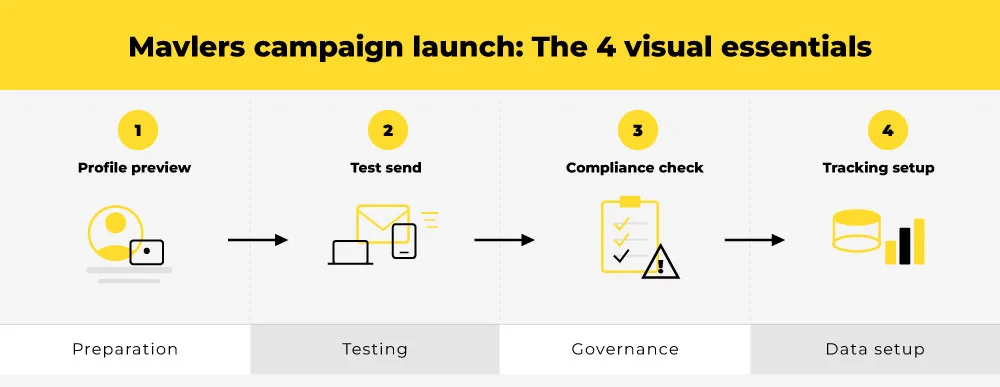
Start by selecting a single Unified Individual. That gives you the clearest view of how dynamic content, personalization, and logic will render for a real person.
This is where mistakes reveal themselves. Bad assumptions do not survive exposure to actual data.
Test send phase
Then send the sample to up to five email addresses. That lets you verify subject lines, content blocks, and rendering behavior in actual inboxes.
Tracking records are stored in MessagingEventsEmail DLO and Email Engagement DMO. That sounds technical because it is, and that technical detail is what keeps the system accountable.
CAN-SPAM checks
Promotional emails need the physical address placeholder.
If {!$organization.Address} is missing; the platform will complain. And rightly so.
Unsubscribe handling is a little more flexible. If you use a custom unsubscribe URL, the platform does not force the standard one. That flexibility is helpful, but it should never become a shortcut around clarity.
| Checkpoint | Why it matters |
| Unified Individual preview | Verifies personalization |
| Test send | Confirms rendering |
| Compliance fields | Avoids launch errors |
| Tracking storage | Supports reporting |

What does a good launch actually look like?
A good launch does not feel heroic. It feels prepared.
- The asset is branded.
- The logic is clean.
- The preview matches reality.
- The compliance checks are green.
And the campaign is ready to flow into broader journey mapping without someone needing to patch it at midnight.
That is what makes Marketing Cloud Next campaign creation different from older, more fragile approaches.
It is not just about building something that looks right. It is about building something that can survive contact with the system.
Wrapping up
That brings us to the business end of this article, where it’s fair to say that the Save and Publish is not the end. It is the moment the asset becomes useful.
Once your content is previewed, compliant, and structured for reuse, it can support broader journey execution across channels and audiences. That is the real promise of Marketing Cloud Next: not just faster creation, but smarter execution.
- Build with brand governance.
- Build with modularity.
- Build with data logic.
That is how the first campaign becomes the first of many.
Connect with our SFMC experts to launch your first campaign today.