Lifecycle marketing
 Customer data management
 Email campaign production
 Search marketing
 CMS development
 Who we are
 How we work
 Case studies
 Testimonials
 Salesforce Marketing Cloud
 Braze
Braze HubSpot
 Marketo
 Pardot
 DataBricks
 Snowflake
 HighTouch
 RudderStack
 Segment by Twilio
 Videos

Salesforce is rapidly evolving.
Their shift toward an AI-driven, Data Cloud-native future makes Marketing Cloud Next (MCN) the ultimate destination for enterprise marketing teams.
It’s an incredibly exciting leap forward.
But let’s be totally honest.
If someone tells you moving from Marketing Cloud Engagement (MCE) to Marketing Cloud Next (MCN) is just a simple software update, they’re fundamentally underestimating the technology. MCE-heavy organizations actually face a massive technical undertaking.
This is primarily due to big architectural differences in Marketing Cloud Next vs Marketing Cloud Engagement and the impending deprecation of legacy scripting languages.
So, how can you navigate this transition smoothly? How do you move forward without breaking your revenue-critical email flows or losing years of customized campaign logic?
The secret is in the approach. A successful Marketing Cloud Next migration requires a phased, architectural convergence rather than a simple lift-and-shift.
By leveraging the MCE+ Bridge Strategy and following a rigorous technical checklist, your team can safely keep what works while adopting the next generation of Salesforce automation.
Let’s dig into exactly how to make this happen with Marketing Cloud Next vs Marketing Cloud Engagement at the center of it all.
Why is the Marketing Cloud Next migration more complex than expected?
The migration is a fundamental shift from MCE’s bespoke, standalone relational data model built on Data Extensions to MCN’s standardized, interconnected platform powered natively by Salesforce Data Cloud.
Think about your current MCE setup. It runs on ExactTarget’s proprietary infrastructure. It acts like a bespoke, custom-built villa, with every wire and pipe laid specifically for your business needs.
MCN, on the other hand, is entirely different. It’s a modular smart home built on a standardized, core platform. You cannot simply drag your custom pipes into a new smart home and expect the water to flow.
Because of this, Salesforce actively treats this process as a “convergence” rather than a traditional data migration.
Your previous investments in automation and segments must be systematically mapped to fit the new schema.
You aren’t just moving data; you’re fundamentally re-engineering how your data talks to your marketing channels.
“Keep what works and add new ideas.”
That is the official mantra for this convergence. Instead of discarding their existing systems on day one, businesses can safely layer ‘Next’ capabilities on top of their current MCE setups.
This brings us to the most critical technical shift: Identity Resolution. In legacy MCE, your primary identifier was often a scattered web of varying Subscriber Keys.
Data Cloud completely rewrites this playbook. It plays a critical role in this new architecture by resolving identities across disconnected systems into a stable, unified profile before activation. This natively prevents duplicate sends and gives you a genuine 360-degree view of your customer.
But getting there requires meticulous data modeling. You have to translate those isolated Subscriber Keys into Data Cloud’s Party Identification framework. It’s complex, but it’s the only way to power the autonomous AI agents that make Marketing Cloud Next so valuable.
How do we solve the AMPscript challenge during migration?
Because Marketing Cloud Next does not support AMPscript, organizations must adopt the MCE+ Bridge Strategy to deploy emails through the legacy MCE engine while using MCN’s Salesforce Flows for overarching journey orchestration.
Here is the hard truth about your current email templates. Marketing Cloud Next simply does not support AMPscript.
For years, enterprise teams have relied heavily on AMPscript for complex operations. You used it for dynamic personalization, executing LookupOrderedRows, building conditional nested logic, and making real-time API callouts. Moving to MCN equivalents requires complete re-engineering, not just copying and pasting code.
So, how do you survive this shift without breaking your live campaigns? Enter the MCE+ Bridge Strategy.
This strategy relies on a simple philosophy: Keep what works, add what is next. Teams use Salesforce Campaign Flows on the MCN platform for intelligent audience selection and overarching decision logic.
However, they continue routing the actual email sends through their legacy MCE engine, where those complex AMPscript templates still function perfectly.
You get the intelligent brain of MCN combined with the execution muscle of MCE. It’s a highly pragmatic middle ground.
We also have to be completely transparent about current content migration limitations. As of early 2026, Salesforce has not completed automated tooling for migrating MCE email templates, images, and files directly to MCN. The “one-click” connect simply doesn’t exist for content yet.
Because of this, we strongly recommend a “daisy-chain” model during your transition. You can build your messaging logic in MCN Campaign Flows, but actively invoke your existing Journey Builder journeys from within those flows. This protects your high-value assets while you slowly rebuild them natively in the new system.
Ready to head over to the Marketing Cloud Next migration checklist? Let’s ease out the complexities first.
How do you assess your MCN migration complexity?
Migration effort is directly dictated by your organization’s reliance on custom AMPscript, Server-Side JavaScript (SSJS), Cloud Pages, and complex multi-table data models.
Before you start unplugging systems, you need a reality check. Not every migration requires the same level of effort, timeline, or budget.
For marketing executives, accurately gauging your readiness is the first step toward securing the right resources. You need to look under the hood of your current MCE instance. How heavily customized is your account?
We use a specific diagnostic framework to help CTOs and Directors of Marketing Operations categorize their migration risk. Evaluate your current architecture against the table below to find your starting line in Marketing Cloud Next migration.
| Complexity Level | Current MCE Usage | Mavlers Migration Strategy |
| Low | Simple email sends, basic Journey Builder paths, minimal personalization. | Direct Data Mapping. Straightforward transition leveraging native Data Cloud connectors. |
| Medium | Moderate Journey Builder complexity, standard relational Data Extensions, some AMPscript. | Targeted Re-engineering. Rebuild segments in Data Cloud; deploy the MCE+ bridge for complex emails. |
| High | Heavy AMPscript reliance, custom API integrations, complex preference centers. | Strict Audit & Roadmap. Requires a phased re-engineering roadmap to translate scripting into Flow logic. |
| Very High | SSJS, custom Cloud Page applications, bespoke deliverability IP setups. | Long-Term Convergence. Multi-year phased rollout, maintaining MCE for deep programmatic execution. |
Think about it. The more custom code you have holding your campaigns together, the more delicate the transition becomes. You need a structured plan to untangle that web safely.
If you fall into the High or Very High categories, a rushed lift-and-shift approach will inevitably result in critical failures. You absolutely must plan for a phased convergence over several quarters.
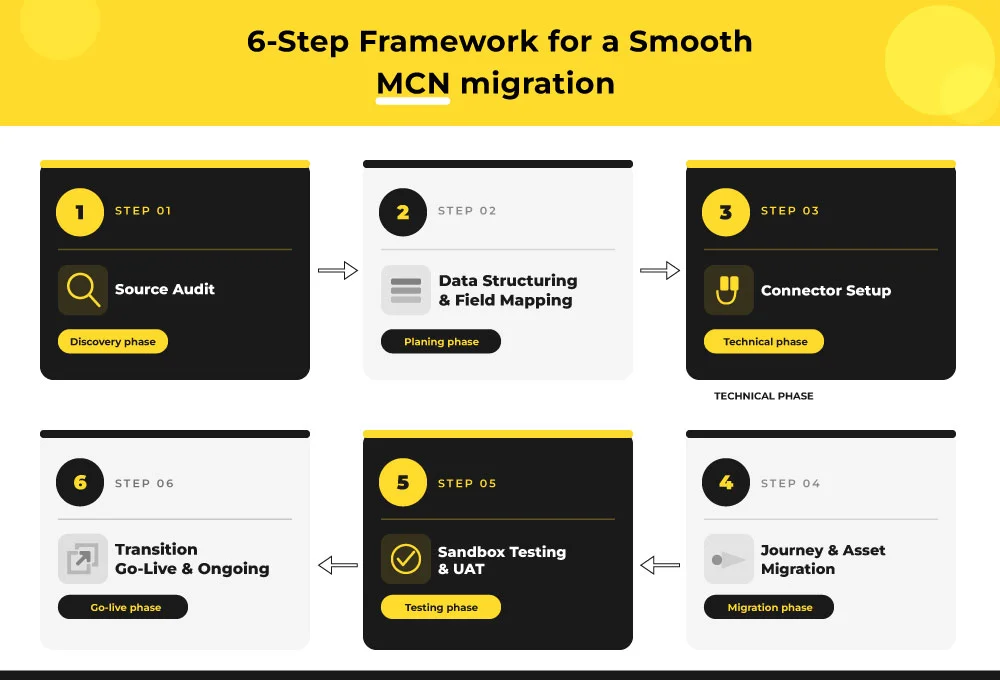
Mavlers 6-step framework for a smooth MCN migration
This is not a big-bang story.
It is a careful one. And one that matters.
Salesforce frames this as a convergence, not a migration, and the platform is still evolving. So the smart move is simple: audit first, map with intent, test properly, and shift workload in stages.
Because with MCN, the real risk is not speed. It is an assumption.
Here is the Marketing Cloud Next migration checklist we follow at Mavlers to ensure everything goes buttery smooth.
Phase 1: Source audit
Before anything moves, look at what already exists.
Not just the obvious pieces. All of it.
That means documenting every active Data Extension, along with schema, row counts, retention rules, and whether it feeds a live journey or send.
It also means auditing subscriber lists and all subscriber statuses to ensure a clean consent baseline before migration begins.
Then go one layer deeper.
- Catalog every active journey in Journey Builder. Note the trigger type, entry source, decision splits, wait timers, and channel.
- Catalog every automation in Automation Studio, too. Especially SQL queries, file imports, and data extract activities, because these do not map cleanly into MCN.
And do not stop there.
- Inventory email content assets. Templates. Image files. Dynamic content blocks.
- Document every API integration and triggered send.
- Record Business Unit structures and user roles.
- Capture sender authentication details, including SAP, domains, and IPs.
Because dedicated IP support is new in MCN Spring ’26, it must be carefully planned if the client already uses dedicated IPs in MCE.
In other words: Know your house before you move.
Phase 2: Data structuring and field mapping
Now the translation begins.
This is where old structure meets new logic.
Map MCE Data Extensions to the Data Cloud DMO/DLO structure. Understand which fields belong to Individual, Contact Point Email, Unified Individual, and the rest of the model.
Define Identity Resolution match rules.
The default ruleset includes email match, but you still need to confirm what works for your data.
Map subscriber status fields to MCN Subscription objects. Unsubscribed, bounced, and held flags must be mapped to the MCN consent model. Do not assume direct equivalence.
Then, map journey entry sources to MCN Segment definitions.
- Data Extension entry sources become Data Cloud Segments.
- SQL-based entry sources need rewriting as segment criteria.
Some fields will not have a natural home. That is normal.
Identify them early: custom profile attributes, scoring fields, preference data, anything without a native DMO equivalent. Then decide whether to extend the model or abandon it.
And do not forget the data space assignment.
Most organizations will use the Default data space.
Multi-BU setups need explicit planning before setup begins.
This phase is not glamorous. It is where the migration either becomes stable. Or becomes a mess with better branding.
Phase 3: Connector setup
Now you build the bridge. Carefully.
Create the API or Connection user in MCE with the correct roles, including the Marketing Cloud Administrator role that links MCE to Data Cloud. Install the Marketing Data Kits through Setup > Assistant Home.
Then configure Identity Resolution rulesets.
Do this after all data streams are active, not before.
That timing matters.
It is also where historical engagement data comes in. Set the connector lookback to bring up to two years of history into Data Cloud. Then, validate that Unified Individuals are being generated correctly, with the right deduplication and merge behavior.
This is the invisible part of the job. The part nobody praises. Until it breaks.
Phase 4: Journey and asset migration
This is where the work becomes visible. And where discipline matters most.
Do not rebuild everything at once.
Prioritize journeys first. Decide what should be bridged and what should be rebuilt. Journey Builder journeys can be invoked from MCN Flows via Send to Journey, so the recommended model is not a panic rewrite. It is a staged transition.
Build MCN Campaign Flows for net-new campaigns first.
That way, new work starts native while existing Journey Builder journeys continue to run in parallel. That is the intended model.
Then, keep consent in sync.
Opted-out records must stay aligned across both systems during the parallel run.
Rebuild email templates in MCN manually, starting with the highest-volume ones, because there is no automated template migration path yet.
Recreate Automation Studio SQL queries as MCN equivalents, too, using Data Cloud transformations or Flows where needed.
The same applies to the custom preference.
MCN custom preferences only arrived in Spring ’26, so feature availability must be verified before rebuilding.
This phase is not copy-paste. It is rebuild-with-judgment.
Keep the value. Improve the structure.
Phase 5: Sandbox testing and UAT
Before anything goes live, test it in a low-stakes environment.
That is not caution. That is professionalism.
- Run Identity Resolution in the sandbox and validate the output.
- Check for unexpected merges, missed duplicates, and rule behavior.
- Test segment generation and compare segment counts against known MCE list or DE sizes for the same criteria.
- Send test emails through MCN and validate rendering.
- Check personalization tokens, dynamic content, and link tracking against the MCE baseline.
Validate that the consent state is inherited correctly as well. A test email sent to an unsubscribed record should prove that MCN suppresses the record properly. And do not skip the final gate.
UAT sign-off from the client marketing operations team is required before go-live, covering every channel in scope.
Quiet confidence starts here, not in the launch meeting.
Phase 6: Go-live and ongoing transition
This is not the end. It is the handover.
Define the parallel run duration clearly. MCE and MCN are meant to run simultaneously for an extended period, not through a hard cutover. Salesforce notes that this is a gradual shift in workload, potentially spanning 6 months or more.
Set up the IP warm-up plan for dedicated sends in MCN.
That matters even more because dedicated IP support is new in MCN.
Then define workload-shift criteria. Do not rely on instinct. Use metrics such as open-rate parity and zero-suppression misses to determine when a campaign type is ready to move fully to MCN.
Also, document rollback triggers and the rollback procedure. Not because you expect failure. Because mature teams respect possibility.
Finally, monitor Data Cloud credit consumption after launch. Identity Resolution and segment refreshes consume Data 360 credits, so alerts should be in place early.
That is how the transition stays controlled. Not dramatic. Controlled.
What does this approach really give you?
It gives you fewer surprises.
It protects prior investment.
It respects the fact that MCE and MCN are meant to coexist for a while.
And it helps the team move from old logic to new logic without losing data, consent, or confidence along the way.
Plan it. Audit it. Map it. Test it. Then move.
Wrapping up
That brings us to the business end of this article, where it’s fair to say that transitioning to Marketing Cloud Next is not a simple software update.
It is a fundamental, architectural overhaul that prepares your enterprise for a collaborative, AI-native future. Treat this process with the immense technical respect it deserves.
The convergence of MCE into MCN is challenging, but the payoff, unified data, agentic AI workflows, and seamless cross-cloud orchestration, is absolutely worth the effort. By following a structured, phased approach, you can future-proof your tech stack without risking your current pipeline.
Ready to start planning your convergence? Don’t navigate this architectural maze alone.
Book a “Marketing Cloud Next Complexity Assessment” with a Mavlers architect today.
Meanwhile, here are a few more relatable reads you should take a look at.
Moving to Salesforce Marketing Cloud Next? Here’s what you need to know
How Marketing Cloud Next turns Do-Not-Reply emails into conversations