Lifecycle marketing
 Customer data management
 Email campaign production
 Search marketing
 CMS development
 Who we are
 How we work
 Case studies
 Testimonials
 Salesforce Marketing Cloud
 Braze
Braze HubSpot
 Marketo
 Pardot
 DataBricks
 Snowflake
 HighTouch
 RudderStack
 Segment by Twilio
 Videos
Ever felt like your Salesforce Marketing Cloud data extensions are fighting you? One day you’re sending personalized campaigns, the next you’re drowning in slow queries, duplicate sends, and failed lookups.
Data Extensions are where Salesforce Marketing Cloud either gets elegant or gets expensive. They can either become your biggest advantage or your most expensive headache.
At a small scale, they look harmless. A table here, a lookup there, a list for the next send.
At enterprise scale, though, the wrong structure turns into slow queries, duplicate sends, broken personalization, and a database that behaves like a drawer full of wires.
SFMC data extension best practices are not housekeeping. They are architecture. They may also help you migrate to Salesforce Marketing Cloud Next.
Get them right, and Data Extensions become the engine behind dynamic emails, real-time lookups, and scalable personalization.
So, let’s cut to the chase and learn how SFMC data extension can help you scale your business using dynamic emails.
To start building this robust Salesforce Marketing Cloud data architecture, we must first establish the foundational rules.
What are the 3 core Salesforce Marketing Cloud data extension best practices for scalable architecture?
An optimal Salesforce Marketing Cloud data architecture requires a hybrid data model separating contact and transactional data, strict primary key definitions, and the use of ContactKey for all send relationships to maintain data integrity.
1. Adopt a hybrid data model
Do not put everything into one giant Data Extension and call it a strategy.
That is how teams create slow queries, bloated records, and personalization logic that collapses under pressure.
A healthier model separates responsibility:
- Contact_Master_DE for durable contact data
- Orders_DE for transactional behavior
- Country_Lookup_DE for standardized reference values
That separation keeps the system clean. It also makes future changes easier because you are editing a single layer instead of rewriting the entire stack.
2. Always define primary keys and data types
If your primary key is missing, your data model is already drifting. Duplicate records lead to duplicate sends, and duplicate sends lead to confusion that no subject line can fix.
Use the right type for the right field.
- EmailAddress for email fields
- Date for order or event dates
- Decimal for price values
- Text only where flexibility actually matters
That choice matters more than teams admit. Text-everything models look easy until you try to query them at scale.
3. Establish the correct send relationship
Always use ContactKey as the Subscriber Key relationship. Not EmailAddress.
Email addresses change. People move, rename, switch domains, and hand inboxes across jobs like borrowed umbrellas. ContactKey remains stable, which helps maintain Journey Builder continuity and preserve lifecycle history.
Once the foundational architecture is solid, the next critical step is defining the purpose of each Salesforce Marketing Cloud data extension optimization in the context of email deployment.
Sendable vs. Non-Sendable DEs: How to differentiate and use them for email deployment
Sendable DEs should be explicitly filtered and prepared for email deployment, whereas Non-Sendable DEs should be reserved exclusively for relational lookups and transactional storage.
The golden rule of Sendable DEs
Do not send from raw transactional tables.
That is not just inefficient. It is careless at an enterprise scale. Instead, build a filtered Sendable DE through a Query Activity that pulls only the exact audience you need.
That keeps your send layer lean. And lean sends are easier to test, faster to process, and less likely to break when volume rises.
Query activity optimization
Bad queries do not stay bad quietly. They slow down everything downstream.
A common mistake looks like this:
SELECT *
FROM Orders_DE
A better version is intentional:
SELECT
ContactKey,
EmailAddress,
ProductName,
OrderDate
FROM Orders_DE
WHERE OrderDate >= DATEADD(day, -30, GETDATE())
Use only the fields you need. Filter early, reduce columns, and avoid dragging unnecessary weight into your send audience. That will have you build a foolproof Salesforce Marketing Cloud data model.
Recommended enterprise naming convention
A naming system saves more time than another dashboard ever will.
| Purpose | Entity | Type |
| Contact | Master | Sendable |
| Order | Transaction | Log |
| Campaign | Audience | Sendable |
A clean naming convention becomes a quiet form of governance. And governance, in SFMC, is just scale wearing a proper suit.
With a clean architecture and well-defined sendable audiences, you can now unlock the true power of Salesforce Marketing Cloud by leveraging Data Extensions for dynamic, complex personalization.
How to leverage data extensions and AMPscript for advanced dynamic email personalization
Dynamic emails leverage Sendable Salesforce Marketing Cloud data extensions alongside AMPscript and Non-Sendable Lookup DEs to render personalized, relational data, like product recommendations, at the exact time of sending.
Personalization gets interesting when it stops being ornamental.
A first name is nice. A relevant product, timed correctly, is useful.
1. Basic personalization from Sendable DEs
Pull data directly from the Sendable DE, but protect the send with fallbacks.
Missing values should never produce broken copy.
%%[
VAR @firstName
SET @firstName = AttributeValue(“FirstName”)
IF EMPTY(@firstName) THEN
SET @firstName = “there”
ENDIF
]%%
Hi %%=v(@firstName)=%%,
That little fallback keeps the email human even when the data is not. It also prevents empty greetings from turning a strong campaign into a shrug.
2. Relational lookups for dynamic content
Now you move from personalization to behavior.
If you want to display the last purchased product, use a lookup against your transactional Data Extension.
%%[
VAR @rows, @row, @productName
SET @rows = LookupOrderedRows(“Orders_DE”, 1, “OrderDate DESC”, “_subscriberkey”, _subscriberkey)
IF RowCount(@rows) > 0 THEN
SET @row = Row(@rows, 1)
SET @productName = Field(@row, “ProductName”)
ENDIF
]%%
Your last purchase was: %%=v(@productName)=%%
That is relational messaging in motion. The email is no longer generic. It is aware.
3. Advanced conditional logic and recommendations
Conditional logic lets the email adapt its shape based on who is seeing it.
%%[
VAR @country
SET @country = AttributeValue(“Country”)
]%%
%%[ IF @country == “India” THEN ]%%
<p>Exclusive India Offer</p>
%%[ ELSEIF @country == “US” THEN ]%%
<p>US Offer</p>
%%[ ELSE ]%%
<p>Global Offer</p>
%%[ ENDIF ]%%
For deeper personalization, use LookupRows to pull products from a recommendation DE.
That gives you:
- product names
- images
- category-specific offers
- a fully automated 1:1 layout
The trick is not adding more logic. The trick is using just enough logic to feel tailored without turning the template into a maze.
To bring all these best practices together, from architecture to personalization, we need a cohesive, end-to-end enterprise strategy that manages data flow seamlessly.
Mapping the ideal enterprise Salesforce Marketing Cloud data extension strategy (end-to-end flow)
A scalable enterprise architecture flows seamlessly from data import to a Contact Master, processes via Query Activities into Filtered Audience DEs, and injects lookup data into the final dynamic email.
Think in layers, not lists.
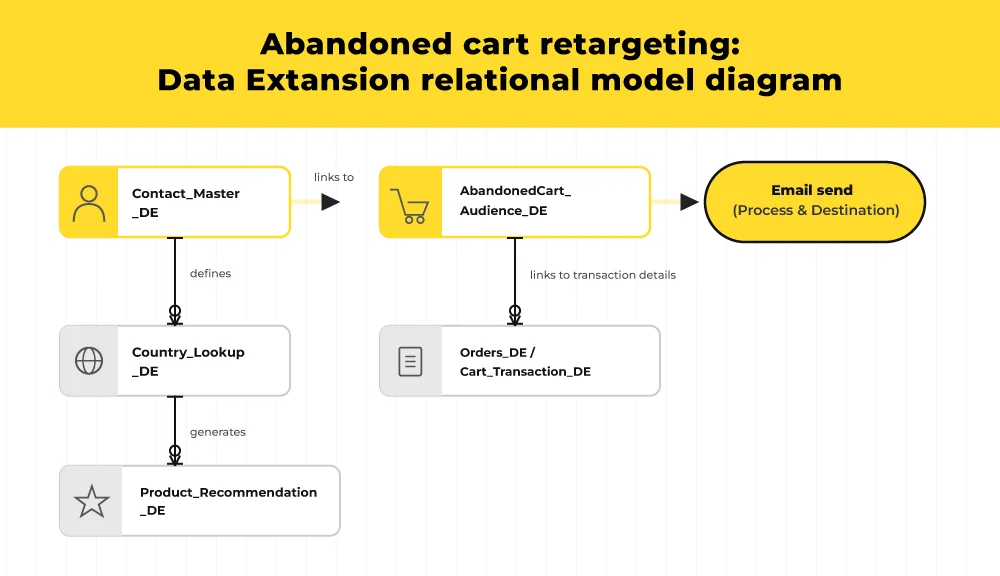
The abandoned cart architecture example
A cart event enters Cart_Transaction_DE.
A Query Activity filters relevant records into AbandonedCart_Audience_DE, which becomes the Sendable layer.
Then the email pulls:
- the customer name from Contact_Master_DE
- the abandoned product from AbandonedCart_Audience_DE
- the product image from Product_Recommendation_DE
That gives you a clean division of labor. Transactional truth stays in one place, while the send-ready audience stays lean and focused.
Data retention and performance maintenance
For high-volume enterprise instances, retention policies are not optional.
A 180-day retention window on aging transactional Salesforce Marketing Cloud data extensions can reduce storage pressure and improve query performance. Old data should inform strategy, not clog the system.
This is the part teams often forget. Optimization is not only about what you add. It is also about what you let go.
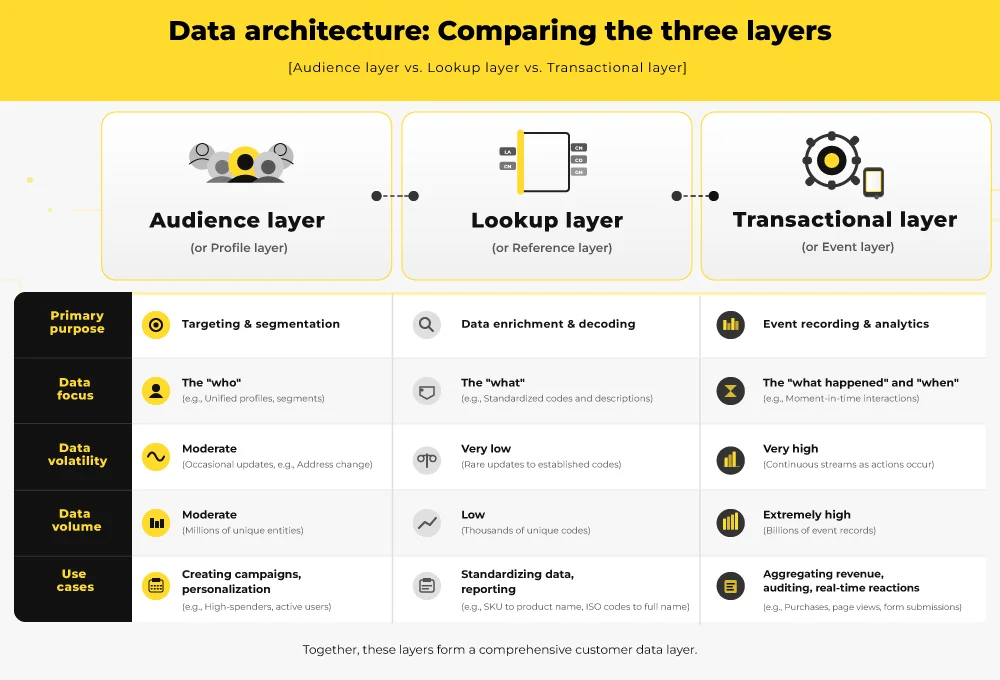
| Layer | Purpose | Example DE |
| Contact | Permanent identity | Contact_Master_DE |
| Transaction | Event history | Orders_DE |
| Lookup | Dynamic rendering | Product_Recommendation_DE |
Wrapping up
That brings us to the business end of this article, where it’s fair to say that SFMC Data Extensions are not spreadsheets with a nicer UI. They are the relational spine of personalization, querying, and send-time logic.
When you structure them properly, your emails stop being static assets and start becoming dynamic systems. That is how SFMC scales without turning into operational sludge.
You can book a technical Salesforce Marketing Cloud data architecture audit and let us pressure-test your current data model.
The ball is in your yard now. Make every effort count.