Lifecycle marketing
 Customer data management
 Email campaign production
 Search marketing
 CMS development
 Who we are
 How we work
 Case studies
 Testimonials
 Salesforce Marketing Cloud
 Braze
Braze HubSpot
 Marketo
 Pardot
 DataBricks
 Snowflake
 HighTouch
 RudderStack
 Segment by Twilio
 Videos

In Salesforce Data Cloud, identity resolution is the process of linking multiple disparate data points from different systems to create a single, unified view of a customer.
After data from various source systems such as a CRM, data warehouse, website, or loyalty program is ingested and mapped into Data Cloud’s individual data model object, multiple records often represent the same person. Identity resolution connects these records.
It is important to understand that identity resolution doesn’t merge records by selecting one and removing others. Instead, it creates a new unified individual record and links each source record to it using a separate junction object. The original records remain unchanged and connected to their source systems. The unified record serves as a connective layer above them.
No data is lost; the process is fully reversible and repeatable. If your source data changes, such as a name correction, duplicate account flag, or address update, you can re-run identity resolution to generate a new, more accurate set of unified records while preserving all original information.
Let’s explore the process of identity resolution in Salesforce Data Cloud in more detail.
What is the identity resolution process in Data Cloud?
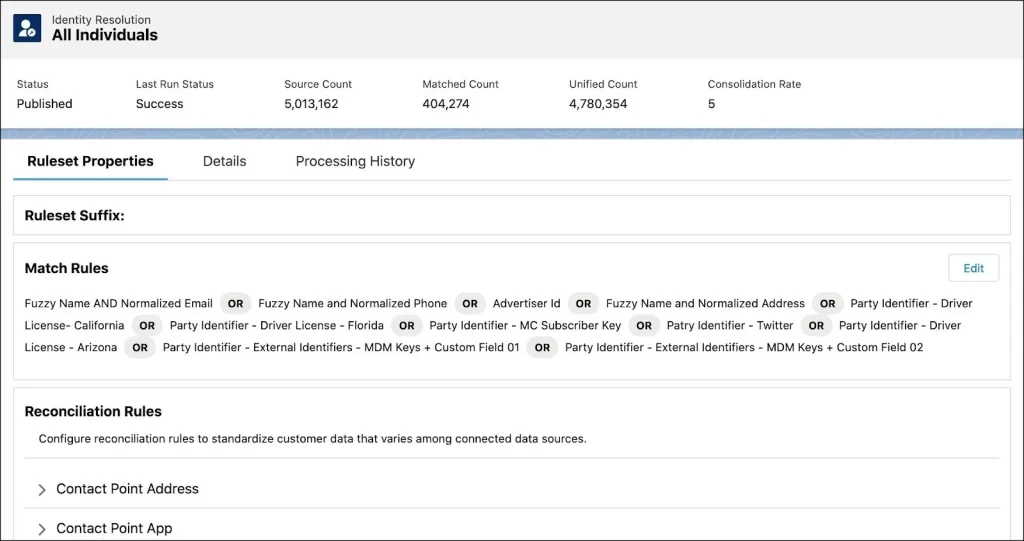
In Salesforce Data Cloud, identity resolution relies on two types of rules.
Match rules determine which records Data Cloud treats as the same individual. And reconciliation rules specify which value prevails in the unified profile when matched records conflict.
Match rules offer three methods, listed from strictest to loosest:
- Exact matching compares the literal text value of a field. This method is useful for phone numbers or emails, but exact matches do not always indicate high confidence. For example, unrelated individuals may share a phone number or household email address, so exact matches on a single attribute should not be considered definitive.
- Normalized matching addresses formatting inconsistencies such as capitalization, punctuation, and spacing before comparing values. This approach is especially helpful for emails, phone numbers, and mailing addresses, reducing the need for data standardization before reaching Data Cloud. However, normalization can alter how the platform interprets customer data, so consider whether reformatting might obscure information the customer intended to provide.
- Fuzzy (probabilistic) matching currently applies only to first names and allows for near-matches rather than exact matches. You can adjust the precision level. Lower precision accepts more variation, such as misspellings or nicknames, while higher precision requires closer similarity. This tool is valuable, but it is important to test results carefully to avoid errors.
A unified profile is created when any single match rule is met, so adding more rules broadens the scope of matching.
Two important points are often overlooked.
First, Data Cloud does not merge or delete source records; it links them and presents a unified view while preserving each original record (the key ring, not a flattened master). Second, all rules are selected by the individual configuring the ruleset. The platform supplies the tools, you supply the judgment.
What is the difference between deterministic and probabilistic identity resolution?
Deterministic matching links records when identifiers are unambiguous, such as the same email, phone number, or ID. This method is highly accurate, easy to audit, and poses minimal risk of false matches, but it requires reliable identifiers.
Probabilistic matching connects records based on similarity across multiple attributes, allowing for broader coverage, including variants and anonymous data. However, it introduces a higher risk of false matches.
Refer to the table below for an overview of the key differences between the two.
| Feature | Deterministic identity resolution | Probabilistic identity resolution |
| What it does | Links records using exact matches of unique identifiers. | Links records using statistical modeling and patterns to calculate the likelihood that they belong to the same person. |
| Typical inputs | First-party data like hashed emails, phone numbers, login IDs, or tax identifiers. | IP addresses, device types, browser fingerprints, location data, and behavioral patterns. |
| Accuracy | Very high (99%+). It only links data when there is a concrete, indisputable match. | Variable (typically 80-90%). It relies on confidence scores and thresholds. |
| Scale / reach | Lower. You can only resolve identities for users who actively log in or share matching, hard identifiers. | Much higher. It can resolve identities for anonymous visitors and across devices without requiring logins. |
| Use cases | Financial transactions, personalized billing, healthcare records, and direct email/SMS marketing. | Audience targeting, lookalike modeling, attribution tracking, and top-of-funnel ad campaigns. |
| Privacy risk | Lower. Relies on consented, explicit user actions (like logging in). | Higher. Can feel intrusive (“creepy”) as it tracks and links user behavior implicitly across the web. |
In Data Cloud, ‘probabilistic’ matching refers to configurable fuzzy matching. You set the precision level, select identifiers, and define thresholds. The chief distinction is not between specific algorithms, but rather the balance you set between accuracy and reach. Adjusting this balance is a business decision regarding acceptable risk. Best practice? Begin with deterministic matching and introduce fuzziness intentionally.
What is a party identification object in Data Cloud?
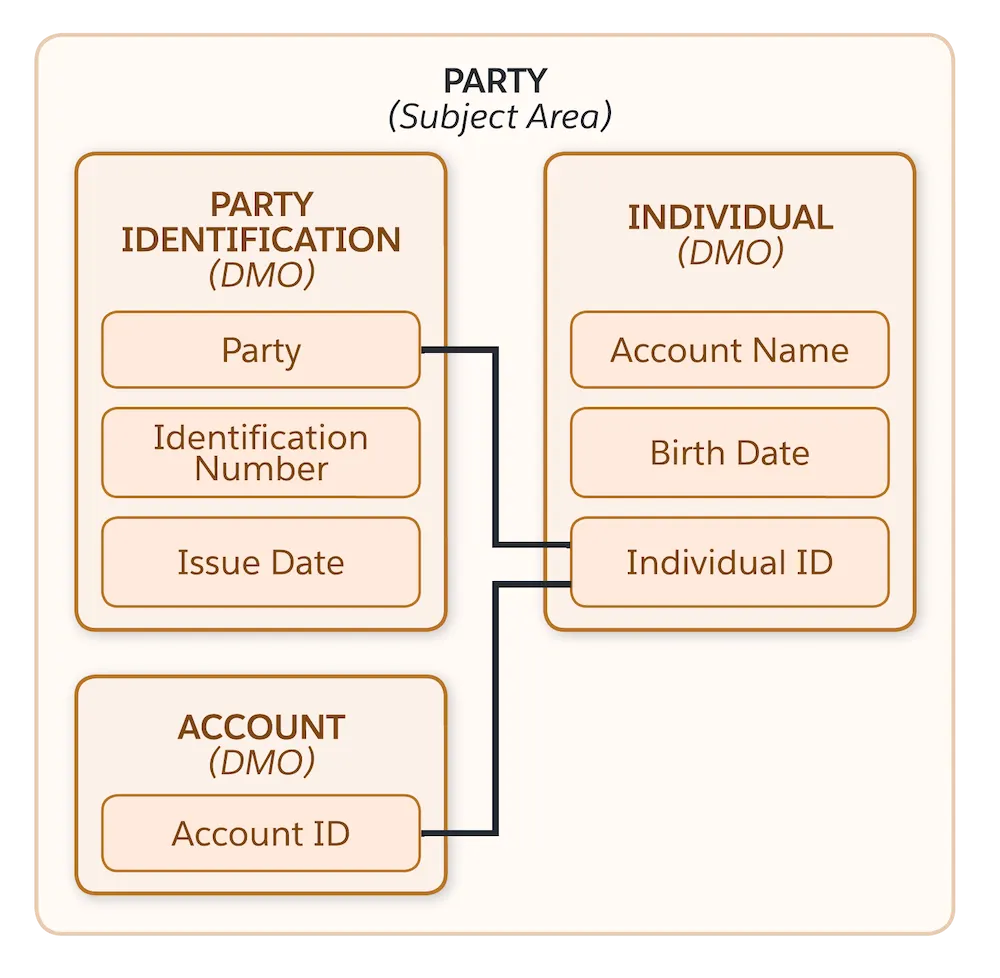
The party identification object matches real, unique identifiers rather than descriptive attributes such as names or addresses. Examples include loyalty card numbers, driver’s license numbers, government IDs, and system-specific identifiers such as contact IDs or subscriber keys.
The object stores multiple identifiers, each distinguished by identification type, identification name, and identification number. This structure is necessary because, for example, a loyalty card number and a driver’s license number could share the same digits but belong to different individuals. Matching only on the number, without considering the type, risks linking unrelated profiles.
Accordingly, two systems may store the same identifier value but fail to match if they use different labels.
For example, a CRM system may use “contact ID,” while a marketing platform may use “subscriber key” for the same value. Even if the numbers match, records will not link unless the identification name is consistent. Effective party identification requires a robust naming convention across all source systems.
Consolidation rate in Data Cloud
In Salesforce Data Cloud, the Consolidation Rate measures how effectively Identity Resolution rulesets merge duplicate or fragmented source records into unified profiles. It indicates the percentage of raw data identified as redundant and reduced during deduplication.
The identity resolution dashboard displays a consolidation rate, which measures the percentage reduction of source records into unified profiles. It’s calculated as one minus the number of unified profiles divided by the number of source records.
So, for example, if you ingest 10,000 raw customer records, and your identity rules determine they belong to 7,500 unique individuals, then the consolidation rate is 25%.
How does an administrator increase the consolidation rate for identity resolution?
You raise the consolidation rate by adding or loosening match rules, and lower it by removing them. A high rate may indicate genuinely duplicative data, or it can also result from overly loose rules that combine records belonging to different individuals (overgrouping). The optimal consolidation rate is not the highest possible, but the one that ensures accurate matching for your data.
Use the consolidation rate as a diagnostic tool, not a metric to maximize.
Identity resolution relies on defined rules. The quality of each segment, campaign, and report depends on decisions made in the ruleset, typically by a data engineer or administrator, often without marketing input. However, two of these decisions should be owned by marketing.
A match rule balances reach and accuracy. The level of strictness determines how many customers you can identify and personalize for, versus the risk of misidentification. This is a strategic decision about acceptable error. A reconciliation rule defines the source of truth when systems have conflicting customer data. It specifies which value takes precedence, such as the most recent, most frequent, or a trusted source like CRM.
This is an editorial policy defining what is considered accurate about a person. Every organization has a source-of-truth policy, whether it is explicitly defined or not.
Householding
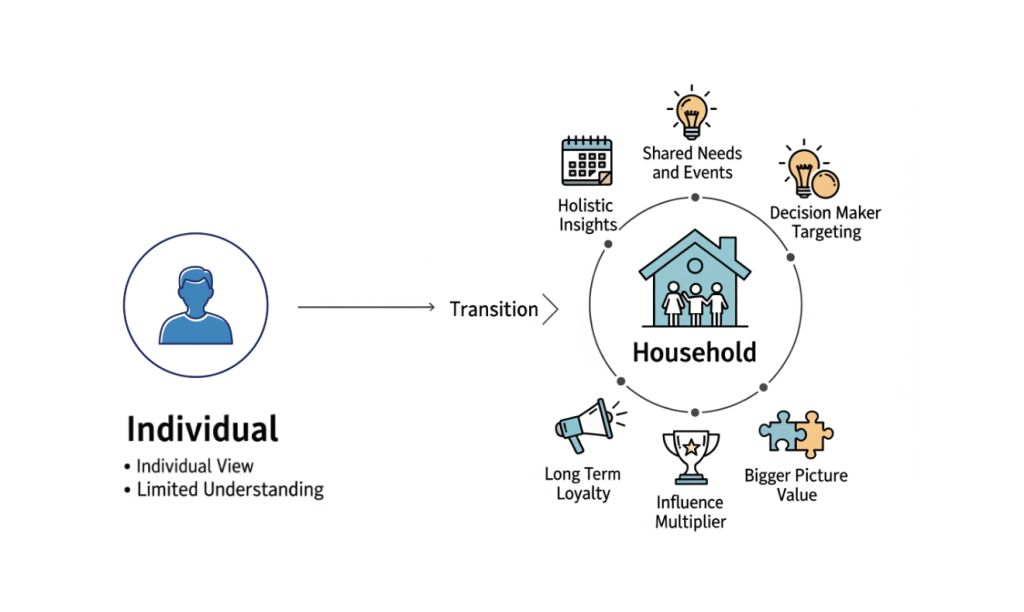
Data Cloud extends identity resolution from individuals to households, defined as groups sharing a last name and address. Once established, a household can be used in segmentation like an individual, and its members can be included in a single data graph query.
The primary benefits are improved context and efficiency. While an individual may appear to spend modestly, their household’s combined spending can reveal greater overall value. Using households also reduces redundant marketing by sending one message per household instead of multiple messages to individuals at the same address.
Configuring household resolution is similar to individual resolution, but the primary DMO is the household object. The rule set is based on the unified individual rule set to determine which individuals belong together. An important architectural detail is that, while matching occurs against unified individuals and their addresses, the resulting household links reference the underlying individual records rather than the unified ones. This approach simplifies downstream processes. It is also expected that one person may belong to multiple households if they have more than one address on file.
Why a bad match costs more than it used to
Previously, an identity error meant an email was sent to the wrong person, resulting in a lost opportunity. Today, the impact is greater in three key areas that you as a marketer should consider:
- Privacy: Overgrouping can link one person’s contact information and history to another’s profile, exposing data between unrelated individuals.
- Consent: In Salesforce’s model, consent is managed at the contact-point level, such as a specific email address or phone number, and always honors the most restrictive preference. A unified profile does not guarantee a single consent status, and assuming otherwise often leads to errors.
- Agents: With Data Cloud supporting Agentforce, a mismatched profile can cause an agent to share another person’s information with a customer.
How to create identity resolution in Data Cloud?
Identity resolution begins with thorough mapping, well before configuring rule sets. Contact points such as email, phone, and address must be accurately linked to the individual object. If you plan to use party identification matching, ensure each object includes a valid identification number, name, type for every relevant identifier, and a foreign key referencing the associated individual.
This may require adding formula fields upstream in your data lake objects to generate consistent labels, such as fixed identification types or normalized identifier names, before the data reaches individual or party identification objects. It’s tedious, but important. Match rules depend on the structure you provide.
Once resolution runs, keep an eye on job summaries. If records are skipped, often due to contact points referencing non-existent individual IDs, you may need to clean up the source data.
Data graphs
Unified individuals and households provide a strong foundation, but retrieving related information such as orders, cases, web activity, and household members still requires querying multiple objects.
Data graphs address this by allowing you to define all desired data for a root object, and retrieve it in a single API call as a structured JSON response. Data graphs operate in standard batch mode or, with an add-on license, in real time. In both cases, any downstream system or application, such as a flow, Lightning web component, Marketing Cloud, or AI agent, can request a customer’s complete context in a single call, without needing to identify the original source system for each data element.
AI assistants and MCP servers
Recently, Data Cloud extended its unified context to AI assistants via an MCP server. This enables tools like Claude Code to query identity resolution status, review flagged records, or determine household membership using natural language instead of the UI. Once the data is unified, it can support new use cases, including agents that require reliable, de-duplicated context.
Wrapping up
You are not limited to a single identity resolution rule set. Many organizations use multiple rule sets, such as a stricter version for customer-facing activities and a more flexible one for internal analysis or trend prediction, where the risk of imperfect matches is lower. Each rule set generates separate unified profiles and links. However, this flexibility increases resource consumption, as identity resolution is one of the most resource-intensive processes in Data Cloud. Running multiple rule sets multiplies these costs, so it is important to have a clear justification before implementing a new one.
You should also expect that your initial rule set may not be perfect.
Reviewing matched profiles and refining criteria based on your findings is a standard and necessary part of the process, not an indication of error.