Lifecycle marketing
 Customer data management
 Email campaign production
 Search marketing
 CMS development
 Who we are
 How we work
 Case studies
 Testimonials
 Work samples
 Salesforce Marketing Cloud
 Braze
Braze HubSpot
 Marketo
 Pardot
 DataBricks
 Snowflake
 HighTouch
 RudderStack
 Segment by Twilio
There is a persistent belief in marketing that wider the reach, higher the revenue. Accordingly, if engagement metrics start to dip, the gut reaction is to add more channels. The logic seems sound: if customers are not responding on one channel, reaching them across three or four will surely improve the odds, right?
As a certified partner with 50+ Braze clients to date, trust us when we say that it isn’t the case.
Because customers don’t experience email, SMS, and push as separate communication streams from separate teams. They experience them as a single brand voice.
When that voice is megaphoned from all directions, it wears them out, leading to:
- Rising unsubscribe rates
- Push notification opt-outs
- SMS complaints
- Declining clickthrough rates
- Deliverability issues
- Reduced long-term lifetime value
This is an orchestration problem. And the fix is not necessarily to send less indiscriminately, but to smarten up your sending patterns. But first, what’s behind such a mess?
How channel bloat occurs
Most marketing organizations did not set out to overwhelm their customers. Channel overload is typically the result of structural factors that plaque up over time:
- Channel teams operate in silos, each optimizing for their own metrics.
- Campaign calendars drive sends based on internal schedules, not customer behavior.
- Promotional pressure during seasonal events ratchets up volume.
- A lack of unified decisioning means no single system is asking whether a given customer has already received multiple messages on a certain day.
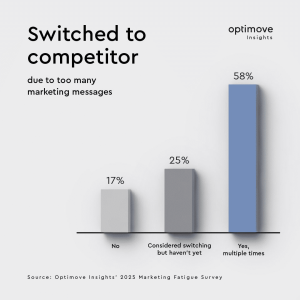
Source: Optimove
In Braze environments, this pattern shows up in familiar ways.
We routinely discover an overreliance on one-off Campaigns instead of coordinated Canvas journeys; multiple Canvases targeting the same audience at the same time; no global frequency governance; transactional messages colliding with promotional blasts; and so on.
Remember, Braze is a powerful execution engine; it will do exactly what you configure it to do.
That means orchestration must be intentional.
The platform will not impose limits that you have not defined.
The real problem: Wrong channel, wrong moment
Channel overuse is not simply a volume problem. It is a ‘relevance’ problem too. The issue is sending the wrong message through the wrong channel at the wrong time for a specific person; and doing so repeatedly until that person is forced to disengage.
Now, channel effectiveness depends on a constellation of factors:
- Individual channel affinity
- Lifecycle stage
- Recency of engagement
- Current intent
- Message urgency
- Consent status
- Device availability, and
- Delivery likelihood.
A push notification may be exactly right for an active app user who opened the app this morning. The same notification sent to someone who has not opened the app in three weeks is almost certain to be ignored; or worse, to prompt an opt-out. SMS may drive immediate action for urgent, time-sensitive alerts while feeling intrusive and inappropriate for routine promotional pings.
Mature CRM teams have moved past asking which channel to use for a campaign.
They ask a more precise question: which channel is best for this specific person, right now, given everything we know about them? Answering that question dynamically, at scale, is exactly what intelligent channel routing in Braze is for.
Intelligent channel routing in Braze: 4 orchestration pillars
Braze provides a layered set of tools that, together, form a complete channel orchestration framework. Each addresses a distinct failure mode in multi-channel programs:
- Intelligent Channel: Computes per-user engagement rates across channels using six months of interaction history. At send time, routes to the channel with the highest engagement ratio for that individual automatically. No manual segmentation rules needed.
- Canvas Decision Splits: Routes users based on real-time attributes and behavior. Push for active app users, email for lapsed ones, SMS for high-urgency alerts only. Contextual decisioning beyond historical averages.
- Frequency Capping: Global and channel-specific message limits, send throttling, and quiet hours. The single most underused lever in Braze configurations, and one of the fastest paths to improving user experience signals.
- Eligibility & Exit Criteria: Removes users from journeys when they convert, engage, or become ineligible. Prevents the frustrating experience of receiving a discount after already purchasing, or a re-engagement nudge after just logging back in.
Now, let’s take a look at each of these pillars in some detail.
1. Intelligent Channel in Braze
Braze’s Intelligent Channel feature addresses the routing problem by computing engagement rates per user across available channels. It analyzes the ratio of message interactions (opens and clicks) to messages received over the prior six months, ranks each channel by its engagement ratio, and designates the highest-ranking one as the most engaged channel for that particular user.
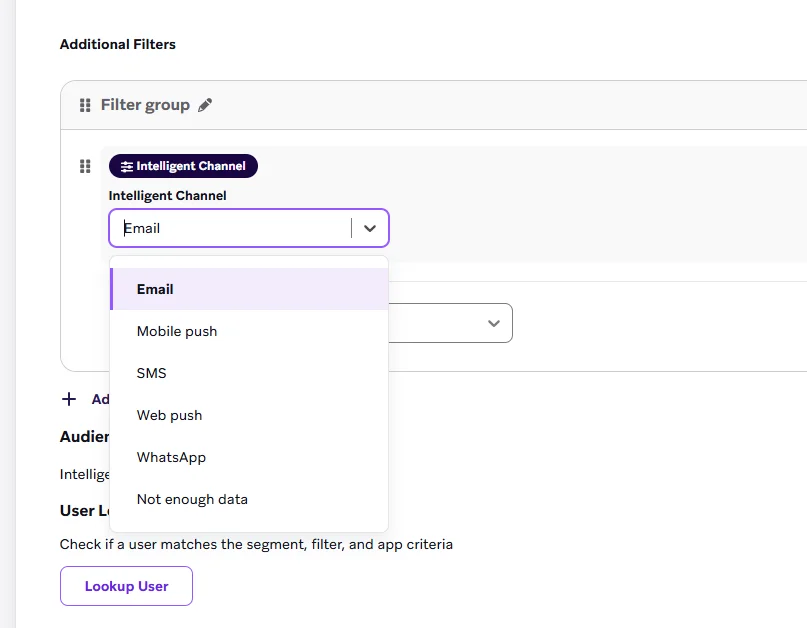
Then, at send time, Braze evaluates this data against channel availability, consent status, device eligibility, and real-time behavioral signals to determine the channel most likely to drive meaningful engagement. The result is adaptive routing grounded in actual user behavior.
Important: Intelligent Channel optimizes the delivery decision. It does not replace overall messaging strategy or frequency governance. Think of it as a sophisticated routing layer that sits on top of your broader program architecture, not a substitute for it.
Intelligent Channel works best in multi-channel environments with large, engaged audiences and strong event tracking, which conditions are common in mature implementations.
However, for very small datasets or single-channel strategies, its value is more limited.
2. Braze Canvas decision splits
For scenarios requiring a more nuanced routing logic, Canvas decision splits allow teams to build channel selection directly into journey architecture based on real-time attributes and behaviors. This moves beyond historical engagement analysis into contextual decisioning that responds to where a customer is right now.
Practical examples include routing users to push if they were active in the app within the last 24 hours, defaulting to email for users inactive for more than seven days, and reserving SMS exclusively for high-priority or time-sensitive alerts. These rules can be as granular as the data supports, enabling routing logic that responds to current behavior rather than historical averages.
The combination of Intelligent Channel for adaptive historical routing and Canvas decision splits for contextual real-time routing gives Braze teams a layered orchestration capability that can be tuned to the complexity of their specific programs.
3. Braze frequency capping
Even the most intelligently routed message can contribute to fatigue if frequency is not governed.
Braze supports a robust set of frequency controls that operate at both global and channel-specific levels. Global messaging limits cap the total number of messages a user can receive across all channels within a defined time window. Channel-specific caps allow separate limits to be applied to email, push, SMS, and in-app independently.
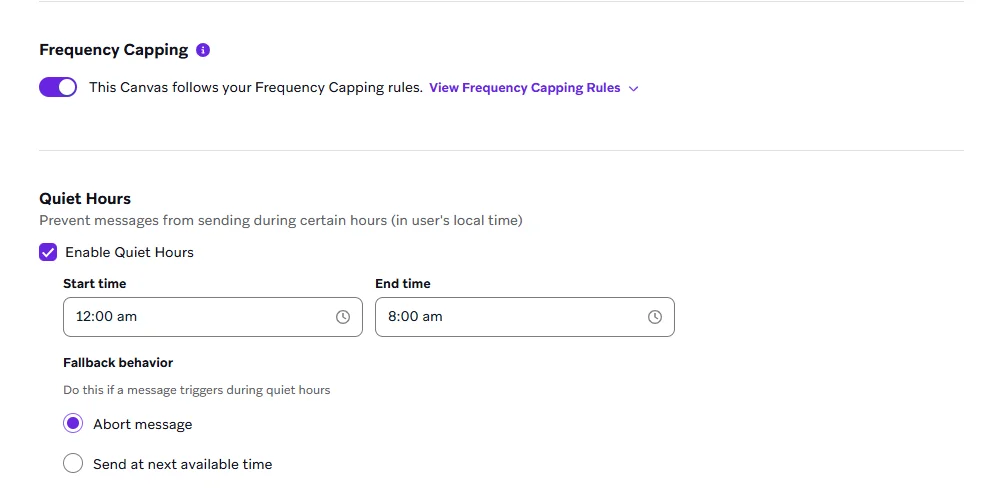
Send throttling controls the rate at which messages are dispatched, preventing spikes that can strain your deliverability infrastructure. Quiet hours configurations ensure messages are not delivered during times when users are unlikely to engage and more likely to be irritated by the interruption.
Frequency capping in Braze is one of its most underused levers.
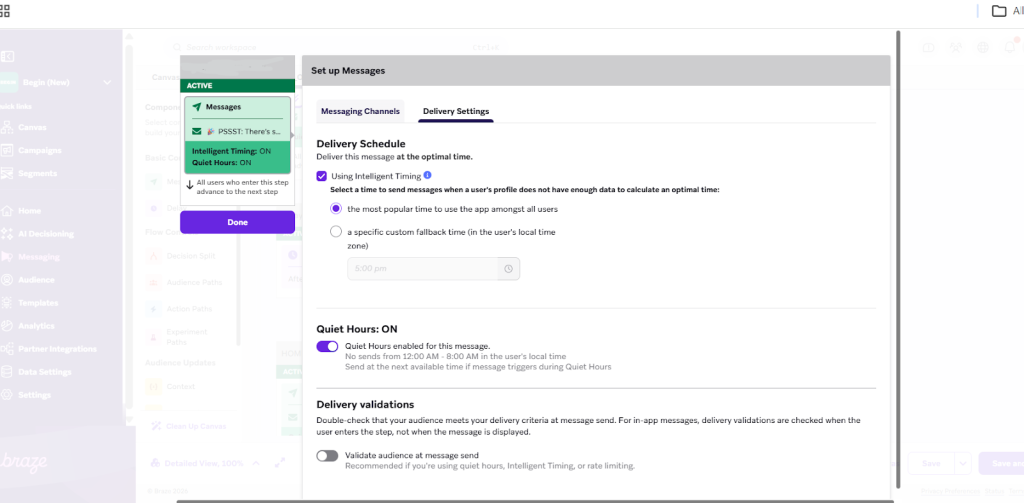
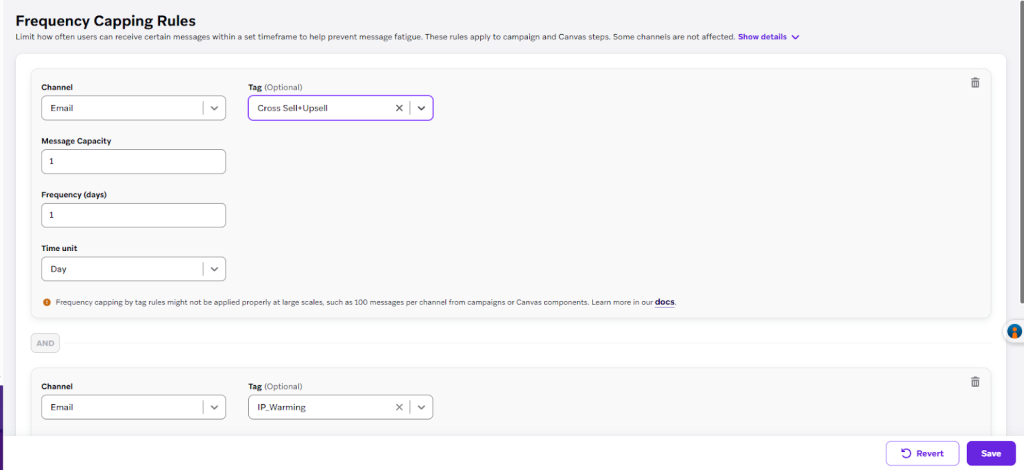
Teams that implement global limits consistently see improvement in user experience signals: unsubscribe rates stabilize, opt-out rates decline, and click-through rates often improve because the messages feel more relevant.
4. Eligibility and exit criteria
Advanced orchestration is as much about restraint as it is about routing.
Braze’s eligibility filtering and exit criteria capabilities give teams the ability to define precisely when a user should be removed from a message flow.
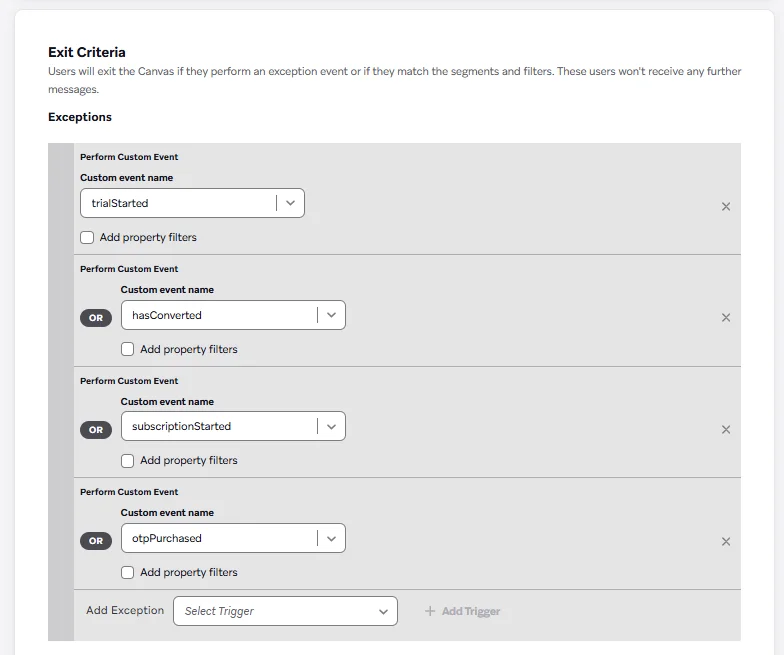
Eligibility filtering can prevent a message from being sent when a user has recently received other communications, when they are unreachable on a given channel, when they have opted out of a message type, or when they qualify for a higher-priority journey that should take precedence. These conditions can be layered and combined, allowing teams to build a nuanced suppression logic that reflects real program complexity.
Exit criteria operate at the journey level. When a user converts, completes a goal action, or reaches a defined engagement threshold, exit criteria remove them from the Canvas immediately, halting any subsequent steps that would otherwise fire on schedule.
Without this, a customer who purchases within an hour of entering a cart abandonment journey will continue to receive cart abandonment messages regardless.
Important: Exit criteria can also be used to route users into higher-priority journeys mid-flow . For example, removing a user from a re-engagement program the moment they become a high-value segment member, and enrolling them in a VIP onboarding Canvas instead. This kind of dynamic re-prioritization is only possible when exit logic is treated as a first-class part of journey design, not an afterthought.
A practical path to better channel orchestration in Braze
Implementing intelligent channel orchestration in Braze is a structured optimization process. It follows a consistent progression regardless of the size or maturity of the program:
- Audit messaging volume & overlap: Look for users receiving multiple communications within short time windows. Identify channel distribution, send frequency, overlapping Canvases and Campaigns, and high-risk segments transmitting early signals of fatigue.
- Analyze channel affinity: Use the segment builder and engagement filters to determine which users engage where. Active app users may prefer push; lapsed users respond better to email; high-value customers may favor SMS for genuinely urgent updates.
- Define routing rules: Create clear, documented decision logic. Push for recently active users, email for low-urgency communications, SMS for time-sensitive alerts only. This becomes the architectural blueprint for Canvas configuration.
- Implement Intelligent Channel in Canvas: Enable adaptive channel selection within Canvas flows. Replace fixed-channel sends with adaptive routing where data supports it, and apply frequency caps at global and channel levels simultaneously.
- Build exit criteria into active journeys: Remove users from journeys once they convert or engage meaningfully. Prevent unnecessary follow-ups to eliminate the jarring experience of sending anachronistic messages after a goal has already been achieved.
The business case for getting orchestration right
Organizations that implement intelligent routing consistently see improvements across multiple dimensions: higher engagement rates, reduced unsubscribe and opt-out rates, improved deliverability, better conversion efficiency, and lower SMS spend.
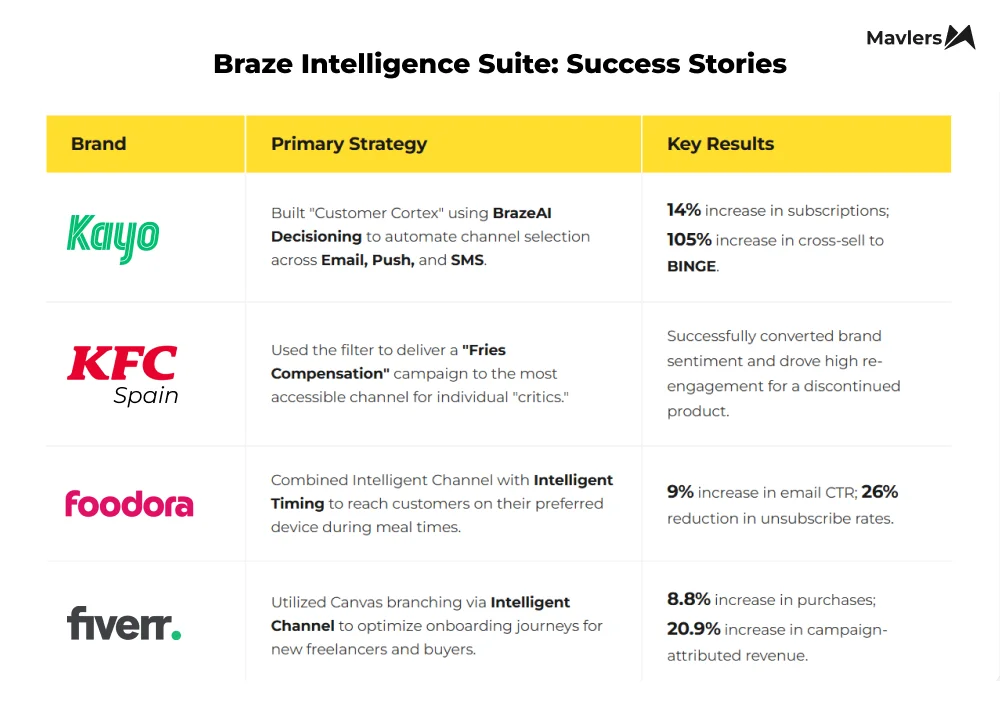
Sources: Kayo Sports, KFC, Foodora, Fiverr
That last point carries real commercial weight. SMS is a powerful channel, but it is expensive. Using it indiscriminately — for routine promotions that email handles equally well — inflates costs without a proportional return. Intelligent routing naturally shifts non-urgent communications to lower-cost channels while preserving SMS for the high-urgency moments where it earns its cost.
Unlock Braze’s Intelligence Suite, with Mavlers!
The shift from broadcasting to intelligent routing is ultimately a shift in how CRM teams think about their relationship with customers. Broadcasting treats reach as the primary objective. Intelligent routing treats relevance as the primary objective, and trusts that relevance, delivered consistently, builds the kind of engagement that broad reach alone never will.
If you need expert support with Braze, we can help. We have successfully managed over 2,000 campaigns and automations on the platform.
Book a no-obligation call with one of our Braze experts for implementation support.