Lifecycle marketing
 Customer data management
 Email campaign production
 Search marketing
 CMS development
 Who we are
 How we work
 Case studies
 Testimonials
 Salesforce Marketing Cloud
 Braze
Braze HubSpot
 Marketo
 Pardot
 DataBricks
 Snowflake
 HighTouch
 RudderStack
 Segment by Twilio
 Videos
Salesforce Data Cloud uses a consumption model in which you purchase credits and spend them as you ingest, unify, segment, activate, and feed AI agents. This approach is similar to a utility bill, allowing you to pay only for what you use. However, high-volume operations may burn through credits rapidly.
Fortunately, in late 2025, Salesforce simplified the model by introducing free Salesforce-data ingestion, a single fungible credit, and improved visibility through the Digital Wallet.
By understanding these mechanics, the model becomes much more manageable.
Data Cloud is indispensable to Agentforce. To get the most out of Agentforce without precipitating a cost blowout, you need to know how Salesforce prices Data Cloud and how to manage your spending.
Let’s find out what the costs associated with Salesforce Data Cloud are, and how the pricing is structured.
Salesforce Data Cloud pricing: The 3 things you actually pay for
A Data 360 bill consists of three main components.
- Consumption credits cover activities such as ingesting, unifying, segmenting, activating, grounding agents, and generating insights.
- Storage is billed separately per terabyte each month, so you pay only for what you use.
- Premium add-ons, including Data Spaces, Data 360 One, Real-Time Profiles, and Ad Audiences, have their own fixed costs.
The entry-level SKU is the Data 360 Starter, listed at $60,000 per year, which includes a baseline amount of credits and storage. There is also a $0 Provisioning (Everywhere) SKU for customers using other Salesforce products built on Data 360 who do not yet have their own use cases. The minimum purchase for credits is approximately 100,000 credits for about $500.
Salesforce Data Cloud credits explained
Each action in Data 360 creates a usage event, assigned a usage type with its own multiplier. The formula is shown below.

For example, a batch-calculated insight on two million rows with a multiplier of 15 consumes (2,000,000 ÷ 1,000,000) × 15 = 30 credits. As your data grows and refreshes, credit consumption increases accordingly. Recurring operations scale with your data volume rather than a fixed fee.
Salesforce organizes usage types into five consumption categories:
- Connect
- Harmonize & Unify
- Analyze & Predict
- Act
- Segment & Activate
The key exception is that ingesting structured Salesforce data through native connectors (Core, Marketing Cloud Engagement, Marketing Cloud Personalization, Commerce) does not consume credits.
Importing your own Salesforce data is free; credits are only consumed when you process or analyze it.
Please note that billing is based on rows processed, not rows returned. For example, If a query scans a million records before filtering down to a single matching row, you’re charged for the million rows scanned, not the single output row.
What changed in 2025 (How is Data Cloud billed today?)
Previously, Data Cloud pricing was criticized for its complexity, including multiple credit types, charges for Salesforce data ingestion, and limited transparency.
In September 2025, Salesforce addressed all three concerns:
- Structured Salesforce data ingestion is now free across four connectors.
- Sandbox and segmentation-and-activation credits have been combined into a single, flexible Data Service Credit usable for any function.
- Sandbox usage is now billed at a 20% discount to encourage testing.
- The Digital Wallet offers feature-level usage tagging, threshold alerts, standard reports, and a new public pricing calculator.
Data Cloud flex credits or profile-based pricing?
Salesforce now offers two new ways to buy.
- Flex Credits work as a universal currency, so you can use one credit for any Data 360 action. The credit pool is shared across Data 360, Agentforce, and Slack. As you buy more, the price per credit goes down. You can pre-purchase credits, pay as you go, or pre-commit. However, any unused credits expire at your Order End Date.
- Profile-Based Pricing works differently. It removes usage limits for the types that make up unified profiles and charges a flat, predictable cost per profile. Each profile also comes with one Flex Credit per year for work outside the profile. If you use personalized marketing journeys or proactive service based on unified profiles, the flat rate is easier to plan for.
If your usage changes a lot, Flex Credits may be a better fit. If you are already using legacy Data Services Credits, you can keep them. There is no required migration.
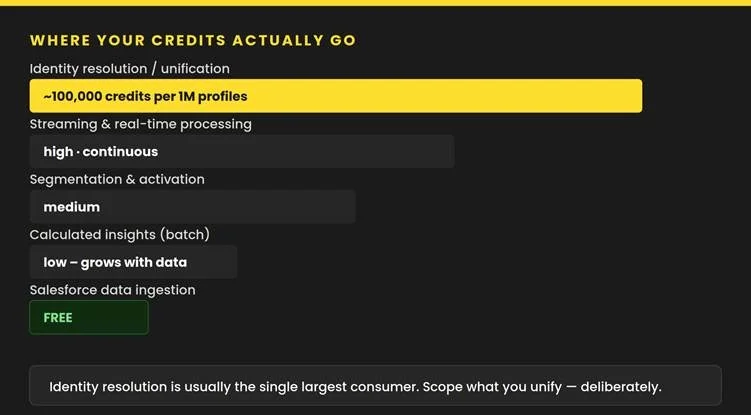
Where your Data Cloud credits go
Not all operations have the same cost, and the difference can be significant.
Data Cloud identity resolution cost
Identity resolution is usually the most expensive step because it combines duplicate records into single profiles. Merging about one million profiles can use around 100,000 credits, making this the largest cost in most projects. The initial run consumes the most credits because it builds unified profiles from scratch. Later runs are much cheaper, as long as you don’t change the source data that feeds the rule set. If you do, the system needs a full refresh, which is costly.
So, it is a good idea to pause identity-resolution jobs while you are updating several source streams at once, instead of letting each change trigger its own expensive re-run.
Real-time processing
Streaming and real-time processing run continuously, unlike batch jobs that follow a schedule. Streaming ingestion usually costs about three to five times more than batch ingestion for the same data. Streaming can also get much more expensive, and even destabilize a pipeline, if the data source sends bursts of traffic instead of a steady flow. For example, a single schema change at the source can cause a surge of change events, which increases both costs and recovery time.
As a general rule, use streaming only if your use case truly needs real-time results, like tracking live website visitor counts. If you can wait an hour, a day, or even a week, batch processing is much cheaper. Also, once you switch a pipeline to streaming, you usually can’t go back to batch.
Segmentation and activation
Segmentation costs a modest amount for each million rows processed as a data query. However, credits are only charged when you publish a segment, not while you are building or previewing it.
Costs can increase based on how often and how much you publish.
For example, publishing in real time to a system that only updates once a day uses up credits without adding value. Also, using long look-back windows, like multi-year segments when a shorter window would work, increases the number of rows processed without improving your analysis.
Batch calculated insights
Batch calculated insights usually cost less, but expenses go up as your data grows. It’s important to know the difference between calculated insights (CI) and semantic data models (SDM):
- A CI runs on a schedule and saves the result, so running the same query again is inexpensive.
- An SDM runs the calculation each time you query it, which means you save on storage but might pay more for computing, especially when people open dashboards or reports.
Choose CIs if you need to run the same queries often and can accept slightly outdated data. Pick SDMs if you need up-to-date results and are less concerned about query costs.
Ingesting your Salesforce data is now free, even though many teams worry about it first.
The key takeaway is to focus on what you unify, not just what you bring in.
For the exact cost of each usage type, check Salesforce’s official Data Services rate card. Use the ranking below as a general guide, but rely on the rate card for accurate information.
How to keep Salesforce Data Cloud costs in control
Managing Data 360 costs takes ongoing effort. Consider these strategies to manage your costs:
- Use your free Salesforce data first, and only add outside sources when needed. Clean and shape your data in your warehouse if possible to avoid paying Data 360 for the same work. Choose batch processing when real-time results are not needed.
- Keep identity resolution as limited as possible since it is usually the biggest expense. Avoid triggering unnecessary full re-runs by batching source changes instead of letting each one trigger a fresh rule-set refresh.
- Turn off old segments and calculated insights that are no longer needed. Match publish and refresh cadence to how the destination system consumes the data. There is no point publishing hourly into a system that updates daily.
- Design efficient data models. Use the system-generated fully qualified key, not just a source primary key, to avoid record conflicts during identity resolution. Minimize deep or unnecessary joins, remove unused columns before they reach a transform, and normalize placeholder values.
- Watch query patterns, not just data volume. Filters on the partition (date/time) column are efficient, but filters on other columns fall back to a full table scan unless a secondary index exists. Secondary indexes only help on high-cardinality columns. NOT, NOT EQUALS, and LIKE-style clauses generally cannot use an index and force a scan.
- Don’t join a local (batch-ingested) table to a zero-copy federated table. This forces 360 to scan and pull the entire external table before filtering. Keep zero-copy joins on the federated side or accelerate and cache the external data locally first. Where possible, pre-aggregate with a data graph so repeat lookups hit a stored aggregate instead of recomputing.
- Use Query Editor before you build. It lets you inspect existing DMOs and data streams directly with SQL or ask an LLM to draft SQL. This confirms what is already unified or calculated.
- Finally, keep an eye on the Digital Wallet and set alerts at 70 to 80 percent. You can also use the Digital Wallet’s threshold-triggered flows to automatically call Data 360’s Connect APIs and reschedule or pause specific ingestion streams, transforms, and calculated insights before a spike causes an unexpected invoice.
The last word on Salesforce Data Cloud pricing
Salesforce Data Cloud’s consumption model rewards efficient architecture. Organizations that understand which operations consume the most credits, schedule processing intelligently, and monitor usage proactively can scale their customer data strategy without unpleasant billing surprises.
Make sure that every credit delivers business value. Prioritize batch processing where possible, limit unnecessary identity resolution runs, optimize queries before they reach Data Cloud, and use the Digital Wallet to catch spending trends early.