Lifecycle marketing
 Customer data management
 Email campaign production
 Search marketing
 CMS development
 Who we are
 How we work
 Case studies
 Testimonials
 Salesforce Marketing Cloud
 Braze
Braze HubSpot
 Marketo
 Pardot
 DataBricks
 Snowflake
 HighTouch
 RudderStack
 Segment by Twilio
 Videos
Intelligent Channel in Braze is tempting, to say the least. It literally solves an ancient marketing problem: How to reach users on their preferred channels? The feature selects the channel most likely to generate engagement for each individual user dynamically, at send time. Now that should lay to rest your multichannel nightmares. Or at least some of them.
However, in reality, many teams positively hesitate using it. The questions we commonly hear:
- Will we lose control over our channel strategy?
- Could it reduce our reach?
- Does it require petabytes of data to work effectively?
- How long does it take before we start seeing results?
These concerns are worth taking seriously.
And it’s true that like any automated feature, Intelligent Channel works best when implemented in a thoughtful way. Plus, a lot depends on how you measure its performance.
We’ll give you the answers to these questions. But first, let’s get behind the scenes.
What Braze Intelligent Channel actually does
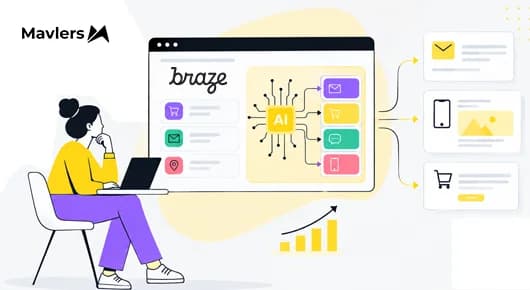
Intelligent Channel is a decision engine embedded inside Braze Canvas. It dynamically selects the most effective delivery channel for each user.
Behind the scenes, the system does the following at send time:
- Uses historical engagement signals across all included channels
- Considers channel availability and user consent status
- Evaluates eligibility rules defined by your team
- Selects the best-fit channel based on the latest engagement data
- Continuously adapts as new engagement signals accumulate
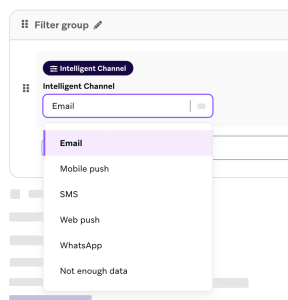
Source: Braze
One important clarification: Intelligent Channel is not a static preference setting. It does not permanently assign a user to a single channel. Instead, it evaluates each send individually using the most current engagement signals available.
As a result, a user who consistently opens emails but rarely engages with push notifications will receive the message via email. Another user in the same campaign might receive it as a push notification. The routing decision is individual, not segment-level. And it recalibrates over time.
Braze Intelligent Channel explained
Will we lose control over our channel strategy?
No. You’re not handing over your strategy, whatever that may be, to a black box. You still define which channels are included, set eligibility rules, and design the fallback logic. What Intelligent Channel removes is the executional decision of which channel to use for which user on any given send. The strategy remains yours; the routing becomes data-driven.
If anything, you’re likely to gain even more control, because messaging is no longer subject to arbitrary defaults that may not reflect how different users actually behave.
But an equally important question is, what does your channel strategy sound like? For example:
- Do your channels compete for the same message?
- Are you trying to reduce the messaging costs?
- Is inbox fatigue or opt-out rate a concern for your team?
- Are you in a high-frequency sending environment?
Bottom line, Intelligent Channel is meant to serve your strategy, not be a substitute for it. It isn’t going to take the wheel and drive your campaign to the ditches.
Could it reduce our reach?
If you are concerned that Intelligent Channel will bring down your engagement by curtailing your reach, then the answer is no, it won’t.
The feature is designed to increase and deepen customer engagement.
The key is that Intelligent Channel can be paired with fallback paths that escalate the messaging when the first channel doesn’t initiate any kind of engagement. This layered approach lets teams maintain reach while still prioritizing the channel most likely to convert first. Across several implementations, reach increased by 20-40% when fallback logic was used alongside Intelligent Channel. It’s pretty straightforward: users are contacted through the channel they actually engage with, rather than receiving redundant messages blasted across all channels simultaneously.
What data does Braze Intelligent Channel require?
For Intelligent Channel to function effectively, Braze does need engagement signals across the channels being considered. A practical rule of thumb is having at least a few historical interactions per channel for a meaningful portion of the audience. Some relevant signals include:
- Email opens or clicks
- Push notification opens
- SMS clicks or responses
- App session activity
From these signals, the system identifies patterns.
Ah, but what happens when there isn’t enough data? In most implementations, roughly 20-30% of users initially lack sufficient engagement history. Braze handles these users through a default routing logic, which you define yourself. Common fallback rules include:
- Push for users with recent app activity
- Email for inactive users
- SMS for time-sensitive communications
As those users begin interacting with the messages, Intelligent Channel gradually learns their preferences and adjusts the routing automatically. So this means the system improves over time rather than requiring a perfect platter of historical data from the get-go.
How long does it take to see results?
Intelligent Channel makes the routing decisions immediately upon activation. However, for any meaningful results to surface, you’ll need to bide your time:
- First 30 days: Initial engagement patterns begin influencing channel selection. Early engagement improvements may appear, but the data is still limited.
- Around 90 days: Engagement models become significantly more accurate. Channel routing stabilizes. Cost and engagement improvements become measurable.
To sum up, performance compounds as more interaction data becomes available. Early results can be directionally encouraging, but the clearest signal emerges around the 3-month mark.
How to measure Braze Intelligent Channel performance?
Once again, it’s going to take some time if you want to make a proper evaluation of performance. From our experience so far, we recommend the following framework.
| Checkpoint | Goal |
| Week 1 | Establish baseline engagement rates across channels before full optimization kicks in |
| Month 3 | Compare engagement trends after routing adjustments have had time to stabilize |
| Month 6 | Evaluate long-term improvements in both engagement quality and messaging efficiency |
In addition, here are the key metrics you should be tracking:
- Conversion rate by channel
- Engagement rate
- Reach rate
- Unsubscribe and opt-out trends
- SMS cost per conversion
- Time to interaction
It’s worth being clear about where Intelligent Channel sits in the broader Braze AI stack.
The feature packs a punch, but it’s still rule-based routing informed by engagement history. It selects from channels you’ve predefined, within the fallback logic you’ve configured.
Source: Braze
As Kevin Wang, Chief Product Offer at Braze, points out, Braze has since moved further with its acquisition of OfferFit that now forms the core of the Braze AI Decisioning Studio. What this means is that teams that leverage Intelligent Channel and witness strong results are often good candidates to explore AI Decisioning Studio as a next step.
Try Braze’s Intelligence Suite with the help of Mavlers!
The evidence both from external and internal implementations is consistent: Intelligent Channel in Braze works very well within the constraints and engineering we’ve talked about.
You define the strategy once, and then let the data do the dance.
The benefits by way of relevant communication, lower messaging costs, higher engagement, and a more straightforward campaign planning are too big to let go of. For most teams, Intelligent Channel is exactly the right place to start. It’s low-risk, produces measurable results quickly, and builds the engagement data that more sophisticated decisioning systems will eventually need.
If you need help operationalizing the Intelligence Suite, we can be your go-to execution partners. Book a free, no-obligation call with one of our Braze experts!