Lifecycle marketing
 Customer data management
 Email campaign production
 Search marketing
 CMS development
 Who we are
 How we work
 Case studies
 Testimonials
 Salesforce Marketing Cloud
 Braze
Braze HubSpot
 Marketo
 Pardot
 DataBricks
 Snowflake
 HighTouch
 RudderStack
 Segment by Twilio
 Videos

You’re staring at a Salesforce process automation challenge.
Your team debates: “Should we use Flow or Omnistudio?” Someone says Flow is easier. Another argues OmniStudio is more powerful.
Your CFO mentions budget concerns. But in the meantime, your project deadline looms…
Here’s the truth: Choosing the wrong tool costs you wasted licenses, frustrated users, rebuilds, and missed opportunities. The right choice? It depends on what you’re actually building. This isn’t about which tool is “better.” It’s about which tool fits your specific need. Let’s clear the air in this Salesforce automation decision guide from our Salesforce team.
Understanding the two tools: Omnistudio vs Flow
1. Salesforce Flow
Flow is Salesforce’s native automation engine. It replaced older tools like Workflow Rules and Process Builder, offering significantly more power as Salesforce Flow Builder.
What it does:
- Automates internal processes declaratively
- Updates records based on triggers
- Routes approvals and creates tasks
- Builds simple data entry screens
- Handles backend automation with Record-Triggered and Scheduled Flows
Core strength: Streamlining internal operations using standard Salesforce functionality.
2. Salesforce Omnistudio
Omnistudio, as you already know, came from Vlocity (now Salesforce Industries)—a specialized suite designed for sophisticated digital experiences, especially customer-facing ones.
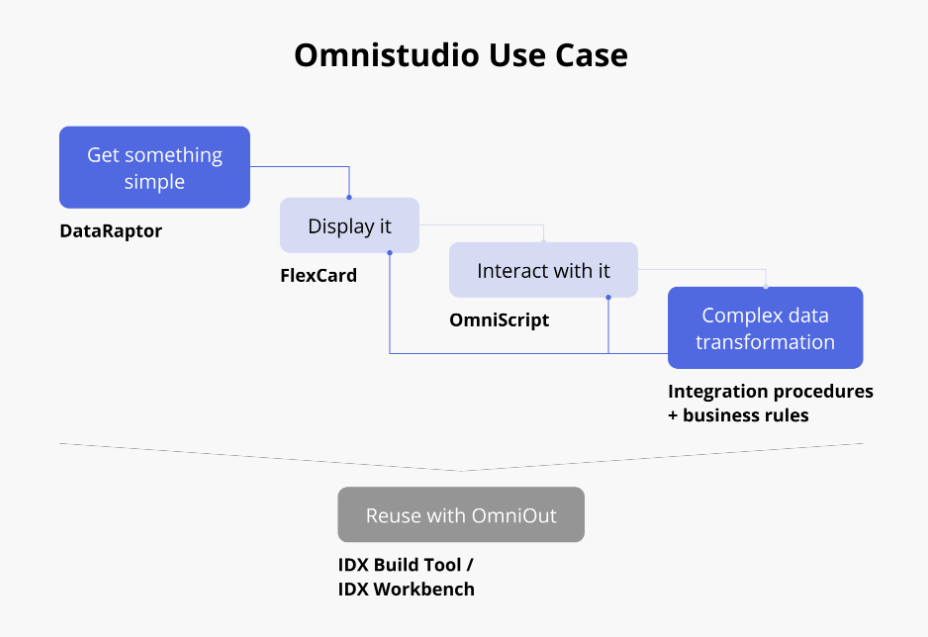
Source: Twistellar
What it includes:
- OmniScripts: Guided, multi-step processes with custom UI
- Integration Procedures: Server-side orchestration for complex logic and API calls
- DataRaptors: Declarative data extraction and transformation tools
- FlexCards: Dynamic UI cards displaying contextual information
Core strength: Crafting branded, complex user journeys that integrate multiple data sources declaratively.
5 key differences between Omnistudio & Flows
1. User interface control
Automation choices in Salesforce depend on how you want to prioritize usability. The way each tool handles user interfaces determines how interactive, branded, or flexible your end experience can be.
Salesforce Flow:
- Standard Salesforce UI works for internal teams
- Limited styling and layout options
- Requires Lightning Web Components for advanced customization
- Functional but not pixel-perfect
Salesforce Omnistudio:
- Consumer-grade, highly branded interfaces
- Extensive declarative customization options
- Responsive, pixel-perfect designs without code
- Dynamic, interactive components out of the box
2. Data handling complexity
Data movement and transformation sit at the core of automation. Each tool manages integrations and data logic differently, reflecting distinct philosophies about scale, structure, and control.
Salesforce Flow:
- Works well with core Salesforce data
- Tied to database transactions
- Needs Apex for complex transformations
- Basic API integration through HTTP Callout action
Salesforce Omnistudio:
- Handles multi-source data aggregation natively
- DataRaptors transform complex structures (including JSON/XML)
- Integration Procedures orchestrate multiple nested API calls
- Process-centric, not strictly database-bound
- Can be called an API itself
These capabilities show how flow automation in Salesforce focuses primarily on transactional logic, while Omnistudio extends that reach to multi-system orchestration.
3. Learning curve & skills
The learning experience for architects varies notably between Omnistudio and Flow, influencing adoption speed and project efficiency.
Salesforce Flow:
- Gentler initial learning curve
- Familiar to Salesforce admins
- Standard declarative tool patterns
- Mastering advanced patterns still takes effort
Salesforce Omnistudio:
- Steeper learning curve
- Requires understanding interconnected components
- Needs JSON proficiency
- More specialized skillset required
- Excellent debugging with step-by-step preview
4. Licensing & budget
The licensing models behind Flow and Omnistudio reveal important differences in how each fits into Salesforce’s broader commercial landscape.
Salesforce Flow:
- Included with core Salesforce platform licenses
- No additional cost
- Standard feature for all orgs
Salesforce Omnistudio:
- Requires separate licensing
- Bundled with Industry Cloud packages or a standalone add-on
- Represents a significant additional investment
- Proprietary to Salesforce Industries
5. Industry alignment
The tools’ intended audiences aren’t the same. One is designed for universal workflows, while the other embeds deeply within Salesforce’s industry-specific solutions.
Salesforce Flow:
- Horizontal platform tool
- Generic across all industries
- No pre-built vertical accelerators
Salesforce Omnistudio:
- Deep integration with Industry Clouds
- Pre-built components for insurance, healthcare, and telecommunications
- Industry-specific accelerators speed development
- Works seamlessly with CPQ, CLM, and Order Management

Choosing between Omnistudio & Flow
Making the right choice depends on your users, data, and automation goals. The essence of choosing between Omnistudio and Flow effectively lies in understanding when to apply each tool, which helps you optimize scalability and development effort.
Choose Flow when:
Flow fits best in environments where efficiency, simplicity, and native Salesforce capabilities take priority. It’s ideal for teams focused on internal automation:
- Your users are internal employees needing process automation
- Backend automation is the goal—record updates, approvals, and task creation
- Standard UI suffices for the use case
- Core Salesforce data is the primary focus
- Budget is constrained, and additional licensing isn’t feasible
- Your team has standard Salesforce admin skills, but limited specialized development resources
- Simple or generic processes don’t require heavy customization
Choose Omnistudio when:
Omnistudio shines in scenarios demanding sophisticated, customer-facing experiences that go beyond core Salesforce functionality:
- External users (customers, partners) are the primary audience
- Complex, multi-step guided experiences are required
- Highly branded, responsive UI is non-negotiable
- Industry-specific processes align with your vertical
- Multiple external system integrations need declarative orchestration
- Complex data transformations from various sources are involved
- Budget accommodates premium licensing and specialized development talent
- You’re already using Salesforce Industries products
Final thoughts on when to use Omnistudio vs Flow
Both Flow and Omnistudio embody Salesforce’s vision of smarter, low-code automation, but they serve different masters. Flow excels at orchestrating internal operations within the Salesforce core, while OmniStudio extends the platform outward, crafting dynamic, data-rich experiences for customers and partners. The smartest choice depends not on which tool is more powerful, but on which aligns best with your business goals and data architecture.
Looking to make the right Salesforce automation choice?
Our certified consultants can help you evaluate your requirements, design scalable architectures, and implement tailored solutions with Flow, Omnistudio, or both.
Schedule a call with one of our SFMC experts!