Lifecycle marketing
 Customer data management
 Email campaign production
 Search marketing
 CMS development
 Who we are
 How we work
 Case studies
 Testimonials
 Work samples
 Salesforce Marketing Cloud
 Braze
Braze HubSpot
 Marketo
 Pardot
 DataBricks
 Snowflake
 HighTouch
 RudderStack
 Segment by Twilio
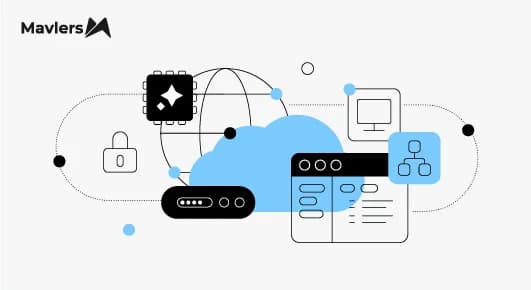
CMOs keep presenting Salesforce Data Cloud as a marketing tool, and that’s exactly what puts it on the chopping block when the money’s tight. Instead, what if you positioned Data Cloud as essential data infrastructure supporting your CRM, service, commerce, and AI investments? That’s certainly one way of framing it.
Deep into 2026, most companies have committed, politically and financially, to an AI agenda. Agentforce and similar platforms only deliver reliable results when they use unified, up-to-date data. So, the best move for a CMO is to stop focusing on selling personalization and instead highlight the need for the data foundation that the finance team has already supported.
You are not asking for extra budget; you are making sure the money already spent delivers results. With that in mind, let’s find out how you can make a business case for Salesforce Data Cloud.
How to pitch the Salesforce Data Cloud business case to your CFO?
1. Adopt the SPIN technique
You may have heard of SPIN selling, but just in case: it was developed by Neil Rackham, and SPIN stands for Situation, Problem, Implication, and Need-payoff. The entire framework relies on digging into the problem and its implications before you ever mention what you are selling.
In the context of Data Cloud, this means pitching the pain points before pitching the product.
Imagine a CMO managing loyalty programs across three regional storefronts, each with its own customer database. If a shopper signs up in one region and later makes a purchase in another, she appears as two separate records. As a result, marketing ends up spending discount dollars on a customer who would have purchased anyway. This is not just a database cleanup issue; it means losing profit every campaign because the system does not recognize its best customers.
Framed this way, it becomes a budget issue, not an IT conversation.
2. Address the bleeding neck
Not every marketing problem needs a pilot project. Therefore, before you commit resources, get specific:
- Who is affected?
- Where could better data actually improve their experience?
- How does this use case compare to other options?
Don’t just go with the first idea that gets attention in a meeting.
Perhaps the bigger issue here is the people who you want on your side.
These are mid-to-senior level managers or operational leaders who rarely speak up in big brainstorming meetings because they don’t want to look cynical or combative in front of executives. However, they possess veto power by friction. When it comes time to actually launch the project, they can pull the plug. Are these people challenging you while you’re pitching to them? If yes, that’s a good sign.
3. Take it one step at a time
Skip the grand unveiling. Begin with a small team, just two or three people, working for a few weeks on one important data source and one use case, all the way to a real outcome. The point isn’t just that small is safer, but that it changes what you bring back to the group. Now, instead of talking about what could happen, you can show what actually did happen.
You should take the same approach when talking about the budget.
As Salesforce MVP Mehmet Orun suggests, use free credits to run an early real-world workload and measure the additional cost across your first few batches. This is better than trying to guess the total cost based on assumptions. Don’t ask finance to trust a guess when you can give them real numbers.
4. Speak in the CFO’s tongue
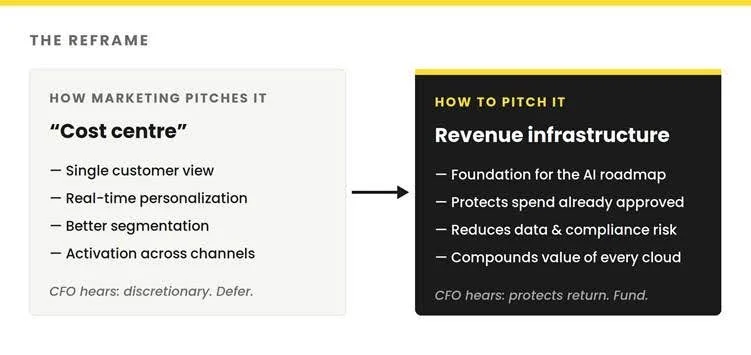
Consider what people actually remember from a pitch. Decision-makers are unlikely to recall technical achievements or system integrations. Instead, they remember clear outcomes: time saved, processes streamlined, and effort redirected toward valuable work. What matters most is not the technical specifics, but the tangible benefits to daily operations and business results.
That’s the approach you should use when you present the case of Data Cloud. Accordingly, resist talking about the system’s nuts and bolts. Focus on these four things:
- The specific Data Cloud ROI after accounting for labor costs
- The weekly or monthly time savings achieved
- The high-value business problem addressed, and
- How the pilot enhanced the company’s understanding of its customers
You can see where the focus isn’t – the purpose and benefits of Data Cloud!
5. Bring up the cost of inaction
One of the most compelling metrics you can highlight is often not about direct savings, but about the costs you avoid. Instead of focusing on technical achievements or individual contributions, emphasize how you addressed challenges efficiently preventing unnecessary projects or wasted resources. The most persuasive messages show how your solution helped sidestep major expenses or uncovered hidden opportunities, rather than simply noting improvements to systems or data.
When presenting results, it is effective to show the savings generated and provide a realistic estimate of the ongoing costs that would have persisted without the intervention.
Data Cloud works on a pay-as-you-go system that charges for credits, storage, and add-ons. The starting credit package costs around $500, and the price increases as you use more. However, this starting price can be misleading since Data Cloud is usually not just one simple expense. Independent analysis suggests that a typical first-year cost for an enterprise, which includes Data 360, related cloud services, and systems integration fees, ranges from $360,000 to over $750,000. Standard setups usually take 8 to 16 weeks, while more complex, multi-cloud projects can last from 3 to 12 months. It is best to mention this full cost upfront to keep the conversation clear and honest
6. Anticipate and address the cost objection
Financial leaders are wary of open-ended software spending, and consumption-based pricing models can seem risky unless they are managed carefully. Still, this type of pricing can actually make costs clearer compared to handling a mix of different platforms, each with separate contracts and budget owners. When costs are divided among different systems and teams, it can be difficult to understand the true total cost of ownership. In contrast, using one consumption-based platform may feel unfamiliar at first, but it is often easier to track and predict than juggling several vendor contracts and custom integrations.
To help ease concerns about unpredictable costs with consumption-based pricing, offer clear and practical ways to manage spending.
For example, batch ingestion and zero-copy access to external data can help reduce costs.
The biggest risks often come from real-time processing and reprocessing large, unstructured documents when it is unnecessary. Instead of only promising to limit usage, it is more effective to provide transparent monitoring tools and make careful design choices that keep consumption predictable and manageable.
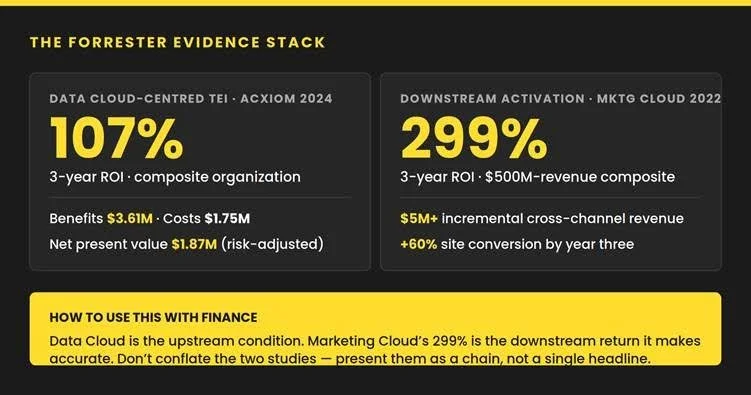
CFOs trust Forrester’s Total Economic Impact methodology because it follows the steps that finance values. It builds a composite organization, compares benefits to costs, adjusts numbers for risk, and discounts them to present value. Still, it’s important to cite it accurately, and honesty is key here.
Orun’s argument also comes in handy here. One big challenge with older ways of managing customer data is that different departments, like marketing, sales, and IT, often pay for and run their own separate platforms. This split makes it very hard to figure out the real total cost of ownership. He points to Data Spaces, a feature that lets an organization segment data access by region, brand, or business unit within one platform instead of standing up parallel infrastructure to keep that data separated. This gives a clear, measurable way to meet compliance or access needs without having to set up duplicate systems.
7. Name the risks
CFOs feel more confident when you show that you have already considered what might go wrong. As far as Data Cloud is concerned, here are some implementation risks worth flagging:
- Starting without a clear goal: If you collect data without knowing how you’ll use it, you’ll likely run into problems. Once you organize and label data in a certain way, changing it later can be expensive. Decide on the exact business question first, and only gather the data that helps answer it.
- Choosing the costly option out of habit: Teams often pick real-time, always-on processing because it seems more complete, even if the project doesn’t need instant updates. Use real-time only when you can clearly explain why it’s needed, not just because it feels safer.
- Wanting everything to update instantly: It’s easy to think every metric and dashboard must refresh the moment something changes. Most don’t need that—and usually, only a few really do. Save real-time updates for the rare cases where a delay would actually cause a problem.
- Re-processing documents that haven’t changed: Running big files like policies, contracts, or manuals through the system every time you refresh wastes resources if nothing has been updated. Only re-index when there are real changes, and watch how often you trigger refreshes.
- Underestimating what the project really needs: Even with no-code tools, this is not just a basic admin job. You need people who understand both the business logic and how the data fits together. If you don’t have that expertise from the start, you’ll likely have to redo work later. Get the right skills or experienced help before problems crop up.
- Treating access control as an afterthought: When several systems and AI agents can access the same data, weak permission settings can create risks. Sensitive information might end up visible to the wrong people or systems. Set up field-level masking and access rules from the start.
The last word on the business case for Salesforce Data Cloud
Data Cloud can be a hard sell because its value is foundational and becomes evident in other systems rather than in a demonstration. To secure approval, present it in terms your CFO understands: return, risk, and protection of prior investments.
Summing up, choose your use case carefully. Start by focusing on the main business problem. Test your idea quickly and at a low cost. Compare your savings to the cost of doing nothing. Clearly explain your calculations for cost and risk. Address objections before they come up.