Lifecycle marketing
 Customer data management
 Email campaign production
 Search marketing
 CMS development
 Who we are
 How we work
 Case studies
 Testimonials
 Salesforce Marketing Cloud
 Braze
Braze HubSpot
 Marketo
 Pardot
 DataBricks
 Snowflake
 HighTouch
 RudderStack
 Segment by Twilio
 Videos

Sizing a Salesforce Marketing Cloud Next migration starts with a data extension inventory. Marketing Cloud Next runs on Data 360 (formerly Data Cloud) and doesn’t support SSJS, so teams must classify what maps, what needs rebuilding, and what can be retired. Schema Explorer’s readiness workspace automates this first pass.
The challenge goes beyond moving data from one platform to another.
Marketing Cloud Next runs on Data 360, using data lake objects (DLOs) and data model objects (DMOs), and doesn’t support AMPscript or SSJS in the same way MCE does. Before teams can estimate migration effort, they need to understand what each data extension supports, what can map to the new environment, what needs to be rebuilt and what can be retired.
We used Marketing Cloud Schema Explorer to assess how much of this initial migration assessment a tool could help automate.
Note: All screenshots in this post use dummy data from a demo account.
What is the Marketing Cloud Next readiness assessment in Schema Explorer?
The MC Next Readiness workspace is a planning layer that looks at your current MCE business unit and sorts it by likely destination in Marketing Cloud Next. In its own words, it helps you “classify data extensions, inspect migration evidence, and review likely MC Next landing zones before you plan the move.”
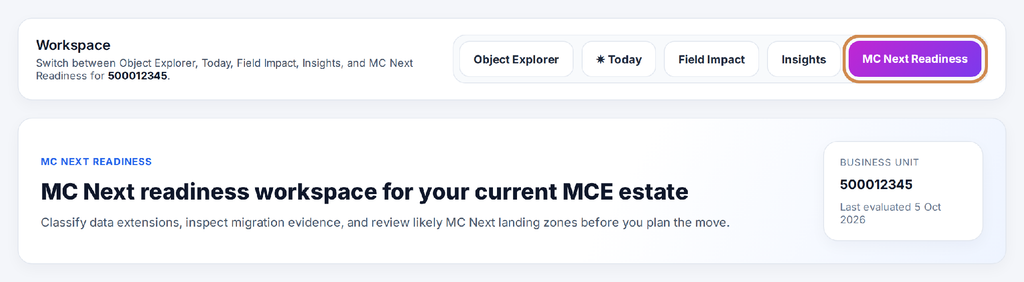
Figure 1: The MC Next Readiness workspace
A data extension (DE) is a table used to store and organize records and fields in Marketing Cloud Engagement. The workspace works at three levels:
- A readiness summary for the whole business unit
- A classification engine that groups every data extension by the role it plays today
- A record-level list showing each data extension’s status, suggested DMO target and supporting evidence
An Export migration plan option gives the team a document to take into planning workshops.
What the readiness scan does—and doesn’t—cover
The readiness workspace tells you how ready you are from a data extension point of view: what your data looks like, and where it is likely to land in Data 360.
But data is only one part of a Marketing Cloud Engagement account.
A complete move to Marketing Cloud Next also needs an audit of everything that uses that data, because most of it has to be rebuilt rather than migrated.
| Area | What to audit | Why it matters for MC Next |
| Emails and templates | Content Builder emails, templates, content blocks and dynamic content | Content doesn’t migrate automatically, and anything personalized needs reworking |
| AMPscript and SSJS | Scripting inside emails, content blocks, CloudPages and Script Activities | MC Next runs few of the functions of AMPscript but not SSJS, so this logic must be re-engineered |
| CloudPages | Landing pages, preference centres, forms and code resources | Often heavy on scripting and DE writes; each one needs a new home and design |
| Journeys | Entry sources, decision splits, wait logic, activities and goals | Entry and orchestration patterns change; journeys are rebuilt, not copied |
| Automations | SQL queries, script activities, imports, extracts and file transfers | SQL logic typically moves to Data 360 transformations, calculated insights or Flow |
| Integrations | Installed packages, API users and external systems calling MCE | Every connection must be repointed or rebuilt for the new platform |
| Subscribers and consent | All Subscribers, lists, publication lists and preference data | Consent must land correctly before a single email is sent from MC Next |
In other words, the readiness scan is an excellent starting point for the data workstream, but it should sit alongside content, code, journey and integration audits to give the full picture of what a migration involves.
What the scan found across 1,862 Marketing Cloud data extensions
Our demo business unit had 1,862 data extensions. (See below)
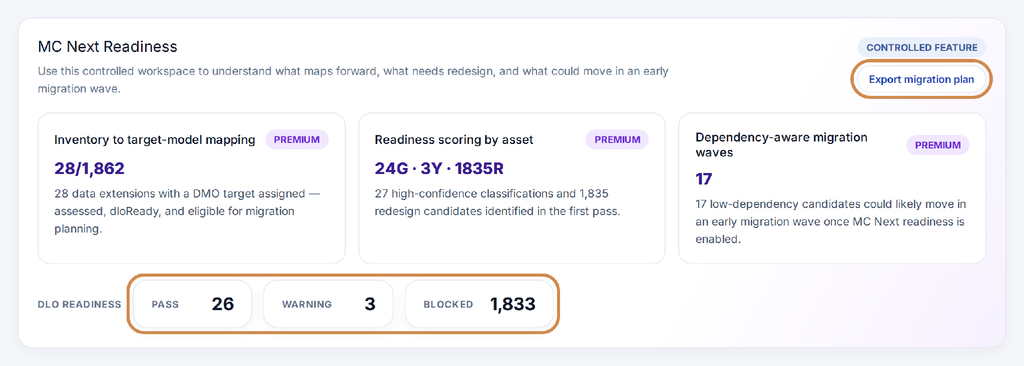
Figure 2: Readiness summary, with the export option and DLO readiness highlighted
| Signal | Result | How we read it |
| Inventory to target-model mapping | 28 of 1,862 | Data extensions that already have a DMO target assigned |
| Readiness scoring by asset | 24 green · 3 amber · 1,835 red | Most assets flagged as redesign candidates in the first pass |
| Dependency-aware migration waves | 17 | Low-dependency candidates that could likely move in an early wave |
| DLO readiness | 26 pass · 3 warning · 1,833 blocked | Very little is ready to land in Data Cloud as it stands |
Marketing Cloud Engagement vs Marketing Cloud Next: why this is a re-platforming
Marketing Cloud Engagement to Marketing Cloud Next is a re-platforming, not a lift-and-shift. Marketing Cloud Next uses Data 360 data lake objects (DLOs) and data model objects (DMOs). Most data extensions, scripts, journeys, and automations must be redesigned rather than copied.
A data lake object (DLO) is a Data 360 structure that stores ingested source data. A data model object (DMO) organizes data into a standardized model that can be used across Data 360.
“1,833 blocked” looks alarming, but it confirms what experienced MCE architects already expect: a move to Marketing Cloud Next is a re-platforming, not a lift-and-shift. The value is in knowing where the work is, so it can be planned instead of discovered halfway through.
How the classification engine sorts your data extensions
The DE Classification Engine placed all 1,862 data extensions into ten classes, each with a suggested next step.
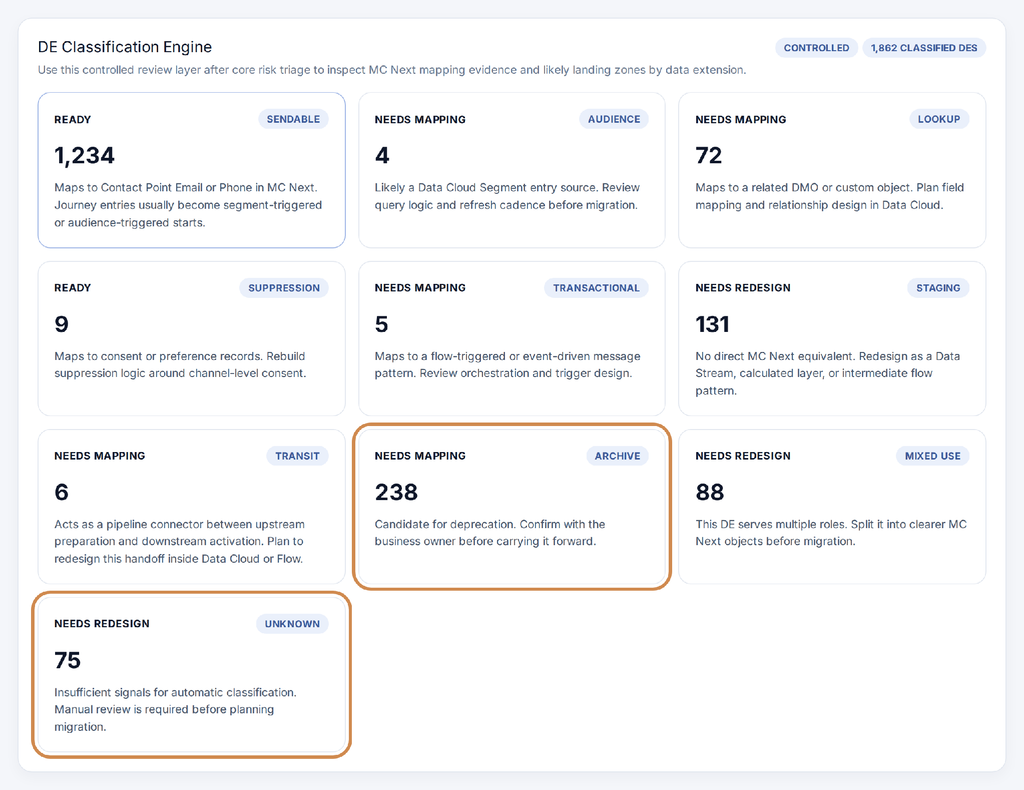
Figure 3: The DE Classification Engine, with the Archive and Unknown classes highlighted
| Status | Class | DEs | Suggested direction in MC Next |
| Ready | Sendable | 1,234 | Contact Point Email or Phone; journey entries usually become segment- or audience-triggered |
| Ready | Suppression | 9 | Consent or preference records; rebuild around channel-level consent |
| Needs mapping | Archive | 238 | Candidate for deprecation; confirm with the business owner first |
| Needs mapping | Lookup | 72 | Related DMO or custom object; plan field mapping and relationships |
| Needs mapping | Transit | 6 | Pipeline connector; redesign the handoff in Data 360 or Flow |
| Needs mapping | Transactional | 5 | Flow-triggered or event-driven pattern; review orchestration |
| Needs mapping | Audience | 4 | Likely a Data 360 Segment entry source; review query logic |
| Needs redesign | Staging | 131 | No direct equivalent; redesign as a Data Stream, calculated layer or flow |
| Needs redesign | Mixed use | 88 | Serves several roles; split into clearer objects first |
| Needs redesign | Unknown | 75 | Not enough signals to classify; needs manual review |
This is where 1,862 rows turn into ten conversations.
Instead of asking “what about this DE?” hundreds of times, the team can ask “how do we handle staging tables?” once, and agree on a pattern.
Classification is not the same as clearance
The Sendable class holds 1,234 data extensions marked Ready, meaning that type of object has a clear landing pattern in MC Next. But open the list, and most individual DEs in that class still show Blocked.
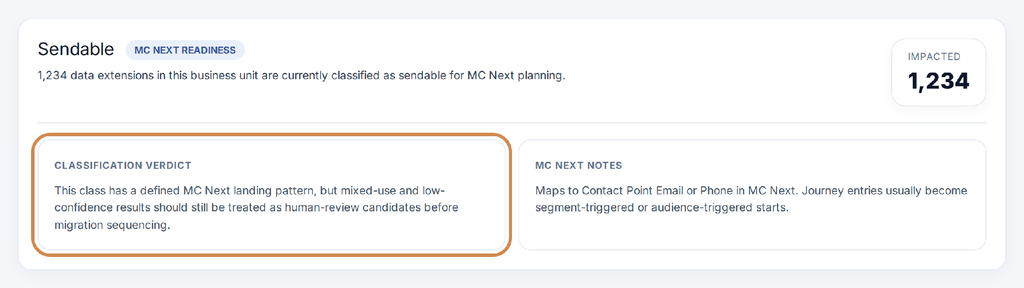
Figure 4: The Sendable class, with the classification verdict highlighted
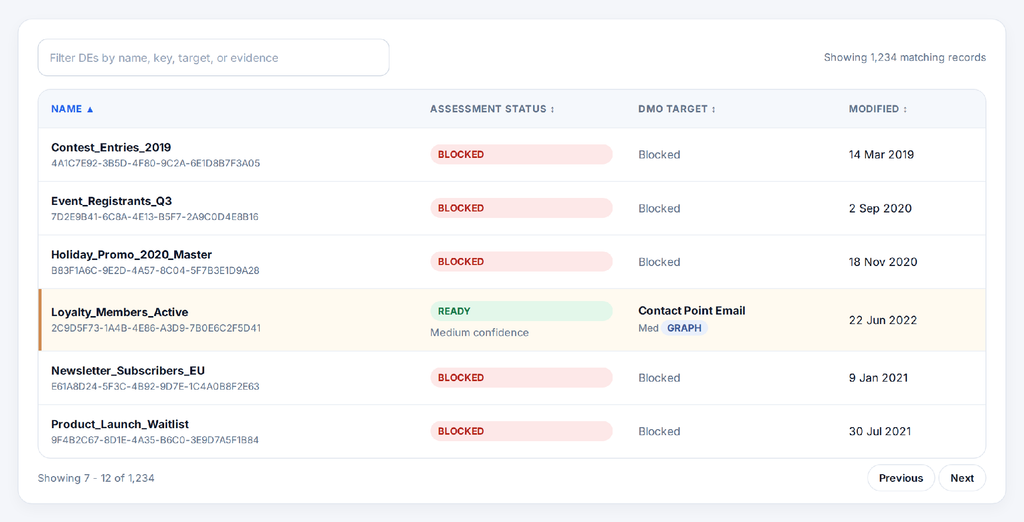
Figure 5: Individual Sendable DEs. Most show Blocked; one shows Ready with medium confidence and a suggested DMO target
That’s by design. The tool separates two questions:
- What is this? (the class, and where that kind of object usually lands)
- Can this specific one move yet? (its own assessment, mapping and confidence)
The workspace says as much in its own verdict: mixed-use and low-confidence results “should still be treated as human-review candidates before migration sequencing.”
That’s exactly how we’d use it: as the map that tells architects where to look, with the final call made by people who know the account, the data and the business.
How do you size a Marketing Cloud Next migration?
1. Put a realistic size on the project, early
Discovery for a Marketing Cloud Next migration can take weeks. A first-pass classification gives the first workshop a structured view of the estate instead of a blank page. It won’t replace discovery, but it gives it a head start and a shared vocabulary.
2. Shrink the scope before you start
The cheapest data extension to migrate is the one you don’t have to. Here, 238 DEs were flagged as archive candidates. Combine that with the unused and stale DEs from an [asset health check], and you have a strong case for a cleanup phase before migration: less to map, less to test, less to pay for in Data 360.
3. Plan an early pilot wave
The scan suggested 17 low-dependency candidates for an early wave.
That’s a sensible pilot shortlist: small enough to move quickly, independent enough not to break anything else.
4. Build the redesign backlog
131 staging, 88 mixed-use and 6 transit DEs were flagged for redesign. These are usually held together by Automation Studio SQL, which in Marketing Cloud Next typically moves to Data Streams, calculated insights, Data 360 transformations or Flow. Knowing the count up front means architects can design patterns, not one-off fixes.
5. Get consent and suppression right first
Only 9 suppression DEs were found, but they matter most. The scan suggests rebuilding them around channel-level consent, the way Marketing Cloud Next handles it.
Migrate and validate these before any sendable audiences.
6. Rethink journey entry, and give owners a clear review list
For sendable DEs, journey entries “usually become segment-triggered or audience-triggered starts”, so plan journey redesign alongside data mapping. And for the 75 DEs that couldn’t be classified, business owners get a named list with evidence.
Where a readiness scan fits in your Salesforce Marketing Cloud migration plan
Our MCE to Marketing Cloud Next migration guide sets out a six-phase approach. A readiness scan does most of its work in the first two phases and feeds the rest:
| Phase | How the readiness scan helps |
| 1. Source audit | Inventory and classification of every data extension in the business unit |
| 2. Data structuring | Suggested DMO targets, lookups and redesign candidates as a starting point for the data model |
| 3. Connector setup | DLO readiness shows what can stream into Data 360 now and what needs work first |
| 4. Journey migration | Sendable, audience and transactional classes highlight journeys that need new entry patterns |
| 5. Sandbox testing and UAT | The classified list becomes a checklist to confirm each object landed correctly |
| 6. Go-live and transition | Waves and archive candidates help decide what moves, what runs in parallel and what retires |
How to get the most out of a readiness scan
- Run an asset health check first. Clean up broken queries and obvious clutter so the scan reflects the account you actually want to migrate.
- Treat the output as a working hypothesis. Walk each class through with an MCE architect and the business owner before it goes into a plan.
- Check what the scan can’t see. DEs used only in AMPscript, SSJS, CloudPages or external API calls need a separate review, and that code needs rebuilding in MC Next anyway.
- Re-run after each wave. Readiness changes as the team maps, archives and redesigns. Use the counts to show progress.
Start your Marketing Cloud Next migration with a readiness scan
The hardest part of any Marketing Cloud Next migration is the beginning: understanding what you have. On our demo account, the readiness workspace turned 1,862 data extensions into ten clear classes, a shortlist of 17 pilot candidates and 238 DEs that may not need to move at all.
That’s not a migration plan. It’s something more useful at the start: a clear, structured picture that lets an experienced team build the right plan faster.
Planning your move to Marketing Cloud Next?
Book a Marketing Cloud Next readiness assessment.
Our MCE architects will review your current account, validate what maps and what needs redesign, and help you shape a phased migration plan.