Lifecycle marketing
 Customer data management
 Email campaign production
 Search marketing
 CMS development
 Who we are
 How we work
 Case studies
 Testimonials
 Salesforce Marketing Cloud
 Braze
Braze HubSpot
 Marketo
 Pardot
 DataBricks
 Snowflake
 HighTouch
 RudderStack
 Segment by Twilio
 Videos
Activating audiences across paid media channels directly from your marketing automation stack has long been a key advantage for brands. Within the Salesforce Marketing Cloud (SFMC) ecosystem, Marketing Cloud Advertising Studio enabled this seamlessly. But the landscape is shifting: as of 15 August 2026, Advertising Studio and its related products will no longer be renewable, marking a strategic change in Salesforce’s product direction.
For CRM strategists, lifecycle teams, email and SFMC implementation specialists, this isn’t merely a vendor update; it’s a clear signal to re-evaluate how advertising-audience activation integrates with your broader lifecycle and data ecosystem.
As certified SFMC experts, we can say that transitioning to the new Salesforce Data Cloud-based paradigm will significantly elevate your lifecycle operations.
In this blog article, we’ll cover what Marketing Cloud Advertising Studio offered, why Salesforce is sunsetting it, the replacement solution, alternative options, and practical steps to plan a smooth migration.
What was Salesforce Advertising Studio?
Advertising Studio has long functioned as SFMC’s native paid-media and audience activation engine. It allowed marketers to create segments directly in Marketing Cloud and seamlessly publish them to advertising platforms (such as Google, Meta, and display networks) for purposes like retargeting, lookalike modeling, suppression, and repurposing audiences across channels.
By connecting audiences built in Salesforce Marketing Cloud (SFMC), using behavioral, engagement, email, and transactional data, with external ad platforms, marketers were able to merge owned-channel insights with paid-media activation. This integration played a pivotal role in executing lifecycle strategies such as onboarding, reactivation, and cross-sell.
Why is Advertising Studio in Salesforce being retired?
According to the official retirement notice: “Subscriptions to these products will no longer be renewable starting 15 August 2026.”
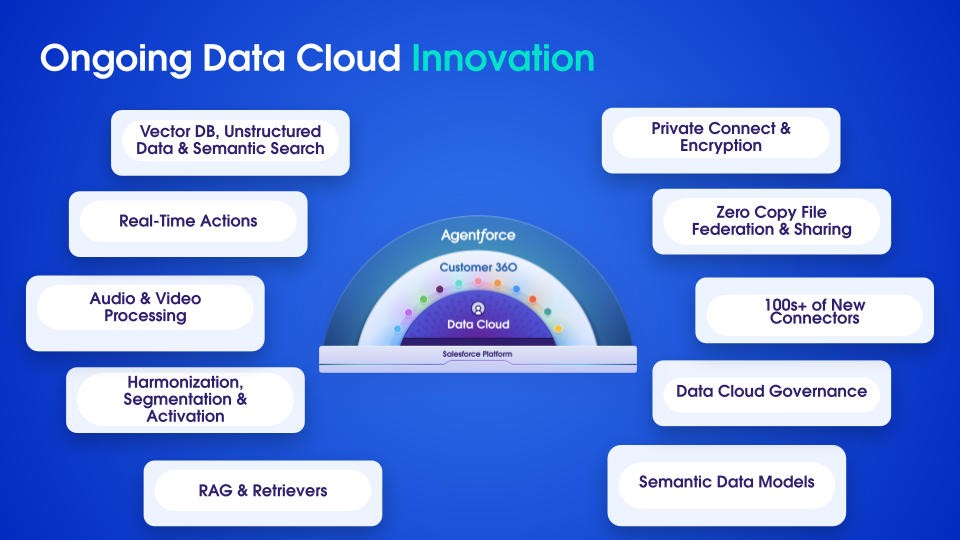
Source: Salesforce News
But what’s behind this move? Several strategic drivers are at play.
1. Product consolidation and simplification
Salesforce is moving away from standalone Advertising Studio licenses in favor of a unified data and activation platform. Customers are being guided toward Data Cloud-powered ad audience activation, signaling a shift to a broader, more consolidated solution.
2. Stronger focus on first-party data, identity resolution, and unified profiles
In a world of stricter privacy laws, cookie deprecation, and fragmented identities, the emphasis is shifting from channel-specific ad audiences to unified data foundations that power all touchpoints — email, service, commerce, and ads. Salesforce’s “First-Party Data Advertising” messaging underscores this direction.
3. Deeper cross-cloud and cross-channel integration
Advertising Studio functioned as a point solution for ads, but Salesforce is positioning Data Cloud (now branded Data 360) as the core data layer across Marketing, Sales, Service, and Commerce. A single data foundation enables native identity resolution, fewer silos, and activation across every channel, not just paid media.
4. Future-proofing the Salesforce marketing stack
By reorienting around a unified data and activation platform, Salesforce aims to deliver real-time audiences, AI-driven insights, cross-channel orchestration, and direct ad partner activation — without legacy Advertising Studio constraints. This aligns with the company’s vision of positioning Data Cloud as the leading CDP for marketers.
Related: Salesforce × Informatica ~ The $8B data power play that just redefined the customer experience era
What replaces Salesforce Advertising Studio? Data Cloud Ad Audiences!
Salesforce is providing a clear migration pathway through the Ad Audiences add-on within the Salesforce Data Cloud / Data 360 platform. According to official documentation, First-Party Data Advertising, built on Data 360, enables activation of audience segments directly to digital advertising ecosystems.
Simply, instead of creating segments in Advertising Studio, marketers will now build segments in Data 360, leveraging capabilities such as unified customer profiles, identity resolution, and zero-copy connections to data lakes and warehouses. These segments can then be pushed to advertising partners like Google and Meta.
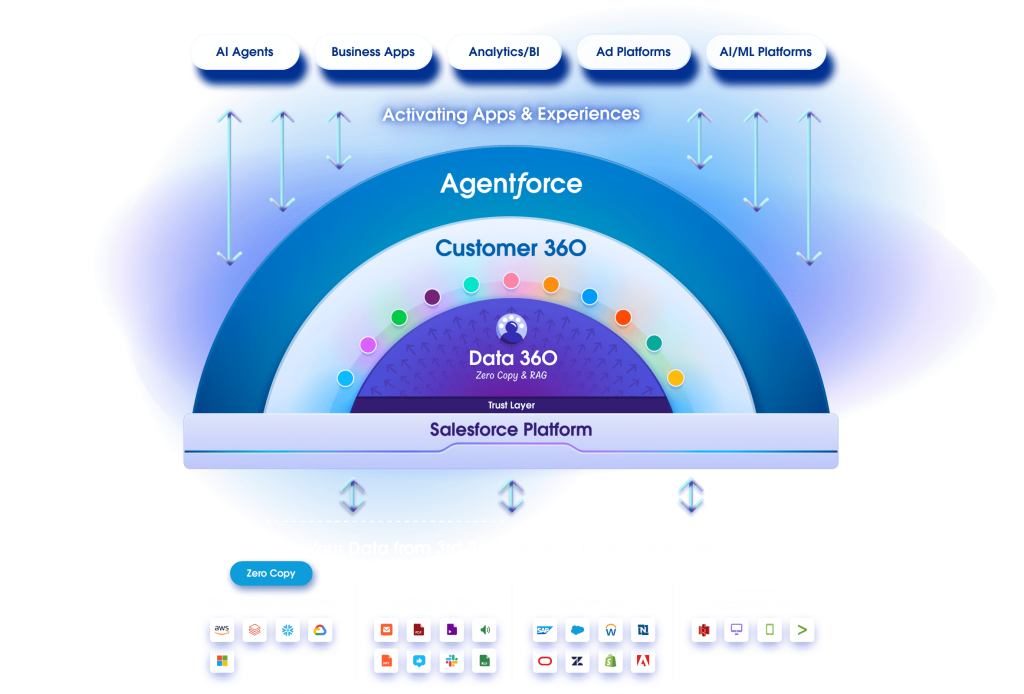
Source: Salesforce
As Salesforce put it: “Use Data 360 to act on unified data and insights across Customer 360, and activate segments across every channel.”
Now, while current Advertising Studio users can continue using their existing subscriptions for the duration of their contract, renewals will not be allowed after the cutoff date.
This makes migration planning urgent. The tool still works today, however, future renewals will not be possible, so clients must scope and plan their transition now to avoid disruption.
What is Data Cloud Ad Audiences?
Data Cloud Ad Audiences is a feature that allows you to use the unified customer profiles in Salesforce Data Cloud (formerly Customer Data Platform) to create and target highly specific, first-party audience segments across various digital advertising platforms.
Let’s break down this solution from a CRM and marketing strategy viewpoint.
1. Unified customer profile and identity resolution
Data 360 consolidates structured and unstructured data from CRM, commerce, service, digital behavior, and external data sources like Snowflake, BigQuery, and Databricks. Using zero-copy architecture, it avoids unnecessary data movement and creates a single, trusted customer profile with accurate identity resolution.
2. Segmentation and paid-media activation
With unified profiles in place, marketers can build dynamic audience segments based on attributes such as lifetime value, engagement, propensity, or loyalty. These segments can then be activated across advertising platforms through the Ad Audiences capability, which enables secure activation with partners like Google and Meta via the Data 360 platform.
3. Channel-agnostic activation and suppression
Since Data 360 operates on a unified data layer, the same segments can be used consistently across email, mobile, push, service journeys, and advertising. This enables consistent targeting, smart suppression (e.g., excluding recent purchasers), and more deliberate control of frequency, reach, and spend.
4. Embedded privacy and governance
Data 360 includes policy-based governance, consent management, secure data sharing, and compliance features. As privacy frameworks tighten, these capabilities are essential for teams managing cross-channel audiences.
Data Cloud Ad Audiences is not a simple upgrade to Advertising Studio in Salesforce. It is a fundamentally more advanced architecture that connects audience activation with core data, identity, and orchestration capabilities. By adopting this model, your clients gain access to deeper integrations, stronger measurement, and more flexible, intelligent audience management.
Related: Turning Data into Dollars: Future-proofing CRM, Loyalty, & Retention
Other options apart from Data Cloud Ad Audiences, and should you keep Ad Studio outside Salesforce?
While Salesforce provides a defined migration path, it is essential to assess strategic alternatives based on each client’s needs. Possible approaches include:
- Short-term status quo: Continue using Advertising Studio in Salesforce until the contract expiry, allowing time to plan and prepare for migration without immediate disruption.
- Use external ad-activation platforms or CDPs: Some brands deliberately separate ad-audience activation from their marketing automation platform, opting for specialized external solutions or standalone CDPs.
- Adopt a hybrid approach: Retain certain external ad-audience tools while progressively shifting audience activation to Data 360 for both owned and paid channels.
Is it a smart choice to keep Ad Studio outside the Salesforce ecosystem?
Yes and no. It depends on your client’s maturity, tech landscape, and long-term strategy. Let’s consider the pros and cons of the choice.
Pros of staying within the Salesforce ecosystem
- Unified data across email, service, commerce, and advertising reduces silos, simplifies segmentation, and improves attribution and measurement.
- Native integrations streamline operations, reduce data handoffs, and minimize manual segment syncing.
- Better alignment with Salesforce’s roadmap for AI, Agentforce, and cross-cloud journeys, which rely on a native data foundation.
Pros of external activation or keeping ad tools separate
- If the client already has a mature ad-tech stack with strong DSP capabilities and limited dependency on SFMC data, external activation may remain viable.
- Budget, contractual timelines, or migration readiness may make an immediate shift impractical.
Cons of keeping ad activation separate
- Data silos and fragmented audience definitions lead to duplication, inconsistent targeting, and measurement gaps.
- Increased operational complexity due to syncing segments across multiple platforms.
- Growing risk of misalignment, as Advertising Studio deprecates and becomes a stranded investment.
For most organizations relying on SFMC and aiming for cross-channel lifecycle orchestration, the stronger long-term path is to bring ad activation into the same unified data and marketing ecosystem through Data Cloud. External tools are still an option, but require accepting added complexity and investing in strong governance and operations to compensate.
Migrating from Marketing Cloud Advertising Studio to Data Cloud Ad Audiences
1. Audit and discovery
Conduct a thorough audit of current Advertising Studio usage by identifying all active audience segments, connected destinations (Google, Meta, etc.), suppression rules, and reporting/KPIs, while also documenting contract renewal dates, associated costs, and key dependencies.
2. Review data foundations
Review all current customer data sources, including CRM, commerce, digital, behavioral, and offline, assess existing SFMC data extensions, identity resolution processes, and connected data lakes or warehouses, and identify gaps such as missing offline purchases, absent hashed phone numbers, or delayed data updates.
3. Define future audience strategy with Data 360
Include purchase and service interactions, determine how advertising audiences will integrate into full-funnel lifecycle journeys (onboard → engage → retain → reactivate), and define suppression rules along with the cadence for dynamic segment updates.
4. Infrastructure and integrations
Plan the technical architecture by connecting Data 360 with zero-copy access to data warehouses and identity resolution, configuring governance and consent management, setting up AppExchange ad-activation integrations (Google, Meta, Amazon, etc.), and determining the activation format (hashed email, phone, mobile IDs).
For example, documentation illustrates how Data Cloud enables activation to Google, Amazon, and Meta through its activation modules.
5. Migration execution and parallel run
Execute the migration in phases, such as setting up segments in Data 360 and testing activation on a single ad platform while keeping Advertising Studio operational, then compare performance, validate suppression logic, measure cost per acquisition, and refine processes. Once successful, retire the segments in Advertising Studio and complete the full transition.
6. Measurement and optimization
Establish new reporting frameworks to monitor segment performance, ad spend efficiency, and cross-channel impact (email and advertising), leveraging Data 360’s unified data layer to connect results to metrics like LTV, churn, retention, and cross-sell. The “First-Party Data Advertising” guidance highlights using calculated insights such as lifetime value and lookalikes within this new model.
7. Governance and future-proofing
Define policies for data usage, consent, suppression, and identity linking, ensuring the solution remains adaptable to new ad platforms and identifiers, while staying aligned with your client’s lifecycle marketing maturity and strategic roadmap.
So, if you have already invested enough time and resources, and still fail to reap the results, maybe it’s a sign of concern.

Related: How to leverage privacy-enhancing technologies (PETs) for GDPR-proof marketing
Short-term, long-term plans, and next steps in Salesforce Marketing Cloud
Short-term plan
- Audit current Advertising Studio usage and capture contract renewal dates.
- Launch a basic Data 360 pilot on a single ad platform (e.g., Google) using existing segments.
- Map current segments to Data 360, test data ingestion, identity resolution, and segment activation.
- Communicate the upcoming changes and roadmap to stakeholders, including marketing ops, ad operations, and CRM teams.
Long-term plan
- Fully migrate all advertising audience activations to Data 360 Ad Audiences.
- Integrate advertising activation into broader lifecycle orchestration (onboarding, retention, reactivation) via SFMC and Data 360.
- Implement real-time segmentation and dynamic activations (e.g., qualifying a user for a lookalike ad segment minutes after an email click).
- Decommission Advertising Studio completely.
- Leverage unified data to measure cross-channel impact, including how email, ads, service, and commerce interactions influence LTV and retention.
Next steps
- Conduct a stakeholder workshop with marketing, CRM, ad ops, and IT to review audit findings and define the timeline.
- Develop a client-specific migration roadmap with key milestones, dependencies, resource requirements, and cost estimates.
- Partner with an agency that is experienced in migration workflows.
- Align the budget for Data 360 add-ons, including Ad Audiences.
- Begin pilot activations in Data 360, validate results, and refine before full-scale rollout.
- Communicate the sunset of Advertising Studio and the strategic shift to Data 360 to manage stakeholder expectations.
If your clients rely on Advertising Studio, now is the moment to audit, pilot, migrate, and integrate, not just to minimize risk but to advance from static audience activation to dynamic, data-driven lifecycle orchestration across email, web, service, and ads. Remember: the value lies not in the tool itself, but in how the tool is connected into your broader lifecycle strategy, your data foundation and your cross-channel measurement. Embrace this change, and you’ll turn a product retirement into a strategic acceleration of your CRM and lifecycle marketing capabilities.
How Mavlers can support the transition from Salesforce Advertising Studio to Ad Audiences
As Salesforce gradually phases out Advertising Studio, moving to Data Cloud Ad Audiences is far more than a technical migration. It represents a strategic evolution in how brands build, enrich, activate, suppress, and measure audiences across the entire customer lifecycle.
As a trusted Salesforce Consulting Partner, Mavlers combines deep CRM expertise with hands-on technical capability to guide your organization through this transformation efficiently, strategically, and confidently. We will:
- Assess your current audience architecture, define future-state use cases, and develop a migration roadmap aligned with your lifecycle marketing goals.
- Establish Data Cloud architecture, identity resolution rules, data mappings, and set up governance frameworks to ensure reliable, scalable activation.
- Recreate and optimize Advertising Studio audiences in Data Cloud, configure activation to platforms like Google and Meta, and implement suppression, frequency, and refresh logic for maximum efficiency.
- Integrate paid media activation with your SFMC journeys and enable unified reporting to measure LTV, churn, and cross-channel performance.
- Conduct parallel testing, ensure operational continuity, and train your teams to confidently operate in the new Data Cloud environment.
With Mavlers, your transition to Data Cloud Ad Audiences is strategic, seamless, and future-ready, empowering your marketing organization to unlock smarter audience management and higher ROI across channels. Reach out to us.