Lifecycle marketing
 Customer data management
 Email campaign production
 Search marketing
 CMS development
 Who we are
 How we work
 Case studies
 Testimonials
 Salesforce Marketing Cloud
 Braze
Braze HubSpot
 Marketo
 Pardot
 DataBricks
 Snowflake
 HighTouch
 RudderStack
 Segment by Twilio
 Videos

About a year ago, in our blog post Web Development Trends 2025: What You Need to Know to Stay Ahead, we talked about PWAs stepping up as the future—promising native-app-quality experiences delivered straight in the browser.
And that part still holds true. But none of the functionality counts if your PWA is invisible to search engines.
Because the moment you start planning an upgrade from a traditional website to a PWA, the very next thought is always, “But will it rank? Will it still pull in SEO traffic?”
A fair concern—no one wants to ruffle the feathers of something that already works. Even more so when the rules of SEO for progressive web apps feel fuzzy and half-explained.
The good news? Yes, PWAs can be indexed and optimized just like any other web page. Googlebots can crawl them. So, turning your site into a PWA can give your organic visibility a noticeable facelift.
Plus, PWAs are built with mobile behavior at the core. Which means faster performance, slick experiences, and better mobile rankings—the combination search algorithms reward. More visibility, more organic traffic, more conversions: that’s the promise.
At Mavlers, we’ve spent the last 13+ years building 9,000+ websites globally, and we’ve seen both sides of the coin—PWAs that upped organic traffic, and PWAs that hampered it because SEO fundamentals were ignored. Let’s not let that be your story.
We’ve already covered how PWAs work in a separate blog. Today, we’re addressing the iceberg beyond its tip.
Here’s more about improving visibility of PWAs with our PWA SEO checklist.
Why PWA SEO is different
Before we get into SEO best practices for PWAs, let’s address the elephant in the room: not all search engine crawlers can process JavaScript-based sites such as PWAs.
That’s because?
Most PWAs are heavy on JavaScript for building and displaying content in the browser. That’s unlike traditional websites, which serve fully-formed HTML pages directly from the server.
This makes it harder for search engine crawlers, which historically expect static HTML, to access and index content—and this directly affects discoverability.
So what creates this challenge?
It mostly comes down to how your page is rendered: Client-Side Rendering (CSR) vs Server-Side Rendering (SSR). Understanding this distinction is the bedrock of effective SEO for PWAs.
Client-side rendering vs Server-side rendering
Traditional websites use Server-Side Rendering (SSR). The entire page is baked on the server and delivered to the crawler as a one complete package.
Indexing is straightforward in such cases. When a user types a URL or clicks a link, the server sends back a fully assembled HTML page—content, structure, and data.
Crawlers love this because everything they need to index is handed to them upfront. Easy, predictable, algorithm-friendly.
PWAs, however, usually use Client-Side Rendering (CSR). Here, the server returns a barebones shell and executes JavaScript to fill in the details, rather than sending a complete page.
The browser is then responsible for building out the page content in real time. Fast for users, beautiful for performance—but not always straightforward for crawlers, because search engines must execute the JavaScript to discover content.
And like we said earlier:
Not every crawler does that. Some ignore JavaScript entirely. Even Google — the best of the bunch — needs more time and processing to index CSR content.
It happens in two waves: first, the bare HTML, then a second visit where JavaScript is rendered. That extra step introduces delays, inconsistencies, and uncertainty into rankings.
So, can client-side-rendered PWAs still be crawled?
Yes—Google can crawl CSR content. But it’s slower, more resource-heavy, and sometimes incomplete. That’s why blindly relying on JavaScript for everything is risky.
Rendering approaches that support stronger SEO for PWAs
To make PWAs more discoverable, many teams adopt hybrid rendering strategies, such as:
- Dynamic rendering – serve fast CSR to real users and pre-rendered HTML to crawlers. Convenient, but complex and prone to inconsistencies.
- Hybrid rendering (SSR + CSR) – render primary content on the server and let JavaScript take over interactivity afterward. A balanced approach and often the best option for SEO.
- Isomorphic / Universal JavaScript – rendering on both client and server if you’re using Node or similar environments.
No matter which path you choose, the universal rule stays the same:
If crawlers can’t see the content, they can’t index it. And if they can’t index it, your PWA won’t rank.
PWA SEO steps to make your app fully discoverable by search engine algorithms
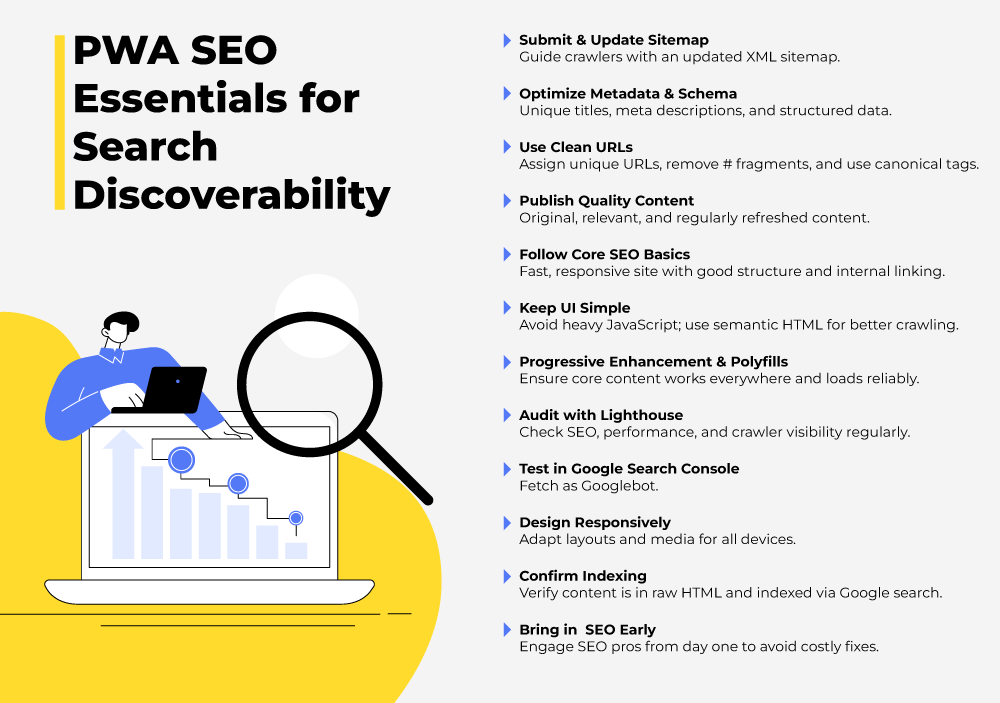
1) Submit an XML sitemap
XML sitemap provides a structured list of URLs and metadata that helps crawlers go through your PWA more efficiently.
Submit a complete sitemap via Google Search Console, then run it through the robots.txt tester to confirm no critical pages are blocked. And don’t treat your sitemap like a one-and-done upload—update it any time new content is added or major structure changes occur.
2) Appreciate metadata & structured markup enough
Metadata is how search engines interpret your content, and schema is how they understand context. Both influence PWA discoverability and CTR.
A few essentials for improving the visibility of PWAs:
- Every page needs a distinct title tag—include your main keyword.
- Write specific, human meta descriptions.
- Use index and follow meta directives to guide crawlers.
- Add structured data (schema.org) for reviews, pricing, FAQ, product info, and events.
This additional layer of clarity helps search engines understand what your page represents—and rewards you with richer visibility in SERPs.
3) Create clean, crawlable, unique URLs
It’s not uncommon for PWAs to update content dynamically without changing the URL. This can block indexing.
It means the page appears to stay the same to search engines, even though what’s shown to users changes.
Search engines like Google rely heavily on unique URLs to identify and index different pieces of content. If the URL doesn’t change when the content updates, the crawler treats it as the same page, so it indexes only one version.
This blocks other content from being discovered and ranked, making important pages in your PWA invisible in search results.
To fix this:
- Assign each view a unique URL using the HTML5 History API.
- Remove hash (#) fragments from URLs—they break crawling and are outdated.
- Use canonical tags to prevent duplicate content from harming your SEO, especially when the same or similar content lives at multiple URLs.
Read a more detailed SEO guide on managing duplicate content.
4) Publish high-quality, intent-driven content
No matter how well you configure your PWA technically, superior content remains king. SEO for PWAs doesn’t get special rules—Google still ranks based on relevance, depth, and usefulness.
That’s why:
- Ensure the content fulfills the searcher’s intent.
- Be original, helpful, and aligned with the keywords your audience uses.
- Rich, regularly refreshed content will sustain your rankings and attract backlinks, which signal authority to search engines.
5) Stick to core SEO fundamentals
After ensuring crawlability, the game is the same as traditional SEO.
You still need:
- An intuitive site structure
- Responsive and fast site
- Internal linking for thematic relevance
- Authoritative backlinks
- Fast performance and mobile-friendly layout
- Semantic HTML elements for accessibility and crawlability
- A regular SEO audit comes in handy to identify issues before they swell. Also, it’s a must-follow practice if you’re not sure about the reliability of your SEO best practices.
6) Keep UI simple & pro-search
Over-engineered interactions can sabotage your SEO. Crawlers struggle with overly animated or JS-heavy elements.
For an effective UI for PWA, use real HTML elements (<button> over <div>) and structure content logically so search engines—and humans—can navigate easily.
7) Use Progressive enhancement & Polyfills
The reason progressive enhancement is such a popular dev strategy is that it ensures all users have access to essential content and functionality first, and enhances their experience only when their environment supports it.
Thus, access to content is very easy for both users and search engine crawlers.
Polyfills fit into this strategy by filling gaps in older browsers that don’t support modern web features.
Using them for your PWA development gives it a fallback plan. So that, on modern browsers, your PWA can deliver a full, interactive experience, while also degrading gracefully to a functional baseline on older platforms.
The result? Your content stays visible, readable, and indexable, rather than hiding behind scripts that never execute. And that translates directly into better SEO.
8) Audit with Lighthouse
If you’re serious about your PWA’s performance, Lighthouse is essential.
Use it as a PWA SEO audit tool and see how well your PWA performs across SEO, accessibility, performance, and PWA standards.
It also simulates an HTML-only crawler environment so you can check if mission-critical content is visible.
9) Test using Google Search Console
Use the Fetch as Googlebot tool to fetch and render pages as Googlebot would, rendering and processing them.
It’s a great tool for verifying JavaScript execution, structured data, and indexing status. It’s also where Google flags problems like indexing failures, coverage errors, and rich result issues.
10) Design for device diversity
You want the user experience to be not just fast but also responsive, as responsiveness is desirable for both UX and SEO.
To make the site scale for different screen resolutions and viewports–
- Adapt layouts, padding, fonts, and media to different breakpoints.
- Avoid oversized images as they take a long time to download on mobile phones. Plus, they hamper the overall mobile scroll experience.
- Avoid under-sized images that look blurry on larger screens.
11) Verify your content is actually indexed
To confirm that search engines can see your content:
- Copy a unique sentence or phrase directly from your webpage.
- Right-click anywhere on the page and select “View Page Source” (not “Inspect”) to open the raw HTML code.
- Use the browser’s search feature (Ctrl + F or Cmd + F) to find the copied text within the source code. Search for that sentence. Just to ensure the content is actually present in the HTML.
- Head to Google and type this query in the search bar: site:[your-domain] “that exact text”
- Replace your-domain.com with your website’s URL and include the exact text in quotes.
- If Google returns your page in the results, it means the content is indexed and visible to search engines.
12) Bring SEO specialists in early — not after launch
Too many teams treat SEO like frosting—something you spread on at the end to make things look nice. But with PWAs, that mindset is a fast track to pain.
Trying to patch PWA SEO mistakes after launch is akin to changing the foundation of a building after the walls are up: expensive, slow, and guaranteed to leave a crack somewhere.
The smarter move? Bring in SEO minds early. Before locking in architecture decisions, content modeling, routing structure, or rendering approach. Before the dev team gets attached to an architecture that search engines can’t crawl.
It’ll save weeks of rework—and protect your SEO rankings before they tumble down the search ladder.
The road ahead
If that feels like drinking from a firehose, you’re in good company. PWA SEO tends to get technical before you know it. Google Search Central has deeper reading if you want to nerd out—but before you dive into documentation, zoom out and look at PWAs from a strategy lens.
Start here on the Mavlers blog:
- How Progressive Web App for eCommerce Works: Unveiling the Secret Behind Faster, Smarter Stores
- Progressive Web Apps vs. Native Apps: The Ultimate Guide to Choosing the Right Fit
These will help you see the strategic perspective behind the technology.
And if a PWA build or migration is on your roadmap, stick with us. More practical playbooks are on the way.