Lifecycle marketing
 Customer data management
 Email campaign production
 Search marketing
 CMS development
 Who we are
 How we work
 Case studies
 Testimonials
 Salesforce Marketing Cloud
 Braze
Braze HubSpot
 Marketo
 Pardot
 DataBricks
 Snowflake
 HighTouch
 RudderStack
 Segment by Twilio
 Videos

Email works best when it feels like a conversation, not a broadcast.
But the moment brands try to personalize at scale, the calendar gets crowded, and the template count starts multiplying like rabbits with a SaaS budget.
That is the trap.
One audience becomes three.
Three become twelve.
And suddenly every campaign needs a small army.
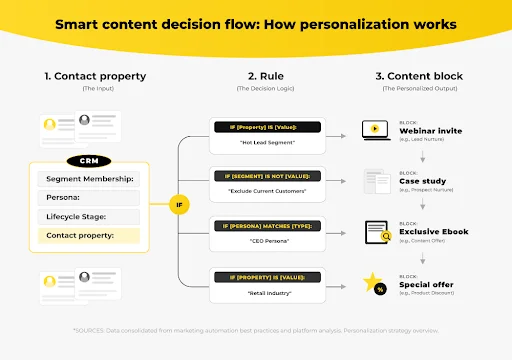
HubSpot smart content changes the game by letting one email behave like many.
Instead of building separate versions for every segment, marketers can dynamically change content based on who is reading, where they are, and what they have done.
Let’s cut to the chase and learn how HubSpot Smart Content boosts dynamic email personalization.
To truly leverage this capability and stop the template sprawl, we first need to clearly define the feature and understand why relevance is the single most important driver for email response.
What is HubSpot Smart Content, and why is it important?
HubSpot Smart Content lets marketers display different content modules to different contacts within the same email, streamlining campaign management and improving engagement at scale.
Smart Content is HubSpot’s built-in dynamic content system. It lets you show different copy, images, or CTAs inside the same email based on contact properties, list membership, lifecycle stage, geography, device, or behavior.
HubSpot dynamic email content matters because relevance drives response. When the right person sees the right message, opens rise, clicks sharpen, and conversions stop dragging their feet.
It also reduces campaign sprawl. One template can serve multiple audiences, which means less maintenance, fewer duplicate edits, and fewer chances to break something at 6:42 p.m. on a Friday.
| Problem | Smart Content fix |
| Too many versions of the same email | One template, many experiences |
| Low engagement | Content matches audience context |
| Manual workload | Fewer assets to build and maintain |
| Generic messaging | Personalized content blocks |
Customers do not want to feel like a row in a spreadsheet. They want to feel seen. HubSpot Smart Content helps you do that without turning your marketing team into a template factory.
Now that we know the fundamental difference Smart Content makes, the next step is mastering the ‘how.’ HubSpot provides five core criteria to ensure the right content reaches the right segment.
What are the 5 key types of Smart Content personalization?
Marketers can personalize HubSpot emails using five core criteria: lifecycle stage, contact list membership, geographic location, device type, and user behavior.
1. Lifecycle stage personalization
Lifecycle stage is where the relationship starts telling the truth.
A subscriber should not see the same content as a customer who has already bought twice and opened every email like clockwork.
That is where Smart Content becomes useful.
You can show introductory guides to subscribers, provide education to leads, and offer advanced tips or expansion offers to customers.
2. Contact list personalization
Lists are not dead. They are just more useful when they stop acting like buckets and start acting like signals.
Webinar attendees can receive the recording. Trial users can get upgrade incentives. The logic is simple, but the impact compounds.
HubSpot uses cookies and contact association to understand who belongs where. That means Smart Content can adapt without requiring a fresh template for every segment.
3. Geographic personalization
Location still matters, especially when offers, events, or compliance differ by region. A London audience should not be invited to a New York event as if it were a casual typo.
Regional content keeps messaging timely and practical. It also prevents awkwardness, which is a very expensive form of brand damage.
4. Device-based personalization
Mobile readers are impatient. Desktop readers are usually less patient and more distracted by tabs they don’t need.
Use Smart Content to tailor the experience. Shorter copy and larger CTAs work better on mobile, while desktops can carry richer detail and broader visuals.
5. Behavior-based personalization
Behavior is the closest thing marketing has to honesty.
If someone downloads a pricing guide, visits a product page, or watches a demo video, Smart Content can use that signal to shape the next message.
That is how dynamic HubSpot email personalization stops being decorative and starts becoming useful.
Understanding the power of these five segmentation types is only half the battle.
Let’s walk through the exact, step-by-step process for configuring Smart Content rules inside the HubSpot email editor.
How do you create Smart Content in HubSpot emails?
Creating Smart Content involves selecting a module in the email editor, enabling HubSpot smart rules based on your chosen criteria, creating content variations, and using preview tools to verify that the correct version renders.
Step 1: Open the email editor
Navigate to Marketing → Email and open the template or draft you want to personalize. This is where the email stops being static and starts learning how to behave.
Step 2: Select the module
Click the specific module you want to personalize. That could be a text block, an image, a CTA, or a rich text section.
Pick the block with intention. Not every element needs to become dynamic, and that restraint will save your sanity.
Step 3: Enable Smart Rules
Click Make Smart and choose the rule type. You can base rules on list membership, lifecycle stage, geography, device, or behavior.
This is where the email gets its instructions. The rule tells HubSpot which version belongs to whom.
Step 4: Create content variations
Now write the default content and the tailored versions. For example, a SaaS product update might include feature notes for users, a trial upgrade CTA for active evaluators, and a retention message for customers.
That is not just HubSpot email personalization. That is lifecycle-aware communication.
Step 5: Preview and test
Use Preview and test → Preview as a specific contact to verify logic. If the wrong version renders now, it will not magically become correct after sending.
| Rule type | Example variation |
| Lifecycle stage | Lead sees benefits, customer sees advanced tips |
| List membership | Webinar attendees see the replay |
| Geography | UK event vs. US event |
| Device | Short CTA on mobile, richer layout on desktop |
| Behavior | Pricing page visitors see demo CTA |
Configuring the smart rules is only the beginning.
To avoid the administrative burden that personalization can create, teams must follow key best practices for long-term scale and effectiveness.
What are the best practices for scaling Smart Content?
To scale Smart Content effectively, teams must maintain clean CRM data, limit the number of variations to prevent administrative bloat, and rigorously test every email across devices and segments.
1. Keep segmentation clean
Smart Content is only as sharp as the data behind it.
If lifecycle stages are outdated or lists are messy, the wrong content will land with perfect confidence, which is one of the more charming forms of failure.
Clean CRM data makes Smart Content useful. Dirty data makes it theatrical.
2. Avoid overcomplicating variations
The temptation is to personalize everything.
That is how teams end up with six versions of the same email and a maintenance burden that could frighten a small government.
Stick to three to five meaningful variations per email. Focus on the highest-value differences: stage, intent, geography, or behavior.
3. Test everything and focus on value
Check desktop and mobile layouts.
Verify that the content is actually useful, not just individually addressed.
A name in the subject line is not a strategy. A message that helps someone decide is.
“Personalization should reduce friction, not create new work for the team.” – HubSpot Smart Content expert
Wrapping up
That brings us to the business end of this article, where it’s fair to say that Smart Content is not just a HubSpot feature.
It is a way to stop cloning emails like nervous photocopies and start building experiences that adapt.
When you use it well, one template becomes many journeys. That means less overhead, stronger engagement, and cleaner execution across the board.
Start with one high-impact email, one clear rule, and one meaningful variation. Then let the data show you where the next layer belongs.
The ball is in your yard now. Make every effort count.
Meanwhile, here are a few relatable blogs you should check out.
Beyond the trigger: Designing HubSpot workflows for every stage of the buyer’s journey
HubSpot data agent decoded: The complete guide to HubSpot’s new AI data tool
HubSpot enterprise review: What you actually get when your CRM grows up