Lifecycle marketing
 Customer data management
 Email campaign production
 Search marketing
 CMS development
 Who we are
 How we work
 Case studies
 Testimonials
 Salesforce Marketing Cloud
 Braze
Braze HubSpot
 Marketo
 Pardot
 DataBricks
 Snowflake
 HighTouch
 RudderStack
 Segment by Twilio
 Videos
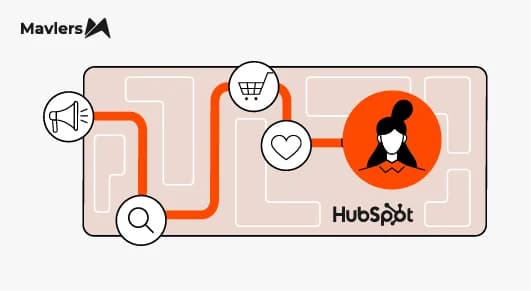
We have automation in place. It may either nudge or nag. The choice is yours.
Think about it this way.
A new lead enters your funnel.
- Three emails fired.
- A task is created.
- A lifecycle stage updates.
Still, nothing moves.
Why? Because workflows aren’t magic. They are mirrors. And when they focus on internal processes rather than buyer behavior, they start to feel more like nagging than nudging.
The best HubSpot workflows work because they match the buyer’s pace. This post shows exactly how.
You’ll get a practical breakdown of what workflows do, how to align them with real progression stages, and how to design automations that feel timely, helpful, and human, not robotic.
Let’s cut to the chase.
What are HubSpot workflows?
HubSpot workflows are sets of automation rules that trigger when contacts meet specific criteria. These criteria might include form submissions, email clicks, changes to lead score, or deal updates.
Common workflow actions:
- Send an email
- Update a contact property
- Assign a lead owner
- Create tasks or deals
- Notify internal stakeholders
The core value: respond to behavior, not assumptions. Great workflows don’t push based on your timeline. They pull based on buyer signals.
Now, let’s look at HubSpot through the lens of buyer progression.
Buyer progression: Foundation for workflow design
There are four essential buyer progression stages:
- Awareness – identifying a problem
- Consideration – exploring solutions
- Decision – choosing a vendor
- Post-purchase – onboarding and retention
Each stage comes with a question the buyer needs answered. Traditional workflows often ignore that question and focus on internal next steps instead.
When you design workflows to serve those questions, conversion isn’t forced. It flows.
Let’s head to the awareness stage.
Awareness stage workflows, education, and trust building
The goal here is simple: be helpful, not hungry. Let the buyer explore.
Typical trigger: a first form fill or newsletter signup.
What should the workflow do?
- Send a warm welcome series
- Share 2 to 3 educational pieces based on the initial interest
- Prompt light engagement (preference center, quick survey)
- Update the lead score gently based on the interaction
Success looks like higher engagement rates, deeper content consumption, and soft signals of progression, like multiple blog visits within a week.
Then comes the consideration stage.
Consideration stage workflows, signal-driven nurturing
Now the buyer is evaluating. They want clarity, not fluff.
Strong triggers:
- Downloading a whitepaper
- Attending a webinar
- Viewing product or pricing pages multiple times
Smart workflow actions:
- Send use-case-driven content (e.g., customer stories)
- Introduce comparisons, FAQs, and implementation info
- Notify sales when meaningful behavior spikes
- Adjust the lead score accordingly
Example: A contact who joins a webinar gets a follow-up case study and, if they view pricing within 48 hours, is automatically routed to sales with a relevant task.
The metrics to watch: time-in-stage reduction and MQL-to-SQL conversion lift.
And lastly comes the decision-making stage.
Decision stage workflows, reduce friction, accelerate conversion
This is where buyer hesitation hurts the most. Your workflow’s job is to remove it.
Triggers:
- High lead score
- Repeated pricing or demo page visits
- Request for a meeting or custom quote
Workflow tasks:
- Update lifecycle stage to SQL
- Create a deal in the pipeline
- Assign a sales owner automatically
- Launch a short, personalized follow-up sequence
Bonus: add an optional time-sensitive offer, a custom incentive, or a helpful asset that shows you’re listening.
Measure what matters: speed-to-contact, deal creation rate, and win-rate improvement.
But HubSpot won’t leave you stranded just when you think you’re done. The post-purchase stage is equally important for generating repeat business.
Post-purchase and retention workflows, automation for lifetime value
Congratulations, the deal is won. Now make sure the relationship is too.
Here are the triggers you need to set:
- Deal marked “closed-won.”
- Lifecycle stage = Customer
And here is your workflow playbook:
- Day 1: Welcome and onboarding guide
- Day 3: Setup checklist or product tips
- Week 2: Invite to support channels or community
- Month 1: Request NPS or feedback
Look for signals of retention: product usage, engagement with tips, rand esponse to surveys. Then trigger upsell or advocacy workflows when the time is right.
Practical workflow templates and triggers
Here’s a compact checklist you can steal:
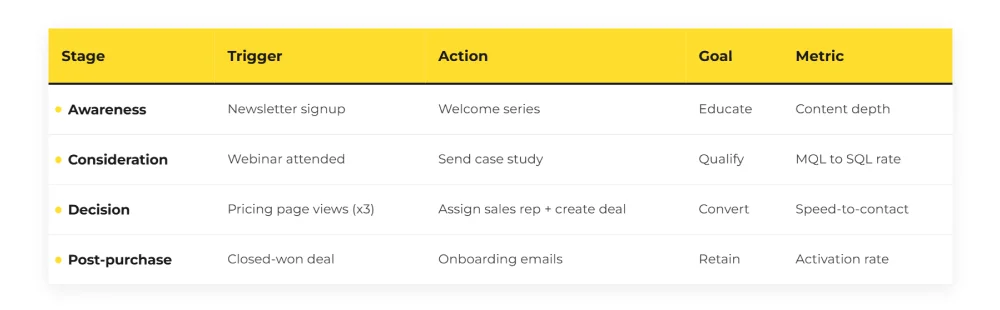
These four workflows alone cover 80 percent of funnel automation needs.
Need some more pro tips for an effective implementation? We have got you covered.
Best practices to build buyer-centric, not busywork automations
Here is what our experts suggest you should do while implementing HubSpot workflows.
- Trigger based on meaningful behavior patterns, not isolated clicks
- Segment flows by lifecycle stage and declared interest
- Set goals and exits, if a buyer progresses, stop the sequence
- Suppress disengaged contacts before damage is done
- Use lead scoring to sharpen decision triggers
- Keep logic readable, what makes sense now should still make sense in six months
- Run monthly reviews for logic bugs, enrollment errors, and stale content
Automation only works when it also knows when to stop.
But that’s not all? You need to know what the success of your campaigns should look like.
Measurement of what true success looks like
Forget email sends and workflow completions. They don’t matter if the buyer didn’t move.
Here are the metrics you should measure:
- Progression rate (who advances stages)
- Time-in-stage (how long to move)
- Conversion velocity (faster deal creation)
- Retention or upsell triggers (post-purchase success)
Use holdout groups. Suppress half your audience from a workflow and compare outcomes. The difference is your real lift.
Your reporting dashboard should show:
- Workflow performance by stage
- Buyer velocity trends
- Engagement versus progression correlation
Governance, testing, and audit checklist
To govern the workflows, you should:
- Use naming conventions (e.g., STAGE_Action_Segment)
- Assign an owner to every workflow
- Document logic, enrollment triggers, and last edit date
For testing:
- Preview every branch with real contacts
- Run test sends with sample data
- Simulate blank fields, wrong inputs, and unsubscribes
And your monthly audits should include:
- Check for orphaned or outdated workflows
- Avoid overlapping enrollment logic
- Monitor for stuck contacts or bloated logic trees
A broken workflow isn’t just annoying. It’s expensive.
If you do otherwise, you may end up hitting a dead end.
Common problems and ways to overcome them
Here are a few common problems and ways to overcome them.
- Contacts stuck in a flow? Your exit condition is missing or never achievable.
- Duplicate tasks or emails? You’ve got overlapping triggers. Check for workflow collisions.
- Low conversion but high engagement? You may be triggering on weak signals. Refine your behavioral logic.
- Sales not responding in time? Check whether task assignments and notifications are actually being seen.
Need some expert implementation tips? We have got your back.
90-day playbook to shift from reactive to buyer-progression workflows
Here is a proven 90-day strategy to jump-start your buyer progression journey.
Weeks 1–2: Audit all active workflows. Label by stage. Flag anything without a clear goal or outcome.
Weeks 3–6: Fix the big ones. Add goals and exits. Suppress contacts who aren’t moving.
Weeks 7–10: Build or improve lead scoring. Add two new workflows based on behavior, not just form fills.
Weeks 11–12: Test one holdout experiment. Does your best-performing nurture actually outperform silence?
Review monthly. Document changes. Share learnings.
Wrapping up
That brings us to the business end of this article, where it’s fair to say that workflows that respect the buyer’s pace win.
Automation is powerful, but only when it feels natural.
If your workflows reduce friction, honor behavior, and answer the buyer’s next question, the buyer will answer yours.