Lifecycle marketing
 Customer data management
 Email campaign production
 Search marketing
 CMS development
 Who we are
 How we work
 Case studies
 Testimonials
 Salesforce Marketing Cloud
 Braze
Braze HubSpot
 Marketo
 Pardot
 DataBricks
 Snowflake
 HighTouch
 RudderStack
 Segment by Twilio
 Videos
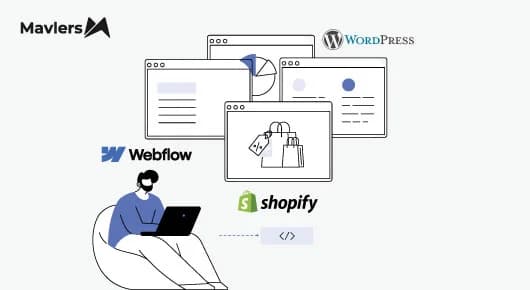
WordPress vs Webflow vs Shopify. The real question isn’t “what these platforms can do” but “which one does it for you”. Let’s skip the feature dump and make conclusions to choose the right platform.
When we first started building websites nearly a decade ago, WordPress was the platform almost every client relied on. It was open, flexible, and a huge step up from hard-coded sites, wherein even the smallest website update meant calling a developer.
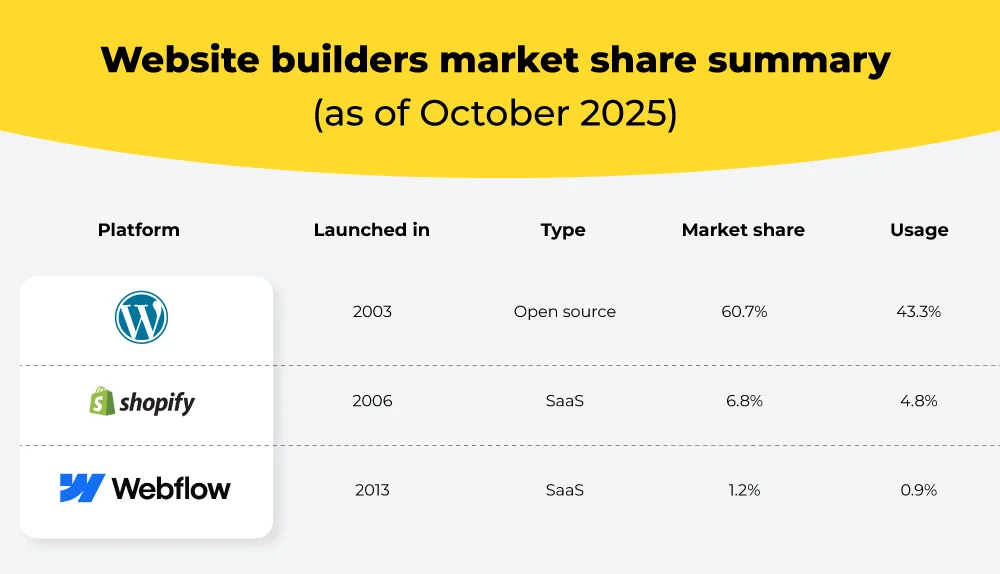
Till today, WordPress is a dominant platform. It powers over 43% of websites on the internet. Yet, after a sustained drop from its peak of 65.2% and with SaaS website builders like Shopify and Webflow finding their legs, the landscape is far more heterogeneous now.
There are more options for business owners when launching their websites. One size no longer fits the requirements of different business models. The flip side is that choosing the right platform to build websites has become an incredibly important yet tough part of the process.
These platforms come loaded with a wide range of features. But in no way does that mean they’re interchangeable. Just because WordPress, Webflow, and Shopify can do many of the same things doesn’t mean any one of them is the right choice for your business.
WordPress offers unmatched flexibility for customizing your site, but falls short in built-in business management features, which is Shopify’s forte. Meanwhile, Webflow is an emerging contender for businesses seeking design-led website-building platforms.
In this guide, we’ll explore WordPress vs Webflow vs Shopify to help you choose based on your business needs. We’ll also look at how each platform is currently adapting to AI.
Website builders market share summary (as of October 2025)
The Question you should answer before comparing website builders
Choosing the right platform for your business website will not only strengthen its visual identity but also influence its functionality, too. All of which ultimately help you create a unique online presence and drive business growth.
Before you start dissecting individual platforms’ features, answer these strategic questions. It will help you closely understand your current and future growth needs. Only then can you find a close match in a website builder for your business needs.
“Know what you want. Clarity is power. And vague goals promote vague results,” as Robin Sharma said. The more time you spend answering them, the more clarity you will gain on WordPress vs Webflow vs Shopify.
1) Are you renting your website or owning it?
This question is to identify the fundamental architecture of the tools you’re comfortable with. As in, closed SaaS (Software as a Service) platforms or open-source content management systems (CMS).
Closed SaaS platforms:
- When you “rent,” you use a closed SaaS (Software as a Service) platform or a proprietary website builder. The provider controls the design, code, and server. Your website exists only on the provider’s proprietary servers.
- These platforms are all-in-one systems. Hosting, site builder, updates, domain management, security, and support, all into a single subscription.
- The appeal? Setup is fast, maintenance is handled for you, and there’s very little technical friction.
- The trade-off? Control. You’re limited to templates and features the platform offers. And if you want to migrate to an open-source platform, best of luck. Because that’s tough without manual transfer or rebuilding from scratch.
- In short, you work within a platform’s rules. Long-term flexibility is decided by what that platform chooses to support. Shopify and Webflow fall into this category.
We talked about everything about migrating your website to WordPress in our article- Migrating to WordPress in 2026: The ultimate guide for teams managing multiple CMS. We highly recommend you to check it out.
Open-source platforms:
- “Owning” is common with these types of website builders. It means you own the software and the data behind your site. You get solid control over the codebase, content, and hosting.
- You can achieve better control over where you host your website and how much you want to extend its functionality. Basically, you adapt it to suit your personalized needs.
- That ownership takes you off the leash. The responsibility is inevitable, but it also removes platform lock-in. WordPress belongs here.
Spend some time understanding whether your business demands convenience or ownership, and the rest of the platform comparison becomes far more straightforward.
More on: Secure Data Migration: How To Migrate Orders, Customers & Passwords In Shopify
2) What role does your website play in your business?
To avoid abstract comparisons among the platforms, understand what job your website is expected to do. That way, you can evaluate whether a tool is designed to support how your business operates. And also avoid a common caveat: choosing a website builder that looks impressive in a demo but falters with your real-world demands.
Are you launching fast with limited time and resources?
For someone like a small business owner or someone who manages without developers, speed and simplicity top the list of desired features. They likely need a professional site up and running fast. But don’t have weeks to learn technical details or manage ongoing maintenance.
These are the cases where ease of use, reliable hosting, and pre-built templates take precedence over customization.
Is your website the center of your marketing strategy?
That’s typical of freelancers, solopreneurs, and marketers. Their website is the brand. No wonder such websites need to pop visually, communicate credibility, and convert visitors into leads.
Here, design flexibility and marketing integrations justify the investment more than getting online quickly.
Do you build and manage websites professionally?
Creating websites for clients? In that case, your priorities tilt toward efficiency and control. You need tools that support advanced customization, let you scale across projects, and reduce administrative overhead.
In this scenario, the platform should adapt to your workflow.
Is your website tied to direct revenue?
All businesses expect ROI from their websites. But for some , revenue is a byproduct rather than the primary function. They use websites to achieve non-monetary KPIs, such as lead generation, customer support, education, etc.
For e-commerce businesses, on the other hand, the website is a sales engine. It’s designed to process payments and fulfill orders directly. Naturally, reliable, secure transactions directly affect revenue and are the deal breakers while choosing a website builder.
3) The questions you must ask when comparing website builders
Ease of use
- Can I design pages in a WYSIWYG editor experience?
- Does the platform include AI-Assisted Setup?
- Can my team handle the Learning Curve? Or will even small changes be developer-dependent?
- Is it a turnkey experience? Or do I need to piece together 10+ plugins before I can launch?
Design and control
- Can I control spacing, positioning, and layout precisely?
- Is there a Global Design System to update brand colors and fonts across pages in one click?
- Does the builder allow for Mobile-First customization?
- Do I only get pre-set templates? Or can I build custom logic for niche features?
SEO and speed
- Are basic SEO controls available by default?
- Can I add advanced optimization when needed?
- Does the platform generate Clean Code? Or is it bloated with “div-heavy” structures that affect my Core Web Vitals?
- Is Technical SEO built-in?
- Is there an integrated Image Optimizer to auto-convert media to WebP for faster loading?
Integrations
- Are there Native Solutions for site mailers and checkouts to ensure emails don’t hit the spam folder?
- Does the Plugin/App Ecosystem have a specific solution for my niche ?
E-commerce and store management
- Can I track inventory, payments, and shipping from one point?
- How much operational visibility does the platform offer?
- Will I need external tools for day-to-day e-commerce tasks?
Hosting and scalability
- Is hosting included, or something I manage independently?
- Does the platform use a CDN (Content Delivery Network) by default?
- Can the platform scale during traffic spikes?
- Can it support more pages, products, or content?
Content and data ownership
- What happens to my site if you stop paying the subscription?
- Does my entire digital presence disappear, or can I move my site to a different host?
- Can I export content and data easily?
- Do I own my assets, or am I “renting” the platform with no way to export my code and data if I decide to leave?
Support and security
- Is there a single point of contact for technical support or multiple vendors?
- Is documentation easy to find and useful?
- Is there an active user community?
- Are security updates and patches managed by the platform? Or am I responsible for monitoring vulnerabilities in outdated plugins?
Use of AI
- Does the AI perform “agentic” tasks, like building layouts, writing code snippets, and fixing accessibility, rather than just generating text?
- Is the AI context-aware? Will it understand my specific design system and brand guidelines when suggesting changes?
- Does it save time in real workflows?
Pricing
- What’s offered in the base price?
- Are critical features locked behind upgrades or add-ons?
- Will costs grow in a way I can predict as the business scales?
- Once you account for transaction fees, paid add-ons, and ongoing maintenance, what does this platform really cost over time?

WordPress vs. Webflow vs. Shopify: A detailed platform comparison
1) WordPress: Built for ownership, flexibility, and complex integrations
Open-source
WordPress is an open-source CMS. Which is a technical equivalent to saying that there’s no predefined ceiling on what it can do. You’re not limited to surface-level settings or approved features. If you can define a requirement clearly, you can build it. Either through plugins or custom code.
Building without code
Despite its technical reputation, creating a professional WordPress site is really not reserved to experienced coders only. It has block-based themes and modern visual editors. So, it’s just a matter of assembling pages using drag-and-drop components. The blocks are responsive by default and follow accessibility standards.
The plugin ecosystem for extendibility
It’s no secret that WordPress’s plugin ecosystem is exceptional. Plugins, like apps, extend the core functionality of your website without touching the underlying system.
The best part is that because the platform is open-source,approval processes don’t restrict developers. You can adapt your site to highly niche requirements without being constrained by platform rules.
WordPress has Thousands of free and paid plugins for everyday business needs:
- SEO optimization
- Ecommerce
- Payment processing
- Contact forms
- CRMs
- Booking and scheduling
- Email and marketing automation
- Ecommerce on WordPress: Flexible, but not turnkey
WordPress serves a wide range of use cases, e-Commerce being one of them. Launching an online store happens with some additional setup, mostly through WooCommerce and supporting plugins for SEO, payments, and customer management.
This approach offers some amount of flexibility and cost savings. But it also complicates matters. If you compare WordPress with e-commerce-first platforms, more legwork goes into WordPress for configuration and ongoing maintenance.
Design control
WordPress supports multiple ways to design control. Developers can alter the code. Whereas non-technical users can try their hands at visual page builders like Elementor. This makes WordPress a suitable platform for businesses ranging from simple brochure sites to highly customized interfaces.
Content management
Content is WordPress’s strong suit. It has blogging origins, and that makes it an excellent tool for creating, organizing, and scaling large content libraries. Custom post types and advanced taxonomies allow businesses to add structured data for articles, resources, case studies, or product documentation.
No wonder WordPress is a go-to for businesses seeking success in content-driven growth and SEO-led strategies.
SEO capabilities
WordPress users have deep control over on-page SEO elements. Plugins such as Yoast and Rank Math fortify this further with advanced optimization tools.
Performance and hosting
WordPress website performance is driven by multiple factors. With the right host, a lightweight theme, caching, image optimization, and CDN integration, WordPress can be extremely fast. But unlike SaaS platforms, performance is something you consciously configure and maintain.
Ownership and portability
One of WordPress’s defining advantages is complete ownership. You control the code, the database, and the content. You can back up, export, and migrate it to another hosting provider without restriction. This relief from platform lock-in empowers businesses to build long-term and secure digital assets in their own infrastructure.
Learning curve and maintenance
WordPress can be intimidating for those who are not prepared to take on choosing hosting, themes, and plugins, and keeping them updated. Nonetheless, visual editors do reduce the learning curve. And with the right processes, ongoing maintenance is no big task.
But for complex designs, an experienced WordPress developer does a better job of configuring the system. Once set up, site maintenance doesn’t require daily technical intervention.
Security
Because of its widespread use, WordPress is a common target for attacks. Most vulnerabilities, however, stem from outdated plugins or poor configuration. With regular updates, SSL certificates, security plugins, and reliable hosting, WordPress sites can be secured effectively.
Dive deeper: How to Maintain WordPress Security in 2025: The New Rules of Protection
Support and community
WordPress doesn’t have a single official support desk. But it has one of the largest developer communities in the world. Forums, documentation, tutorials, meetups, and agencies provide support at every level.
2) Webflow: Built for visual storytelling and design-led websites
Design comes first
Webflow is unapologetically design-first. Giving users precise, visual control over every element on a page is its core strength. Layouts, spacing, typography, layering, and interactions can be customized without writing code.
For designers, this feels intuitive. You’re designing the site visually, and Webflow translates the design into clean HTML and CSS behind the interface.
This level of control is one of the reasons Webflow is a staple platform for businesses requiring complete design freedom for their web development. Perfect for design-led agencies and brand-focused enterprises, high-end portfolios, and conversion-optimized marketing pages.
Pixel-perfect control without plugins
Webflow has an edge over those platforms that require you to install plugins for animations, responsiveness, or layout control; Webflow has them built in. This democratizes advanced motion design, making it easy to build high-end scroll interactions and dynamic layouts natively rather than relying on external code.
Likewise for responsive design. You can easily tweak and preview your layouts for every breakpoint. Even the teams without a dedicated designer can deliver polished outcomes without hiring one.
A visual CMS
Webflow includes a built-in, code-free CMS. Its native CMS eliminates the need for manual coding when managing dynamic content. You can build bespoke collections for any content type and then visually link those fields to your design. This ensures your site updates automatically as your database grows.
For instance, you drag a “blog title” field onto your template, and it auto-populates across all posts without code. Perfect for visual-heavy sites
Important >> Where Webflow starts to strain is scale. Webflow CMS caps items. Standard plans offer a ceiling of 2,000 to 10,000 CMS items. For sites exceeding these thresholds, you’ll need to look toward Webflow Enterprise or consider unbundling your content via external APIs.
Clean code and strong performance
From an SEO and performance perspective, Webflow has a clear advantage in output quality.
Webflow generates clean, efficient HTML and CSS and couples that with high-performance, managed hosting on a global CDN. This gives Webflow sites a strong starting position for site speed and Core Web Vitals.
Plus, you have an undisputed control over on-page SEO elements. Structured data and advanced SEO configurations are possible with custom code injection, but not with plugins.
More on: Mavlers’ Playbook on How to Improve Speed & Performance in Webflow
Hosting and maintenance are largely hands-off
Hosting is a part of the Webflow platform. Likewise, security, performance optimization, and platform updates are handled for you. There’s no separate hosting provider, no server configuration, and no plugin update cycle to monitor.
For teams that want fewer moving parts, this is a blessing. Especially compared to platforms where maintenance is a shared responsibility.
E-commerce: Functional, but not advanced
Webflow offers native e-commerce capabilities suitable for boutique stores and basic functions like designing product pages and managing stock.
But advanced features? Not exactly. If you’re expecting advanced e-commerce setups for complex scaling or enterprise-level logistics, Webflow might disappoint you. It still lacks multi-warehouse inventory, complex payment logic, or robust user account management.
Integrations and extensibility
Webflow doesn’t have a built-in ‘App Store‘ like Shopify or WordPress. If you want to add complex features, you can’t just click ‘install’. You have to integrate third-party tools using their APIs or add custom snippets of code yourself.
For technical teams, this isn’t necessarily a drawback. But it does mean that more complex solutions require more hands-on work, they aren’t always one-click.
Learning curve
Webflow is friendly to designers and steep for non-designers.
Transitioning to Webflow can be jarring because the platform doesn’t hide the underlying code logic. You still have to build using the ‘box model’. Manually organizing everything through divs, margins, and padding is much a part of the Webflow design process.
For beginners used to the creative freedom of simpler builders, this structural discipline can feel more like a hurdle than a feature.
Nonetheless, there is Webflow University to mitigate this. With its extensive tutorials and documentation, along with community forums and email support, you should be “comfortable” with it after some time.
Ownership and platform constraints
Webflow, being a SaaS platform, you can export code for static sites. But dynamic CMS functionality remains Webflow’s infrastructure.
This isn’t a problem per se for many businesses. But it’s indeed an important distinction if long-term portability or deep backend control is what you prefer.
3) Shopify: Built for e-commerce
A platform designed around selling
Engineered as a commerce-first ecosystem, Shopify is apt for building websites with high-volume scalability. Unlike general-purpose builders, you’ll find an entire architecture dedicated to the transactional lifecycle. From inventory management and integrated payments to global fulfillment. On this platform, e-commerce isn’t an added feature. It is the foundational logic upon which every other tool is built.
Customization within guardrails
With Shopify, you get customization with a safety net. Flexibility within defined limits.
You can customize your Shopify store in three ways:
- Themes give you professional-grade layouts you can adapt to your brand.
- Apps extend functionality through Shopify’s large app marketplace.
- Liquid, Shopify’s proprietary templating language, to dive into code for deeper control.
These guardrails stop you from fundamentally altering the platform’s DNA while staying within a secure and structured architecture.
For the vast majority of retailers, this standardized environment is a strategic asset that minimizes technical risk and prevents system breakage common in open systems.
A true Turnkey experience
One of Shopify’s biggest strengths is how much it handles for you. Inventory tracking, order processing, shipping rules, tax calculations, and customer management all live in one dashboard. You don’t need to stitch together tools to start selling. You can get away with the need for fragmented third-party integrations.
Business owners can fit in brand growth, marketing, and merchandising rather than technical infrastructure.
The cost of convenience
Shopify’s structured environment is a double-edged sword: it provides stability. But as business logic becomes more sophisticated, you often find yourself filling platform gaps with a stack of third-party apps. These apps carry their own recurring overhead, and subscription costs add up.
Scaling your store on Shopify is technically effortless, but it isn’t a bargain. Higher order volume simultaneously increases your plan requirements, leading you to Shopify Plus. This ensures that Shopify’s revenue grows right alongside your own.
E-commerce operations at scale
Shopify can well be the best platform for an e-commerce website. Shopify’s infrastructure is built to handle volume. It’s designed to absorb traffic spikes, flash sales, and viral moments without blinking. Unlimited bandwidth, built-in CDN usage, and a hardened transactional engine make it reliable under pressure.
Out of the box, Shopify supports:
- Unlimited products and 2,048 variants of each product.
- Multi-channel selling.
- Targeted discounts and promotions.
- Abandoned cart recovery.
This operational depth is where Shopify clearly separates itself.
Design and CMS: Functional, not freeform
Shopify’s editor is pretty uncomplicated and fast. With intuitive, drag-and-drop tools, even those with non-technical backgrounds can whip up high-converting product pages and landing pages.
Plus, it’s a masterclass in easy publishing,too. You can bypass technical hurdles and go live instantly. That said, design freedom is limited compared to WordPress or Webflow.
If your brand identity relies on subverting standard web structures, you’ll likely find Shopify’s structural guardrails more restrictive than liberating. You’ll need custom code to push past its pre-set design logic.
Its CMS reflects the same philosophy. It works well for product descriptions and standard blog posts. But it’s not designed for complex content ecosystems or deeply structured resource libraries.
SEO: Great baseline, but structural limits
Shopify handles many technical SEO basics automatically. SSL certificates, sitemaps, mobile-friendly themes, and canonical handling are built-in features.
Product-level SEO is simple. You can edit titles, descriptions, and image alt text without much fuss.
Although Shopify automates the ‘boring’ technicals and simplifies on-page edits, it maintains a proprietary grip on site architecture. URL taxonomy is fixed. The use of /products/ and /collections/ subdirectories is mandatory, which limits advanced siloing strategies.
Furthermore, SEO apps are available in the App Store, but fall short of the depth or control that WordPress’s plugin ecosystem provides.
Hosting, security, and maintenance are managed
Shopify functions as an autonomous infrastructure. It absorbs technical complexities of hosting, security patches, platform updates, and SSL certificates. It automates everything from security to software updates, deleting ‘server maintenance’ from your to-do list.
The tasks of managing third-party apps and ensuring they work together are still your responsibility. But minus the operational burden that is taken off by the platform itself.
Support and ecosystem
Shopify offers 24/7 support. It’s backed by live chat, an expansive community of veteran merchants, and vetted experts. Shopify Academy and extensive documentation help new users get past the learning curve faster.
The ecosystem is mature, commercial, and well-supported—but also tightly controlled.
Dig deeper: Advanced Shopify Performance Optimizations: How to Improve Speed, Core Web Vitals, and UX?
Pricing comparison: WordPress vs Webflow vs Shopify (2026)
After diving into the features and usability, we’re now at the big one – pricing! And it could very well make or break your WordPress vs Webflow vs Shopify decision.
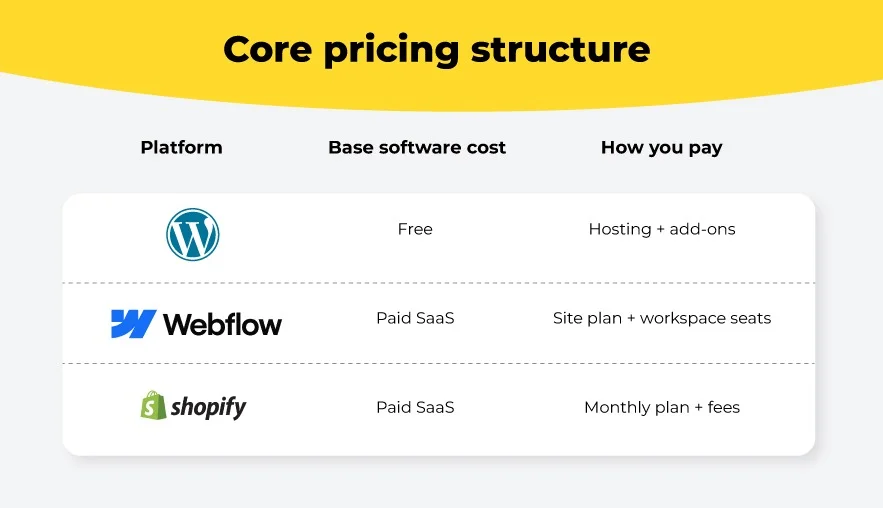
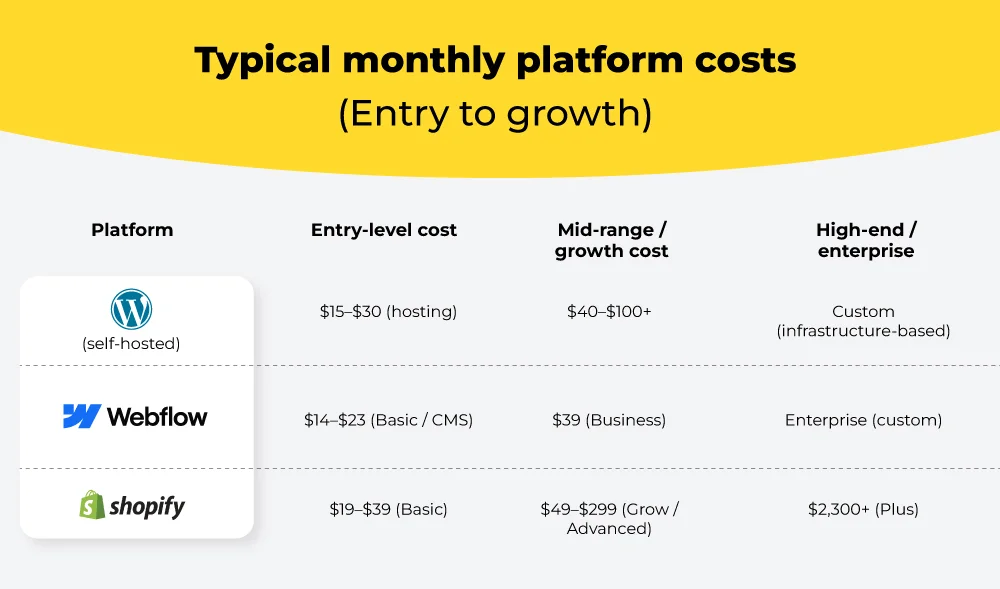
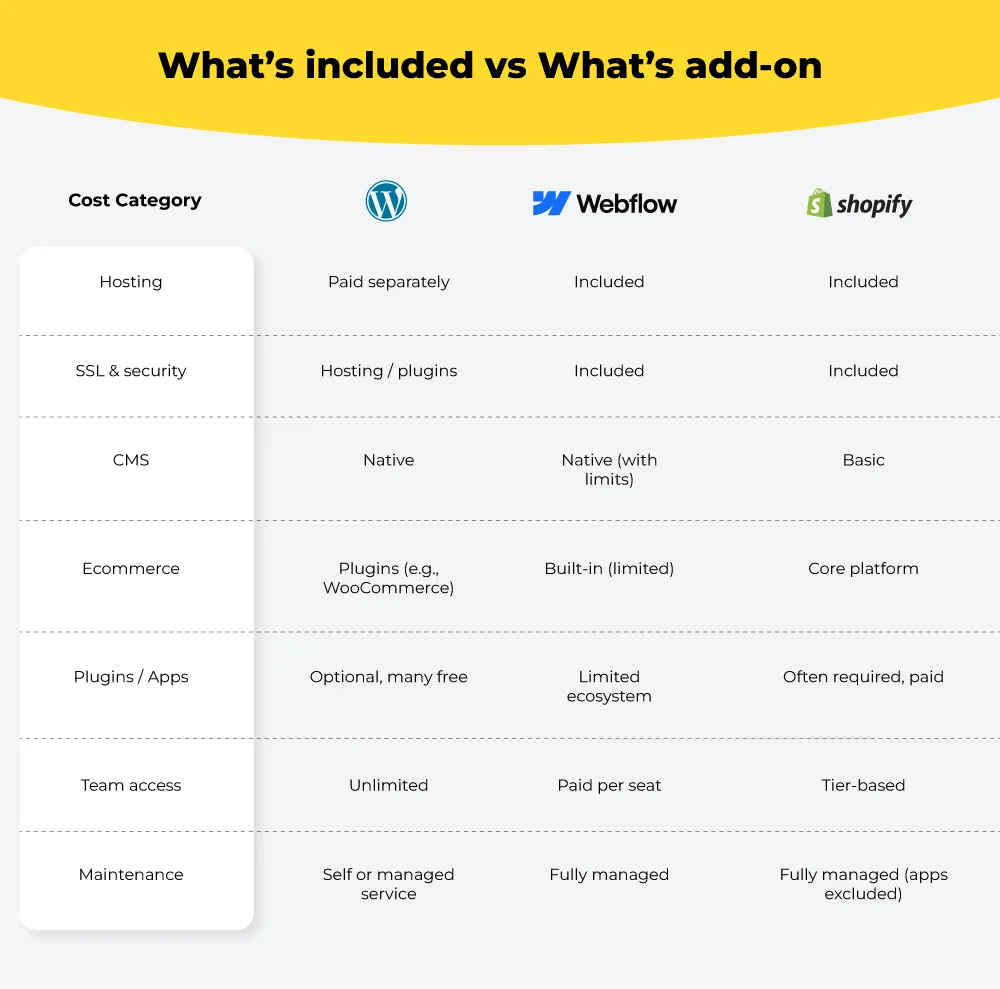
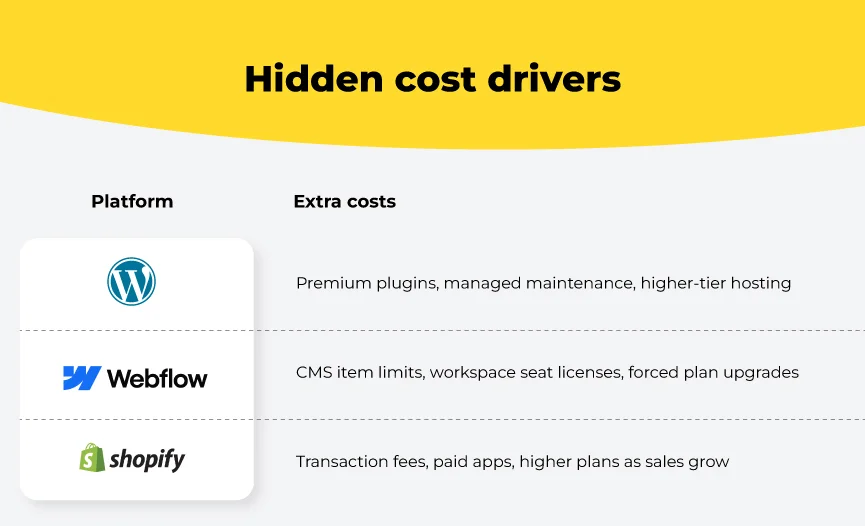
Below is a side-by-side look at how WordPress vs Webflow vs Shopify stack up against one another in terms of pricing:
Core pricing structure
Typical monthly platform costs (Entry to growth)
What’s included vs What’s add-on
Hidden cost drivers
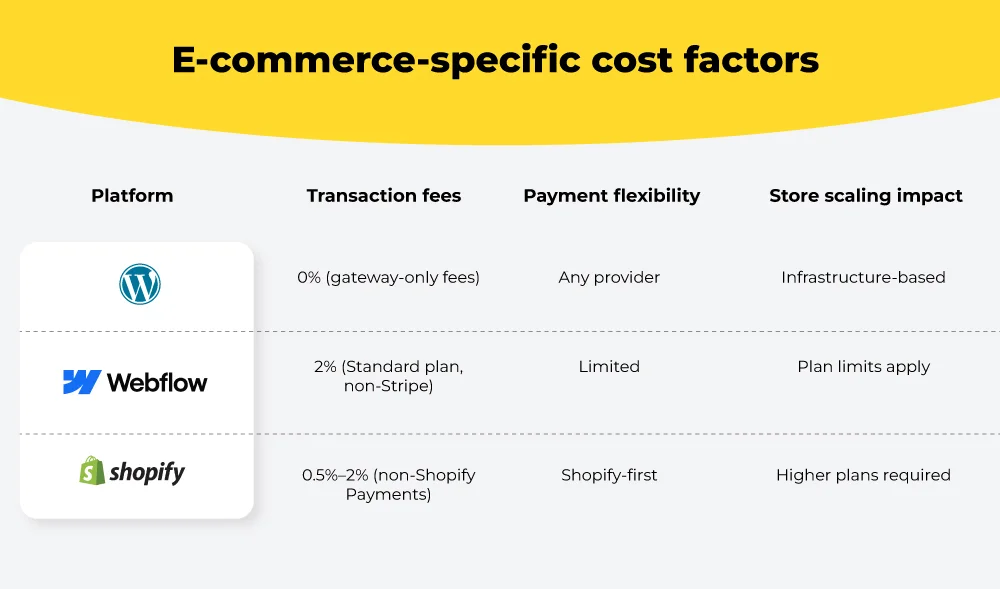
E-commerce-specific cost factors
How WordPress is adapting to AI
1. Writing, editing, and multilingual content
- Blog posts, page sections, and product descriptions in the block editor.
- Rewriting content to adjust tone, clarity, or length.
- Generating summaries, excerpts, and meta descriptions.
- Translating content into multiple languages without exporting it to external tools.
2. Design and site building
- Generating full site structures from a short business description.
- Creating individual sections or landing pages from prompts.
- Image production directly inside WordPress. Automatic resizing, background cleanup, and alt-text generation.
3. SEO and content
- Real-time feedback on keywords, readability, and content structure.
- Automated internal linking suggestions for better crawlability and topical depth.
- Semantic analysis for topical coverage.
4. User interaction and site operations
- Chatbots trained on site-specific content to handle support queries and lead capture.
- Conversational forms that adapt questions based on user responses.
- Proactive monitoring for performance issues, uptime anomalies, and suspicious login behavior.
How Webflow is adapting to AI
1. Site generation
- Webflow’s AI site builder can generate a responsive website from a short set of inputs about your business.
2. Design workflow
- It can generate new page sections on demand.
- Those sections automatically inherit your site’s existing styles.
- Repetitive layout and structure work is handled without design inconsistency.
3. Copy and CMS content
- Generating page copy that matches the site’s tone and structure.
- Refining existing text without leaving the editor.
- Creating CMS Collection items using structured prompts.
4. Accessibility, SEO, and AEO Audits
- Identifying missing alt text, meta titles, and descriptions.
- Flagging accessibility gaps across pages.
- Highlighting SEO and Answer Engine Optimization (AEO) opportunities.
5. Full-stack web apps
- Generate and refine application logic.
- Connect apps to CMS data and site variables.
- Customize layouts visually.
- Deployment to a custom domain through Webflow Cloud.
How Shopify is adapting to AI
1. Writing product and marketing content
- Drafting product descriptions, emails, blog posts, and page copy within the admin.
- Generating headlines, email subject lines, and marketing variations.
- Producing SEO-friendly content without switching tools or pasting text from external apps.
2. Store setup and design
- Automating initial store setup based on business type and industry.
- Recommending themes and layouts as per the audience.
- Generating a usable starting point that merchants can refine rather than build from scratch.
3. Merchant support and guidance
- Answering merchant questions about store performance and setup.
- Suggesting design or content changes.
- Helping automate workflows and surface insights from store data.
4. Images and visual assets
- Background removal and image cleanup.
- Visual enhancements without external design tools.
- Faster iteration on product imagery within the platform.
5. Customer experience and FAQs
- Suggesting FAQ questions based on store content and customer behavior.
- Drafting answers that merchants can review and publish.
- Conversational AI (currently rolling out) that can respond to customer questions beyond static FAQs.
6. Marketing, personalization, and operations
- Personalized product recommendations for upsells and cross-sells.
- Targeted marketing suggestions based on customer behavior.
- Automated meta title and description generation for SEO.
- Sales trend analysis to support inventory and planning decisions.
Our take on this is:
No matter what your feelings about AI technology in web development are, AI literacy will be critical in the near future. Those who understand and effectively use it will likely lead the next wave of web development innovation.
Fortunately, WordPress, Webflow, and Shopify are all on board with rapidly advancing developments in AI and using them to support your business needs.
Which platform to choose for your AI-powered e-commerce store? Here’s what we think:
Which platform scales better for AI-powered e-commerce: Shopify or WooCommerce?
WordPress vs Webflow vs Shopify: Which one should you choose?
Choose WordPress if:
- Your business growth depends on SEO, high-volume publishing, or complex content structures.
- You need custom workflows, structured content, or CRM/LMS-style systems.
- You refuse to be “locked in” and want absolute control over the data and server environment.
- You’re planning CRO testing, custom data flows, or AI-driven personalization.
Webflow is your platform if:
- You’re a marketing team that need to build immersive, high-end visual experiences without a developer bottleneck.
- You want managed hosting without worrying about servers or plugins.
- Your site is marketing-led: campaigns, landing pages, interactive portfolios, and boutique product showcases.
Choose Shopify if:
- Your website’s primary job is selling products.
- You need speed-to-market, a battle-tested checkout, and a comprehensive retail ecosystem from day one.
- You are ready to trade deep design flexibility for a “set and rest” infrastructure that handles traffic spikes and security automatically.
- You prefer using an established marketplace of apps to solve problems rather than building custom code from scratch.
More resources from Mavlers
- From blog to app: Why WordPress makes a surprisingly good backend!
- When Webflow met Foxy: The power of integrating custom checkout with Webflow’s e-commerce capabilities
- The ultimate guide to Webflow component variants for designers and marketers
- How to place badges, reviews, and guarantees in your Shopify store to increase website trust