Lifecycle marketing
 Customer data management
 Email campaign production
 Search marketing
 CMS development
 Who we are
 How we work
 Case studies
 Testimonials
 Salesforce Marketing Cloud
 Braze
Braze HubSpot
 Marketo
 Pardot
 DataBricks
 Snowflake
 HighTouch
 RudderStack
 Segment by Twilio
 Videos
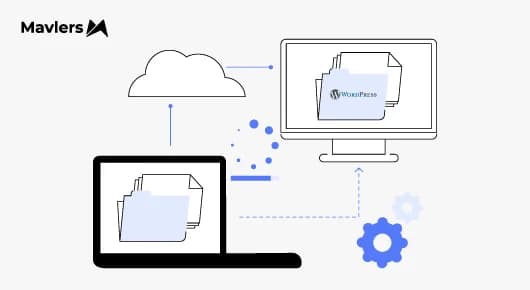
So, every web dev professional is privy to the fact that migrating a website is never just about moving files from Point A to Point B.
Anyone who’s actually lived through a migration knows this instinctively. It’s more of a structural shift that ripples across SEO, performance, user experience, analytics, and, often overlooked, how teams work with the site day to day.
In 2026, this will matter more than ever.
To call a spade a spade, digital ecosystems have grown messy.
What might have begun as a simple website often evolves into a patchwork of platforms.
One might begin with Wix for early pages, or Squarespace for marketing experiments.
Over time, they might choose to move to Shopify or Magento for e-commerce, Webflow for design-heavy initiatives, and sometimes even Drupal or Joomla for powering legacy sections.
Each CMS might make sense initially, but when used together, they might introduce friction.
That’s why more businesses are taking a step back, looking at the sprawl, and making a deliberate move to consolidate, most often into WordPress.
Not because WordPress is fashionable, but because it remains the most flexible, scalable, and future-ready content management system when implemented thoughtfully.
So, whether you’re planning a Wix-to-WordPress migration, moving commerce from Shopify or Magento, or transitioning complex structures from Drupal or Joomla, this expert-backed guide is designed to help you plan a modern, SEO-safe, and sustainable move, without illusions or shortcuts.
Why so many roads lead back to WordPress?
Let’s get one thing out of the way, WordPress isn’t magical.
What it is, though, is forgiving.
It is forgiving of growth, of change, and of the fact that most businesses don’t evolve in straight lines.
In 2026, that’s going to be the real differentiator.
When teams consolidate into WordPress, it’s rarely because WordPress does something no other CMS can do. It’s because WordPress refuses to lock you into a single way of working.
You have the freedom to start simple, grow complex, and may choose to centralise or decentralise. Also, you can layer workflows without rebuilding the foundation each time.
That kind of flexibility holds importance when you’re migrating from multiple systems, not just one.
SEO teams love the control. Clean URLs, predictable content structures, and metadata you can reason about. Performance teams understand that optimisation is something you design, not negotiate with the platform.
Engineering teams appreciate that the system is transparent, so you can see what’s happening, fix what’s slow, and replace what’s fragile.
Even though cost behaves more honestly, there’s no licensing cliff, and the expenses grow with complexity, not ambition.
Is WordPress perfect? Of course not. But it’s steady. And after a few years of CMS musical chairs, steadiness starts to look very attractive.
Pre-migration checklist (Before migrating to WordPress)
Every smooth migration we’ve seen shares one trait, it was decided before a single file was moved.
This phase doesn’t feel productive on the surface. There are no visible changes or shiny previews. But it’s where migrations succeed quietly.
A technical and content audit is where reality sets in. You take inventory of what actually exists, not what you think exists. Pages, posts, media, custom content types, forms, integrations, and forgotten sections that still attract traffic. This is also where you decide what not to migrate, which is just as important.
An SEO audit runs in parallel. You identify ranking URLs, high-value pages, backlink-heavy assets, metadata patterns, and current URL structures. This audit becomes your blueprint for preserving equity during the migration.
Performance audits establish a baseline for Page speed, Core Web Vitals, and mobile performance, because without this data, you’ll never know whether the migration truly improved anything.
Security and access preparation come next in the pipeline.
Credentials, admin access, API keys, and hosting permissions should be synchronized before work begins, and not discovered mid-migration.
Backups deserve their own moment of seriousness. It’s important to have not just one backup, but multiple backups, stored independently. So if something goes wrong, recovery should be boring, not heroic.
A staging environment is something that’s non-negotiable. Migration work belongs where mistakes are private.
Finally, having a redirection plan in place that ties everything together makes sense, mapping old URLs to new ones intentionally and, hopefully, not guessed after launch.
This single document often protects more SEO value than any plugin ever will.
After the migration ~ Where the real work quietly begins
Launch day feels like a relief. However, it shouldn’t feel like victory.
Because what matters now isn’t whether the site is live, it’s whether it behaves.
Content needs to be right, not just present. Forms need to submit where they’re supposed to. Search needs to return sensible results and integrations need to fire quietly, without drawing attention to themselves.
SEO takes a breath here. Redirects are tested, indexation is watched, not forced and rankings wobble, as they always do. The signal you care about is whether they recover with dignity.
Performance work finally becomes honest and real traffic reveals real bottlenecks.
Caching is tuned, images are corrected, and hosting proves whether it was chosen thoughtfully or optimistically.
Design issues surface on devices that haven’t been tested thoroughly enough. Accessibility gaps reveal themselves, not as compliance theatre, but as usability friction. Analytics is either trusted or rebuilt.
And then, slowly, the site settles. That’s when you know whether the migration worked.
Migration by CMS platform (How each one actually behaves on the way out)
Every CMS leaves differently.
Some pack neatly, some drag their feet, while some slam the door and pretend they never knew you. If you go in expecting them all to behave the same, WordPress won’t save you, judgment will.
- Drupal to WordPress
Drupal doesn’t resist the move. It just demands respect.
The data itself usually migrates cleanly with tools like FG Drupal to WordPress or CMS2CMS. Content types map sensibly. Users and media follow along without much drama, and on paper, it looks reassuring.
Where people stumble is assuming Drupal’s logic will come with it. Views don’t migrate. Custom modules don’t magically reappear. They have to be rethought and, often, rebuilt more simply in WordPress. Custom fields need deliberate handling, usually via ACF, not guesswork.
The best Drupal migrations don’t try to recreate Drupal. They take what Drupal did well and leave the rest behind without guilt.
2. Joomla to WordPress
Joomla is polite, but opinionated.
Articles, categories, users, media, all move over fairly smoothly using migration plugins or even manual exports for smaller sites. That part rarely causes heartburn.
What does cause pause is layout thinking. Joomla’s module positions don’t translate cleanly into WordPress’s world, so menus and page structure often need to be rebuilt by hand. If the site uses K2, slow down; that content needs extra care.
Nothing here is fragile, but nothing is automatic either. So, one may expect a bit of furniture rearranging.
3. Wix to WordPress
Wix doesn’t want to let go. At all.
Blog posts trickle out through RSS, usually in limited batches. Pages don’t export; they’re rebuilt. Media gets downloaded manually. Wix apps stay behind, and you replace them one by one with WordPress alternatives.
Some tools help, but none that eliminate the work. A Wix to WordPress migration is hands-on by design.
That said, once you’re free, it’s immediately obvious why you bothered. Control comes back. Flexibility returns. The site stops feeling like it’s behind glass.
If you’re wondering how to move a Wix website to WordPress, the honest answer is, slowly, deliberately, and with realistic expectations.
4. Squarespace to WordPress
Squarespace is courteous.
Blog content migrates cleanly via its built-in WordPress export. Posts, authors, and images usually land where they should, and that part feels refreshingly civil.
Pages and custom layouts don’t survive the trip and need to be recreated. E-commerce data also needs separate handling, which often surprises people who assumed it would “just work.”
This migration is easiest when content matters more than recreating the exact look and feel.
5. Shopify to WordPress (WooCommerce)
This one isn’t really about the CMS, it’s about the business.
Products, customers, and orders migrate reliably using services like Cart2Cart or LitExtension. The mechanics are fine, but the consequences are not.
Customer passwords don’t migrate, that’s non-negotiable. Payment gateways and shipping rules need a fresh setup, order history must be carefully checked, and redirects matter more here than anywhere else, because revenue pages don’t get second chances.
Treat this like an operational change, not a “site move,” and it goes smoothly. Treat it casually, and you’ll feel it in sales.
Some common mistakes to steer clear of!
This is the part no one brags about on launch day, but it’s where migrations quietly succeed or spectacularly unravel.
Trusting a single backup
If you have one backup, you effectively have none. You must have files, a database, and a restore point you’ve actually tested. Anything less is optimism, not preparation.
Migrating when your site is busiest
Moving a site mid-peak is like renovating a café during the lunch rush. Even if nothing breaks, the experience suffers, and users remember friction longer than polish.
Forgetting redirects (or doing them halfway)
URLs change, and that’s completely fine. However, not telling search engines and users where things moved is not. Broken links and lazy redirect chains bleed trust and rankings faster than most people realize.
Treating migration as the finish line
Getting to WordPress is the move, while making it fast, stable, and efficient is the real work. Performance tuning isn’t optional; it’s how the site earns its new home.
Launching and walking away
Traffic drops rarely announce themselves loudly. They creep. Rankings wobble before they fall. Post-launch monitoring isn’t paranoia, it’s basic stewardship.
Avoid these, and your migration doesn’t just work; it settles in, holds, and grows.
The road ahead
On that note, in case you want to know more about insuring WP security, we recommend reading ~ How to Maintain WordPress Security in 2025: The New Rules of Protection.