Lifecycle marketing
 Customer data management
 Email campaign production
 Search marketing
 CMS development
 Who we are
 How we work
 Case studies
 Testimonials
 Salesforce Marketing Cloud
 Braze
Braze HubSpot
 Marketo
 Pardot
 DataBricks
 Snowflake
 HighTouch
 RudderStack
 Segment by Twilio
 Videos
Speed and intuitiveness have become the bare minimum in eCommerce. Not taking Shopify performance optimization seriously is like leaving money on table.
Yet far too many online stores treat speed and smooth navigation as extras, rather than necessities.
Because think about it–you know that exact instant when you click on a page, and it just doesn’t load… the carousel is spinning, the video won’t load, and you’re tapping your fingers, thinking, come on, really? Yeah, that. That’s exactly what your shoppers feel every time your online store refuses to match the modern online purchasing experiences.
And boy, shoppers act decisively on bad web experiences:
- 53% won’t wait more than three seconds.
- Nearly 40% have abandoned carts worth over $100 because the site couldn’t keep up.
- 88% of users simply won’t return after a bad experience.
And although one might see Google’s search algorithm fixated on ranking factors, it cares most about helping visitors find answers without frustration. That’s why Shopify site performance is stitched tightly into user experience—both for buyers and everyone building those experiences.
And while Shopify stores are faster than most—up to 2.4x quicker than competitors, optimizing them for optimal performance is not always as straightforward as people would have you believe. The fact remains that every theme, app, video, or feature adds invisible weight.
At Mavlers, we often see how adding bells and whistles often leaves user-friendliness behind. And yet, we’ve also seen the opposite. Seemingly incremental improvement is site performance have had a huge impact on converting window shoppers into customers—and ultimately bringing in more revenue.
In this post, we’ll show the advanced Shopify performance optimization tips and tools to your Shopify store fast, intuitive, and resilient under pressure.
Advanced Shopify optimization tips: speed, core web vitals, and UX
Ecommerce sites are complex ecosystems that grow richer and more feature-filled as brands scale—often at the expense of speed, warns Shopify’s data science manager, Javier Moreno.
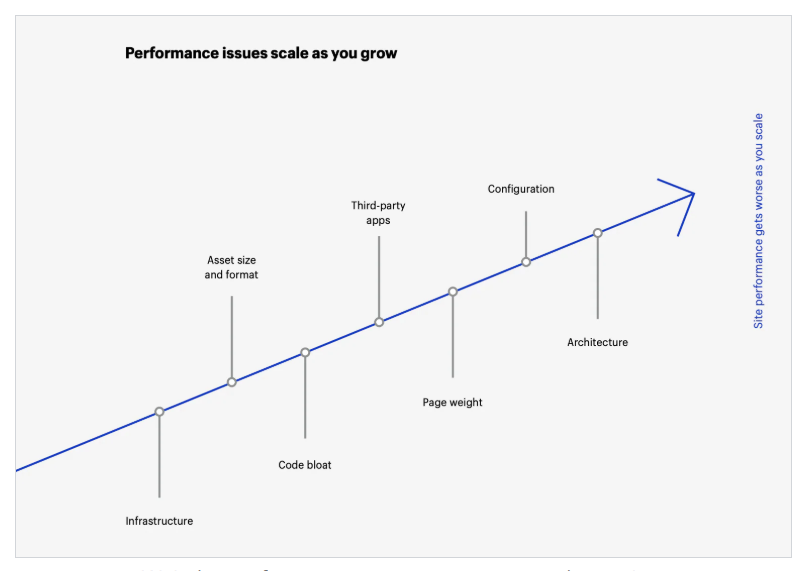
A slow-loading, jittery, or unresponsive store is frustrating. And a lost sale? Yes, that too. Google sends traffic to stores that offer visitors a good page experience. Web performance optimization that optimizes user experience (and SEO!) is, therefore, survival.
And it’s measurable through three metrics called Core Web Vitals that are directly experienced by real users:
- Largest Contentful Paint (LCP): Loading speed
How fast the largest visible element of web page content (image, heading, or content block) appears on visitors’ screens. It shapes shoppers’ perception of your Shopify store’s loading speed.
Slow LCP usually comes from large images, heavy scripts, or server delays.
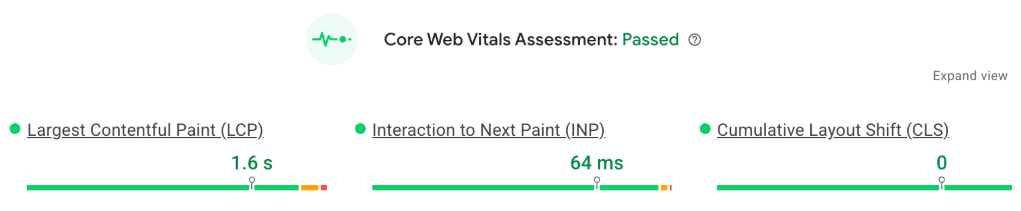
- Cumulative Layout Shift (CLS): Frustration
How much the page content shifts (Layout shifts) while your website loads. Low CLS keeps your layout stable and your visitors calm.
Layout shifts usually occur when an image or ad appears without a reserved space, a cookie banner pops up, a webfont replaces the fallback font, or an animation moves elements around.
- Interaction to Next Paint (INP): Responsiveness
How quickly your site responds to clicks or taps. It means the time it takes the browser to display the next frame after an interaction. Too much JavaScript or unnecessary apps can tank this metric.
Here’s how the values of Core Web Vitals are categorized:
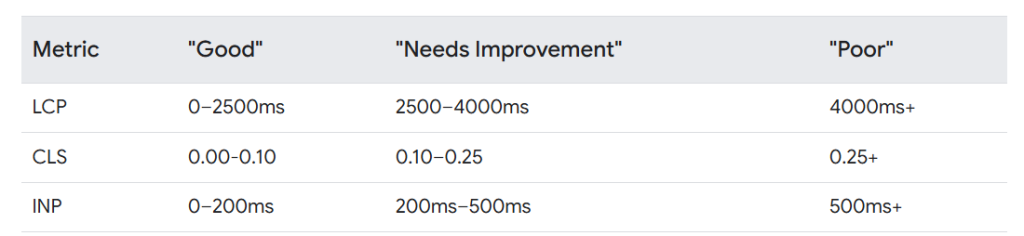
Optimizing these Core web metrics improves both user experience and Google rankings, keeps visitors engaged, and increases the likelihood they’ll buy.
Google’s own research shows that when a site meets Core Web Vitals standards, users are 24% more likely to stay on the page, reducing abandonment during loading.

How to align your Shopify store for optimal web performance
1. Start with a lightweight, optimized theme
Your theme is your foundation. A bloated theme with unnecessary animations or too many page sections can bog down performance. Shopify’s Horizon family and Online Store 2.0 themes are already built for speed, but many third-party themes can slow the page load time.
Pro tip: Test your Shopify site’s performance before and after enabling animations or extra sections.
We always advise our clients that a theme that’s clean, fast, and easy to navigate beats one loaded with bells and whistles. In fact, we’ve seen homepage bounce rates drop by more than 40% simply by switching to a more streamlined theme.
2. Optimize images and videos
Images can make up 50–75% of your page weight. Large, uncompressed images are the most common cause of slow Shopify stores.
Practical steps:
- Compress images without sacrificing quality (TinyJPG, TinyPNG).
- Use Shopify’s built-in image size parameters to serve the right file size.
- Implement lazy loading for below-the-fold images and videos. Only load what’s visible when the user scrolls.
From our experience working with clients, implementing lazy-loading for images has been a game-changer for stores with massive product catalogs.
Videos are trickier. Standard YouTube embeds load heavy scripts before play, slowing the page. Instead, use lite embeds: load a thumbnail first, and only pull in the video when clicked.
3. Audit apps and third-party code
Every app you install can add extra JavaScript and CSS, potentially slowing your site and hurting INP.
Review your apps regularly. Remove any that don’t deliver real value. Also, check your tag manager for redundant tracking scripts. ”
4. Streamline JavaScript and CSS
Excessive scripts block browsers from rendering your page quickly. Minify, combine, and defer non-critical scripts using async or defer attributes. Only load essential scripts per page. This reduces render-blocking, improves LCP, and makes your store feel snappy.
5. Use Shopify’s built-in performance tools
Shopify already has some functionality that improves Shopify store speed:
- Global CDN (Cloudflare): Fast content delivery worldwide.
- Automatic image optimization: WebP support and compression.
- Gzip compression and file minification: Smaller CSS, JS, and HTML files.
- Browser caching: Repeat visitors load pages almost instantly.
Get more insights on AI automation for Shopify with our blog—AI for Shopify stores: Practical ways to automate, personalize, and grow your business
6. Reduce redirects and fix broken links
Redirects slow your store by adding an extra HTTP request. To avoid the redirect chain, use 301 cacheable redirects.
Broken links also create unnecessary server calls. Tools like Broken Link Checker can help you clean up your store and improve SEO.
7. Rethink pop-ups, hero sliders, and quick view
- Pop-ups: Use sparingly. Too many can slow page loads and distract visitors. Trigger them only on exit intent or after a delay.
- Hero sliders: Large multi-image sliders may look flashy but kill speed. Limit to 1–3 slides or replace with a single high-quality hero image.
- Quick View: Convenient, yes—but preloading all product data for multiple items can tank performance. Test if your visitors even use it; if not, consider removing it.
8. Optimize mobile experience
Mobile users are often on weaker networks. Autoplay videos, heavy carousels, or unoptimized images can create delays.
Shopify’s Shop Pay speeds up checkout on mobile, boosting conversion rates by nearly 2x. AMP (Accelerated Mobile Pages) can also double mobile engagement and increase conversions by ~20%.
9. Keep Liquid loops efficient
Liquid is powerful, but repeated loops searching through large collections can slow your site. Audit theme code for redundant loops, and simplify where possible. A single product.options_with_values loop can replace multiple heavy iterations, freeing up speed for your pages.
10. Test, monitor, repeat
Shopify performance optimization is far from a one-time task. To identify bottlenecks:
- Use tools like Shopify’s Web Performance reports, Google PageSpeed Insights, or Hotjar click maps.
- Track Core Web Vitals, monitor load times, and continuously remove unnecessary bloat.
- Run tests from various locations and devices to spot bottlenecks early.
- If you’re using third-party themes or complex apps and need help, Shopify Partners and experts can audit and optimize your store comprehensively.
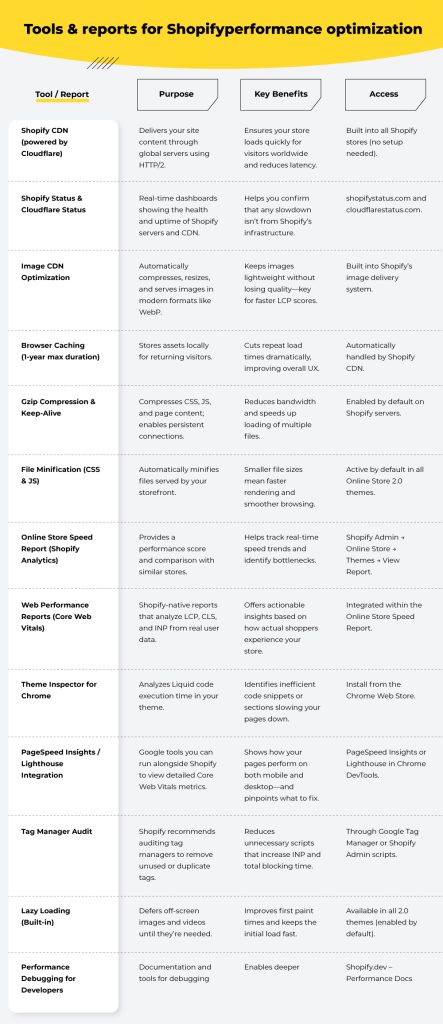
Tools & reports for Shopify performance optimization
The road ahead
Even though platforms like Shopify give your ecommerce brand tools to shine, they only go so far without ongoing Shopify performance optimization. In case you’d like to read almost all that there is to know about Shopify Plus, we’ve put together