Lifecycle marketing
 Customer data management
 Email campaign production
 Search marketing
 CMS development
 Who we are
 How we work
 Case studies
 Testimonials
 Salesforce Marketing Cloud
 Braze
Braze HubSpot
 Marketo
 Pardot
 DataBricks
 Snowflake
 HighTouch
 RudderStack
 Segment by Twilio
 Videos

So, you’ve designed a beautiful store, the kind that would make Dieter Rams raise an eyebrow and mutter, “Not bad.”
The animations hum.
The CMS collections are pristine.
The client is delighted.
And then the penny drops and stirs up the proverbial hornet’s nest.
The client emails, “We need subscription billing. Also multi-currency. And tax logic across five regions. And custom shipping rules. And, oh, can we use our existing processor?”
Suddenly, Webflow’s native e-commerce, apt as it is for small catalogues, feels like a polite dinner guest who freezes when asked to discuss politics.
This is the moment Webflow developers learn two truths:
- Webflow is an exceptional design platform.
2. It is not an exceptional checkout platform.
And that’s usually the moment someone whispers, “Have you looked at Foxy…?”
Not as a miracle cure.
Not as the hero of the story.
But as the quiet, competent side character who knows how to do the hard math without complaining.
This is the story of that partnership, unromantic, reliable, and occasionally a lifesaver.
In today’s edition of unfiltered, honest, developer-to-developer, cognac-fuelled banter, you can expect to dive into;
~ what Foxy.io actually is
~ how Webflow + Foxy.io works
~ Webflow custom checkout limitations
~ how to set up a Foxy.io checkout (overview, not tutorial)
~ benefits and tradeoffs
~ costs involved
~ real community sentiment (Reddit & Webflow Forum)
~ alternatives (Square integration, Shopify Buy Button, etc.)
And finally, who should actually use this setup?
On that note, let’s set this one rolling!
Understanding the need for this conversation
While Webflow has never pretended to be Shopify, it has also never pretended to be WooCommerce!
It is, first and foremost, a visual development environment built for front-end elegance, CMS-driven experiences, design-driven teams, rapid prototyping, and custom site architecture.
Its e-commerce offering, while solid for simple setups, still lives inside this design-first worldview.
This means that you get beautiful product pages, good customization, and adequate native checkout.
But the moment you need anything outside the intended boundaries, such as custom processors, unusual fulfillment logic, advanced tax rules, external inventory systems, subscription flexibility, or multi-step cart flows, you hit the edge of the map.
This is where alternative checkout ecosystems enter the room.
Webflow is beauty incarnate.
But beauty alone doesn’t manage cart logic.
Where Foxy saunters in the ballroom like the perfect suitor ~ Not flashy, not famous, but thoroughly competent!
Foxy.io is not the kind of platform that you discover through a flashy YouTube ad or TikTok influencer wearing a hoodie with a discount code.
It’s the platform you hear about from a senior developer who has been doing e-commerce since PayPal buttons were considered cutting-edge, or a freelancer who has survived one too many “custom checkout” disasters, or even a technical architect who prefers stability over noise.
Foxy is, in many ways, Webflow’s opposite.
When Webflow is elegant, visual, expressive, and aesthetic, Foxy keeps up the balance by being practical, invisible, backend-loyal, and functional.
So, when you wire up Foxy to Webflow, it feels like sneaking a high-torque engine under a vintage convertible.
Want custom fields?
Done.
Subscriptions?
Naturally.
Multi-currency?
Please, something harder.
Inventory for oddball products that have 11 attributes and an optional add-on that triggers conditional logic?
Foxy does not flinch.
And the beauty of it is this: Foxy doesn’t touch your design. Webflow remains your serene temple of layout perfection.
Foxy waits in the background, sleeves rolled up, ready to handle what commerce requires.
There’s a certain grace to that division of labor.
A certain old-world charm.
A recognition that not everyone has to be everything, they just need to be exceptional at their half of the dance.
The slow dance ~ Why these two fit so damn well!
There’s something elegant about two tools that don’t compete for the same spotlight.
Webflow says, “I’ll give you unparalleled control over your front-end. Want to make a product page feel like a French montage? Be my guest.“
Foxy replies, “I’ll handle the calculation of taxes in three currencies while you do that.“
Webflow lays the table.
Foxy cooks the meal.
You get beauty where beauty matters ~ the interface.
And, power where power matters ~ the checkout.
This is the division of labor we should be teaching in business schools.
Native Webflow checkout limitations that developers struggle with
While Webflow might have set the tone and stage for being one of the best visual design tools for crafting pixel-perfect stores, the moment you want to extend its native e-commerce, reality hits:
1. Limited payment gateway options
Webflow supports mostly Stripe and PayPal, and if you’re in India, the UAE, Africa, Southeast Asia, or LATAM…
The Webflow Forum is filled with variations of:
“How do I integrate Razorpay / Paystack / Paytm / Flutterwave / etc.?”
Looking for the short answer, well, you can’t natively.
This is where the need for a third-party payment gateway setup in Webflow begins.
2. Checkout fields are rigid
Developers often want GST/VAT fields, multi-step forms, additional customer inputs, custom donor fields, delivery instructions, and B2B fields (Company name, Tax ID, PO number).
Native checkout doesn’t allow full customization.
3. No multi-currency logic beyond Stripe’s managed setup
4. Limited subscription and membership controls
5. No complex cart logic
Such as bundling, buy X Get Y, complex shipping rules, role-based pricing, and wholesale pricing.
6. Webflow’s ecommerce payment gateway flexibility is low
Especially when compared to Shopify, WooCommerce, BigCommerce, etc.
So developers started asking, “If Webflow can design anything, why can’t its checkout be as flexible?”
That is where Foxy.io flips the game and turns the tables!
How the integration actually works
So, this is where many Webflow Forum threads converge, because developers want clarity on the actual workflow.
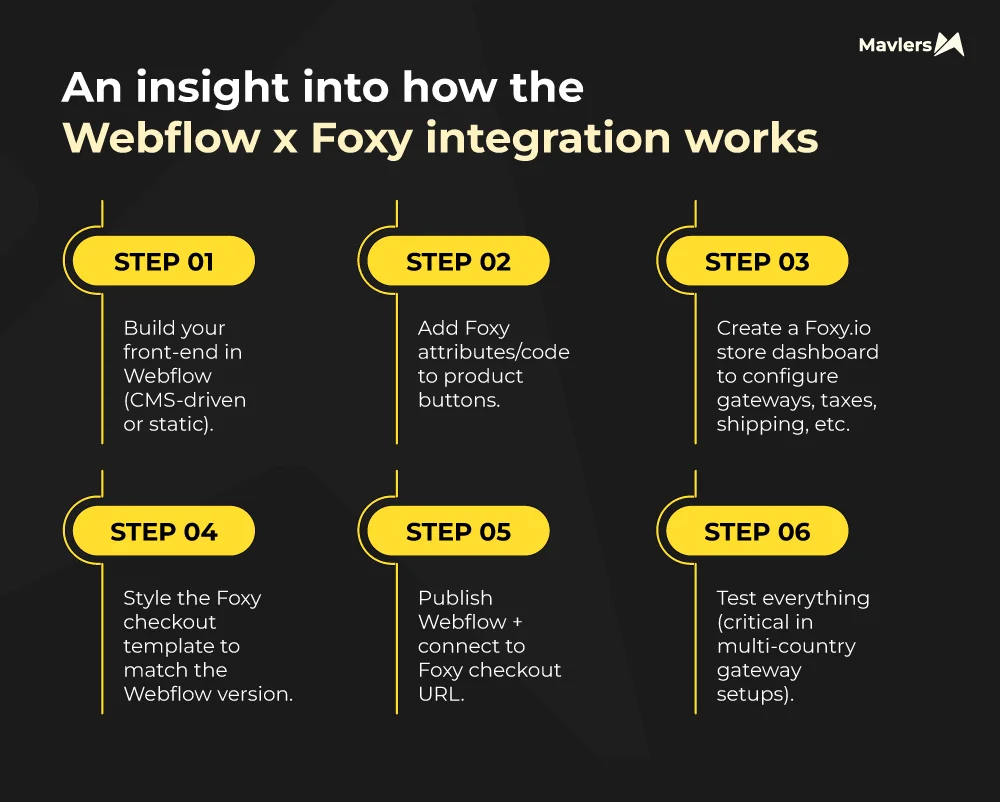
Here’s the simple version:
Step 1 — Build your front-end in Webflow (CMS-driven or static).
Step 2 — Add Foxy attributes/code to product buttons.
Step 3 — Create a Foxy.io store dashboard to configure gateways, taxes, shipping, etc.
Step 4 — Style the Foxy checkout template to match the Webflow version.
Step 5 — Publish Webflow + connect to Foxy checkout URL.
Step 6 — Test everything (critical in multi-country gateway setups).
This is commonly referred to as a Webflow third-party checkout setup.
It’s important to note that you’re not using Webflow’s built-in e-commerce CMS.
You’re using Webflow CMS with Foxy’s “product data via attributes” approach.
Developers love this because, first, it keeps Webflow light; second, you avoid Webflow’s e-commerce transaction fees; third, you get absolute freedom and can integrate ANY gateway Foxy supports.
This is why many call it the Webflow custom checkout solution.
Where Webflow native e-commerce ends (Gracefully!)
To be fair, Webflow’s e-commerce is perfectly fine for boutique shops, small product catalogs, low-complexity fulfillment, minimal tax rules, and simple single-currency setups.
But it stops being cute when clients ask for:
- Subscription flexibility
So, if the client needs varying subscription models, such as weekly, bi-weekly, custom intervals, or even hybrid models, Webflow’s native e-commerce may politely decline. In contrast, Foxy is happy to pick up the tab and provide receipts.
2. Custom payment gateways
If there is a need for regional processors, Braintree add-ons, Authorize.net, or anything beyond Stripe/PayPal, with Webflow, the path will be restricted, whereas with Foxy, the more the merrier!
3. Complex shipping logic
Need tiered, conditional, per-product, or region-specific shipping logic? With Webflow, the playground can be limited, and with Foxy, you can bring your weirdest shipping rules.
4. Advanced tax scenarios
While Webflow is best for vanilla setups, Foxy can help you paint the town red with multi-regional VAT, hybrid exemptions, and ensure compliance with industry-specific rules.
5. Multi-step checkout flows
With Webflow’s native e-commerce, there is just one path to love, whereas with Foxy, your imagination can run riot!
So, Webflow is like a beautiful Japanese chef’s knife, which is perfect for most tasks, but not meant to split a lobster.
On the contrary, Foxy brings the cleaver.
An insight into the costs involved
Let’s pour a fresh inch of truth into this glass and talk about what these platforms actually cost when you put your credit card where your ambitions are.
Because nothing ruins a great design or a great checkout faster than a surprise line item on your invoice.
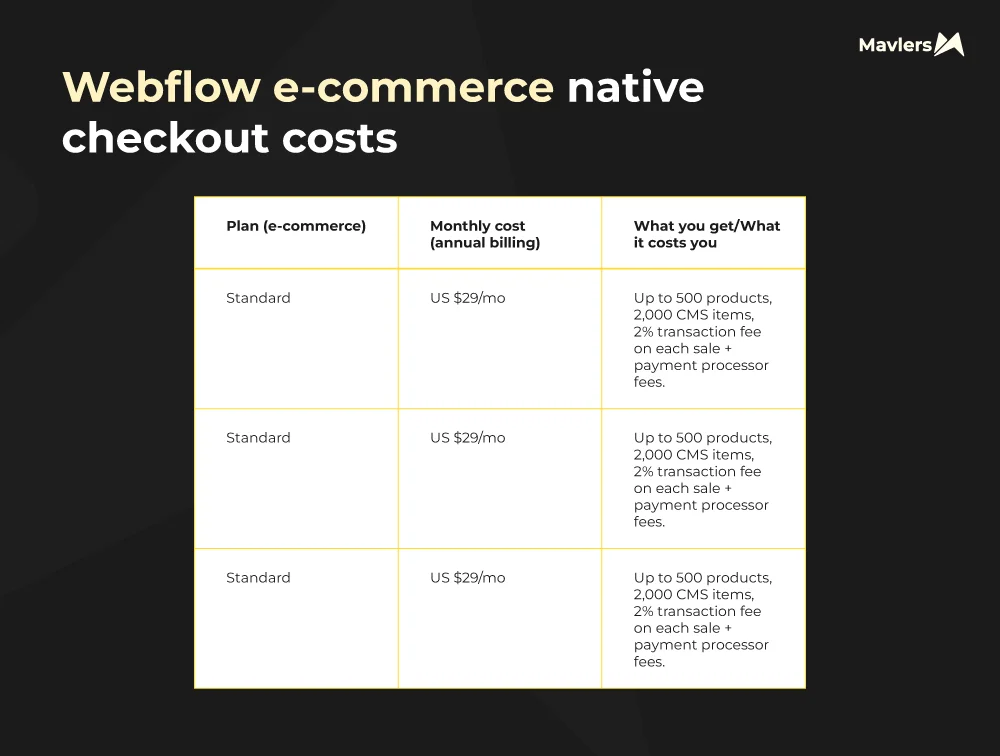
Let’s now take a look at some hidden costs that might show up.
~ Payment gateway fees still apply (Stripe, PayPal, etc.).
~ If you need anything beyond basic checkout logic, e.g., custom payment gateway, subscriptions, complex shipping, or tax rules, Webflow’s native checkout hits its limits. Then you’re stuck with either workarounds or a platform migration.
On that note, let’s switch over to Foxy.io’s costs.
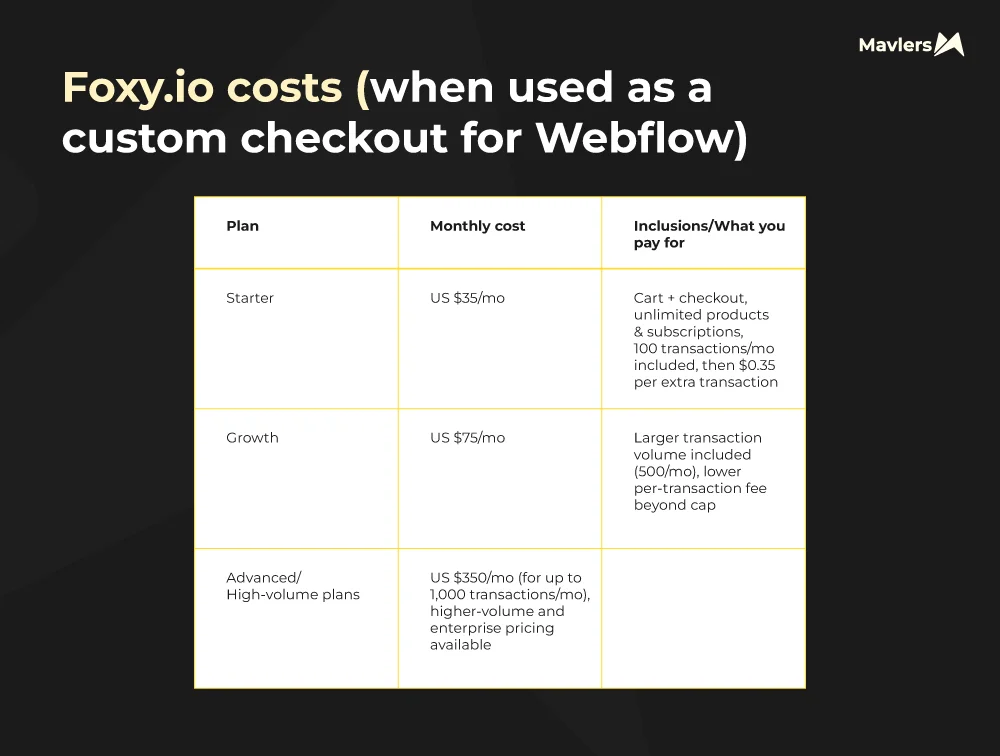
Here are some important caveats that you might want to take note of;
~ Foxy does not absorb payment gateway fees. You still pay Stripe, PayPal, or any other payment processor separately.
~ There’s setup and maintenance overhead: mapping Webflow CMS data or product data into Foxy’s structure, embedding its checkout or cart scripts, configuring gateways, testing flows (especially for subscriptions, multiple currencies, etc.).
~ Using Foxy means managing two dashboards (Webflow for site + CMS; Foxy for orders/checkout), which adds operational load.
So, if your store is simple and low-volume, Foxy’s base cost might seem higher than Webflow’s native cost. But if you anticipate volume, custom logic, or non-standard payment flows, Foxy gives the flexibility you cannot buy inside Webflow natively.
Decoding the undercurrents ~ The community sentiment amongst the Redditors
If you spend enough late nights wandering through Reddit threads and Webflow Forum discussions, a pattern starts to emerge, the kind of pattern that shows up only when hundreds of developers across many years quietly agree on the same things.
Here’s the real, enduring, cross-platform sentiment about Foxy, the stuff that keeps repeating no matter which thread you open or what year the post is from.
But first, the love letters;
~ Foxy’s support team
Developers repeatedly mention, unprompted, that Foxy’s support is unusually responsive. The kind of support where someone actually reads your message, understands your use case, and treats your oddball checkout idea like a solvable challenge rather than an inconvenience.
~ It’s steady and reliable
Foxy has been around for well over a decade, and that kind of longevity shows. People trust it the way you trust a car that’s survived 300,000 miles without drama.
~ Gateway freedom, which is a big deal internationally
This comes up a lot. Webflow’s native gateway limitations are a deal-breaker for many non-US stores, and Foxy solves that with a shrug and a “Which gateway do you want?”
~ Checkout customization that feels almost unfair
Developers love that they can turn checkout into whatever the project demands, donations, subscriptions, bundles, custom logic, conditional fields, you name it.
~ Plays nicely with Webflow CMS
This is another recurring praise thread. Foxy doesn’t fight Webflow’s CMS… it partners with it.
~ Perfect for non-standard business models
Memberships, ticketing, subscriptions, multi-step flows, and scenarios where Webflow’s native e-commerce politely bows out.
And because no grown-up relationship is perfect, here’s where developers hesitate or push back!
~ “Will my client understand this dashboard?”
This is one of the most common worries. Foxy isn’t hard, but it’s definitely more toolbox than toy store. Some clients thrive while others panic.
~ Setup can take real dev time
Not everyone wants to hand-craft a checkout experience. Some people want plug-and-play convenience, and Foxy is not that.
~ Maintenance questions
A few developers wonder: Will a non-technical client be able to maintain this? Should I hand this off? Should I offer a retainer?
~ When growth gets serious, should you just move to Shopify?
This debate appears in almost every “Webflow vs Foxy vs Shopify” thread. Shopify remains the default large-scale e-commerce platform for a reason.
~ Cost stacking concerns
Multiple developers note that Webflow hosting, Foxy subscription, and payment gateway fees can feel heavy if the store is small and simple.
After enough scrolling, you’ll notice the same verdicts popping up like a chorus:
~ If you need a custom gateway on Webflow, Foxy is the best option.
This conclusion is practically universal.
~ If the store grows large and e-commerce becomes core to the business, Shopify is often the safer long-term ecosystem.
~ But for design-first brands, boutique shops, and anything unconventional, Webflow + Foxy remains unbeatable.
Developers love the freedom. Clients love the design. And everyone sleeps at night knowing the checkout won’t break when they add a weird product variation.
How Foxy performs versus the alternatives ~ The suitors who also made it to the ball!
Let’s bring out the velvet smoking jackets and talk grown-up shop.
Foxy vs Shopify
Shopify is the charismatic billionaire, charming, polished, and utterly unwilling to let you decide where the furniture goes.
While Foxy is the quiet, capable spouse who says,
“We can arrange the furniture however you like. Also, I refinished the dining table while you were out.”
Shopify can overpower your design.
Foxy never will.
Foxy vs Snipcart
Snipcart is flexible.
Foxy is flexible and mature.
Snipcart is a great solution for simple stores.
Foxy handles the stores Snipcart, which would politely decline.
Foxy vs Stripe Checkout
Stripe Checkout is a beautiful, controlled environment, like shopping at an Apple Store.
Foxy is like having a private Apple Store with a key to rearrange the shelves.
Stripe defines the flow.
Foxy lets you define the flow.
Foxy vs Webflow Native Ecommerce
This battle is unfair.
Native ecommerce is designed for novice-level simplicity.
Not complexity, enterprise logic, or strange product configurations.
Foxy is for the developer who looks at Webflow’s native options and whispers,
“Adorable. No, really. But I need a few more gears.“
So, who is this marriage really benefiting?
If your client says any of the following sentences, reach for Foxy without hesitation:
“We need subscriptions.”
“We want custom shipping rules.”
“We have multi-currency customers.”
“Our products need conditional logic.”
“We want to sell anything inside Webflow CMS.”
“We want a custom checkout that doesn’t feel template-locked.”
“We need advanced discount rules.”
“Our store requires specific tax handling.”
If none of these apply, and the store is simple?
Then Webflow native ecommerce might be all you need.
But if even one of them rings true?
Foxy earns its recommendation the way the best tools always do, by solving real problems without drama.
In summary, this Webflow x Foxy confluence is not for beginners, dabblers, or people who want drag-and-drop commerce without ever touching a line of code.
This pairing is for people who appreciate design precision, logic that isn’t allergic to complexity, owning their data and front-end completely, and a checkout that doesn’t need to be “pretty,” just perfect.
It’s for the grownups in the room, the designers, developers, founders, and oddball polymaths who need beauty on top and muscle underneath.
The final pour
So, while Webflow is the Parisian apartment you dream about, replete with the tall windows, soft lighting, and perfect molding, Foxy, on the other hand, is the key to the building’s basement. The one with the fuse boxes, boilers, secret tunnels, and industrial-grade equipment that actually runs the place.
Webflow handles romance.
Foxy handles the engineering.
Webflow handles the date night, Foxy pays the mortgage.
There is no competition here.
Webflow is the showroom, the glossy front-end, the story, the feeling, the UX ballet.
Foxy is the operational heart, the billing, the rules, the logic, the global money-moving engine that doesn’t get nervous when you push it.
Together, they create something neither can be alone.;
A beautifully crafted, technically capable e-commerce system that feels human, stable, and trustworthy.