Lifecycle marketing
 Customer data management
 Email campaign production
 Search marketing
 CMS development
 Who we are
 How we work
 Case studies
 Testimonials
 Salesforce Marketing Cloud
 Braze
Braze HubSpot
 Marketo
 Pardot
 DataBricks
 Snowflake
 HighTouch
 RudderStack
 Segment by Twilio
 Videos
Back in May 2024, when we shared AI-Driven Innovation: Seven Game-Changing Tips for WordPress Users, AI still felt like a shiny toy in the dashboard. Something fun to play with, but you weren’t sure it would stick.
Fast forward to the end of 2025, and AI has transformed everything about how WordPress sites are built, managed, and optimized. The tools have matured, integrations deepened, and workflows redefined.
We’ve spent months using AI in real WordPress workflows—testing generative AI’s impact on content creation, SEO, and automation within WordPress ecosystems.
This blog distills what we’ve discovered—practical ways to
- Integrating Gen AI into WordPress responsibly and effectively.
- Tools that really deliver.
- What to watch out for as AI becomes the new normal in WordPress management.
Three primary ways to integrate AI tools in WordPress
More than 1400 AI plugins have taken root in WordPress workflows, but to make them work, you first need to understand the routes you bring AI into your WordPress setup.
Here are the most common ways if you are wondering how to integrate Generative AI into WordPress workflow. Each offers different benefits based on your needs, technical skills, and goals.
1. WordPress plugins
If you’ve been running a WordPress site for a while, WordPress plugins are probably your first stop. Adding WordPress Gen AI is no different. You install one, activate it, and the WordPress editor starts offering smart suggestions, rewriting options, or product descriptions on its own.
A few names that come up a lot right now are—
- AI Power
- Bertha AI
- AI Engine
- WP AI CoPilot
They cover an impressive range of functionality, such as content creation, chatbot engagement, image creation, SEO optimization, and WooCommerce product management.
And some plugins embed AI functionality as Gutenberg or Classic Editor blocks or buttons. By which you can get AI-driven suggestions, rewrite content, or trigger automation with just one click.
The AI capabilities of these plugins integrate with and often make popular SEO tools like Yoast SEO and Rank Math Pro all the more worthwhile to use. The dynamic suggestions for related keywords make it a strong case for improving search rankings and user experience.
In short: these plugins make AI feel like another built-in feature of WordPress, not some separate app you forget existed.
2. Standalone tools with WordPress gen AI integration
Then there are the AI tools that live outside WordPress but plug in through an API. They’re better suited for those who want more robust, customizable AI.
The external AI platforms offer advanced generative models that connect to WordPress through API integrations or specialized plugins.
Take CodeWP, for example. It generates snippets and helps automate dev tasks inside WordPress.
Other external AI tools might generate SEO analyses, content drafts, or images that are then imported or synchronized back to your WordPress instance, often via automation tools.
It’s a bit more setup work. But it certainly gives you room to experiment and customize how deep AI runs in your stack.
3. Built-in AI from WordPress or hosting providers
Some platforms have stopped waiting for third-party tools and built AI directly into their products. AI functionality embedded directly within WordPress themes, page builders, or hosting platforms is one such emerging avenue.
Elementor now includes its own AI assistant, Angie. It can edit visuals, tweak copy, or even run quick promotions. Hosting providers like Cloudways are adding AI features too—their Co-Pilot monitors server performance and suggests fixes before something breaks.
You don’t have to install or configure much. The trade-off is that these built-in tools can be limited compared to standalone AI setups, but they get the job done fast.
Wondering which WordPress AI builder suits you best? Check out our blog comparing the Top 5 AI Builders for WordPress.
How WordPress Gen AI automation helps to improve workflows
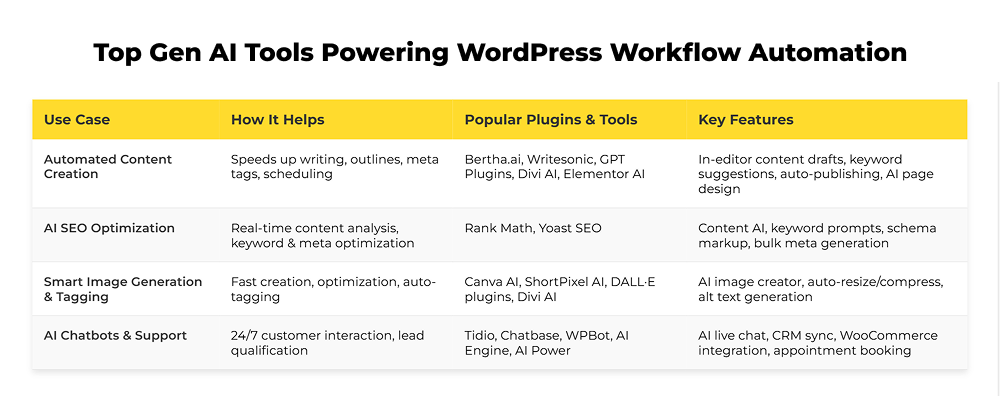
1. Automated content generation and publishing
Sustaining the practice of consistent publishing is a grind in its own way. Ideation, writing, formatting, and scheduling—all have to happen on time for the publish button to be hit on time.
When you automate WordPress content with AI, much of that creative-to-publish cycle without removing the human voice.
How to automate WordPress content with AI:
Bertha.ai, Writesonic, and GPT-based plugins are now integrated in the WordPress editor. You can ask them for a topic, an outline, or a full blog post with built-in keyword suggestions. They’ll also draft meta descriptions, and excerpts. Will it even suggest AI-powered internal linking in WordPress? Absolutely.
If you use Uncanny Automator or WordPress Cron Job, you can take it further—schedule posts to publish automatically on set days. No dashboard visits, no manual uploads.
Inside page builders, Divi AI and Elementor AI do the same for design. Divi AI can build full layouts of web pages from a short prompt —complete with text, code, and images. Elementor’s AI sits inside its widgets, so you can write or rewrite an on-brand copy without leaving the builder.
2. AI-fueled SEO optimization
SEO used to mean checking boxes. Now with AI, it feels more like working with a second brain. The job of these AI tools? Analyze content in real-time, suggest improvements, and implement fixes automatically.
How it works:
Rank Math and Yoast SEO both bring AI into the optimization process. Rank Math’s Content AI module gives you prompts for keyword ideas, headings, and schema. It can bulk-generate meta tags and multilingual descriptions for large sites.
Yoast SEO keeps things simple. It features AI-driven meta descriptions and titles, and provides editing advice for optimal keyphrase use inside premium plans.
These plugins, inside the post editor, continuously monitor your content’s SEO health and surface actionable insights as you write. There is no need to jump between tabs or tools.
You get a smart SEO assistant that watches your back while you write — one that knows Google’s latest signals and can make SEO adjustments in seconds.
3. Smart image generation and tagging
Good visuals take time—and often, too much of it. Sourcing, editing, resizing, tagging… all tiny tasks that add up.
How it works:
Now tools like Canva AI, ShortPixel AI, and DALL·E plugins handle that chain of work. Type a short description—“clean WordPress dashboard mockup,” “tech-themed hero image”—and you get something ready to drop into a post.
Canva’s Magic Media and Text-to-Image apps handle generation and resizing automatically.
ShortPixel AI takes over compression, converts images into lighter formats, and writes alt text based on what it sees.
Divi AI even creates or extends images to fit your layouts without breaking design consistency.
4. AI-powered chatbots and customer support in WordPress
When visitors land on your WordPress site, they expect quick answers. But answering every question in real time is maddeningly exhausting.
This is where AI-driven chatbots like Tidio come to the rescue.
How it works:
If you’re familiar with ChatGPT, imagine having a similar AI assistant trained specifically on your website content. This leads to more natural, engaging conversations. Which can boost sales, handle support tickets, or simply guide visitors effectively.
Plus, these bots get smarter with each interaction, improving the experience over time. No need to be available 24/7—your chatbot has it covered.
AI bots can:
- Answer FAQs, even complex ones.
- Qualify leads by interacting naturally.
- Book appointments or collect contact data.
- Sync conversations with CRMs.
Take Tidio, for example.
Setting up Tidio on WordPress is painless—no coding required. Install it directly from the WordPress plugin directory, and a live chat widget appears on your site. Control chat and automation settings right from your WordPress dashboard.
Tidio uses WordPress shortcodes to show or hide chat on specific pages and can sync visitor data with registered user accounts for personalized support.
For WooCommerce shops, Tidio adds special powers—support agents can view shoppers’ carts, order histories, and send product cards directly via chat.
Other leading AI chatbots for WordPress are:
- Chatbase: Easy to use and works across platforms. It stores your content as “truth” for chatbot answers, handles multiple content types, and allows some pre-training for better responses.
- WPBot: Lets you embed AI chat flows directly into WordPress for everything from product discovery to demo bookings.
- AI Engine and AI Power plugins also offer robust chatbot creation options inside WordPress, though they may require some technical know-how.
Expert insights: Key caveats in AI automation for WordPress
- Avoid plugin overload. Seasoned developers recommend limiting your plugin stack. Overloading leads to slower performance, conflicts, and complex troubleshooting. Choose multifunctional, reliable AI tools that align with your core workflows.
- Guard against AI hallucinations. Take AI-generated content as a draft, not a final product. Always apply rigorous human review to ensure factual accuracy, brand consistency, and legal compliance before publishing.
- Prioritize data privacy and compliance. With rising regulations like GDPR, it’s critical to adopt AI solutions that transparently handle user data. Maintaining consent records, and providing secure data storage are also non-negotiable.
- Keep AI as a tool, not a crutch. Automation expedites repetitive tasks, but creative control and strategic decisions must be human-led to preserve brand voice and originality.
- Start small with AI. Industry veterans suggest piloting AI use on targeted, low-risk tasks before enterprise-wide deployment to measure impact and adjust without disrupting workflows.
- Plan for integration complexity. Harmonizing AI with existing WordPress ecosystems requires workflow automators like Uncanny Automator, and careful testing to avoid interruptions.
- Have strong editorial oversight. Experts agree that effective AI use depends on ongoing human input—tuning tone, fact-checking, and adapting content to evolving user intent.
- Don’t neglect core SEO fundamentals. AI tools aid optimization but should supplement—not replace—best practices around metadata, internal linking, and structured data.
- Customize AI tools to fit your site. Rely on detailed configuration of AI triggers, content limits, and automation triggers to optimize effectiveness and user experience.
- Invest in training and change management. Leading agencies emphasize educating content teams, developers, and reviewers on responsible AI use, ensuring ethical practices and consistent quality.
- Avoid overusing AI for idea generation. True creativity emerges from human insight. Use AI as a kickstarter after initial brainstorming to keep your content authentic and innovative.
The road ahead
Still on the fence, wondering why WordPress generative AI matters? Then, our detailed guide on Coffee, Code, and Automation: Making WordPress Management Effortless with AI may help you gather more facts and make sound decisions.