Lifecycle marketing
 Customer data management
 Email campaign production
 Search marketing
 CMS development
 Who we are
 How we work
 Case studies
 Testimonials
 Salesforce Marketing Cloud
 Braze
Braze HubSpot
 Marketo
 Pardot
 DataBricks
 Snowflake
 HighTouch
 RudderStack
 Segment by Twilio
 Videos
Honestly, every business owner, marketer, or web designer eventually hits that frustrating fork in the digital road:
“Should we go all in on Webflow’s SEO tools or take the manual SEO route?”
It’s a fair question and not an easy one. While everyone wants better rankings, faster load times, and traffic that actually converts, not everyone has the same team setup, budget, or appetite for deep technical dives.
We’ve built, optimized, and babysat enough websites to know that both Manual SEO and Webflow SEO can lead to phenomenal results, just in different ways. So today, let’s have an honest conversation about both, minus the jargon and the marketing fluff.
Understanding the ground reality ~ What manual SEO really means
If Webflow SEO is like cruising in a Tesla, manual SEO is more like driving a stick shift on a winding mountain road, exhilarating for those who know what they’re doing, exhausting for those who don’t.
Manual SEO means you’re handling every aspect of optimization yourself, such as meta tags, sitemaps, redirects, schema, server response times, and canonicalization. No safety rails, no “auto-optimize” buttons.
But here’s the thing, when you do it right, it’s pure power.
Here’s why manual SEO still has its loyalists.
~ You own every pixel and parameter
Well, for starters, you’re in complete control. Want to set up a custom schema for thousands of dynamic pages? Fine-tune caching and CDNs for global delivery? Or even tweak your robots.txt logic by hand? You can. Manual SEO gives you the freedom to push boundaries, experiment, and achieve precision that automated systems rarely match.
~ Perfect for complex architectures
If your website serves multiple languages, handles large databases, or relies heavily on programmatic content, manual SEO can be your best friend. Automated platforms, even the smart ones, often hit a wall when asked to handle custom logic or unique indexing patterns.
~ Advanced technical edge
From structured data testing to server-side redirects, manual SEO allows deeper experimentation and micro-optimizations that can make a massive difference at scale.
But the other side of the coin still needs to be considered.
Simply put, manual SEO isn’t romantic all the time. It’s more like maintaining a vintage car, which is beautiful, powerful, but high-maintenance.
- It’s time-consuming because every change demands deliberate effort.
- It’s not beginner-friendly. You’ll need technical SEO expertise or at least someone who speaks fluent “robots.txt.”
- It’s expensive at scale. Developer time, SEO work, and maintenance hours can add up quickly.
So yes, manual SEO gives you absolute control. But it also means you’re constantly wearing multiple hats of a developer, strategist, and mechanic.
Exploring Webflow SEO ~ a smarter shortcut (when used right!)
To put it simply, if manual SEO is driving a race car, Webflow SEO is hopping into a sleek Tesla with Autopilot engaged.
Webflow’s entire ecosystem is designed to eliminate friction, especially for non-technical users. You get an SEO-friendly foundation the moment you publish, replete with clean semantic HTML, HTTPS, responsive design, fast hosting, lazy loading, and a global CDN out of the box.
But that’s just the surface.
Let’s explore the real perks of Webflow SEO optimization.
~ SEO-ready from the start
Webflow generates lightweight, semantic code that’s easy for search engines to crawl. You don’t have to worry about bloated scripts or messy HTML that drags your performance down.
~ Visual control (Without the code overload)
Want to edit meta titles, descriptions, or alt text, you just need to click and type. You can manage your entire Webflow SEO setup visually without FTP access or plugin chaos.
~ Built-in technical SEO wins
SSL certificates come built in automatically.
Canonical tags are included, XML sitemaps are auto-generated, and 301 redirects are a few clicks away.
These small automations save you hours of grunt work, especially when you’re running multiple projects or managing a content-heavy site.
~ Webflow CMS equals scalable content powerhouse
The CMS lets you structure and publish SEO-friendly content at scale. For blogs, case studies, or product listings, it’s gold. Each CMS item automatically follows your global SEO rules, meaning your editors don’t have to touch code to keep things optimized.
We will now explore the limitations of Webflow SEO.
Honestly, Webflow SEO tools are powerful, but they’re not omnipotent. There are still limitations that seasoned devs and SEOs bump into:
- You can’t always control every server-level setting.
- Handling multilingual or region-based content can be tricky.
- Advanced schema logic (such as nested structured data or conditional markup) still requires custom embedding.
That’s why most of us Webflow devs say, Webflow SEO handles 85–90% of what most businesses need beautifully. For the rest, a touch of manual customization bridges the gap.
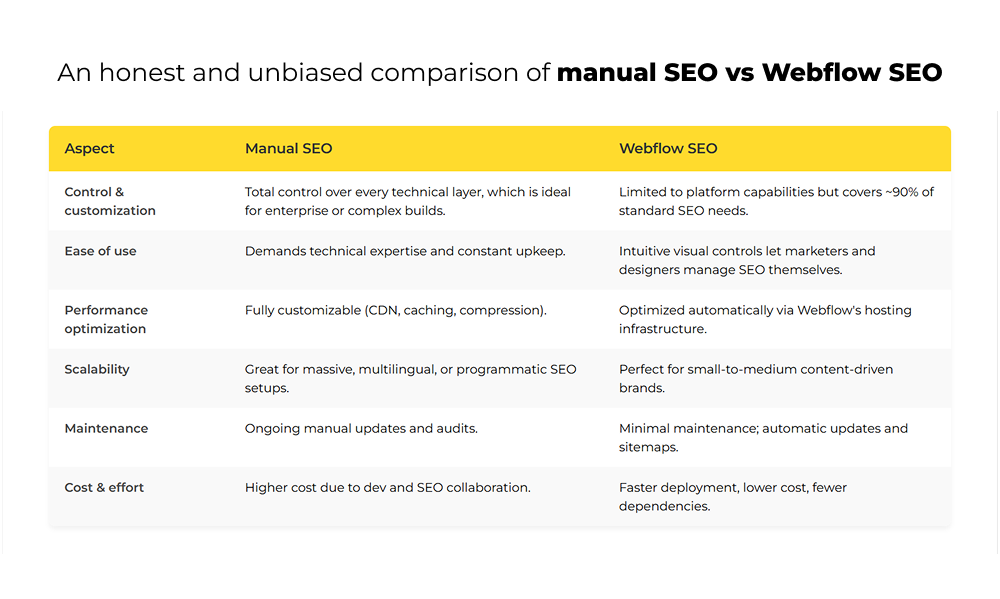
Manual SEO vs Webflow SEO: An honest comparison
Here’s what it looks like when you pit both approaches against each other in day-to-day use:
Who should pick manual SEO?
You should lean toward manual SEO if you:
- Run a large or complex site such as enterprise e-commerce, SaaS, or global portals.
- Have dedicated SEO and development teams who can handle custom architecture and audits.
- Need advanced technical configurations, like headless CMS integrations or intricate structured data logic.
- Want to squeeze every last ounce of performance out of your hosting environment.
Manual SEO gives you complete autonomy, but it’s a commitment. You’re signing up for ongoing optimization, testing, and sometimes, troubleshooting.
So, who should go with Webflow SEO?
If your brand values agility, design freedom, and usability, Webflow SEO is a no-brainer.
Choose Webflow SEO if you:
- Manage a small-to-medium business, agency, or creative studio.
- Want to prioritize content quality, structure, and performance over deep server-level customization.
- Prefer no-code SEO management your marketing team can handle directly.
- Need a solid foundation that grows with you from launch to scale.
Webflow lets you build fast, look professional, and rank decently right out of the gate. And with a few extra touches, like custom schema snippets, content clusters, and proper alt tagging, you can achieve results close to what manual SEO delivers, minus the complexity.
An honest perspective from the trenches
Allow us to tell you about two clients.
The first, a B2B SaaS company who insisted on a fully manual SEO setup. They had complex geo-targeted landing pages, dynamic dashboards, and custom schema logic. It made sense. They had an in-house dev team and the patience for deep optimization.
The second, a fast-growing DTC lifestyle brand, built its site on Webflow. They didn’t have SEO engineers. They just wanted a beautiful, fast site they could update themselves. After we implemented the right Webflow SEO best practices, such as alt tags, internal linking, clean slugs, and dynamic meta fields, they doubled their organic traffic within months.
Neither approach was “wrong.” Each was right for its business model.
That’s the part most people miss. It’s not Manual SEO vs Webflow SEO; on the contrary, it’s Manual SEO for control vs Webflow SEO for convenience and scalability.
Saying hello to a smart hybrid approach!
Truth be told, most successful brands we work with end up using a hybrid model.
They start with Webflow SEO optimization simply because it’s quick, visual, and gets results fast. Then, as they scale, they layer in manual SEO enhancements where it matters:
- Adding custom structured data.
- Fine-tuning server response times.
- Building advanced content logic or programmatic SEO features.
This combo delivers the best of both worlds, combining Webflow’s automation with manual SEO’s depth.
The verdict ~ Deciding which one works best for you?
If you’ve read this far (thank you, seriously), here’s the bottom line:
- Choose Manual SEO if you’re running a large, complex site, have a technical team, and need deep, granular control.
- Go with Webflow SEO if you value design, speed, and ease, and want to manage SEO without juggling developers for every update.
Neither is inherently “better.” They just solve different problems.
For most small to mid-size businesses, Webflow SEO setup is the smarter starting point, which is efficient, affordable, and powerful enough for 90% of SEO needs. Later, if you outgrow it, you can always bring in manual SEO reinforcements.
At the end of the day, SEO isn’t about whether you clicked a setting manually or let a platform automate it. It’s about whether your site helps users find what they’re looking for, fast, cleanly, and beautifully.
Final thoughts from a Webflow dev who’s seen it all
Honestly, if you’re overthinking the “manual vs Webflow SEO” debate, pause. Take a moment to ask yourself what your team can actually manage consistently. Because the best SEO strategy is the one you’ll maintain, not the one you’ll abandon halfway through.
If you start with Webflow, you’re not “settling.” You’re setting a smart, scalable foundation.
However, if you go manual, you’re not “overcomplicating.” You’re future-proofing your infrastructure.
Either way, make sure your SEO is intentional not accidental.
And that’s how you win, no matter what road you take.
On that note, you might want to read ~ The ultimate Webflow guide ~ How to know if it’s the right-fit CMS for you?