Lifecycle marketing
 Customer data management
 Email campaign production
 Search marketing
 CMS development
 Who we are
 How we work
 Case studies
 Testimonials
 Salesforce Marketing Cloud
 Braze
Braze HubSpot
 Marketo
 Pardot
 DataBricks
 Snowflake
 HighTouch
 RudderStack
 Segment by Twilio
 Videos

Model Context Protocol (MCP) is quietly rewriting the rules of how AI meets the real world.
It is becoming the standard that every serious platform is adopting, because it solves a problem that has frustrated marketers and developers for years.
MCP is an open standard, open-source framework that standardizes the way LLMs and other AI systems integrate with and share data with external tools, systems, and data sources. The goal is to enhance customer profiling.
Before MCP, connecting an AI model to your systems meant building one-off integrations. Each took time. Each broke easily. Each slowed your team down. MCP replaces all of that with a single, elegant framework that allows an AI agent to speak to your tools in a common language.
Klaviyo has now introduced its own MCP server. With it, you can:
- Get conversational summaries of campaign, flow, and segment performance.
- Detect performance shifts and receive AI recommendations for instant optimization.
- Describe your flow logic and let the AI generate the structure and filters.
As Klaviyo practitioners and lifecycle marketing specialists, we see this as a major step forward for CRM-driven growth and customer data activation. Let’s take a closer look at how Klaviyo’s MCP Server works and how you can start using it.
Table of Contents
How does the Klaviyo MCP Server work?
Here’s how the Klaviyo MCP Server quietly does the heavy lifting behind every AI-powered task you trigger:
- User prompts the agent: A marketer enters a natural language request (e.g., “Find best campaign RPR and draft a new email”) into the AI client (e.g., Claude).
- Agent reasons and structures: The AI Agent determines the necessary steps and translates the request into a standardized MCP call.
- MCP server receives request: The MCP Server receives the standardized MCP request.
- Server authenticates: The server verifies the client’s identity and permissions using OAuth/API Keys.
- Server translates to API: The MCP Server translates the standardized MCP command into one or more specific Klaviyo REST API calls.
- Klaviyo executes: Klaviyo’s backend executes the REST API commands.
- Data is structured: The MCP Server receives the raw API results and formats them into a clean, simple structure for the LLM to understand.
- Agent completes and acts: The AI Agent receives the data, uses it for reasoning, and sends follow-up MCP commands.
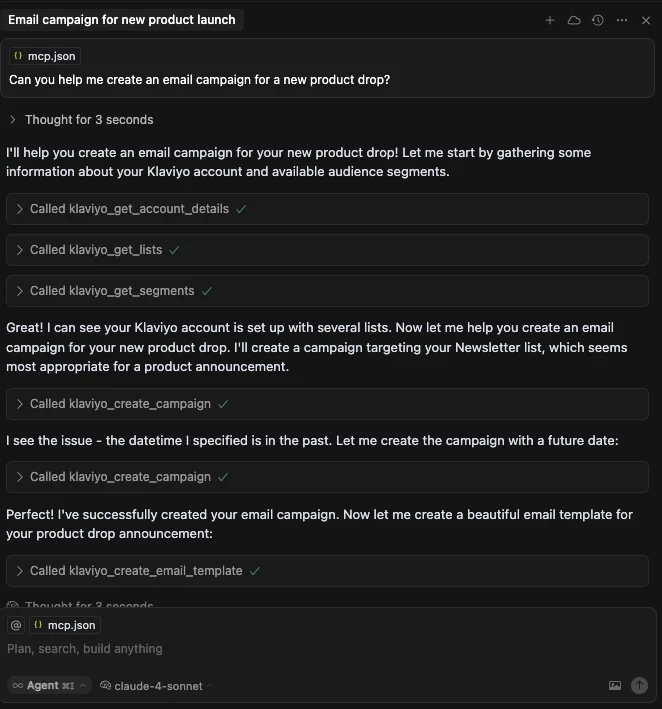
For example, here is an email campaign for a new product launch in Klaviyo.
Source: Klaviyo Developers
The campaign is being set up through Klaviyo. The AI handles the entire setup process — from selecting the right audience list, to creating the campaign, to designing the email template. As more brands deepen their usage of the Klaviyo customer data platform, this level of coordination is quickly becoming foundational.
Related: Klaviyo AI for Email Marketing: Highlights from A First-hand Experience
Where to start with the Klaviyo MCP server?
You should start with the Remote-Hosted Setup. It uses a secure web address and OAuth to connect, meaning your data stays safe without dealing with API keys or code:
- Choose your client: Select a supported AI tool you are already using or want to explore, such as Claude Desktop or Cursor.
- Add the endpoint: In the client’s settings, add the Klaviyo Remote MCP URL.
- Authenticate: Follow the secure OAuth prompts to link your Klaviyo account. This is the only step required to connect your Klaviyo data to the AI tool and begin experimenting with faster customer data activation patterns.
Useful prompts for Klaviyo data automation using MCP
Once connected, your focus shifts from setting up to asking questions that drive revenue. Here are some of the prompts you can use to leverage MCP in Klaviyo:
- “Which of my five flash-sale campaigns in Q3 drove the highest Revenue Per Recipient (RPR) and why?”
- “Compare the conversion rate of the ‘Browse Abandonment’ flow vs. the ‘Abandoned Cart’ flow over the last 30 days.”
- “Alert me to any campaigns this month with a click-through rate drop of more than 15% compared to the previous month.”
- “Suggest three new segments based on my top 10% of customers, focusing on their product category affinity and AOV.”
- “Identify all profiles who have purchased in the last 90 days but haven’t opened an email in the last 30, and add them to a ‘Re-engagement’ list.”
- “Upload this CSV of profiles from our recent event into a new list called ‘Event Leads 2025’ and tag them as ‘High Intent’.”
- “Draft an email subject line and body for a win-back campaign that offers a 15% discount, using the tone and style of my last three top-performing emails.”
- “Create a new Post-Purchase flow that skips customers who already have a subscription, and suggests a related product to all others based on their last purchase.”
Read more: 7 High-converting Automated Klaviyo Flows You Must Create, How to Create & Use A Klaviyo Abandoned Cart Flow
MCP server use case: Claude + Klaviyo
Suppose you want to overhaul your post-purchase lifecycle in Klaviyo and make sure every touchpoint, from transactional emails to long-term loyalty nudges, is running at peak performance. Using Claude through MCP connectors, you can manage the entire audit, planning, and execution workflow without jumping between tools:
- You start by opening a project in Claude and confirming it is connected to the right Klaviyo account as well as your task manager.
- Once the connections are live, you ask Claude to analyze your flows. Claude pulls in the configuration details, performance metrics, delays, branches, and message content, then flags friction points, if any.
- From there, Claude automatically begins generating structured tasks in your task manager. It creates a main section for “Post-Purchase Optimization” and drops in detailed briefs for each gap it identifies. Each task includes the exact trigger to use in Klaviyo, recommended timeline adjustments, flow structure notes, and copy recommendations.
- When you click into the tasks, everything is already organized. Claude breaks complex work into sub-tasks including copy updates, segmentation fixes, design assets, and QA checks, and assigns them to the right team members with timelines.
By the time Claude finishes, you have a fully mapped post-purchase optimization plan: documented findings, cleaned-up briefs, clearly assigned tasks, and deadlines. All that is left is to open Klaviyo and execute what Claude has already thought through.
Considerations before using the Klaviyo MCP server
The Klaviyo MCP Server is a powerful tool, but like any technology, it has practical limitations and important considerations for a user in your position:
- The MCP Server is built on Klaviyo’s APIs, which have strict rate limits. Complex, bulk commands can hit these limits and cause failures or delays.
- The AI model (Claude/ChatGPT) has a limited context window (memory). If you ask it to analyze a very large amount of data, the model may not be able to process everything and will return partial or inaccurate results.
- While secure, you must actively manage the API key scopes or OAuth permissions. Granting the AI client full “write” access (the default for full functionality) means you must trust the AI’s reasoning; a single prompt could launch unintended campaigns.
- The functionality and stability are tied to the external AI client you choose (e.g., Claude Desktop, Cursor). Free versions of these clients may have limits on tool usage or context, affecting the MCP’s performance.
- The server primarily handles data and execution of digital marketing tasks. Complex visual design or creative tasks still require manual intervention.
Creative judgment is still a weak spot, so avoid offloading it completely to AI. Andy King, founder of Email Love, maintains, “I’m less convinced about the content creation side. Personally, I don’t see myself generating email copy through MCP. Email content needs a human touch, and the risk of something feeling generic or off-brand isn’t worth the time saved.”
Besides, even with the Klaviyo customer data platform in the picture, MCP isn’t spotless.
Do your due diligence!
Generally speaking, MCP has its share of hype, and as marketers enter the agentic ecosystem, it’s worth remembering that AI agents are powerful but not perfect.
As this chat between Ryan Donovan and Karen Ng highlights, MCP still needs clearer guidance on authentication, OAuth flows, scope management, and true agent-to-agent communication. And key architectural questions remain unresolved, including whether remote servers should be stateless or stateful, how state should be managed, and how to bridge the OAuth gap between Anthropic’s 2.1 spec and ChatGPT’s 2.0 requirement.
So even with advances in Klaviyo data automation, human oversight remains indispensable. With that in mind, keep these reminders in view when using Klaviyo’s MCP server:
- Use the AI to draft and prepare, but use the Klaviyo UI for final validation and activation.
- Use prompts that encapsulate a multi-step marketing workflow.
- Leverage the official Klaviyo Remote-Hosted MCP or only custom-built servers that are rigorously owned and maintained by your in-house engineering team.
- Try to resist using the chat interface for single, low-value actions you could do faster in the Klaviyo UI or via a simple API call.
Beware of the MCP alarmists. These are often highly technical experts who insist you avoid using MCP for the top-shelf work, yet casually recommend using it for content creation or email copy—as if mediocre creative output is somehow acceptable. The truth is, whether you’re handling technical workflows or creative work, you need to stay sharp and use AI with clear judgment.
Automating customer engagement with Klaviyo MCP: Kicking things off!
The remote MCP server option allows web-based tools like Claude Web to connect seamlessly, removing technical setup friction entirely. This opens access not just to developers but to product managers, marketing operations teams, and content creators. In fast-moving markets like e-commerce, where attention spans shrink and customer behavior shifts quickly, the difference between proactive and reactive databases can be existential.
Klaviyo has been pouring serious investment into AI, and the results are rewriting how fast teams can move from data to dollars. If you want to turn Klaviyo’s new AI capabilities into sharper targeting, faster launches, and revenue you can measure, we can help you make it happen.
You’ll have a team of 15+ certified Klaviyo experts in your corner. Book a call today.