Lifecycle marketing
 Customer data management
 Email campaign production
 Search marketing
 CMS development
 Who we are
 How we work
 Case studies
 Testimonials
 Salesforce Marketing Cloud
 Braze
Braze HubSpot
 Marketo
 Pardot
 DataBricks
 Snowflake
 HighTouch
 RudderStack
 Segment by Twilio
 Videos
We sat down with Allan Heo, founder of For Now Marketing and former Senior CSM at Braze, to talk about what really blocks teams from executing in Braze. (If you missed it, you can watch the full video here.)
Unlike some of our previous conversations with marketing leaders, this conversation wasn’t about best practices or engagement optimization.
It was about those Braze technical challenges that most teams face:
- Campaigns stuck in endless engineering queues.
- Data requests unanswered for weeks.
- Canvases that don’t remain maintainable by the third iteration.
- Powerful features like Content Cards that never get implemented.
At Mavlers, we’ve managed over 2,000 campaigns in Braze and, as certified partners, nothing hurts more than watching such a powerful platform reduced to just a fancy email sender.
So, stay with us as we unpack the technical mindset and execution tactics you need to squeeze every ounce of value from Braze, and ultimately focus on improving Braze campaigns.
The engineering bottleneck: Why data requests sit in backlog (& how to fix it)
Allan pointed out that the biggest blocker for Braze teams isn’t actually technical—it’s that marketers struggle to write detailed technical requirements.
Engineering often deprioritizes Braze requests because the impact isn’t clearly conveyed. Most marketers lack the skills to write tickets with precise data types, trigger points, and business context. Meaningful data ingestion ultimately requires engineering collaboration.
Here are four ways to make your data requests more effective:
- Specify the trigger point. Define precisely where the event fires (checkout confirmation, webhook callback, success API call), because timing and reliability vary by location.
- Include full property details. List property names, data types, formats (e.g., price as integer cents), and whether they’re required or optional.
- Tie the request to campaigns, revenue, or retention impact, and team OKRs so engineering can prioritize based on value, not just tech specs.
- Estimate event volume, define duplicate and null handling, and flag edge cases to ensure robust implementation.
Watch the entire conversation with Allan Heo.
The hidden skill: Why technical marketers are the future of CRM
Allan argued that technical marketers are becoming essential—people who combine creative strategy with execution capabilities around APIs, Liquid templating, and data structures. They’re the bridge between marketing and engineering.
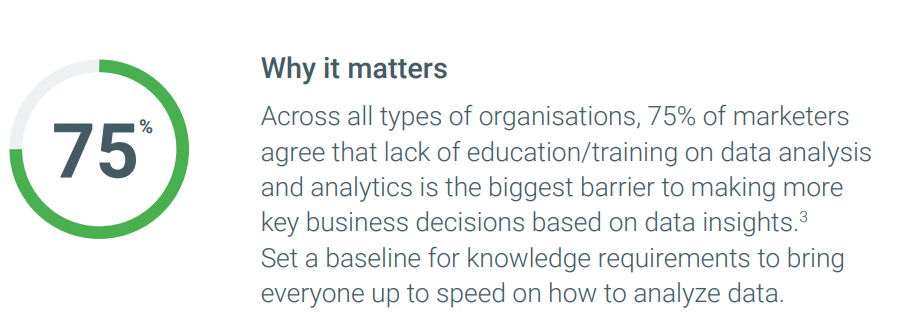
According to Allan, the shift starts with a willingness to learn and curiosity.
Source: Think with Google
Traditional marketers who think “I’m a marketer, I don’t need to be technical” need to evolve. It requires tinkering, experimenting, asking engineers for enablement sessions, and using available resources like YouTube videos and ChatGPT.
How can marketers acquire technical discipline
Below are a few additional insights on how you can become more technically sound while utilizing Braze:
- Get comfortable with conditional logic, date functions, and data structures to build advanced personalization and automation.
- Design journeys that account for real-world scenarios like cancellations, multiple bookings, timing offsets, and data dependencies instead of linear flows.
- Try to learn to connect tools, pass data across systems, and troubleshoot when integrations fail or platforms stop talking to each other.
- Stay curious and continuously ask questions about data, its use, and the ecosystem to drive accountability and better data utilization.
- Seek, if and whenever possible, meaningful consultation with partners who have proven expertise in deploying data assets for improving Braze campaigns.
Watch the entire conversation with Allan Heo.
The Content Cards problem: Why your most powerful channel sits unused
Allan maintained that Content Cards are one of the most underutilized features in Braze. Marketing creates the strategy, engineering implements the SDK container, designers ensure brand consistency, and product manages edge cases and default states. Most teams underestimate this cross-functional lift.
But once implemented, Content Cards give marketing teams product access—they can change copy, images, and CTAs without engineering tickets.
How to collaborate on Content Cards in Braze
To keep momentum and avoid stalls, teams need structure and clarity around how they work together:
- Assign a single project owner to coordinate marketing, engineering, design, and product, keeping momentum and preventing handoff gaps.
- Align teams early with a shared spec covering placement, design, logic, and edge cases to avoid mid-build surprises.
- Start with a minimal version. Launch a basic content card (single placement, simple design, limited logic), and iterate once roles and processes are clear.
- Run a kickoff workshop. Bring teams together to map dependencies, timelines, and blockers, preventing delays caused by scattered communication.
- Start with banners—they’re faster to launch, lighter on design and SDK, and help prove value before scaling to content cards.
Watch the entire conversation with Allan Heo.
The audit nightmare: How to know what’s actually live? (Without opening 200 canvases)
Allan reminded that Braze does not provide a true bird’s-eye view of everything that is live. As a result, teams fall back on spreadsheets, Figma boards, or manual API scripts to track active assets.
Meanwhile, the most advanced teams automate visibility using /campaigns/list and /canvas/list, pulling metadata and scraping HTML to audit live content. They go further by building monitors that alert when canvas volume drops or behaves unexpectedly. Braze provides built-in monitoring for campaigns, but not for canvases.
How to audit live campaigns in Braze
Keeping track of active campaigns is essential for performance and accuracy. Here are five ways to audit live Braze campaigns and Canvases effectively:
- Use the /campaigns/list and /canvas/list APIs to automatically pull metadata (status, last updated, name) into Sheets, Airtable, or an integration tool, and filter for only active assets.
- Pipe API-pulled campaign and Canvas metadata into BI tools such as Looker or Tableau to build a real-time, searchable dashboard.
- Enforce naming conventions and consistent tagging to quickly filter and identify live assets directly within the Braze UI.
- Monitor Canvas performance by pulling /canvas/data_series volume data and setting up external alerts for unexpected drops.
- Maintain a shared source-of-truth artifact (Spreadsheet, Figma, Miro) with a “Status” column (Live, Paused, Draft) that teams manually update.
Watch the entire conversation with Allan Heo.
The data type disaster: Small mistakes that quietly break everything
Data type mismatches usually tend to surface during ingestion, but when engineering changes data formats mid-flight, live campaigns break.
Source: Medium
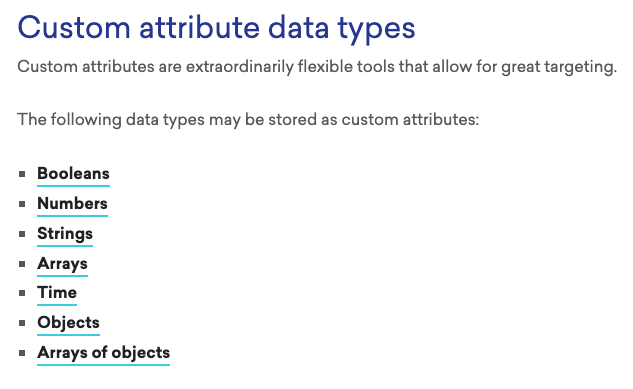
Allan highlighted a common pitfall: passing numbers as strings. Braze supports seven key data types—string, number, boolean, datetime, plus arrays, objects, and arrays of objects. Marketers who understand Braze data types can prevent 90 percent of data issues before they ever reach engineering.
Internalizing Braze data types
Allan emphasized marketers needed to focus, study, and truly understand how data types work. Here are three ways to internalize them with BrazeAI Operator:
- Understand why data types matter—they define valid operations and enable the system to allocate memory and prevent errors.
- Practice declaring and testing basic data types in a code sandbox to see how operations behave differently.
- Lists, arrays, and JSON objects are just organized collections of basic types. The efficiency and allowable operations depend on whether the items are consistent or mixed, so internalizing types means recognizing how they combine to form these larger structures.
Watch the entire conversation with Allan Heo.
Liquid beyond personalization: Utilizing it for logic, formatting, & workarounds
Allan described Liquid as a lightweight scripting language for data transformation, not just name insertion. The real power comes from treating it like a Swiss army knife.
You can use for loops, if/else statements, and string manipulation. It lets marketers handle data transformations without engineering tickets. Moreover, Braze’s AI Liquid builder helps non-technical marketers write scripts faster, although you still need to understand the structure to debug and customize. (Take a look at our dedicated post on Braze AI’s Liquid Assistant.)
Other ways to leverage Braze Liquid logic
Liquid gives you control over how information is displayed, structured, and handled in your messages. Here are some ways it improves clarity and consistency:
- Format raw data into readable text: Use Liquid filters to convert system-stored dates, times, or currencies into clear, region-friendly strings.
- Inject metadata into links: Dynamically add campaign_id, message_name, or UTMs to URLs for accurate external click tracking.
- Enforce text case and length: Use string filters to fix capitalization, apply title case, or trim long inputs so messages stay clean and on-brand.
- Switch images and assets dynamically: Use Liquid to swap image URLs based on custom fields, making it easy to change banners or assets.
Watch the entire conversation with Allan Heo.
The survey gap in Braze: Why feedback doesn’t trigger journeys (& how to fix it)
Allan pointed out that Braze isn’t built for robust survey logic. After all, it’s a messaging platform, not a survey tool. Native Braze surveys are limited to multi-step flows, conditional branching, and detailed response tracking. Third-party integrations like SurveyKit fill this gap with NPS, multi-page surveys, conditional logic, and seamless data passback to Braze. Survey responses then become custom events in Braze that can trigger canvases and enable segmentation by satisfaction score.
How to run customer surveys in Braze
Gathering customer feedback is key to improving experiences. Here are four ways to run surveys effectively in Braze:
- Utilize embedded email surveys with link aliases and Canvas by tracking button or image clicks and logging responses as custom attributes via a Canvas User Update step.
- Link to external survey tools like Typeform, SurveyMonkey, or Qualtrics, and push response data back into Braze using APIs, webhooks, or server-side sync.
- Deploy simple surveys through in-app messages or Content Cards, and log button clicks directly as custom events or attributes.
- Send users to a Braze-hosted survey landing page and capture their responses as custom attributes or events upon submission.
Watch the entire conversation with Allan Heo.
When DIY tools beat waiting: The need for custom solutions
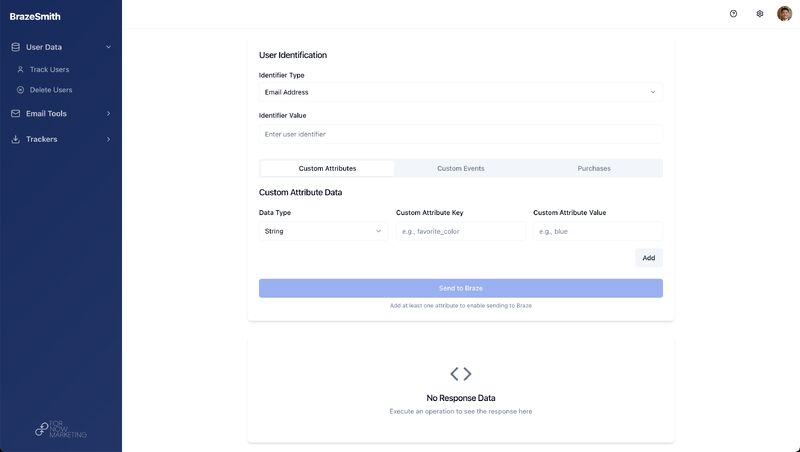
Allan revealed that Braze gates certain actions like deleting users behind the API intentionally. For years, there was no dashboard button—you needed Postman or a saved webhook template.
Source: LinkedIn
BrazeSmith, created by Allan, was built to put a UI layer on top of these API endpoints. With AI-assisted development, building internal tools became more accessible.
Using Braze without custom solutions
Naturally, most companies lack the time, resources, or technical depth to build internal tools whenever a platform such as Braze falls short of something.
So if a custom solution isn’t feasible, here are practical alternatives:
- Low-code internal tool builders: Drag-and-drop platforms to quickly build custom dashboards and admin panels, easily connected to Braze APIs without heavy frontend coding.
- No-code automation tools: Trigger Braze API actions from simple inputs like Google Sheets or form submissions, creating automated dashboards.
- Spreadsheet/database app builders: Build interfaces on Airtable or Sheets, then trigger Braze actions via built-in API or webhook functionality.
- API gateway/management tools: Wrap complex API calls into secure, reusable microservices that can be triggered by simple web forms or scripts.
Watch the entire conversation with Allan Heo.
AI in Braze: Useful now, transformative soon
Interestingly, as Allan pointed out, Braze was quietly using AI long before it became a buzzword. Features like Intelligent Timing and Intelligent Channels were live as early as 2020. Recent tools like the Liquid builder and SQL query assistant now help technically minded marketers execute faster. Of course, they are not perfect, but they significantly accelerate work. Copy and image generation remain experimental.
Only recently, Braze introduced the Model Context Protocol too.
Evidently, Braze is now opening its data to external AI platforms—not just embedding AI inside Braze, but enabling Braze data to power broader AI-driven analysis, reporting, and recommendations.
How to utilize AI properly in Braze
As AI becomes embedded into campaign tools like Braze, marketers need a smarter approach to using it effectively:
- Use AI builders as “accelerators,” not replacements—when you understand the Liquid structure (variables, filters, loops), you can prompt the builder to get 80% of the way quickly, although you still need to debug syntax and logic.
- Treat AI output like junior work: create drafts with AI, but always review for brand accuracy, logic, and compliance before launching.
- Never push AI-generated content straight to production. Build a workflow where AI drafts, humans refine, and only then approve for final use.
Find out how Braze AI lifts customer engagement by minimizing latency.
Watch the entire conversation with Allan Heo.
Scaling beyond the solo Braze owner: How teams should split responsibilities
Allan explained how a single Braze owner splits into strategy and execution, and then expands into full lifecycle and marketing ops teams.
When one person handles everything, they’re stuck launching campaigns with no time for strategic work. According to Allan, the ideal model separates lifecycle strategy from marketing ops execution. At scale, marketing ops owns canvas audits, volume tracking, tagging frameworks, and data pipelines.
How to optimize your Braze team
Beyond Allan’s insight, here are a few additional ideas on optimizing your team:
- Cross-train team members through short rotations in areas like deliverability, in-app, and data to build T-shaped marketers and reduce dependency.
- Assign Subject Matter Experts for key channels and features. They host office hours, mentor others, and enforce best practices.
- Use a RACI matrix to clarify roles across strategy, content, and ops for each campaign type, reducing friction and confusion.
- Build a centralized knowledge base with processes, troubleshooting steps, and campaign templates to speed up onboarding and cut repetitive questions.
Here’s what you can expect in your first month with our Braze specialists.
Watch the entire conversation with Allan Heo.
Closing thoughts on Braze technical challenges
Braze is powerful because it is flexible, but that same flexibility introduces complexity that often derails execution. From Allan’s experience, the teams that succeed are the ones that treat Braze as technical infrastructure and apply discipline.
Making that shift from marketing tool to marketing infrastructure requires new skills, structured processes, and tools that Braze does not always provide. And the payoff? Campaigns that launch on time, scale smoothly, and stay maintainable.
Watch the full conversation with Allan for more tactical examples and implementation strategies that didn’t make it into this post.
If you want to launch campaigns in Braze without execution headaches, our team of 20+ specialists can help. So far, we have delivered 2,000+ campaigns for 50+ brands, including Prodigy and Weight Watchers. Book a free, no-obligation call with us.