Lifecycle marketing
 Customer data management
 Email campaign production
 Search marketing
 CMS development
 Who we are
 How we work
 Case studies
 Testimonials
 Salesforce Marketing Cloud
 Braze
Braze HubSpot
 Marketo
 Pardot
 DataBricks
 Snowflake
 HighTouch
 RudderStack
 Segment by Twilio
 Videos

If you have a backyard or a terrace garden, you’re no stranger to the art of pruning. Every now and then, you’ve got to trim the dead branches, snip off the dried leaves, and make space for new growth. Not just for neatness. But for letting the tree channel all its energy into the growing parts.
Many SEOs see a similar principle at work on websites. Because sometimes, your blog is less a lush green plant and more… a dense tangle of old blog posts stealing sunlight from the ones that still have a shot at ranking.
Now, is outdated or low-quality content the reason your site’s underperforming on Google?
Not always — SEO is rarely that simple. There are a dozen other culprits.
Yet, there’s no denying this: thin, redundant, or stale content can pull your site down in the search results. You may start to notice this in the numbers — impressions and clicks dipping, fewer keywords ranking than before.
At Mavlers, we see it firsthand. Some evergreen topics we refresh regularly keep bringing in a steady 10% lift in organic traffic.
For some content, removing it entirely can even be an inevitable SEO move. Like that one hyper-specific piece — “The Ultimate Guide to Article Marketing and Directory Submissions” — which was great then, but now… needs a graceful retirement.
That’s where content pruning comes in — the not-so-glamorous but absolutely essential SEO ritual of deciding what to update, what to merge, and what to finally let go of.
So, what exactly is content pruning for SEO, and how do you identify those underperformers worth your attention? Let’s dive in and find out.
What is content pruning, really?
Content pruning is the SEO version of a deep website cleanse.
It involves regularly reviewing your website’s content to remove, update, or consolidate pages that are no longer doing any favour to your website. Or that are chaining you from getting rankings.
But we are already tweaking content here and there. Doesn’t that count as content pruning for SEO?
But wait—if you’re already tweaking or updating old blog posts sporadically, doesn’t that count as content pruning? Well, good on you for staying on top of it!
But content pruning for SEO goes deeper than just minor edits. It asks a discomforting but crucial question: “Is this content still valuable and relevant to my audience?”
If the answer is murky or “not really,” it’s time to pull up your socks.
Now, pruning isn’t akin to deleting old blog posts. Not always.
Yes, some pieces simply have to go. Especially if they’ve lost all timely, SEO, or engagement value. You can’t save everything from the shredder.
But more often, content pruning for SEO is about:
- Refreshing: Updating old blog posts with new data, visuals, and insights for better SEO content optimization.
- Consolidating: Merging duplicate or overlapping articles into one stronger, more authoritative piece.

For example, that old “Top SEO Tactics for 2015” post or a service page for something you no longer offer? Keeping them live only dilutes your site’s authority and user experience.
By strategically pruning, what remains on your site is high-quality, relevant, and worth ranking. And when your overall content quality improves, so do your search keyword rankings.
Which also means:
- Improved crawl efficiency (Google loves a tidy site).
- Stronger topical authority across your content.
- More room for your best-performing pages to get indexed and climb the SERPs.
What happens to SEO if you don’t prune website content?
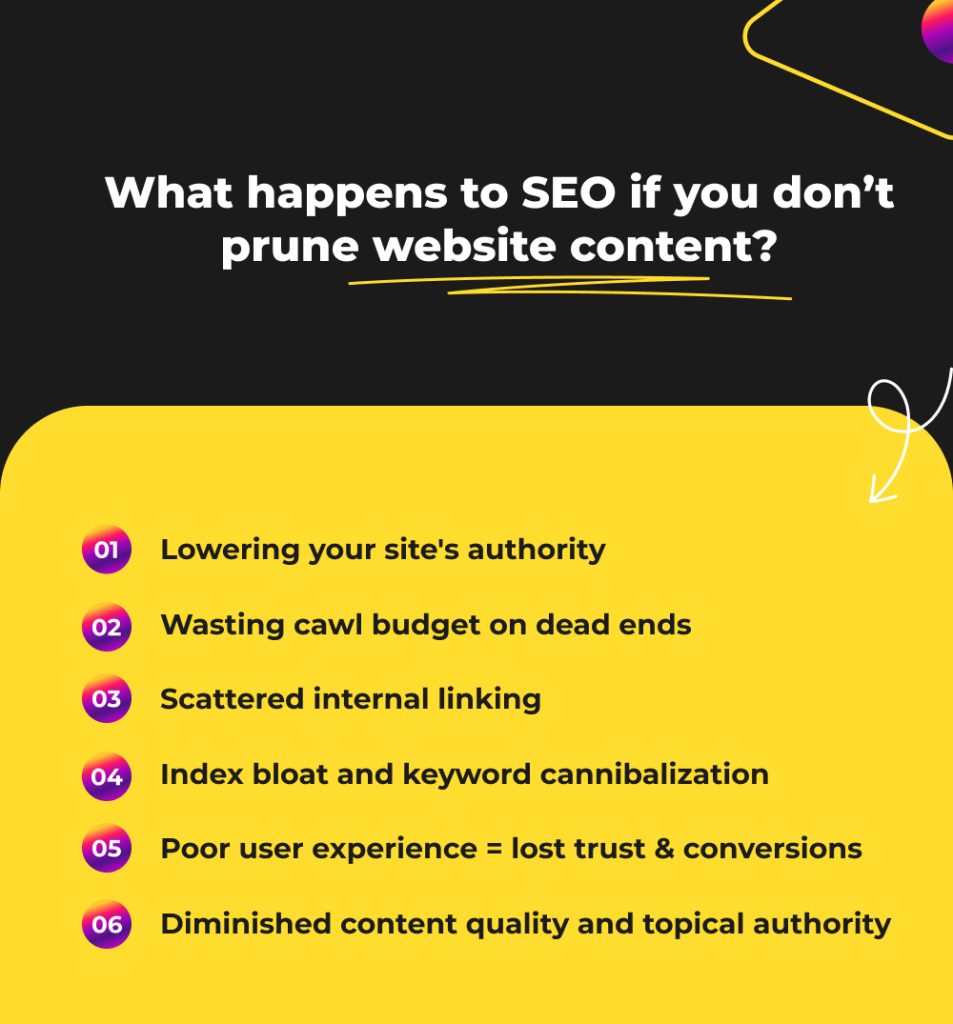
Ignoring content pruning is like letting weeds overrun your garden. Outdated and underperforming pages start stealing SEO nutrients from your best content, until even your strongest pieces struggle to grow. Here’s how:
- Google sees your site as “average,” not authoritative.
Search engines don’t judge one page at a time. They assess your website’s overall quality. An abundance of thin, outdated, or low-engagement pages pulls down your domain’s perceived value, even if your newer posts are great. You lose ground to competitors who update old blog posts for SEO regularly.
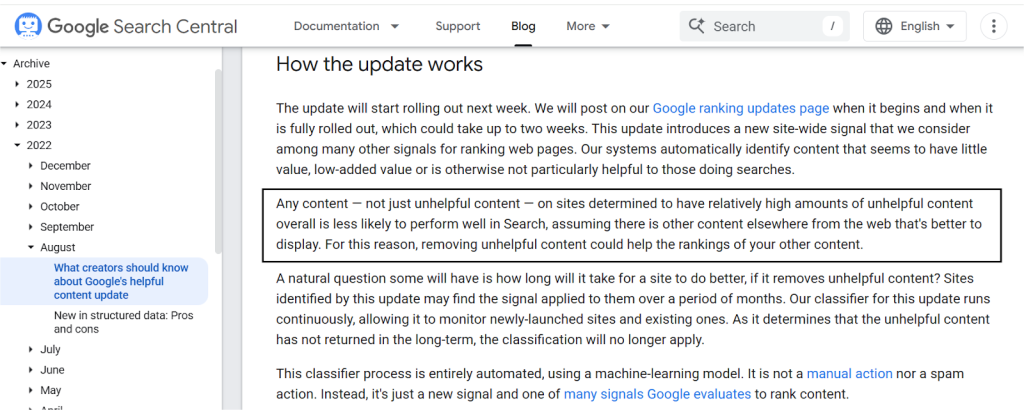
- The crawl efficiency reduces.
An unpruned site is a headache to navigate for both users and crawlers. Which means your best content struggles to get noticed and indexed promptly. - Your crawl budget gets wasted.
Google sets a crawl budget that determines how many pages Googlebot crawls and indexes within a given time. Meaning it only crawls a limited number of URLs on your site. When that time is spent on pages that are irrelevant and obsolete, your freshest or most optimized content gets crawled less often. That means slower indexing and fewer fresh pages in search. - You invite index bloat.
Every low-value page that gets indexed tells Google, “this is part of what we offer.” When too many of those exist, search engines get confused about which page to rank. In this, your best pages often lose visibility. - You risk keyword cannibalization.
When multiple pages go after the same search terms, Google can’t decide which one to rank. So it often ranks neither. A single, well-optimized page always outperforms five diluted ones competing for the same keywords. - Your internal linking power gets scattered.
Every new page earns and passes link equity. When half of those pages add little or no value, that equity gets divided across weak URLs instead of strengthening your most strategic ones. - User trust erodes.
Few things kill credibility faster than outdated advice, wrong prices, or broken references. If readers can’t trust the basics, or feel misled, they won’t trust you enough to convert.
How to identify low-value content that needs content pruning
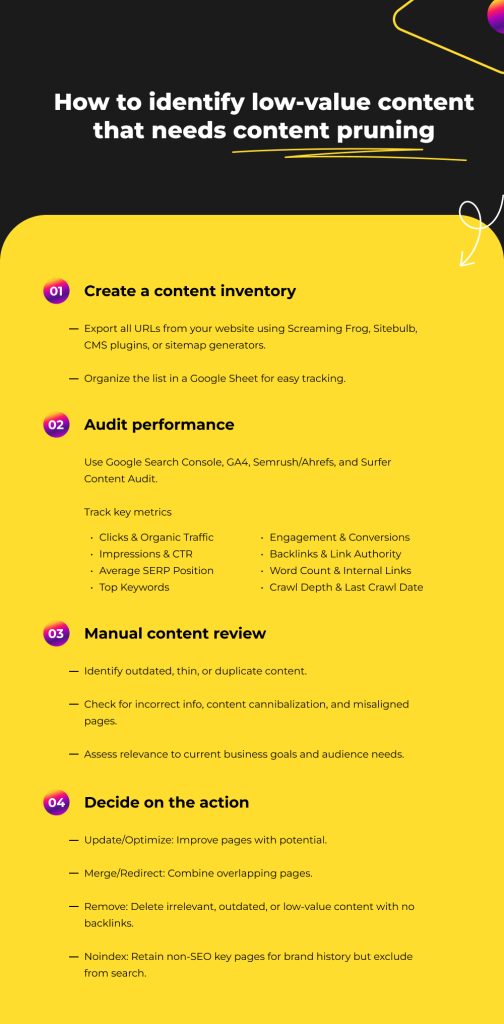
Start by creating a content inventory before you conduct a site-wide or blog content audit. Not because it looks tidy, but because you can’t fix what you can’t see.
Use Screaming Frog, Sitebulb, sitemap generators, or CMS plugins (like Export All URLs for WordPress) to export every URL and dump it into a Google Sheet, and label it. Now add performance data.
Step 1: Run a performance audit (quantitative pass)
Use Google Search Console, GA4, Semrush/Ahrefs, and Surfer’s Content Audit. These tools surface pages that aren’t earning their keep.
Key Metrics to Track
Google Search Console (GSC)
- Clicks: Pages with consistently low clicks are candidates for review.
- Impressions: High impressions but low clicks → possible CTR or intent mismatch.
- CTR: Poor CTR often means the headline or meta description isn’t pulling. Here’s a detailed read on how to optimize them for better CTR.
- Average SERP Position: Low rankings signal weak relevance or outdated content.
- Top Keywords: See what the page actually ranks for vs. what it was written for.
GA4
- All sessions: Not every high-value page gets its traffic from search.
- Organic sessions: Helps validate GSC click trends.
- Engagement rate: Low engagement = weak experience or wrong audience.
- Conversions / Key Events: The most important metric for business value.
- Trend lines (90-day comparisons): Sudden drops in views or conversions hint at aging or irrelevant content.
SEO Tools (Semrush / Ahrefs)
- Backlinks: Zero links = weak authority; spammy links = potential liability.
- Authority of linking sites: A single credible link can justify saving a page.
- Keyword count: Pages ranking for very few keywords often lack depth.
Additional technical metrics
- Word count: Quick way to spot thin content across the site.
- Internal links (incoming/outgoing): Pages isolated in the crawl graph often underperform.
- Crawl depth: If Google rarely crawls it, that’s a sign in itself.
- Last crawl date: Stale crawl history suggests low search value.
Step 2: Add manual review (qualitative pass)
Data flags the pages. But human judgment takes the final call. Look for:
- Outdated topics, obsolete tools, dead statistics.
- Information that no longer reflects the business.
- Pages competing with each other (classic keyword cannibalization).
- Shallow, surface-level content that doesn’t deserve to rank.
- Pages with no clear purpose or audience.
- Incorrect details that could harm trust.
- Blog posts that aged out of relevance (old-year URLs are easy giveaways)
This is slow work, and it should be. Hasty content pruning creates bigger problems.
Step 3: Decide when to prune, merge, or revamp
- Update/Optimize: Page is underperforming, but the topic has potential and fits your business goals.
- Merge/Redirect: Multiple pages targeting the same keywords. Consolidate into one stronger URL.
- Remove: Irrelevant, outdated, or thin pages with no value or backlinks.
- Noindex: Keep non-SEO-important pages (press, company milestones, partner features) for trust/history, but remove from search.
Step 4: Maintain a log
Keep a running log for the website content audit process with the following data:
- URL
- SEO metrics
- Engagement metrics
- Content quality notes
- Assigned action
- Date completed
This record becomes your guardrail against accidental deletions and lost rankings. Plus, it transforms content pruning from a rescue operation into regular site hygiene.
Pro tips to prevent content pruning mistakes
- Always cross-reference metrics—don’t prune based on one data point.
- Watch for brand visibility, especially in zero-click searches or AI overviews.
- Filter out recently published content from pruning lists; give new content time to perform.
- Document decisions and actions in your audit sheet; track what was updated, merged, deleted, or set to noindex.
- Always 301-redirect pruned or deleted URLs to relevant live pages to avoid 404 errors.
- Check and fix broken links post-pruning to maintain user experience and SEO health.
Word of caution: don’t grab the chainsaw yet
Before you start deleting, redirecting, or de-indexing content, remember:
- Content pruning is less about deleting and more about preserving the structure that holds your SEO together.
- You risk losing internal links that boost your site’s overall authority. So, plan how to replace them.
- Anchor text supporting semantically related rankings can vanish if you prune carelessly.
- Backlinks from other sites often point to “old” pages; losing them can weaken your domain’s credibility.
- Don’t sacrifice topical authority on subjects still important to your audience, even if traffic dips.
- If your site is small or young, heavy pruning might make Google question your niche relevance.
- Organic traffic may drop temporarily after pruning. Avoid mass deletions. Prune website content in stages and monitor results.
- Think twice before deleting and always have a rollback plan.
The road ahead
Google’s gaze sharpens each day. It’s hungry for accuracy, freshness, and content that serves its users. Many sites have accumulated years of posts—pruning and optimizing this content can unlock hidden SEO value.
But don’t just take theory on faith. Audit your content, perform content performance tracking, and adjust—don’t assume old posts are working or failing.
For a deeper dive into SEO content optimization and how to stay ahead of Google’s curve, read:
Predict. Optimize. Rank: How Google Trends Powers Future-Proof SEO