Lifecycle marketing
 Customer data management
 Email campaign production
 Search marketing
 CMS development
 Who we are
 How we work
 Case studies
 Testimonials
 Salesforce Marketing Cloud
 Braze
Braze HubSpot
 Marketo
 Pardot
 DataBricks
 Snowflake
 HighTouch
 RudderStack
 Segment by Twilio
 Videos
Most organizations understand the theory of ABM: stop chasing every lead, get ruthless about account selection, personalize at scale, and measure what actually moves revenue. But theory and practice are different animals. Account-based marketing fails when the foundation is wrong—when you’re trying to run ABM in a CRM that wasn’t built for it, or when you’re scoring accounts the same way you scored leads (a fundamental category error), or when sales and marketing aren’t operating from the same playbook.
HubSpot provides a solid ABM foundation if you approach it methodically. You need a clear architecture, properly configured properties, smart automation, and honest measurement. Get those right at the HubSpot level, and you build something that scales profitably.
With over 70 HubSpot campaigns launched each month for our clients, we can help you build a strong HubSpot ABM program. Stay with this HubSpot ABM setup guide.
HubSpot ABM: Laying the foundation with a B2B ABM strategy in HubSpot
1. Align marketing & sales teams
This step is non-negotiable. Marketing must know which accounts sales is targeting, and sales must understand the content, offers, and campaigns marketing is creating for them.
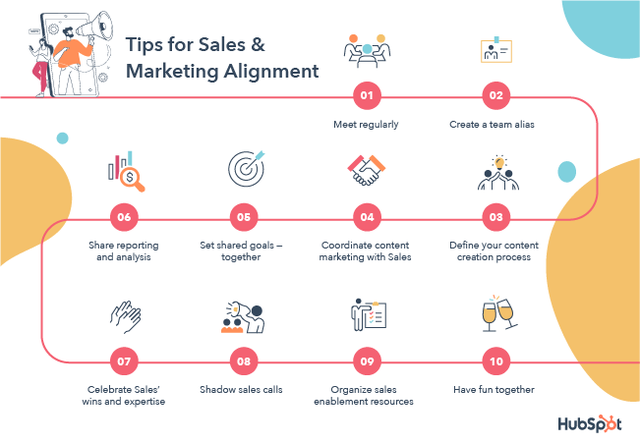
Source: HubSpot Blog
Without alignment, you’ll end up with mismatched efforts—marketing generating unusable leads or sales chasing unsupported accounts. Schedule regular cross-functional meetings and set shared goals and metrics for both teams.
2. Define your total addressable market (TAM)
Start by estimating your total global purchasing power—what you could achieve if every ideal customer bought from you. Then narrow it to the markets where you currently operate or plan to. You can’t sell everywhere, so focus on realistic geographic boundaries.
With your TAM defined, analyze your database for existing clients and prospects that match your ideal profile as part of the HubSpot account targeting strategy.
3. Build your ICP
Start by analyzing your customer database and identifying patterns across three key parameters:
- Firmographics: Look at industry, company size, revenue, and location. If most of your best customers are mid-sized financial services firms, that’s a clear signal.
- Personas: Target specific decision-makers by title and role where data allows. In EMEA, where such data is often limited, think more broadly about buyer personas—their motivations, challenges, and the value your solution provides. Remember, B2B purchases usually involve six to ten stakeholders across departments and seniority levels.
- Technographics: Examine what tools and technologies your customers use. Are they using competitors or complementary platforms?
This helps you spot both opportunities and adoption barriers for ABM in HubSpot and contributes to a structured ABM framework in HubSpot for targeting and personalization.
4. Create a list of HubSpot target accounts
Using your ICP parameters, build a list of specific companies to target—not personas, but real organizations by name. Keep the list size realistic for your budget and resources; a massive, unfocused list will only dilute your impact. Start small if needed. You can always scale once you gain traction and demonstrate ROI.
5. Develop your personalization strategy
Create personalized landing pages tailored to each industry or buying team.
Use dynamic content that adapts to past engagement. If a visitor has already downloaded your whitepaper, show them the next relevant resource instead. Personalize your creative assets by industry, company size, or pain points to make every interaction feel directly relevant.
This is the very essence of personalized marketing with HubSpot, ensuring every prospect’s experience feels one-to-one even when scaled.
6. Establish your measurement framework for ABM campaign tracking in HubSpot
ABM metrics should combine traditional marketing indicators with sales-driven outcomes for a complete performance view:
- Ad Engagement: Measure both quantity (CTR) and quality (engager job titles, company logos, and meaningful interactions).
- Website Traffic: Use UTM tracking to identify which campaigns drive visits and assess engagement depth—whether visitors explore multiple pages or bounce quickly.
- Marketing Qualified Leads (MQLs): Track MQL generation based on your organization’s specific qualification criteria.
- Sales-centric metrics (Most Critical): Prioritize metrics tied to revenue impact. This includes meetings booked, opportunities added to the pipeline, win rate, and the share of the pipeline influenced by marketing (vital for budget validation).
- Measure conversions and ROIholistically. B2B buyers often see ads without clicking—they research independently and convert later. Relying only on click data misses this behavior, so include view-through conversions for a complete picture of account-based marketing in HubSpot.
7. Address budget/resource constraints
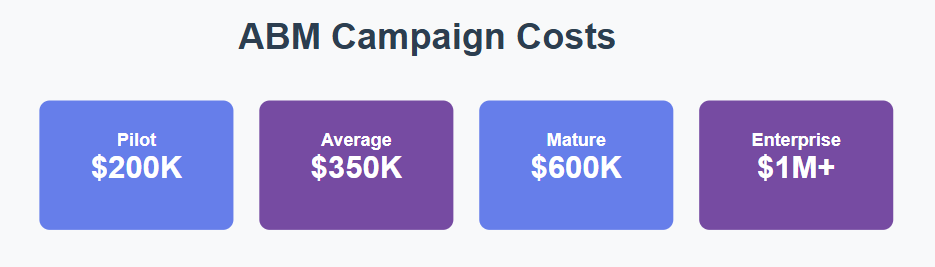
Be realistic about what your budget can deliver. There’s no fixed minimum for ABM success, but expect to invest at least tens of thousands for HubSpot ABM marketing.
Source: The ABM Agency
Also assess internal capacity. Strong ABM programs can generate more leads than sales can manage, turning success into waste if follow-ups lag. Ensure your sales team has the bandwidth to engage every prospect your campaigns attract.
Implementing your HubSpot ABM program
1. Define your ICP
Start by grounding your ABM strategy in clear, data-backed criteria. Identify who your best-fit customers are and how they buy:
- Analyze HubSpot data to find accounts with the highest LTV, fastest sales cycles, and strongest close rates, focusing on who books meetings versus who signs deals.
- Identify buying committee roles within each account, including the Decision Maker, Champion, Influencer, and Approver, ensuring at least a Decision Maker and Champion per account.
- Create three ICP tiers: Tier 1 for high-value strategic accounts with 1:1 personalization, Tier 2 for mid-value accounts with scalable personalization, and Tier 3 for emerging accounts using automated nurture.
2. HubSpot setup
Translate your ICP into structured lists and scoring models to automate tiering and prioritization:
- Build company lists by tier and contact lists by role.
- Create a proper scoring model with a Fit Score (industry, company size, revenue) and Engagement Score (email clicks, form submissions, page views).
3. Configure ABM automation in HubSpot
Set up HubSpot workflows to assign tiers, define buying roles, and hand off leads seamlessly:
- Create a company-based workflow to tag accounts by tier and automatically assign the appropriate sales rep.
- Build a contact-based workflow to assign buying roles based on list membership or job title.
- Set up an MQL handoff workflow that triggers when a demo form is submitted and the company score exceeds 70, automatically setting lifecycle to MQL, alerting the sales rep, and enrolling the contact in a follow-up sequence.
HubSpot target accounts
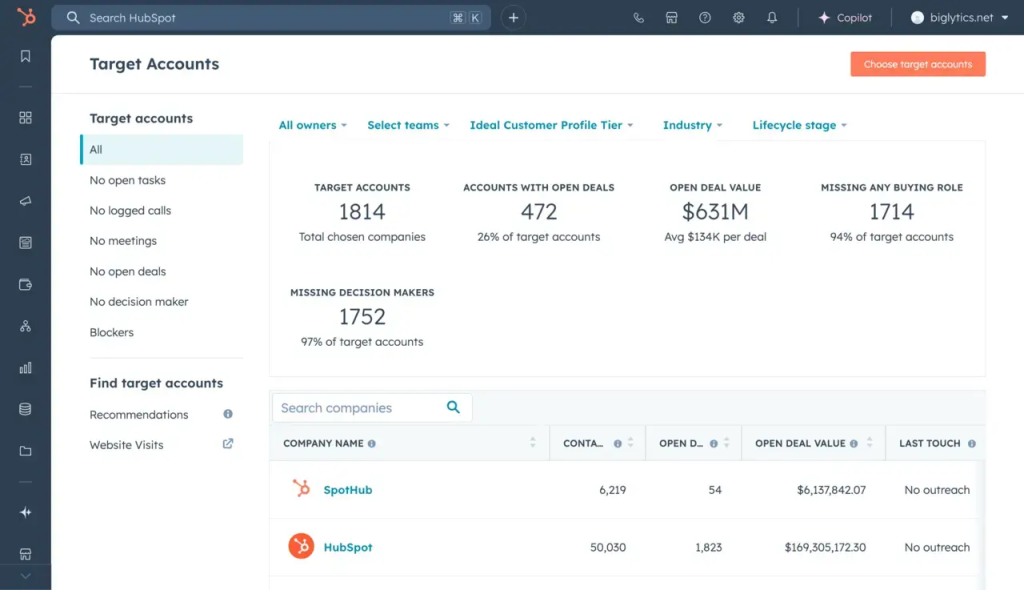
To effectively manage target accounts in HubSpot, you need clear visibility, smart automation, and focused reporting. Take the following steps:
Source: HubSpot
- Identify target accounts in HubSpot: Navigate to CRM → Companies → Target Accounts to view and manage them. Add accounts in bulk via Choose target accounts, discover net-new companies using Breeze Intelligence.
- Customize records: Add the Target Account property to your personal or default company record view, and include the ICP Tier property to assess account value at a glance.
- Create views & filters: Build a filtered view where Target Account = True, add quick filters for ICP Tier and Company Owner, and customize columns to display key details like tier.
- Workflow automation: Use a Company Workflow to automatically set Target Account = True when ICP is known, excluding accounts already flagged to avoid duplication.
- Lists & reporting: Create an Active Contact List filtered by Target Account = True and use it to report on engagement metrics such as Last Contacted, ensuring your team stays connected to high-value accounts.
4. Personalize content
Deliver tailored experiences through HubSpot’s smart content features across email and web.
- Build smart emails with three content variations by tier: ROI-driven executive content for Tier 1, growth-focused messaging for Tier 2, and quick-win self-service CTAs for Tier 3.
- Personalize your website using smart content for hero sections, CTAs, and proof points based on account tier.
- Use personalization tokens to add contextual relevance.
5. Enable sales
Make sure to equip your sales team with templates, sequences, and a clear handoff process for faster conversions:
- Create tier-specific email templates for outreach, follow-ups, meeting requests, and post-demo communication.
- Build sales sequences for each tier: a 6-touch multi-channel sequence (email, call, LinkedIn) for Tier 1, a 4-touch mix of email and calls for Tier 2, and an automated nurture flow for Tier 3.
- Define lifecycle stages from Subscriber → Lead → MQL → SQL → Opportunity → Customer, and ensure all marketing activity is visible to sales in the CRM.
6. Measure performance
Use HubSpot dashboards and attribution reports to monitor performance and ROI:
- Access the Target Accounts dashboard to view open deal value, sales cycle length, and performance by tier.
- Create pre-built dashboards to track ABM metrics such as pipeline by tier, win/loss analysis, engagement by account, and content downloads by role.
- Set up campaign tracking by grouping all related assets (emails, forms, ads) into one HubSpot campaign for complete attribution visibility.
7. Align teams
Maintain strong sales and marketing alignment with clear SLAs, shared reporting, and continuous collaboration toward effective HubSpot ABM marketing:
- Define and document ICP criteria, MQL and SQL definitions, and SLAs where marketing delivers a set number of MQLs per month and sales follows up within 24 hours.
- Build a shared dashboard showing conversion rates, marketing-influenced revenue, and sales activity levels.
- Conduct regular training sessions to help both teams understand dashboards, workflows, and campaign reporting.
8. Optimize & evolve
Keep refining your targeting, messaging, and processes based on data insights and feedback:
- Review performance weekly (activity and stale accounts), monthly (tier performance and SLA check), and quarterly (ICP criteria, tech stack, and content audit).
- Remember to run A/B tests on email copy, CTAs, and sequence timing to identify what drives engagement and conversions.
- Gather insights from your sales teams, customers, and lost deals to refine your ICP and improve future targeting.
Essential note on HubSpot ABM
Before launching, ensure you have Marketing or Sales Hub Pro for Target Account features and Marketing/Content Hub Pro for smart content. Start small with your Tier 1 accounts before scaling to Tiers 2 and 3. Remember, ABM reverses the funnel—identify target accounts first, then build outreach to engage them. Each account should have at least a Decision Maker and Champion mapped, or your program will stall. Use smart content to send one email with multiple tier-based variations instead of separate campaigns.If you want to know which tools you might need for account-based marketing in HubSpot, please go through their dedicated blog post on HubSpot ABM tools.
Getting started with ABM in HubSpot
HubSpot provides everything you need to launch a serious ABM program—account properties, scoring, workflow automation, LinkedIn sync, attribution reporting.
But don’t confuse having HubSpot ABM tools with running ABM. The tool is table stakes. What matters is discipline: ruthless account selection, aligned sales and marketing, authentic personalization, and measurement that proves ROI. Get those right in HubSpot first, and you’ve built a foundation strong enough to grow on. Bolt on specialized ABM platforms later if the data justifies it—but most teams should start here.
If you need help with account-based marketing in HubSpot, schedule a free, no-obligation call with one of our HubSpot experts!