Lifecycle marketing
 Customer data management
 Email campaign production
 Search marketing
 CMS development
 Who we are
 How we work
 Case studies
 Testimonials
 Salesforce Marketing Cloud
 Braze
Braze HubSpot
 Marketo
 Pardot
 DataBricks
 Snowflake
 HighTouch
 RudderStack
 Segment by Twilio
 Videos
Let’s start with a scene every small business owner knows a little too well.
You’re sitting at your desk at 10:47 p.m., surrounded by half-drunk coffee cups, juggling five browser tabs, three spreadsheets, two inboxes, and one flashing WhatsApp message saying, “Hey, any update on my order?”
Your “CRM” is whatever tool wasn’t crashing that day, “process” is a to-do list scribbled on a post-it note, and “strategy” is, well, yeah, let’s not go there.
Meanwhile, the big players you’re competing with? They’ve got automated workflows, AI-driven scoring, pipeline visibility, and dashboards that look like NASA mission control.
For years, CRM platforms seemed like they were built for them. Not you, not your two-person sales team, and not your boutique agency, your fledgling startup, your scrappy service business.
Because let’s be honest, CRMs have been pricey, tricky, overwhelming, and absolutely not built with SMB realities in mind.
Until Salesforce walked in and basically said:
“Alright, enough. Let’s level the field.”
The moment Salesforce hit ‘Reset’ on CRM accessibility
When Salesforce announced its new 100% Free CRM Suite for SMBs, it wasn’t just a product update.
It was a power move, the industry’s equivalent of Beyoncé dropping an album at midnight and breaking the internet.
Salesforce, a platform long associated with enterprise budgets and enterprise-level complexity, essentially told the world: “If you’re a small business, you no longer need to choose between paying your CRM bill or paying your employees. Start free. Grow when you’re ready.”
Not a 14-day trial, not a “freebie, but only if you squint at the fine print,” but a permanently, genuinely free, production-ready CRM built on Salesforce’s world-class infrastructure.
In a market where 70%+ of SMBs still track customers in spreadsheets, this shift is worth paying attention to.
So, what’s actually included in Salesforce’s free CRM?
Here’s the tea, despite being free, Salesforce didn’t serve up some watered-down “lite” toy version.
They gave small teams the real building blocks of CRM maturity.
Sales (Your revenue engine)
~ Lead, account, contact & opportunity management
~ Task & activity tracking
~ Email integration (hello, Gmail sync)
~ Meeting scheduling
~ Basic dashboards that actually look professional
~ One price book (enough for most small teams starting out)
Service (Because customers don’t like waiting)
~ Case management
~ Knowledge articles
~ Email-to-case style support
~ Reporting & dashboards for support flows
Marketing (Lightweight but useful)
~ Simple email builder
~ Premade templates
~ 100 email sends/month
Slack (Yes, it’s included)
~ Slack-to-Salesforce connection
~ A dedicated, free Slack workspace for two users
Salesforce Free CRM supports up to 2 users, making it a good fit for solo founders, small partnerships, and early-stage teams.
Is it restrictive? Sure.
But is it enough to establish a real CRM foundation? Absolutely.
Because let’s be honest, in the first year of your business, the sales team is usually just you and someone you swear you’ll hire “next quarter.”
Why Salesforce launched a free CRM now
If you’re wondering why the company known for enterprise-grade everything suddenly decided to hand out free blueprints like Oprah (“You get a CRM! You get a CRM!”), Here’s the candid truth:
1. SMB digitization is exploding.
Post-2020, every small business realized that digital operations aren’t optional; they’re oxygen.
2. HubSpot and Zoho were eating everyone’s lunch.
HubSpot wooed SMBs with gorgeous UI and unlimited free users. Zoho showed up with affordability and every app under the sun.
Salesforce needed an SMB front door.
This is that door.
3. Land-and-expand is the smartest way to grow.
Salesforce knows if your business starts on its platform, you won’t want to switch when your team grows from 2 to 12.
Migrating CRMs is like moving apartments in Manhattan, possible, but deeply traumatic.
Understanding what’s not included (You need to know this)
Let’s keep it painfully honest, Salesforce didn’t open the entire castle.
Here’s what you don’t get in the free tier:
~ Advanced automation (Flow, process automation, multi-step workflows)
~ Custom objects (sorry, power admins)
~ Limited integrations
~ Advanced forecasting
~ Premium security or admin controls
~ Scaled analytics or dashboards on par with enterprise editions
But here’s the nuance most “review blogs” miss, Salesforce Free isn’t trying to be your forever-home.
It’s trying to be your first good home, the one that keeps you safe, stable, structured, and future-compatible.
You may think of it like moving from your college dorm into your first real apartment.
You won’t have marble countertops or a view of Central Park. But it’s stable, reliable, and doesn’t involve duct tape holding the cabinet door together.
Salesforce Free vs HubSpot Free vs Zoho Free (The real talk)
If these three CRMs were people you met at a New York rooftop bar, this would be their personality:
Salesforce Free:
The well-dressed, quiet, competent one. Doesn’t brag, but has the strongest long-term potential. The one you’d want to build a future with.
HubSpot Free:
The charismatic extrovert who knows everyone, looks amazing, and gives away free drinks. But the moment you want commitment (automation, advanced marketing), that bill hits fast.
Zoho Free:
The resourceful one with a backpack full of tools. Not flashy, not fancy, but reliable and shockingly versatile.
So, which one should you choose?
Alright, let’s cut through the noise. Because if you’re here, it means you’re standing at the crossroads of three very convincing “free” CRMs, wondering which one is actually the best fit for your small-but-mighty business.
One can think of this like choosing a New York neighborhood.
You could move anywhere, but each place has its vibe, its quirks, and its non-negotiables.
If your business feels like a 2-person team hustling out of a WeWork, pick Salesforce Free CRM.
Salesforce Free is like moving into a tiny but beautifully constructed apartment in a luxury building.
Sure, the square footage isn’t massive (only 2 users), but the building infrastructure is world-class.
You get the following:
~ The same platform the Fortune 500 kids use
~ A stable, reliable foundation
~ A future path that doesn’t make you cry when you scale
If you’re the kind of founder who says, “I don’t want to rebuild this whole thing again in 18 months,” Salesforce Free is where you start.
If you see yourself growing into a 5–15 person sales team in the next few years, this is the smartest bet. Everything you build today compounds later.
If your business loves marketing more than sales, we recommend that you pick HubSpot Free.
Let’s be honest, HubSpot knows how to make things pretty.
The UI? Gorgeous.
The onboarding? Frictionless.
The marketing freebies? Honestly too good.
Choosing HubSpot Free is like choosing a SoHo loft where everything is aesthetically pleasing and the coffee shops are artisanal by default.
You get:
~ Strong marketing tools
~ Email tracking, meeting links, forms, chat
But the catch? Once you want to do real automation or more sophisticated nurturing,
that elevator to the paid floor moves FAST.
If your business’ personality is,“We live and die by content, forms, and funnels,” go HubSpot.
If your business is bootstrapped, resourceful, and a little rebellious, Zoho Free might be a good choice.
Zoho is like living in Queens, affordable, packed with hidden gems, and way more powerful than outsiders give it credit for.
You get:
~ 3 free users
~ Surprisingly broad features
~ A huge suite (Books, Projects, Inventory, Campaigns, Desk) waiting to be plugged in
~ Solid customization power for a free tool
The trade-off is that the UI feels, let’s say, “functional,” not fabulous.
And support depends heavily on your region.
But if your personality is, “Give me more tools for less money, and I’ll figure it out,” Zoho will treat you well.
What happens when you outgrow the Free version?
Here’s the smart part, if you start with Salesforce Free, your upgrade path isn’t a messy “rip and replace” nightmare.
It looks like this:
Free → Starter Suite → Pro Suite → Sales Cloud/Service Cloud → AI & Data Cloud layers
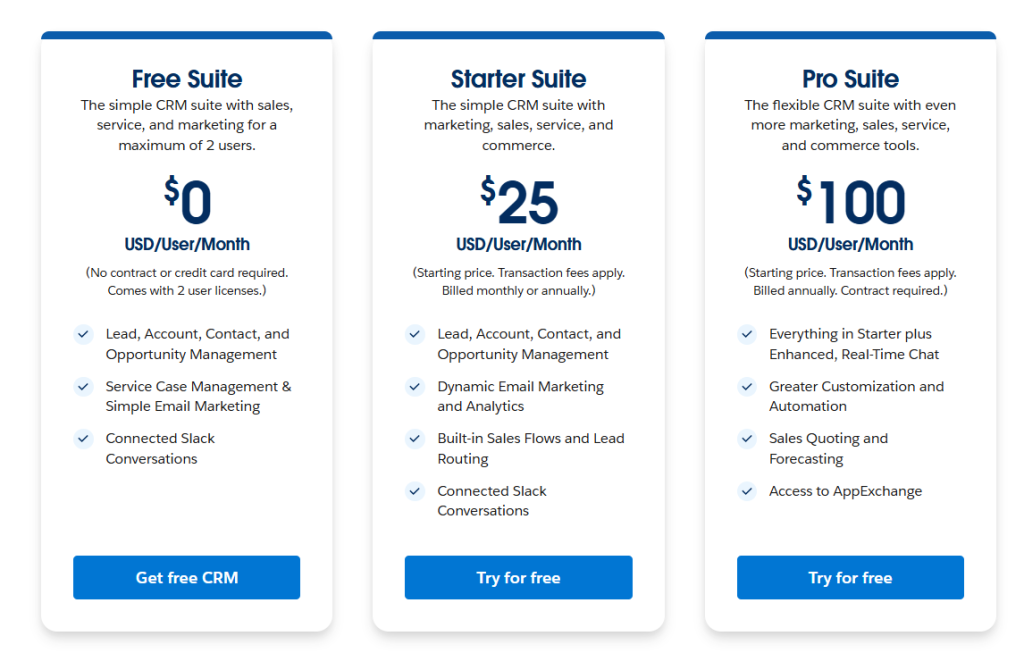
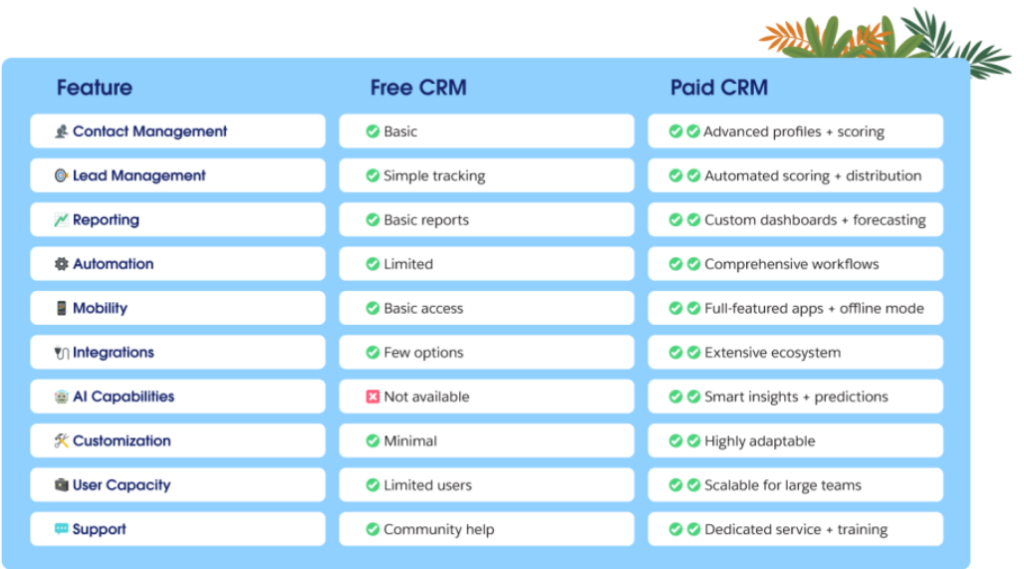
Each step unlocks deeper automation, customization, objects, workflows, dashboards, and industry-level power.
You grow into it, like leveling up in a well-designed game.
How SMBs can use Salesforce’s Free CRM
If you’re running a small business, you already know the truth, your “CRM” is probably a heroic-but-chaotic mix of spreadsheets, Gmail searches, and mental Post-its you hope you won’t forget. Salesforce’s Free CRM is basically your chance to upgrade that system without spending a single dollar or learning a single complicated thing.
Here’s how most small teams actually use it in real life:
1. Give your contacts a proper home
Drag your spreadsheet in, hit upload, and suddenly every customer, past lead, and “Oh right, that guy” lives in one clean place. No more digging through old emails like an archaeologist.
2. Build a simple pipeline you’ll actually follow
You don’t need 14 stages.
Just create something honest, Lead → Qualified → Proposal → Closed.
It keeps you grounded, focused, and way less overwhelmed.
3. Let Salesforce handle the remembering
Follow-up reminders, tasks, due dates, this is where founders usually say, “Oh wow, I needed this.”
You don’t lose deals anymore simply because you were busy running your business.
4. Treat support like a real business, even if it’s just you
Customer issues turn into cases, cases turn into order.
Your inbox turns into, well, something less stressful.
5. Start your day with clarity, not confusion
A quick dashboard shows what’s moving, what’s stuck, and what needs your attention before lunch. It feels like having a mini Chief of Staff inside your CRM.
This is a genuinely smart move because you get the kind of infrastructure big companies use for free. You avoid painful migrations later.
And when you grow, you don’t have to rebuild your entire system from scratch.
It’s the kind of foundation that quietly pays off every single day, especially for teams that don’t have time, money, or patience to waste.
The road ahead
Wondering about the right time to hire a Salesforce expert? You might want to read this next ~ The right time to hire a Salesforce expert? Yesterday.