Lifecycle marketing
 Customer data management
 Email campaign production
 Search marketing
 CMS development
 Who we are
 How we work
 Case studies
 Testimonials
 Salesforce Marketing Cloud
 Braze
Braze HubSpot
 Marketo
 Pardot
 DataBricks
 Snowflake
 HighTouch
 RudderStack
 Segment by Twilio
 Videos
The average small to medium business spends anywhere between $1,000 and $10,000 a month on PPC.
That’s a serious chunk of budget to throw at clicks, conversions, and campaigns. Yet studies show advertisers are losing more money than ever to invalid traffic, like bots and fake clicks.
According to adtech platform Lunio, 2024 saw more than $75 billion of ad spend wasted on invalid traffic, a 33% jump from 2022.
Even Google now openly admits that bots and invalid traffic are present in its ad channels, rolling out Gemini AI to address the problem.
But most advertisers are still left in the dark: you can’t see when one “user” is hyper-clicking your branded campaigns, or when automated bot traffic is inflating costs without delivering real customers.
Wasted clicks, overlapping campaigns, and tracking errors all contribute to what experts call PPC budget leakages — hidden perforations in your campaigns that silently drain your ad spend without delivering results.
With ad spend growth slowing and a shallow recession looming, there’s no room for leaks. That’s why running a PPC audit is essential: it uncovers these PPC budget leakages and fixes inefficiencies.
In today’s blog, with our 13+ years of SEM experience, we at Mavlers will walk you through a step-by-step PPC audit to identify and fix these budget leakages.
What causes PPC budget leakages?
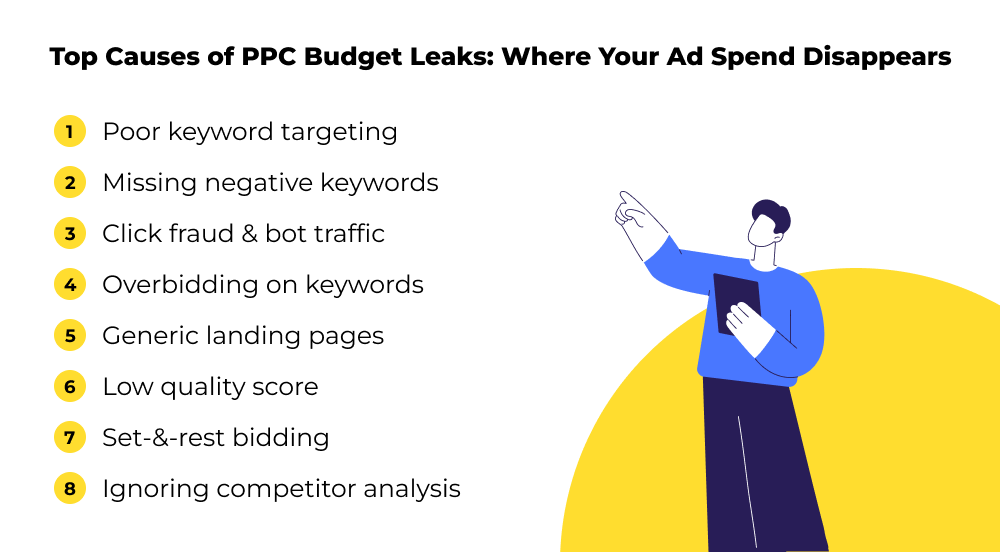
Even the sharpest PPC strategies can quietly bleed budget if you miss the finer points. The damage often slips under the radar, draining your ad spend in tiny, relentless drips.
Here’s where your PPC budget tends to leak most:
1) Poor keyword targeting
This one is the SEO equivalent of fishing with the wrong bait. With wrong keywords, you might catch a few leads, but most clicks are wasted. In case of broad or irrelevant keywords, the chances are you mostly attract and pay for bargain-hunters, casual browsers, or users with zero intent to convert.
2) Missing negative keywords
And skipping negative keywords only aggravates PPC budget leakages. You need negative keywords in your PPC campaigns to prevent them from appearing on irrelevant sites or search results. Skip this, and there is a bigger chance your brand gets associated with the keywords that don’t earn you better ad placement. Especially bad when Google treats every click as engagement and keeps showing your ads to similar searches.
3) Click fraud and automated bot traffic
Bots and fake clicks are becoming a pervasive source of budget waste. They mimic human behavior, inflate click volumes, and distort campaign performance.
Competitors sometimes even deliberately click your ads to push up costs without delivering ROI. The data gets skewed, optimization inaccurate, and resources? Drained. And all you get is meaningless clicks.
4) Overbidding on keywords
Paying $10 per click when $4 could deliver the same results is indeed a classic pitfall. Many PPC marketers can’t get rid of the notion that high competition means you need to overpay.
Getting caught in a bidding war burns the PPC budget at lightning speed. Excessive bidding causes the cost per acquisition (CPA) to rise. With inflated costs per click (CPCs), the return on ad spend diminishes, leaking the profit margin.
Get more tips on rising Google Ads CPC with our free guide:
The Marketer’s Guide to Rising Google Ads CPC: Causes, Fixes, and Future-Proof Strategies
5) Misleading or generic landing pages
Traffic is great, but if visitors hit a landing page that doesn’t match their expectations, they bounce. Imagine clicking an ad promising “luxury spa weekends” but landing on a generic hotel homepage with no spa info. That disconnect frustrates users and bleeds your budget with lost conversions.
6) Low quality score
Google rewards relevance and user satisfaction. When your ad copy, keywords, and landing pages aren’t quite up to par, your Quality Score suffers. This means you pay more for less visibility.
7) Weak ad copy & low CTR
Visitors are compelled to click your ad only if it’s unquestionably exciting and convincing enough to do so. On the other hand, weak ad copies consume budget but fail to return the conversion.
We can’t squeeze in all the ad copy tips into this post. But to get the insights on our post on Writing Bulletproof PPC Ads: Get More Clicks With These Tips and Tricks!
8) Set-and- rest bidding approach
If you set your bids once and let them freeze in the Ice Age, you lose the flexibility your competitors gain by optimizing daily.
Static bids amid shifting competition and seasonal changes quickly hamper your ad performance. Competitors who tweak bids actively scoop up conversions at lower costs while your campaigns limp.
9) Ignoring competitor analysis
Competitor analysis reveals shifts in strategy, new entrants, and opportunities you might miss. Without it, you’re flying blind and usually overspending for less.
Plus, your competitors are constantly analyzing your keywords, copy, and bids to outperform you. Ignoring this means losing ground—and budget in the auction battlefield.
Interested in a step-by-step approach to PPC competitor research? Here it is:
The Smart Marketers’ Ultimate Guide to PPC Competitor Analysis & Strategy

How to audit PPC campaigns to find budget leakages
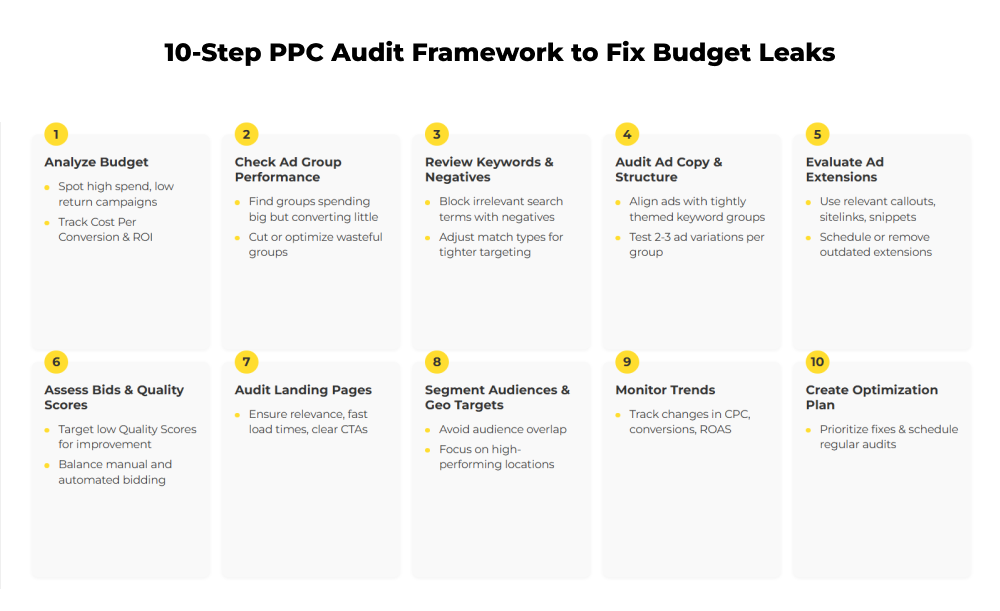
A solid PPC audit is a comprehensive health check to examine every part of your PPC physiology. Keywords, landing pages, bids, and tracking. The aim is to identify the gaps that are leaking money and where you can tighten the taps.
1. Start with a PPC budget analysis
The paid search audit starts with examining metrics and reports.
Ask: Is our total ad spend aligned with results? A good PPC budget analysis breaks down spend by campaign, network, and conversion type.
Spot campaigns with high spend but low ROI as those are early signs of PPC budget leakages.
Creating a simple dashboard helps a lot here. It should highlight:
- Cost per conversion across all PPC campaigns.
- Percentage of spend on branded vs. non-branded keywords.
- Month-on-month budget allocation changes.
Sort your campaigns by cost over the last 30 days and flag those with high cost per conversion or strong click volumes that don’t translate into sales. Those are your PPC budget pits.
2. Look into ad group performance
Here you scrutinize the smaller groups inside your PPC campaigns, called ad groups. The intention is to know exactly where your PPC budget might be leaking.
Each campaign contains multiple ad groups, which are sets of related keywords and ads targeting specific themes, products, or services.
By examining each ad group’s data—especially how much budget it uses versus how many conversions it generates, you can identify which groups are consuming a lot of money but delivering very little return.
Another scenario is when an ad group has many impressions but few clicks or conversions. That’s the indication you may be wasting money on ineffective paid ads.
Zooming in to spot specific pockets of budget waste within your campaigns lets you optimize or pause those areas and plug them from leaking budget.
3. Review keyword targeting and negatives
This is where PPC budget leakages love to hide. So it’s an imperative to examine if the keywords you’re bidding on don’t make you pay for useless clicks.
- Run a search term report: It reveals what users typed into the search engine when your ads appeared. Look for any irrelevant or unrelated search terms that triggered your ads but are unlikely to convert into customers.
- Negative keywords: If you don’t use negative keywords, your ads might show up for completely unrelated queries. So ensure that you have them.
- Keyword match types: These control how closely a user’s search must match your keyword to trigger your ad. Broad match triggers your ad for a wide range of related terms (which can be too broad), while exact match is very precise. Fine-tuning your match types helps stop wasting money on irrelevant searches.
- Close variants: Google may show ads for slightly different versions of your keywords—like plurals or misspellings. You want to keep an eye on these and block any that aren’t useful with negative keywords.
4. Audit ad copy and extensions ad structure
Run a check and ensure ad groups are tightly themed with 10-20 keywords max, allowing precise, relevant ad copy.
Ads should directly address the searcher’s intent with clear, compelling calls to action. Multiple ad variations—about two or three per group—should be tested regularly: one to two variations are ideal to avoid dilution.
5. Review ad assets (extensions)
Ad extensions improve visibility and CTR. Here’s what to know about reviewing ad extensions:
- Check which extensions you have active. Common extensions include callouts (short value-added phrases like “Free Shipping”), sitelinks (additional links to important pages on your site like “Contact Us” or “Shop Now”), and structured snippets (highlighting key product features or service categories).
- Are they relevant and optimized? Make sure the extensions align with what you’re advertising and reflect your current offers or business status. For instance, if you run a restaurant, call extensions should be scheduled to show only during your opening hours so people don’t call when you’re closed.
- Remove or properly schedule extensions. If an extension isn’t relevant anymore or might confuse users , remove it or schedule it to only show during specific dates or times. Likewise, location extensions should be updated if stores move or close.
6. Check bidding strategies and quality score
Low Quality Scores drive up CPCs. Check scores across keywords and ads to identify underperformers who need copy, keyword, or landing-page improvements.
Use PPC audit tools and techniques like scripts or dashboards to analyze CPC spikes and bid adjustments.
Simultaneously, review bidding strategies. Manual bidding is great from control but lacks efficiency. Automated bidding requires sufficient data and ongoing monitoring.
7. Audit landing page relevance
If ads are sending users to irrelevant or slow-loading pages, your conversions will tank no matter how sharp your targeting is.
As part of your PPC campaign performance audit, test landing page load times, message match, and conversion paths.
8. Evaluate audience targeting and segmentation
One of the sneakiest sources of PPC budget leakages? Targeting everyone, everywhere.
Run a paid media performance analysis to check whether your campaigns are showing in regions that don’t convert — or worse, where you don’t even serve customers. You’d be surprised how often ads run in countries or cities that add zero value but still eat into your daily PPC budget.
Then, zoom in on audience segmentation. Are you remarketing to users who’ve already converted? Are your lookalike audiences too broad, wasting impressions on the barely relevant?
Refine your geo-targeting settings to focus only on profitable locations and remove regions with low engagement or inflated CPCs.
Tightening both audience and location definitions is one of the most effective PPC cost control strategies available, and it doesn’t need fancy tools.
9. Analyze performance trends
Look for patterns. A healthy PPC audit compares quarterly trends in CPC, conversion rate, and (Return on Ad Spend) ROAS. Spikes or dips often point to deeper issues: competitor activity, algorithm changes, or creative fatigue.
Tools like Google Data Studio or Looker can visualize these shifts clearly and support faster, smarter decision-making.
Pro tip: It’s time to stop obsessing over ROAS as the only reliable indicator of PPC performance. Read our experts’ advice on real paid media measurement KPIs.
10. Create a continuous optimization plan
The final step of your PPC audit is to turn findings into an action plan.
Prioritize fixes by potential impact: tracking errors first, then structure, then creative or bid adjustments.
Document your next steps in a repeatable checklist — your go-to guide to fix overspending in PPC campaigns and maintain cost efficiency.
This also sets up a framework for future PPC budget analysis, ensuring you’re not just reacting to leaks but proactively preventing them.
The road ahead
If you’re ready to plug PPC budget leakages and make every click count, dive deeper into what’s next for PPC. Start with—
PPC Automation 101: Master AI-Driven Tools & Techniques for Better ROI
Optimizing Ads for Voice Search: Unveiling the Future of PPC in a Voice-Driven World, or explore The Small Business Guide to High-ROI PPC Advertising for a smarter, leaner ad strategy.