Lifecycle marketing
 Customer data management
 Email campaign production
 Search marketing
 CMS development
 Who we are
 How we work
 Case studies
 Testimonials
 Salesforce Marketing Cloud
 Braze
Braze HubSpot
 Marketo
 Pardot
 DataBricks
 Snowflake
 HighTouch
 RudderStack
 Segment by Twilio
 Videos

Most companies face data architecture challenges that manifest as email marketing issues. Blank personalization tokens, re-engagement campaigns targeting recent customers, stalled segmentation due to unreliable contact records, deliverability hits — you don’t need a list!
These issues don’t always stem from email itself. They occur when unstructured, multi-source data is used without proper governance, segmentation logic, or personalization architecture.
HubSpot can address these challenges when configured as an integrated system.
This guide provides a comprehensive overview of the system, including data entry and cleansing, creation of reliable CRM records, development of dynamic segments, and integration of personalization and content logic. It also covers email deployment, measurement, and feedback processes. Let’s get started.
The reference architecture for enterprise email marketing in HubSpot
Before getting into the specifics, it is helpful to capture the pipeline as a single system. Each layer supports the next. The final layer provides feedback to earlier stages.
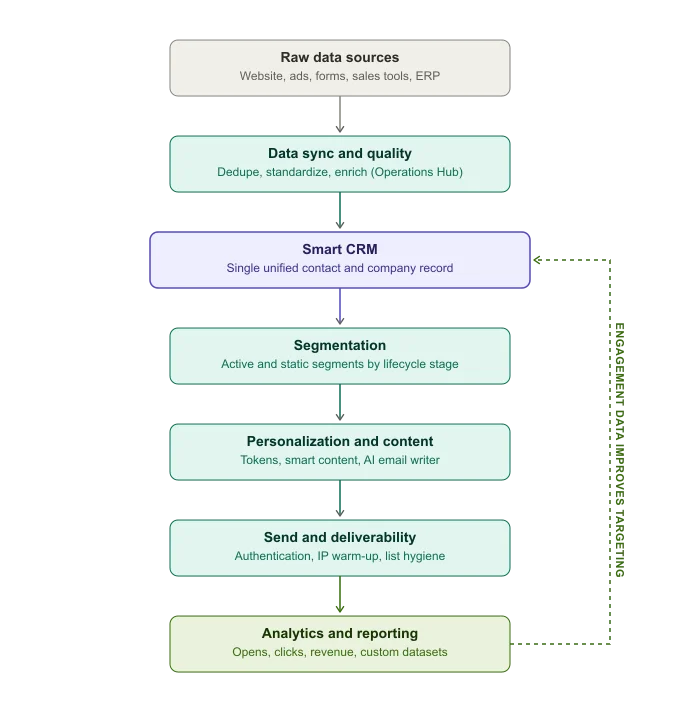
These are the seven layers, in order:
- Raw data sources
- Data sync and quality
- Smart CRM
- Segmentation
- Personalization
- Sending and deliverability
- Analytics and reporting
That’s the whole gamut of enterprise email. Let’s examine each layer now.
1. Getting raw data into HubSpot
Enterprise contact data typically does not originate in HubSpot. It comes from website forms, paid ad platforms, product usage event streams, ERP systems, support desks, or legacy CRMs like Salesforce or Pipedrive. The effectiveness of downstream processes, including segmentation, personalization, and deliverability, depends on the quality of this initial ingestion.
Operations Hub addresses these challenges by offering three key capabilities essential for email programs:
- Data sync: Enables bidirectional, field-level integrations with a wide range of third-party applications. This ensures HubSpot records remain aligned with the tools used by sales, finance, and product teams, without relying on periodic CSV exports and imports.
- Data quality automation: Uses workflow-driven processes to standardize formatting and deduplicating records.
- Programmable automation: Provides custom-code workflow actions for logic not supported by HubSpot’s native workflows, such as calculating renewal dates from existing properties or randomizing email sends for statistically valid A/B tests.
The Enterprise tier of Operations Hub introduces datasets, which are curated, reusable tables built from custom property data, as well as native support for custom objects within workflows. These features are especially valuable for B2B programs that require personalization based on elements other than a contact or company. It could be SKU, location, claim, or subscription.
If your monthly integration spend on middleware tools like Zapier or Workato for HubSpot-bound data exceeds $700 to $800, it is usually more cost-effective and easier to manage within Operations Hub. This ensures syncing, cleansing, and workflow logic are managed alongside the data they affect.
You might want to save this data quality checklist prior to data reaching the send layer:
- Deduplication rules are established for both contacts and companies.
- Required personalization properties have documented fallback values.
- Standard naming and formatting conventions for custom properties are enforced through data quality workflows, not informal practices.
- Sync direction (one-way or bidirectional) is documented for each integration to prevent systems from unintentionally overwriting values.
We’ve really collapsed the first 2 layers here because the two are interlinked. Moving on.
2. Smart CRM as the single source of truth
HubSpot’s Smart CRM provides a unified data model for contacts, companies, deals, tickets, and custom objects, serving as the central source for all platform tools.
For enterprise email, three things define the potential for future personalization:
- Custom properties: Custom properties allow personalization to reflect specific business needs. Add custom fields and map them clearly to relevant workflows and integrations to ensure they are consistently populated and useful.
- Custom objects: If your business relies on entities beyond standard CRM objects, custom objects allow these to exist natively in the CRM. This enables direct referencing in workflows and personalization tokens, eliminating the need for external integrations.
- Lifecycle discipline: Lifecycle stage is a single-value property and forms the foundation of most segmentation logic. Inconsistent updates by sales and marketing can result in contradictory segmentation and personalization.
3. Segmentation
HubSpot has renamed Lists to Segments in the current product. Segments are now designed as dynamic, self-updating audiences based on any combination of contact, company, deal, or ticket properties, form submissions, page views, etc.
Enterprise-level segmentation requires adherence to established best practices:
- Adopt a consistent naming convention for every segment. This is to ensure clarity for all team members. Avoid generic names.
- Schedule recurring quarterly audits to retire segments that are no longer supporting active campaigns to prevent segment sprawl; it can lead to unmanageable portals.
- Configure filter logic accurately. Within a filter group, use AND/OR appropriately; between filter groups, conditions are joined with OR.
- Remember that properties with single values cannot have multiple values simultaneously; use OR with separate filter groups instead.
- Create a permanent active segment for all contacts who have opted out or unsubscribed. Use this segment as a global suppression exclusion for every send.
4. Personalization
In HubSpot, tokens, Smart Content, and AI take care of personalization. Let’s take a look at each of these:
- Tokens act as placeholders. If a property is empty, the token uses a default value you set. For tokens to populate, the recipient must be a tracked contact with the relevant property completed, which highlights the importance of maintaining data quality.
- Smart Content determines which entire content block a recipient sees. A single email can include a module that changes its image, headline, or CTA based on defined rules. These could be contact properties, segment membership, lifecycle stage, etc.
- AI-driven personalization builds on tokens and smart content by using tools like HubSpot’s AI Email Writer. It can draft subject lines, body copy, and offers. These tools also support send-time optimization. AI personalization depends on the same data quality as tokens. If a CRM field is only 20% populated, AI-generated emails will reflect that.
5. Automation and testing
For enterprise teams, the workflow layer is where rigorous A/B and multivariate testing occurs. The typical process is as follows:
- Build a base active segment using standard filters (lifecycle stage, engagement history, firmographic criteria).
- Convert it to a static segment before testing to prevent population changes that could affect results.
- For a simple subject-line or content test, use the built-in A/B split inside the marketing email editor itself.
- To test an entire sequence or nurture path, create a contact-based workflow with an If/Then branch set to Random Split, usually at a 50/50 ratio. Assign each branch a unique email or sequence.
- Allow the workflow to run until reaching a predefined sample size or time frame before determining a winner. Report outcomes at the CRM level, such as replies, meetings booked, and revenue. Don’t be limited to opens and clicks.
Running tests natively in HubSpot ensures each contact retains their full CRM context. There is no need to export data or reconcile separate spreadsheets with CRM records.
6. Deliverability
Deliverability is a core part of your infrastructure. It should be managed continuously. Its three critical components include authentication, IP address, and list hygiene.
Authentication
Authentication is key. SPF, DKIM, and DMARC are the primary trust signals that all major mailbox providers check before considering content quality, personalization, or list hygiene. Since 2024, Gmail and Yahoo require a published DMARC policy for senders exceeding 5,000 messages per day. Microsoft has implemented similar enforcement.
Compliance is mandatory for enterprise-level senders.
SPF records have a strict limit of 10 DNS lookups. Exceeding the limit causes SPF to fail silently. And troubleshooting deliverability issues can be a long process.
Shared and dedicated IP
Shared IPs and dedicated IPs have distinct implications for deliverability. By default, HubSpot uses a shared IP pool, where your deliverability depends partly on the behavior of other senders. A dedicated IP isolates your sending reputation, which is important for high-volume programs. However, dedicated IPs require a 40-day automated warm-up period, during which sending volume must remain consistent. If a dedicated IP is inactive for two weeks, the warm-up process must be repeated.
List hygiene
List hygiene should be an ongoing process. Independent reviews place HubSpot’s average inbox placement in the low-to-mid 80% range. A healthy target is 90% or higher.
Consistently falling below 80% warrants immediate investigation. Key actions include:
- Remove hard bounces promptly. While HubSpot auto-suppresses these, regular audits are recommended to ensure all are addressed.
- Segment contacts with no engagement in over 90 days. Move them to a separate nurture or sunset track.
- Enable graymail suppression. This feature uses HubSpot’s “sends since last engagement” property to automatically exclude chronically unengaged contacts.
- Track delivery rate and deliverability separately. A high delivery rate, such as 98%, only indicates messages were not bounced, while deliverability reflects inbox placement. Many dashboards do not distinguish between these metrics.
For HubSpot deliverability best practices, check out what HubSpot has to say about it.
7. Analytics
The architecture diagram at the top of this article illustrates how analytics feed back into the CRM and segmentation layers. This feedback loop distinguishes an email system from a basic email tool. Each open, click, reply, and downstream deal outcome becomes CRM data, adding engagement properties to contact records. These properties can serve as segmentation filters or as triggers for subsequent workflows.
The datasets feature in Operations Hub Enterprise deserves special mention. It allows teams to curate and transform custom property data into clean, reusable tables for dashboards.
This approach removes the need for every stakeholder to understand the underlying object model. For example, for a reporting requirement, a dataset created once by an operations analyst is more sustainable than having each one build a custom report from scratch.
Conclusion
The primary goal is to create an environment where quality campaigns can be produced consistently. When data is reliable, CRM records are structured, audiences are clearly defined, and all components are connected, email becomes easier to manage and improve.
HubSpot offers a strong foundation, but the platform alone does not ensure a reliable email operation. Success depends on how that foundation is designed, governed, and maintained.