Lifecycle marketing
 Customer data management
 Email campaign production
 Search marketing
 CMS development
 Who we are
 How we work
 Case studies
 Testimonials
 Salesforce Marketing Cloud
 Braze
Braze HubSpot
 Marketo
 Pardot
 DataBricks
 Snowflake
 HighTouch
 RudderStack
 Segment by Twilio
 Videos
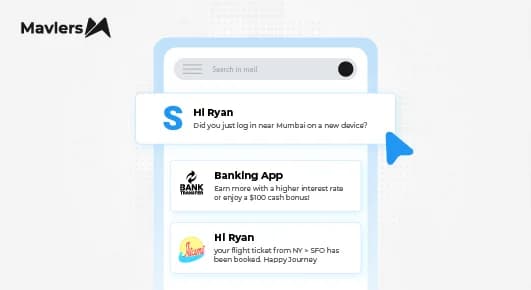
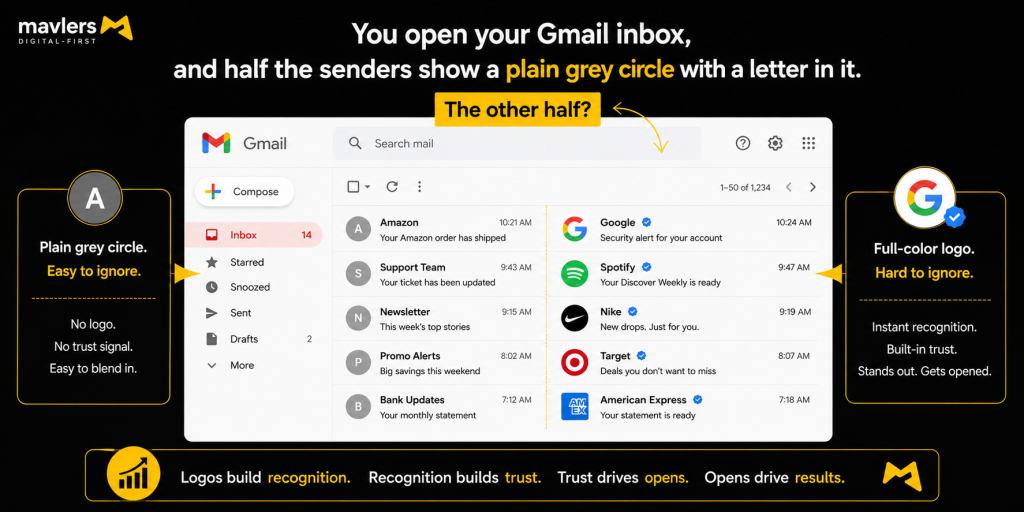
You open your Gmail inbox, and half the senders show a plain grey circle with a letter in it.
The other half?
A crisp, full-color logo sitting right next to the sender name, sometimes with a little blue checkmark for good measure.
- Which one are you more likely to trust?
- Which one are you more likely to open?
Some metrics are beyond measure. Right?
If your brand is still showing up as a grey circle, you’re leaving trust on the table before the subject line even loads. That’s what BIMI email marketing is built to fix, and here’s exactly how to set it up.
Let’s cut to the chase.
What is BIMI (Brand Indicators for Message Identification)?
BIMI stands for Brand Indicators for Message Identification.
It’s a DNS-based email standard that lets you display your verified brand logo next to your emails in inboxes that support it, Gmail, Yahoo, and Apple Mail today, with Outlook and Microsoft 365 still stuck in limited preview as of 2026.
Here’s the part people get wrong: BIMI isn’t a security protocol. It doesn’t stop spoofing or phishing on its own. Think of it as a reward, not a lock. It sits on top of email authentication you should already have in place, SPF, DKIM, and DMARC, and turns “technically authenticated” into “visibly trustworthy.”
No extra security is added. What you get is a trust signal your subscribers can actually see. And even the frequency of emails can’t do it for you.
A quick bit of history: BIMI was introduced back in 2018 by a working group that included Gmail, Yahoo, and Valimail. Gmail rolled it out fully in 2021, and other major providers followed. It’s not new. What’s new is how many senders are finally paying attention to it.
A quick picture of what this looks like
Imagine two promotional emails land in the same Gmail inbox. One shows a retail brand’s circular logo with a blue verified checkmark next to “From.” The other shows a competitor’s plain grey initial. Same offer, same subject line quality, but one already looks legitimate before the reader opens it. That’s the entire email game BIMI is playing.
Why BIMI matters more than you think
Adoption is embarrassingly low right now, and that’s exactly why it’s worth doing. A Validity analysis of 13,000 sending domains found that 90.85% had no BIMI record at all, and only 4.57 percent had a valid one. Most brands haven’t even started.
That gap won’t stay open forever. BIMI adoption is picking up speed as DMARC enforcement becomes table stakes, largely a ripple effect of Gmail and Yahoo’s 2024 sender requirements pushing more domains toward stricter authentication.
Here’s why that matters for you specifically:
- You get a visible trust signal at the exact moment a subscriber decides whether to open your email or mark it as spam.
- You’re protecting brand recognition in an inbox increasingly full of lookalike and spoofed senders.
- You’re ahead of the curve while adoption is still low; right now, a verified logo makes you stand out simply because most competitors haven’t bothered to do so.
- You reinforce every other authentication investment you’ve already made, instead of letting SPF, DKIM, and DMARC work invisibly with nothing to show for it.
So ask yourself: If your last ten marketing emails all landed as a grey circle, how many opens did that quietly cost you? Well, that answer says everything about your email campaign governance.
BIMI vs DMARC: How they relate (and why order matters)
Let’s clear up the confusion right away. BIMI is not a replacement for DMARC. It’s not an alternative path either. It’s an enhancement that only works once DMARC is already doing its job.
Here’s the dependency in plain terms: DMARC has to be set to enforcement, that means p=quarantine or p=reject, not p=none, before BIMI activates. Gmail will not process a BIMI record for a domain sitting at p=none. No exceptions.
And most senders aren’t there yet. An EasyDMARC analysis of 1.8 million domains found that only about 10.7% of domains have reached full p=reject enforcement. That’s the real bottleneck, not BIMI itself.
The practical takeaway: if your DMARC policy is still at p=none, that’s your actual first project. Not BIMI. Getting to enforcement, with pct=100 and every sending source properly aligned, is the hard part this whole guide assumes you’ve already handled.
Here’s the quick version of how the three pieces relate:
- SPF and DKIM are the underlying technical checks that verify a message is legitimately yours.
- DMARC is the enforcement policy that decides what happens when those checks fail.
- BIMI is the visual reward layered on top, once you’re already passing.
Prerequisites before you start implementing BIMI
Before you touch a single DNS record, make sure these four things are in place.
1. DMARC at enforcement. p=quarantine or p=reject, ideally at pct=100, with SPF and DKIM correctly aligned across every sending source, your ESP, your CRM, transactional mail, all of it. One misaligned platform can quietly break the whole setup.
2. A qualifying logo. Square, simple, no embedded text or photos, solid background. It needs to be in SVG format, but not a standard SVG export; you’ll need to convert it to the SVG Tiny Portable/Secure (SVG P/S) profile, which has its own strict rules.
3. A decision on certificate type. You’ll need either a Verified Mark Certificate (VMC) or a Common Mark Certificate (CMC) for major providers to actually render your logo. We’ll break down which one fits you in a minute.
4. Stable HTTPS hosting. A non-redirecting HTTPS URL to host both your logo file and, if you’re using one, your certificate .pem file.

How to implement BIMI step by step
This is the part you came here for. Six steps, done in order, and you’ll have a live BIMI record.
Step 1: Confirm DMARC enforcement
Run your domain through a DMARC record checker first. If you’re at p=none, move to p=quarantine, and work toward p=reject over time. Don’t move forward until this is solid.
Step 2: Prepare the SVG logo
Design a square, solid-background icon version of your logo, then convert it to SVG Tiny 1.2 / SVG P/S format. There’s still no clean one-click exporter for this as of 2026, so expect some manual editing of the file itself. This single step trips up more brands than anything else in the process.
Step 3: Get certified (VMC or CMC)
Apply through an authorized Mark Verifying Authority. Start this in parallel with your DNS work, not after. Certification is the step most likely to take weeks, and there’s no reason to sit around waiting for it before doing everything else.
Step 4: Host the logo and certificate files
Publish both files at stable HTTPS URLs, a .well-known/bimi/ path works well, and make sure neither one redirects. Providers won’t follow a redirect to fetch your logo.
Step 5: Publish the BIMI DNS TXT record
Create a TXT record at default._bimi.yourdomain.com with this format:
default._bimi.example.com TXT “v=BIMI1; l=https://example.com/bimi/logo.svg; a=https://example.com/bimi/vmc.pem”
Double-check every character here. The number 1, the letter I, and the lowercase l look nearly identical in this string, and one typo silently breaks the whole record.
Step 6: Verify and test
Run your record through a BIMI inspector to confirm it parses correctly and the certificate chain is valid. Then send live test emails to Gmail, Yahoo, and Apple Mail addresses. One thing to know going in: caching means your logo can take up to 24 hours to appear, even after a fully valid setup. Don’t panic if it’s not instant.
VMC vs Common Mark Certificate (CMC): Which do you need?
This is usually where people get stuck, so let’s break it down plainly.
A VMC requires a registered trademark and gets validated by an authorized Certificate Authority. It’s supported by Gmail, Apple Mail, and Yahoo, and it’s the only way to get Gmail’s blue verified checkmark. Pricing varies by provider and changes often, so we’d recommend checking current rate cards before you commit. Budget in the general neighborhood of several hundred to over a thousand dollars per year.
A CMC doesn’t require a trademark. Instead, you prove roughly 12 months of consistent public use of your logo on your domain. It’s cheaper and far more accessible, but support is narrower right now; most notably, it works with Gmail but is less consistent elsewhere.
That second point matters a lot if you’ve been putting off BIMI because you don’t have a trademarked logo. The CMC removed the biggest historical barrier to entry. If “we’re not trademarked” has been your excuse, it’s no longer a real blocker.
There’s also a self-asserted route, where you leave the certificate field blank. Technically, it exists. In practice, most major providers won’t render your logo without a certificate, so it’s not a viable option if brand visibility is the goal.
Now, let’s see what’s at stake with the email marketers.
What most marketers get wrong about BIMI
Here is what most marketers get wrong.
Not enforcing DMARC across every sending source. This is the single most common reason a logo doesn’t show up. Your ESP (email service provider) might be aligned while your transactional platform or CRM isn’t, and that one gap is enough to break the whole thing.
Getting the SVG formatting wrong. Invalid SVG files are the most common technical failure point. The SVG P/S profile has strict, non-obvious requirements that standard export tools simply don’t meet.
Letting certificates lapse. VMCs and CMCs expire annually, and an expired or mismatched certificate quietly kills your logo display. Build a renewal reminder into your calendar now, before you forget.
Selector mismatches. If you’re using a non-default selector, the BIMI-Selector header value must match your DNS selector name exactly, or the logo will silently fail with no obvious error.
Forgetting about provider coverage. Outlook and Microsoft 365 remain in limited preview as of 2026. Set your expectations accordingly. Gmail, Yahoo, and Apple Mail cover the realistic near-term audience, and that’s still a meaningful chunk of consumer email in most Western markets.
That’s pretty much it in today’s email marketing episode.
Wrapping up
That brings us to the business end of this article, where it’s fair to say that the sequence matters more than any single step: get DMARC to enforcement first, build a compliant SVG logo, get certified with a VMC or CMC, then publish the DNS record.
Skip that order, and you’ll end up chasing a logo that never appears, which is exactly why most BIMI attempts stall out. It would be a terrible idea for an email marketing campaign with huge potential.
If your DMARC is already in enforcement, start the logo and certificate applications in parallel this week, since certification is the slowest part. If you’re still at p=none, that’s your real starting point, and BIMI can wait until it’s solid.
One honest note before you go: BIMI’s biggest win probably isn’t a dramatic spike in open rates. It’s a durable trust signal in an inbox that’s only getting more spoofed. That’s worth having even without the open-rate bump.
If you’d like a second set of eyes on where your DMARC and BIMI setup actually stands, our team at Mavlers is always happy to help you sort through it. Let’s talk.