Lifecycle marketing
 Customer data management
 Email campaign production
 Search marketing
 CMS development
 Who we are
 How we work
 Case studies
 Testimonials
 Work samples
 Salesforce Marketing Cloud
 Braze
Braze HubSpot
 Marketo
 Pardot
 DataBricks
 Snowflake
 HighTouch
 RudderStack
 Segment by Twilio

For enterprise teams juggling cross-disciplinary assets—from code and design to compliance checklists and internal assessments—a centralized management system is a lifeline.
Marketers have traditionally called this a single source of truth.
But today, with AI infused into the bloodstream of marketing operations, management requires more than just organization. It requires guardrails. That’s what AI governance is.
Email governance is a similar concept relative to multi-team email management.
Email campaign governance codifies the creation, approval, and large-scale deployment of emails. Without it, production stalls and risks skyrocket. Consider the numbers:
- Over a third of marketers say getting the green light is the biggest production roadblock.
- More than half (53%) of teams feel completely bogged down by their current review processes.
- AI is misbehaving in the wild, forcing 70% of teams to grapple with hallucinations and bias.
In a world powered by automated scale, email marketing workflow management is non-negotiable. As a marketing team, you need to rack the balls tightly so they scatter well on the break.
Let’s find out how to set the table.
Why most email teams start from scratch
Cooking from scratch? Highly recommended. But in email marketing, that’s a recipe for disaster.
The cycle is painfully familiar: a new campaign kicks off, someone digs up an old email, copies it, hacks it apart, and creates what is essentially a brand new build from scratch.
We sat down with Megan Boshuyzen, award-winning senior email developer and educator, and she was direct about the root cause: it’s structural.The pressure to move fast — especially in e-commerce, where campaigns turn around in hours — means the foundational work of building a real system gets perpetually deprioritized. But this is a false economy. Every hour saved by skipping the system gets paid back ten times over in rework, inconsistency, and quality issues downstream.
“A lot of email marketers are essentially a team of one. So a lot of times they’re not afforded that time to be thoughtful about their email design systems.” — Megan Boshuyzen
The fix is building the infrastructure once so the work gets dramatically easier every time after.
How to make email operations at scale possible
1. Institute an email design system
If there’s one concept at the center of email governance, it’s the email design system. We also sat down with Dmytro Kudrenko, founder and CEO of Stripo, Claspo, and Yespo.
Both he and Megan make this point emphatically.
Megan echoes this from the developer’s perspective: after building out a full design system, she can now assemble a production-ready email in under 10 minutes.
“That upfront work has a lot of payoff later,” she says.
A well-built email design system defines:
- Spacing and grid: Align to an 8px grid. Match web design standards where possible.
- Color palette: Verified accessible contrast ratios, not just what looks right on screen.
- Typography: Brand fonts plus approved fallbacks for clients that don’t support them.
- Layout modules: One-column, two-column, hero, text-button, with rules for when to use each.
- Reusable components: Headers, footers, CTAs, product cards, all pre-built and pre-approved.
“Speed doesn’t come from working harder. It comes from removing friction. The most effective setup is building your own email design system — a shared pre-approved library of modules combined with clear brand guidelines.” — Dymtro Kudrenko
For an email design system to work, designers, coders, and marketers play a distinct yet interconnected role. Check out the following table to see what that looks like.
| Roles | Responsibilities | Why It Matters |
| Designers | • Create visually engaging layouts • Ensure brand consistency • Apply accessibility best practices (contrast, fonts) • Design for responsiveness & dark mode | Designers set the creative foundation, making emails appealing, inclusive, and aligned with brand identity. |
| Coders | • Write bulletproof HTML & inline CSS • Build reusable modules • Optimize for responsiveness • Test across clients/devices • Automate with frameworks • Adapt templates for ESPs • Apply merge tags • Support personalization & dynamic blocks • Build modular frameworks • Ensure compliance | Coders bring designs to life, ensure they work everywhere, and uphold technical reliability. |
| Marketers | • Choose templates/modules • Add personalized/dynamic content • Match messaging to audience • Schedule & launch • Analyze post-send results | Marketers ensure the right message reaches the right people at the right time. |
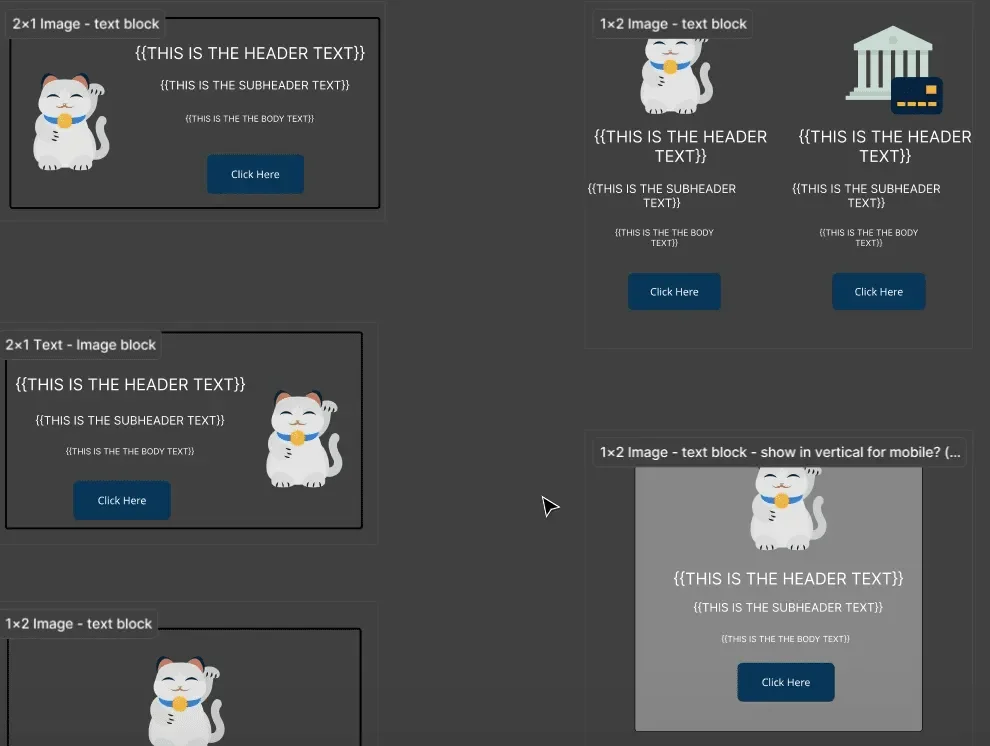
Brand research is key to our process.
It is very extensive. From studying the client’s shared references to understanding their aesthetics as displayed on their website, including analyzing the design of articles, blog posts, and other pages, we do it all. For every email we design, we refer to our inhouse design system which is a set of files containing reusable components, color sets, master layouts, button styles, etc. (See image above)
A modular architecture is key for facilitating email operations at scale.
2. Bake brand rules into the process
A design system only governs what it covers. For everything else, teams need a single source of truth. And that place should be the brand book, with a dedicated email section.
This is governance by design.
It means reducing decision fatigue in the production process by setting clear rules from the start. If a developer knows the body font should be 16px or 14px because it’s already documented, that’s one less conversation, one less inconsistency, and one less reason for the review cycle to take longer.
3. Align across teams before production starts
One of the most overlooked moments in email governance is the cross-functional alignment conversation — specifically, between email developers and the teams working on web and digital design.
Before you build anything, go talk to your designers first.
Dymtro points out, “Too often production slows because design lives in Figma, disconnected from real code, and because teams work in silos and wait for each other.” His solution is integrating design, content, and code into one shared environment where everyone can work simultaneously — with comments, module changes, and reviews happening in real time rather than across slow handoffs.
The point of approval workflows is to minimize handoff gaps, not just to catch errors at the end.
4. Make accessibility a governance standard
Accessibility is where email campaign governance gets consequential. It’s not for compliance only, but for performance. 25-28% of users worldwide have some form of disability, permanent or temporary.
Megan’s recommendation is to bake accessibility into what she calls “email culture” — a baseline standard built into every template and module. Start with the following:
- Eliminate all-image emails. Images should enhance the message, not carry it. The email must still work when images don’t load.
- Set a minimum text size of 16px for body copy. (For older audiences, Megan has gone as high as 21px.)
- Check color contrast rigorously. Use a WCAG checker, not visual judgment.
Dymtro adds logical heading structure to that list, noting that screen readers depend on it, and so do AI tools that extract content summaries. “If you have a bad structure, AI would not work,” he says.
Good accessibility architecture and good AI-readiness have quietly become the same thing.
Accessibility is a legal requirement. Make sure to establish a dedicated email compliance workflow which will include all the necessary legal frameworks by region.
5. Eat the frog (dark mode and rendering)
One of the trickier dimensions of email governance is managing consistency across email clients you don’t fully control. These include dark mode and client rendering. Megan is candid about the limits: “A little bit of it is letting go that dark mode — especially in Gmail — is going to do what it’s going to do.”
That said, practical steps exist:
- Implement the prefers-color-scheme media query in your standard codebase for Apple Mail.
- For Outlook web, targeted CSS gives additional control.
- For Gmail, color blend mode techniques offer partial solutions when needed.
Know your audience’s email client mix before deciding how much dark mode investment is warranted. Audience-informed decision-making is itself a governance practice — ensuring technical effort goes where it improves the recipient experience. That’s what matters in the end.

At Mavlers, our dark mode testing covers these best practices:
- We visually compare emails in both light and dark mode on every client that supports dark mode.
- We add specific dark mode styles using prefers-color-scheme media queries.
- We include color-scheme meta tags so emails can respond to system-level dark mode settings.
- We use transparent PNGs and SVGs for logos to prevent white background halos in dark mode.
- We set specific dark mode background overrides on containers that should not auto-invert.
- We check color contrast in dark mode, since a combination that works in light mode may not have enough contrast in dark mode.
6. Include code quality validation
Code validation should be a step in the approval workflow, not something a developer checks when they feel like it. Templates should be tested across clients before they enter the library. And the Gmail 102-kilobyte code weight limit — which does NOT include image size, a point of common confusion — should be monitored when using drag-and-drop editors that tend to produce bloated output.
According to Dmytro: “A lot of times with visual editors and ESPs, you end up with very bloated code — and I see why, because you have to take so much into account and you never know how somebody is going to build an email.” Drag-and-drop editors may be fine for smaller teams, but they introduce code quality risks at scale that purpose-built visual editors can iron out.
7. Rejig approval workflows
The instinct when governance gets messy is to add more approvals. In reality, the problem is usually the opposite: too many disconnected steps!
Dmytro’s framework rests on pre-approved modules. When components already meet brand guidelines, legal requirements, localization standards, and accessibility rules at the system level, individual campaign reviews can focus on content and strategy.
Version control rounds out this picture. “Version control is your internal documentation — when you know why you made a change, you can go back to a previous decision and keep your A/B testing everything centralized,” says Dmytro. This matters particularly for teams running localized campaigns or managing multiple brands on a shared codebase.
The role of AI in email campaign governance
AI, the whole reason why the world began talking about governance in the first place!
As far as email is concerned, it is important to realize that email development is a niche discipline with enough client-specific quirks that AI-generated code frequently misses the mark. It produces output that looks functional but skips the accessibility requirements, dark mode handling, and rendering considerations that governance actually demands. Teams that have gone all-in on AI for email code often find themselves spending more time fixing the output than they saved generating it.
That said, AI does show real promise in a more targeted role: prompt-driven assembly. When a solid design system, brand guidelines, and a content library are already in place, a marketer can simply describe what they need, and the system can execute it automatically. The keyword there is “already.” AI builds on the foundational work you do.
At Mavlers, our primary tools for coding include Codex, Claude, and AI-powered Figma plugins. Any code generated or assisted by AI goes through the same QA process as manually coded emails.
Our typical process includes:
- Reviewing the AI-generated code to ensure it follows email development best practices.
- Adding client-specific requirements and compatibility fixes for Outlook, Gmail, Apple Mail, and other email clients.
- Testing through Email on Acid and/or Litmus to verify rendering across devices and email clients.
- Validating responsive behavior on desktop, tablet, and mobile devices.
- Checking dark mode rendering, images, typography, spacing, and other design elements.
- Performing a final manual QA review to ensure the email matches the approved design and client requirements.
The last word on email marketing workflow management
Email governance is a competitive advantage. Teams with strong governance ship faster, produce more consistent output, meet accessibility standards by default, and onboard new members in days.
“I think that’s what’s made me a really good developer: I came into email development with the design chops already in place and a lot of the strategy already in place,” Megan says.
Governance is what allows that strategic thinking to survive at scale, even when the team is small, the timelines are tight, and the campaign calendar never stops.