Lifecycle marketing
 Customer data management
 Email campaign production
 Search marketing
 CMS development
 Who we are
 How we work
 Case studies
 Testimonials
 Salesforce Marketing Cloud
 Braze
Braze HubSpot
 Marketo
 Pardot
 DataBricks
 Snowflake
 HighTouch
 RudderStack
 Segment by Twilio
 Videos
Ask five people on a Braze account which AI tool actually runs their campaigns, and you’ll get five different answers pointing at the same dashboard. Confusing? It should be. That’s because most Braze clients aren’t picking the wrong AI tool. They’re expecting one tool to do the job of three.
Braze brought BrazeAI Operator™, BrazeAI Agent Console™, and BrazeAI Decisioning Studio™ together in public for the first time at City x City London in April 2026, when Operator and Agent Console hit general availability. Three products, one platform, and the same overlapping language everywhere: “intelligent,” “autonomous,” “personalization at scale.”
That confusion isn’t free. More than 99% of marketing leaders already say their brand uses AI for customer engagement. Yet a 2025 MIT study found only 5% of AI investments show positive ROI. Picking the wrong tool for the job is part of that gap.
Here’s a clear mental model for BrazeAI Operator vs. Agent Console vs. Decisioning Studio: what each one actually does, who it’s for, and how to combine them, so the decision becomes obvious rather than guesswork.
Let’s give you a head start.
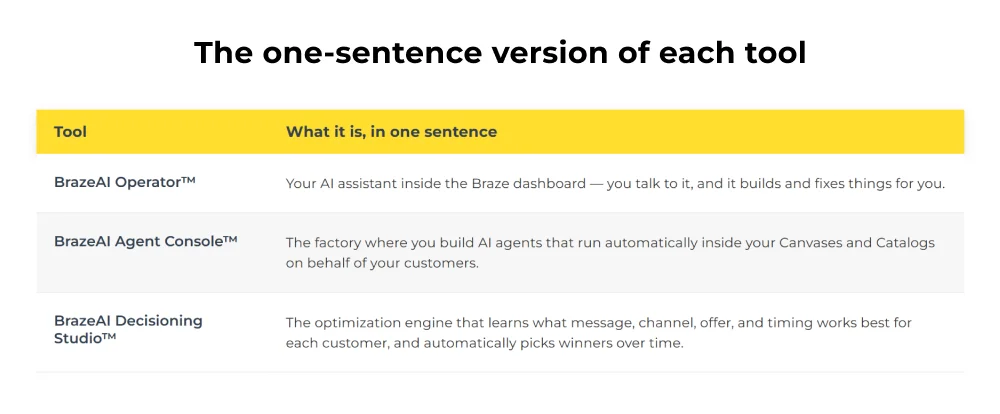
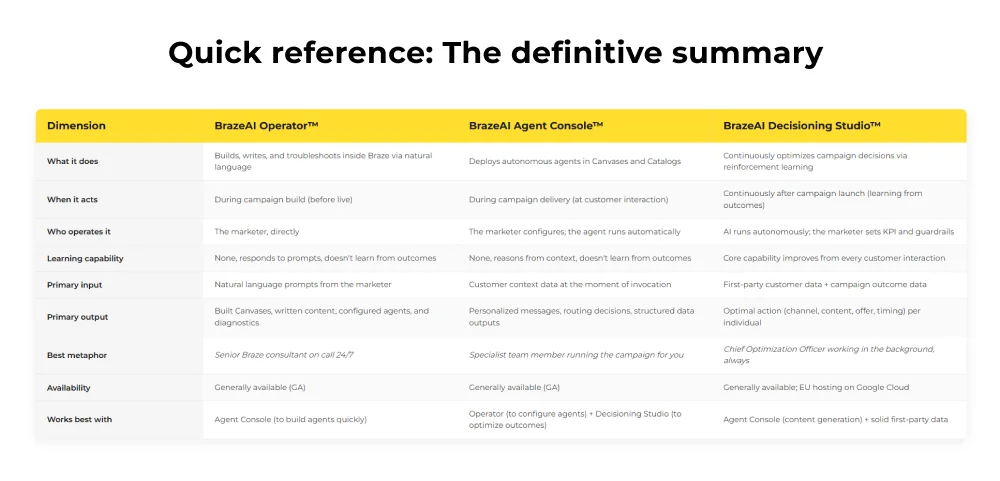
Think about it this way: Builder, Deployer, Optimizer.
- Operator saves time before a campaign goes live
- Agent Console saves time during delivery
- Decisioning Studio saves time continuously by learning from every outcome
Or picture an orchestra: Decisioning Studio sets the strategy, Agent Console agents add nuance moment to moment, and Operator is the studio manager on call for adjustments.
What is the mental model: Builder, deployer, optimizer
The cleanest way to think about all three tools together is through the lens of what they do to time:
- Operator saves time before a campaign goes live, building, writing, and troubleshooting
- Agent Console saves time during campaign delivery, running automated tasks at the moment of customer interaction
- Decisioning Studio saves time continuously, learning from outcomes and automatically improving decisions without human intervention
Or, using Braze’s own internal metaphor: Decisioning Studio is the conductor setting the overall strategy for a campaign.
Agent Console agents are the musicians adding creativity and nuance to individual moments in the journey.
And Operator is the studio manager who built the whole setup, wrote the sheet music, and is on call if something needs adjusting mid-performance.
With that frame established, let’s go deep on each one.
Tool 1: BrazeAI Operator™: The build-and-fix assistant
What it is
BrazeAI Operator is a conversational AI assistant that lives inside your Braze dashboard, not a generic AI tool bolted on in a separate tab. It understands the workspace you’re in and proposes changes through reviewable action cards, staying within your own dashboard permissions.
What Operator can actually do
- Build Canvases and campaigns from a plain-language brief
- Write and debug Liquid personalization, arguably its highest-value use, since it hands a historically dev-dependent skill to anyone on the team
- Draft and iterate cross-channel content across email, push, in-app, and SMS
- Troubleshoot live campaigns and pre-fill Agent Console configuration
What Operator cannot do
Operator is a build and execution assistant. It is not a learning system. It doesn’t observe whether the campaigns it helped you build performed well and improve its suggestions accordingly. It doesn’t make autonomous decisions during campaign delivery. Once the campaign is live, the Operator’s job is done unless you come back to it for another task.
It also won’t replace strategic thinking. Vague prompts produce generic results. The clearer and more specific your brief, the better BrazeAI Operator’s output.
Who gets the most from the Operator
| Role | How Operator helps |
| Campaign Manager | Builds Canvases faster, writes Liquid without needing a developer, and troubleshoots issues independently |
| CRM Strategist | Turns campaign briefs into platform-ready flows without repetitive UI navigation |
| Content Marketer | Drafts and iterates personalized copy across channels without leaving the platform |
| New Braze Users | Functions as an always-available onboarding guide with contextual, workspace-specific answers |
| Agencies (like Mavlers) | Delivers more to clients faster, reduces turnaround on complex builds, and enables junior team members to operate at senior capability |
Real results: Operator in Action
Cleo, a family care platform, used Operator to rebuild its welcome journey around individual member needs, cutting unsubscribes by 81% and lifting push engagement by 124%. ADA’s digital experience team called it an always-available thought partner.
When to reach for Operator?
- You need to build or rebuild a Canvas quickly
- You have a Liquid personalization requirement, and no developer is available
- A campaign is misbehaving, and you need to diagnose why
- You want to create and configure an Agent Console agent without manual configuration
- You’re launching into a new channel and want expert-level guidance on setup
- You’re onboarding a new team member to Braze
Tool 2: BrazeAI Agent Console™
What it is
If the BrazeAI Operator works office hours, Agent Console runs the overnight shift. It’s where you build and deploy custom AI agents that run autonomously inside live Canvases and Catalogs, acting the moment a customer hits a Canvas step, not while you’re building.
You define what each agent can access, what it should do, and its fallback values. The default daily cap is 250,000 invocations per agent, extendable to 1,000,000.
What can Agent Console actually do
Agents support three core categories of action:
- Personalized content assembled per individual at send time
- Intelligent, multi-signal user routing well beyond a Boolean split
- Data enrichment, turning free-form input like survey responses into structured profile fields
What the Agent Console cannot do
Agent Console agents reason from context the moment they’re invoked, but they don’t learn from outcomes over time. That loop belongs to Decisioning Studio. And output is only as good as your data. An audit isn’t optional here.
Who gets the most from Agent Console
| Role | How Agent Console helps |
| Lifecycle Marketer | Enables genuinely 1:1 content at scale; every customer receives a message assembled for them, not a template with their name inserted |
| CRM Strategist | Replaces rigid attribute-based routing with nuanced, context-aware journey decisions |
| Data/MarTech Team | Automates data cleanup, profile enrichment, and catalog updates that previously required manual operations or engineering |
| E-commerce Marketer | Generates dynamic product recommendations, localizes catalog content across markets, and sends contextually relevant cart recovery messages |
| Global Teams | Translates catalog entries and campaign copy at speed and scale, maintaining brand voice, without a human translation sprint |
Real results: Agent Console in action
Dayuse saw a 90% increase in booking conversion rate and doubled incremental revenue on its flagship campaign after adopting Agent Console. Luxury Escapes replaced manual segmentation with an intent-classification agent and lifted revenue per user by 10%.
When to reach for Agent Console
- You want every customer to receive message content assembled specifically for them at the moment of send
- Your Canvas decision splits are based on limited boolean logic, and you want richer, more contextual routing
- You receive free-form customer inputs (chat, surveys, feedback) that need to be structured and fed back into your data layer
- You’re managing a multi-language catalog and need localization at operational speed
- You want to build a QA agent that reviews messages for brand compliance before they are sent
- You’re setting up post-purchase personalization that adapts to what was purchased, not just a static template
Tool 3: BrazeAI Decisioning Studio™
What it is
Decisioning Studio is a different category of product entirely, a learning system, not a responder. It runs continuous experiments and uses reinforcement learning to discover the optimal action for each customer, built on the OfferFit engine Braze acquired in 2025.
What Decisioning Studio optimizes
- Channel: Email vs. push vs. SMS vs. in-app vs. WhatsApp, which channel gets this customer to act?
- Message and creative: Which content framing, which value proposition, which visual direction?
- Offer: Which incentive, discount level, or product pairing maximizes the target metric without eroding margin?
- Timing: What day and time does this individual respond to messages?
- Frequency: How often should this customer hear from you before engagement drops off?
All of these decisions, for every individual, are optimized simultaneously against your defined KPI. The system makes millions of 1:1 decisions per day that no human team and no rule-based segmentation could execute manually.
Decisioning Studio also opens the black box. Unlike many AI systems, it surfaces clear, customer-level reasoning for its decisions, letting you understand why a particular action was chosen for a given customer, which in turn generates insights into the underlying drivers of customer behavior in your category.
The two tiers: Go and pro
Decisioning Studio offers two tiers matched to different team needs:
Go is designed for teams starting their AI decisioning journey. It includes self-serve creative configuration with a pre-designed decisioning agent and compatibility with three customer engagement platforms: Braze, Salesforce Marketing Cloud, and Klaviyo.
Pro is the full-capability tier for advanced use cases, with access to Braze’s AI Decisioning Services team, who configure and tune agents specifically for your business. Enterprise customers, including Yum! Brands and Capital One are operating at this level.
What Decisioning Studio cannot do
Write your copy or build your Canvas. Those are the Agent Console’s and Operator’s jobs. It’s an optimization layer on top of existing content, and it needs a learning runway. Start with a subset of users rather than expecting day-one results.
Who gets the most from Decisioning Studio
| Role | How Decisioning Studio helps |
| CMO / VP Marketing | Replaces the “what do we send to everyone” question with “what does each individual need”, at scale and automatically |
| CRM Lead | Eliminates manual A/B test management and segment maintenance; the system handles optimization continuously |
| E-commerce Director | Maximizes revenue per customer across the entire lifecycle, cross-sell, upsell, repurchase, and winback, with AI selecting the optimal action at each stage |
| Retention Marketer | Identifies the signals that predict churn for each individual and acts before the window closes, without building manual rule sets |
| Enterprise MarTech Team | Provides auditability and transparency through customer-level reasoning logs, meeting the governance requirements that enterprise AI deployments demand |
Real Results: Decisioning Studio in action
foodora: Saw significant improvement in customer engagement and satisfaction, with higher conversion rates, increased revenue, and reduced churn, with Decisioning Studio optimizing channel, offer, and timing automatically across their customer base.
Yum! Brands and Capital One: Enterprise-scale Decisioning Studio Pro deployments, optimizing customer engagement across high-volume, complex lifecycle programs.
When to reach for Decisioning Studio
- You’re running the same A/B test logic repeatedly and want the system to learn automatically
- You have high-volume, repeatable use cases, winback, cross-sell, renewal, repurchase, where the optimal action varies significantly by individual
- You want to optimize for revenue or CLV rather than click-through rates
- You need auditability for AI decisions across a regulated industry (financial services, healthcare)
- Your team has exhausted what manual segmentation and rule-based routing can achieve
- You’re managing multi-market campaigns where optimal timing and channel vary widely across geographies
The decision framework: Which tool for which situation?
Use this as a quick reference. Most real-world use cases will involve more than one tool working together.
| Situation | Primary Tool | Secondary Tool |
| “I need to build a Canvas quickly for a campaign going live tomorrow” | Operator | — |
| “My Liquid personalization is broken, and I don’t know why” | Operator | — |
| “I want every customer to receive a unique subject line based on their real-time data” | Agent Console | Operator (to configure the agent) |
| “I need to route users differently based on nuanced behavioral signals, not just attributes” | Agent Console | — |
| “I want the platform to figure out the best channel and offer for each customer automatically” | Decisioning Studio | Agent Console (for content generation) |
| “I’m expanding into 8 new markets and need my catalog localized immediately” | Agent Console | Operator |
| “I want to stop doing A/B tests manually and let AI pick winners over time” | Decisioning Studio | — |
| “I want to parse customer survey responses and update profiles automatically” | Agent Console | — |
| “I want to troubleshoot why a segment isn’t populating” | Operator | — |
| “I want to maximize revenue from our cross-sell campaign, not just open rates” | Decisioning Studio | Agent Console |
| “I want to build a QA agent that reviews messages before they are sent” | Agent Console | Operator (to configure it) |
| “My team is new to Braze and needs guidance working within the platform” | Operator | — |
The power stack: When all three work together
The most sophisticated use of BrazeAI isn’t picking one tool. It’s understanding how all three fit into a single workflow.
Here’s a real-world example of how this works across a retention campaign:
- Operator builds. The marketer describes the retention campaign in plain language. Operator scaffolds the Canvas, writes channel-specific Liquid-personalized copy, and pre-configures two agents, content generation, and reply sentiment analysis.
- Agent Console runs live. As customers enter the Canvas, the content agent assembles a message per individual at send time. A second agent parses two-way SMS replies and writes structured sentiment back to the profile.
- Decisioning Studio optimizes over time. It watches which channel, message, and offer combination drives the best retention, and shifts delivery toward what’s working, automatically, without anyone reviewing a dashboard.
Build time compresses from days to hours. Every touchpoint gets personalized at the individual level. And performance keeps improving, because each tool is doing only the job it was built for.
The honest caveats: What to know before you deploy
- Start with data. All three tools are constrained by data quality, audit profile completeness, and catalog structure before scaling any of them.
- Agent Console needs prompt discipline. Ambiguous instructions produce inconsistent output. Invest in precise instructions and fallback values before going live.
- Decisioning Studio needs runway. It’s a learning system. Start with a contained use case and scale as the model matures.
- Operator rewards specific prompts. Treat it like briefing a capable teammate, not typing into a search engine.
- Review, don’t blind-trust. G2 reviewers have flagged that AI output needs human verification. Build a review step into every workflow, and run early agent deployments on lower-stakes campaigns first.
Where Mavlers fits in
We work with brands across retail, travel, health, e-commerce, and SaaS on their Braze programs, including Luxury Escapes, ADA, Weight Watchers, and Rent the Runway.
Here’s how we use each layer: Operator to compress build time and write Liquid personalization clients couldn’t build in-house, Agent Console to architect agent configurations against the clearest ROI use cases, and Decisioning Studio to define business KPIs and design multi-agent architecture for enterprise clients.
The value isn’t knowing how to use each tool individually. It’s knowing how they connect to each other, and to a client’s broader data strategy.
Connect with our Braze experts at Mavlers to build your business with a dedicated playbook.