Lifecycle marketing
 Customer data management
 Email campaign production
 Search marketing
 CMS development
 Who we are
 How we work
 Case studies
 Testimonials
 Work samples
 Salesforce Marketing Cloud
 Braze
Braze HubSpot
 Marketo
 Pardot
 DataBricks
 Snowflake
 HighTouch
 RudderStack
 Segment by Twilio

A disaster recovery (DR) plan is one of those rare things you want to have ready but wish you never have to use.
Albeit, there is no guarantee that you won’t.
Cyber attacks, hardware failures, data breaches, system outages, natural calamities, human errors–they’re all different forms of disasters that strike without the slightest hint. They not only put your organization’s critical applications at risk and disrupt operations but also jeopardize its revenue and reputation.
On average, organizations experience 86 outages per year, causing losses of at least $10,000 and up to $1 million PER outage.
Data breach is another common disaster that costs companies millions for downtimes. IBM’s 2025 Cost of a Data Breach report found data breach costs to have reached $4.4 million globally.
To respond to these threats, safeguard data, continue operations, and limit vulnerability, a reliable disaster recovery plan is a must.
But what guarantees that your DR plan will work when disaster strikes? Where do you find the confidence that data, applications, and overall operations will be restored within an appropriate timeframe after a service disruption?
The truth is, you really don’t know whether your disaster recovery plan is effective unless you SEE it working. And that assurance only comes from disaster recovery testing and drills.
The goal of disaster recovery testing is to evaluate the effectiveness of your DR plan before it impacts your ability to restore systems in the event of a disaster. It starts by accepting the fact that having data backup processes in place is no way a sure-fire way to protect them when disasters hit.
It’s backup recovery testing and validation that paint an accurate picture of the DR plan’s effectiveness, hidden gaps, and weaknesses. And only then can you strengthen your disaster recovery plan and bounce back more confidently after specific IT disaster scenarios.
The mistake many IT teams and operations managers make is getting hooked on the disaster recovery plan so hard that they fail to allocate necessary resources to disaster recovery tests.
Let’s change that.
In this blog, we outline a 3-step “stress-test” framework for backup recovery testing. You’ll learn how to simulate real-world failures and test your system’s resilience under pressure—without crashing your live site.
Because peace of mind doesn’t come from having backups. It comes from knowing you can recover.
What is disaster recovery testing?
Disaster recovery testing is a process that assesses the effectiveness of an organization’s disaster recovery plan before a disaster. While disaster recovery is a set of IT best practices for restoring infrastructure, disaster recovery testing validates their effectiveness.
The goal is to verify that the system, infrastructure, and data backups can restore functionality after a service disruption. It also validates that applications can be restored within an appropriate timeframe as planned by the recovery strategy.
Without solid backup testing and validation, it’s hard to tell how well a DR team performs and whether the recovery infrastructure will live up to your expectations.
Plus, the insights from disaster recovery testing allow organizations to reveal and resolve potential loopholes in a disaster recovery strategy. The anomalies that otherwise affect system resilience and business continuity during an outage.
It’s a critical practice to ensure that your IT infrastructure is ready to perform under the same pressures and requirements as actual disasters. Business operations running on such infrastructure continue with minimal interruption caused by the crisis.
Simply put, a disaster recovery plan that is not tested cannot be trusted.
Backups and disaster recovery: They’re not the same thing
Applications, databases, web servers, and file servers are the lifeblood of your organization. Backups are created by copying this data and storing the copies in a secondary location at predefined intervals. At a basic level, that’s what a backup is.
Backup is an essential starting point of a DR plan, but it cannot be the plan itself.
A backup only protects you from data loss if you can access and restore the data in case of a disaster. Many organizations discover—often too late—that their backups don’t satisfy this requirement. The result? They’re locked out of critical systems even though “backups exist.”
So what makes a backup unusable or unrecoverable?
On the surface, the culprits seem straightforward:
- Corrupted backup files
- Incomplete or failed backup copies
- Compromised data integrity
- Outdated or legacy backup software
Look closer, though, and a deeper issue arises.
Backups fail not just because something went wrong technically, but because they were trusted without proper data backup validation. Data that hasn’t undergone regular backup testing and validation can actually make things worse—accelerating reinfection or reintroducing corrupted data rather than enabling resilience.
True disaster recovery depends on backups that are actively protected and continuously inspected. It gives you the confidence that the backup is not just “available”; it’s also safe to restore, reconnect to, and rely on.
That’s why it’s essential to test website backup. Make sure you continuously test, validate, and monitor backups before they are ever used for disaster recovery.
Using simulation for disaster recovery testing
Testing your DR plan on paper is one thing; watching it survive a simulated ransomware attack is another.
Simulation testing for disaster recovery exists for one simple reason: you need a high-fidelity view of your DR practices. You must be sure of their performance under the pressure of real-world disaster scenarios, but without taking your live production environment offline.
Hence, you simulate. You intentionally create failure types conditions in a controlled setup, challenge your infrastructure, and stress-test how your disaster recovery process responds.
A simulated disaster could be anything from a hardware failure to a data integrity issue. The goal is to see whether your recovery steps actually hold up when systems stop behaving as you expect.
What matters here is realism.
A simulation is only as good as the scenarios you choose. If you only test for the easiest problems, you’re living with a false sense of security and maintenance. You have to throw diverse, uncomfortable failure modes at your team that you’re going to witness in real life:
- Total data center loss.
- Partial system failure.
- Data corruption.
- Ransomware attack.
- Application outage.
Each one probes a unique recovery angle and sharpens team instincts for real disasters because they’ve already “lived” through the simulation.
The stress-test framework: A 3-step disaster recovery drill
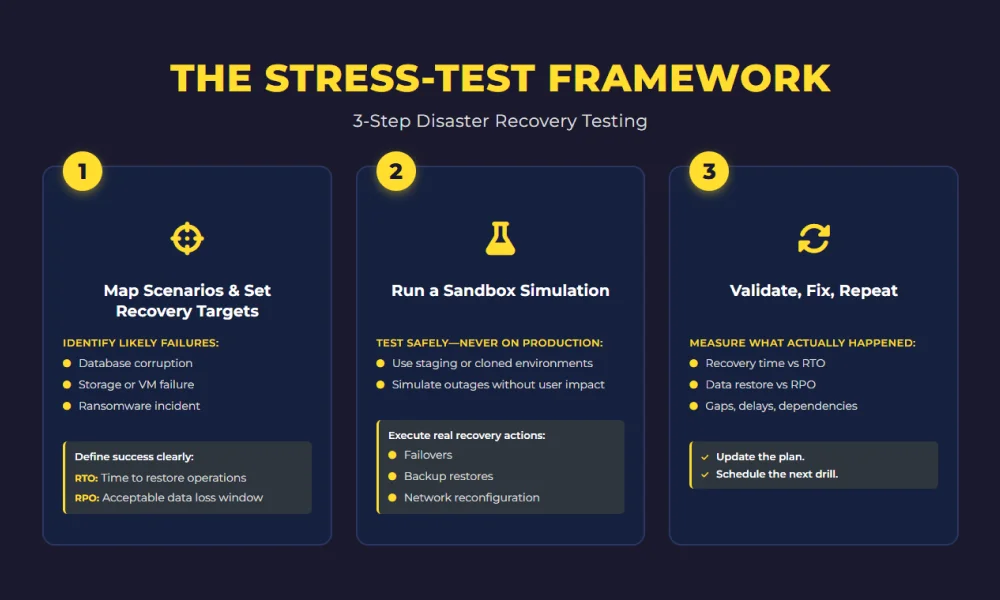
Step 1: Map scenarios and lock in objectives
Instead of pulling a random plug, decide what disasters are most likely to hit your specific organization or setup. Database corruption. Storage failure. A full Virtual Machine (VM) or server failure. A ransomware simulation targeting your primary data.
List them all. But resist the urge to test for everything at once. You’ll test nothing. A more efficient approach is to identify the most likely threats to your uptime.
Once you’ve picked your poison, the next thing you do is define your recovery success metrics. Define what “recovered” actually means for your disaster scenario.
To find out if a DR plan works, it’s essential that it meets your Recovery Time Objective (RTO) and Recovery Point Objective (RPO).
- RTO: The maximum acceptable time limit for business operations to restore after a disaster. If a database crashes, can your team restore it in 15 minutes or is that just a number on a spreadsheet?
- RPO: The maximum acceptable amount of data loss measured in time. It defines the amount of data a business can afford to lose in a disaster. When the data is restored, is it from five minutes ago, or five hours ago?
Making these demarcations ensures that your drill has a “pass/fail” grade, which is the only way to achieve genuine peace of mind.
Step 2: The sandbox simulation
The biggest hurdle for most Operations Managers is the fear that the test itself will trigger an outage.
The solution is to leverage isolated virtual labs. These are the staging environments mirroring your production setup. Thanks to modern cloud platforms and backup tools, it’s absolutely possible to clone your environment or use “fenced” virtual networks. Which means you can simulate a total server collapse or disconnect a database service without a single end-user noticing.
During this phase, ask your team to follow the predefined recovery procedures:
- Triggering failovers (backup or recovery system after an outage) to standby systems.
- Restoring from incremental backups or off-site storage.
- Reconfiguring network routes to point toward the newly restored assets.
The goal here is to build “muscle memory.” You train your team to handle a simulated server crash in the sandbox that keeps them ready for real-world outages, too.
Step 3: Validation and iterative refinement
A drill isn’t finished just because the systems are back up. The final, and most critical, step isn’t over until you conduct the validation process. You need to measure and analyze the results to check:
- The time it takes to restore systems?
- Where did teams get stuck?
- What wasn’t documented clearly?
- Which dependencies caused delays?
During and after recovery, validate that:
- Services are functioning as expected.
- Data integrity is intact.
- Actual recovery timelines align with the RTO and RPO targets you set in Step 1.
Remember that the final step of backup recovery testing is not meant for you to mark it Pass or Fail and call it a day. It’s there so you can use the drill’s findings to update configurations, add resources where needed, and refine your documentation. Hence, update the plan and schedule the next round (quarterly at least) so when a real disaster lands, you’re not reacting, you’re repeating a win.
The road ahead
Your disaster recovery strategy is only as foolproof as the testing behind it. Backups and plans set expectations, but regular disaster recovery testing and drills prove their attainability.
Disaster recovery testing helps teams uncover gaps early, fine-tune recovery steps, and remove uncertainty during high-pressure incidents. It also ensures critical systems and data can be restored within the timelines the business depends on.
A tested, well-documented disaster recovery plan reduces downtime, limits financial and reputational impact, and keeps operations moving during disruptions. In the end, business continuity isn’t built on assumptions, it’s built on proven recovery.