Lifecycle marketing
 Customer data management
 Email campaign production
 Search marketing
 CMS development
 Who we are
 How we work
 Case studies
 Testimonials
 Salesforce Marketing Cloud
 Braze
Braze HubSpot
 Marketo
 Pardot
 DataBricks
 Snowflake
 HighTouch
 RudderStack
 Segment by Twilio
 Videos
Google has started inserting Product listing ads (PLAs) into its AI overviews, AI mode, and chat replies.
So what, you ask?
This means:
- Less traditional SERP real estate for organic listings.
- Fewer outbound clicks as more decisions happen on-platform.
- Rising acquisition costs with new ad auctions.
At the same time, these AI-driven formats demand something most brands haven’t fully operationalized yet: clean product data, structured feeds, and schema that machines can confidently interpret.
There is a comforting prospect, though.
Our in-house experts think that there is no way it’s a temporary squeeze on advertisers. Google still runs on ad revenue. So, as search evolves, paid placements aren’t disappearing. On the contrary, Google will likely provide more of them on the new AI-powered SERP. Hence, we’ll see search ads placed in dedicated ad slots throughout the page. Only in redistributed formats.
In short, no dearth of opportunities for advertisers as they try to reach customers through product listing ads.
And now ChatGPT and Perplexity do it, too.
ChatGPT Shopping and Perplexity AI’s shopping feature now understand intent, summarize, rank, and serve up shortlisted product recommendations right in the conversation.
Behind the scenes, the link between your product listing ads data and your organic AI visibility is tightening. AI models devour structured and trustworthy data. They need enriched product feeds, deep schema markup, and marketplace listings to “reason” through a user’s request. Product feeds that fail to align with model-level interpretation struggle to be visible and competitive in AI-driven shopping environments.
In this context, knowing how to optimize Google Product Listing Ads is no longer just a PPC question; it is a core requirement for AI search visibility. And, that the PPC team manages the feed and the SEO team manages the blog becomes an archaic strategy.
To dominate the AI interface, Marketing Directors must break down the silos between PPC and SEO. PPC managers must partner with SEO leads to create a unified data strategy. By balancing the high-visibility Suggestion of a PLA with the high-authority Recommendation of an organic citation, you shape the conversation.
In this guide, we’ll break down how to optimize your product feed for Product Listing Ads while simultaneously improving your generative search product results. We’ll see the tactics to provide the “Answer” and the “Product” at the exact same time.
What are Product Listing Ads?
Product listing ads (PLAs), a.k.a Google Shopping ads, are paid, visual advertisements. In contrast to text ads, PLAs show users product images, prices, and other relevant information in a convenient tile format.
The E-commerce brands and retailers bid for PLAs to give a strong sense of their products before they click the ad. And that’s why the leads that they get are more qualified.
You’ll see PLAs across:
- SERP.
- The Shopping tab on SERP.
- Search partner websites.
- Google’s price comparison Shopping experience (web and mobile apps).
- YouTube.
How do product listing ads work
How product listing ads work is entirely different from how traditional search ads work.
- Two systems working together: Google Ads and Google Merchant Center.
- Google Ads is where you control budgets, bidding, and performance.
- Google Merchant Center stores your product data.
- There are no keywords to bid on here. You don’t bid on “best winter jackets.”
- Instead, you submit a Product Data Feed via the Google Merchant Center.
- Google evaluates the attributes in your feed and matches them to user queries.
- If the data matches, Google serves your product listing ads as a visual solution.
This makes PLAs fundamentally different from classic search ads. They shift from being just promotional units to serving as structured commerce inputs. And AI-driven search engines assemble their responses across ecosystems; that distinction matters.
The advantage shifts away from simply occupying grid placement on a results page and toward being selected and recommended by AI systems. That’s because the same product feed data that powers PLAs increasingly determines how products are understood, compared, and surfaced across AI-powered shopping experiences.
Consequently, the paid vs. organic product listings is officially obsolete. In the answer-first era, it is a unified game of paid AND organic product listings.
How to set up Google Product Listing Ads
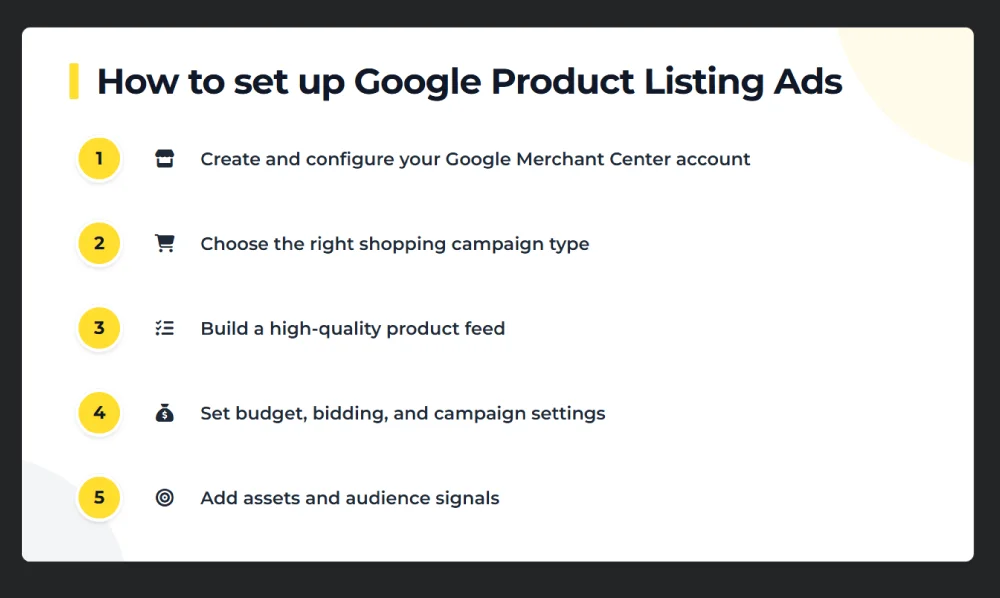
Step 1: Create and configure your Google Merchant Center account
The Google Merchant Center is the heart of your shopping operations. It stores your product feed and dictates the “rules of engagement” for your ads.
- Verify and claim your domain.
- Set tax rules.
- Define shipping settings.
- Link your Merchant Center to your Google Ads account using your Google Ads customer ID.
Step 2: Choose the right shopping campaign type
Google offers multiple Shopping formats. The two most relevant are:
- Performance Max (PMax)
Best for scale and automation. Google uses machine learning to place your products across Search, Shopping, YouTube, Discover, and more—based on your conversion goals.
Choose this if:
- You want reach and efficiency.
- You’re comfortable giving Google more control.
- You have strong product data and conversion tracking.
- Standard Shopping Campaigns
More manual control over bids and structure, but less automation.
Choose this if:
- You want tighter control over spending and queries.
- You’re optimizing around efficiency or specific product groups.
Step 3: Build a high-quality product feed
You can create it via:
- Google Sheets (for small catalogs).
- Feed management tools (for large or frequently changing inventories).
- E-commerce platform integrations (like Shopify).
At a minimum, your PLA product feed should include:
- Clear product titles.
- Accurate pricing and availability.
- High-quality images.
- Consistent categories and identifiers.
Step 4: Set budget, bidding, and campaign settings
In Google Ads, define:
- Daily budget
- Bidding strategy
For new Performance Max campaigns, it’s often better to let Google learn first—avoid strict CPA or ROAS targets early on.
Next, configure:
- Target locations and languages.
- Final URL expansion (lets Google send traffic to the most relevant product or category page based on intent).
Step 5: Add assets and audience signals
Shopping campaigns, especially Performance Max, use creative assets alongside product data.
You’ll provide:
- Images, logos, and videos.
- Headlines and descriptions.
- Calls to action.
- Business name.
You’ll also define audience signals. These are custom segments that give Google a starting point for finding high-intent shoppers. Finally, add extensions like:
- Sitelinks
- Promotions
- Price extensions
How to optimize product feeds for AI-driven discovery
TL;DR — Optimizing Product Feeds for AI Discovery
- You can submit your product feed to AI interfaces like ChatGPT, Perplexity, Gemini, and Google’s AI mode.
- An incomplete or ambiguous product data feed clouds your AI visibility.
- Move beyond keyword matching. Use the conversational language from your customer reviews and support tickets to address natural language queries.
- Every attribute matters: variants, shipping, reviews, labels.
- Product Schema (JSON-LD) as a “signature of truth” to confirm your feed data and Alt-Text to help AI vision models “see” your products.
For years, a structured product feed was a clean list of what’s in stock. It was a specialized tool for the Shopping features of Google, Meta, and TikTok.
Guess what, that feed has been promoted.
Today, it’s the primary dataset from which Large Language Models (LLMs) like Perplexity and OpenAI pull to answer nuanced consumer search queries like this–
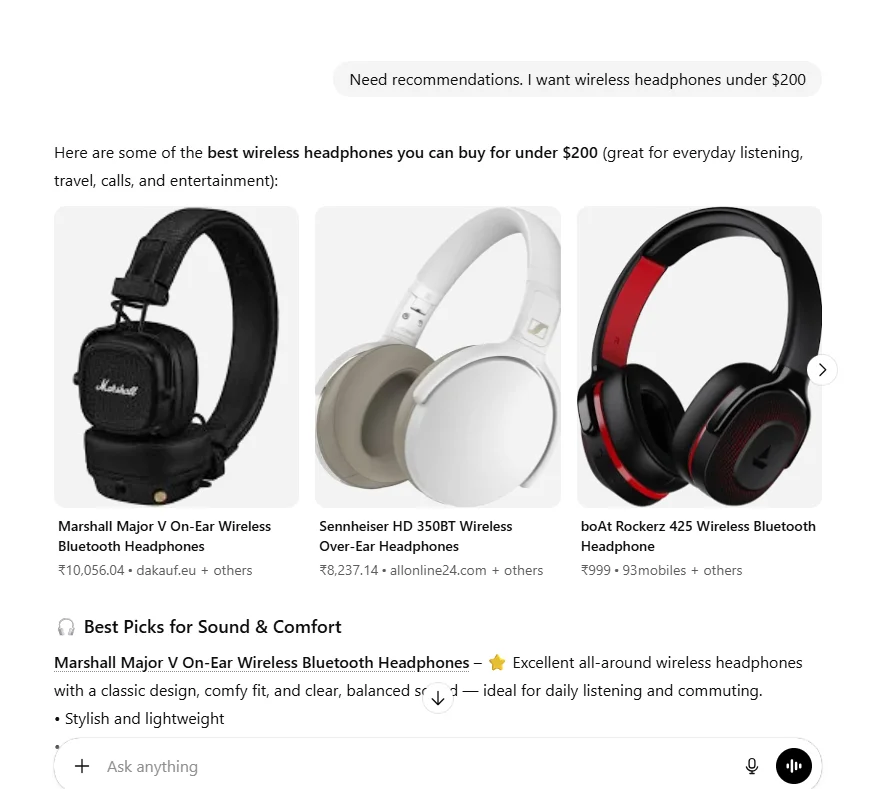
These AI answer engines are building product recommendation systems blended directly into their interfaces. Both have already introduced ways to ingest product data at scale.
When a user asks an AI for a recommendation, the model is querying a structured database to see if your SKU matches a highly specific, conversational intent.
Which means your PLA product feed is also a source dataset for AI-generated answers in the Answer-First era.
So, how do you make your PLA product feed speak the language of the LLMs?
1. Start with complete, unambiguous product feed essentials
AI systems penalize uncertainty. Incomplete or vague fields give a hard time to models trying to connect your product to a specific search query.
Before optimizing any advanced data, your “Product feed core” must be airtight.
Haven’t audited your feed lately? Then, auditing the product feed should be your first step. Conduct an audit using Google Merchant Center or Feedonomics to ensure every SKU contains:
- Unique Identifiers: Valid GTINs or MPNs (The “Social Security Number” for your product).
- Rich Titles: Brand + Category + Key Attributes + Value Proposition
- Semantic Descriptions: Intent-matching text (more on this below).
- Transparent Pricing & Availability: Inconsistencies here trigger “distrust” flags in AI models.
- Clean URLs: Both for the product and the high-res image.
2. Solve for intent along with keywords
Traditional search crawlers matched “trail running shoe” to a search for “trail running shoe.”
Today, shoppers are pro at giving prompts to AI tools. Imagine a user asks for: “Looking for a durable office chair for someone with lower back pain. The chair should suit a mid-century modern aesthetic.”
A keyword-optimized product feed might miss this because it’s looking for “office chair.”
AI uses Natural Language Processing (NLP) to understand the entity behind the words. That’s how an AI model understands that:
- “Shoes for rocky trails” falls under outdoor or trail footwear.
- “Light on the feet” suggests weight and comfort.
- “Won’t overheat in summer” points to breathability and material choice.
Even when users don’t describe products precisely, AI connects intent through context, modifiers, and past behavior. This shifts our attention from rigid keyword optimization to clear, human, and conversational language.
Which is why product feeds should map to the prompt-based use cases. They should echo solutions to customers’ pain points. In the same conversational manner. Not how internal teams label SKUs.
The takeaway is to write your titles and descriptions the way people actually talk, and with the details AI can use to match queries. To find this language and framing, mine:
- On-site search terms.
- Customer support conversations.
- Post-purchase reviews.
- Chat transcripts.
Dig deeper:
NLP And Conversational Search Optimization: A Guide To Optimize Content for Conversational Queries
3. Optimize title and description structure
To be surfaced by generative search product results, you must quit fooling around with your titles and descriptions. Understand that they don’t just influence ads, they help AI decide relevance.
For good product titles, use a clear, attribute-heavy structure to feed the model’s need for detail. Do that by giving a logical flow to your product titles and helping AI parse your product’s value proposition in milliseconds. Here’s what Neil Patel’s formula for a clear title structure looks like:
[Brand] + [Category] + [Key Attributes] + [Value Proposition]
For example:
CeraVe Daily Moisturizing Lotion – Hyaluronic Acid, Oil-Free, Fragrance-Free – Non-Greasy Hydration for Sensitive Skin.
Descriptions should flesh out the title with more context and not repeat it. Use description as a way to give away more granular details about your product. Materials, specific use cases, and technical specifications that AI models use to satisfy long-tail, hyper-specific queries of your customers.
4. Enhance structured attributes with “hard facts”
In the AI interface, there is no such thing as an “optional” field. Every attribute you leave blank is a missed opportunity for the AI to build comparison tables and recommend your product to a specific user.
- Fill out the material, color, and size variants in your Merchant Center.
- Use Custom labels and categorize products by “Best Sellers,” “High Margin,” or “New Arrivals.” AI needs them to recommend the right product for specific scenarios.
- Integrate your Review counts and Star ratings into your feed. Trust Signals: These are the trust signals AI is looking for to back their citations.
5. Close the gap with Schema and Alt-Text
The bridge between your feed and an organic “Recommendation” is Product Schema Markup. It serves as the technical foundation for AI-generated organic product results.
- Use JSON-LD to implement Product, Review, and Offer schema on every page. This acts as a digital signature of truth, confirming the data in your feed is accurate and up-to-date.
- AI models are increasingly multimodal. They “see” your images. Using descriptive alt-text provides the AI with the linguistic confirmation it needs to match your product to a visual search.
6. Automate
As your catalog grows, you must use Feed Rules to standardize your data:
- Append missing colors or materials to titles.
- Standardize capitalization and formatting.
- Populate known defaults where data is missing.
- Flag products with incomplete attributes.
Product feeds alone don’t earn visibility in AI search
AI-powered discovery systems are still in an early stage, and we’re all learning how they work in real time. But based on the patterns we’re already seeing, one thing is clear: LLMs don’t evaluate your product feed or website in isolation. They assess authority by looking for consensus across the web.
That means being the product that an AI model names at the moment requires tighter integration of your brand authority across the entire ecosystem. Your influence no longer lives on a single page or platform—it travels with the product wherever it appears. And AI can evaluate it in ways we couldn’t imagine before.
1. Cross-platform authority
LLMs cross-reference your product data against a massive web of third-party signals to verify your claims. A high-quality product description in your PLA is nullified if Reddit users consistently recommend a competitor or if Amazon reviews don’t agree with you.
Your internal data carries weight only when it is mirrored by external validation from:
- User discussions on Reddit
- Reviews and demos on YouTube
- Customer ratings on Amazon, Shopify, and other such platforms.
- Coverage from trusted publishers and industry reports.
- Community conversations across forums and Q&A sites.
2. Cross-channel data hygiene
Because AI merges your data from different sources when answering a product query, any variations in your product attributes across platforms create “Data Decay.” Which the AI perceives a lack of authority. That’s why:
- Your Shopify store, Amazon listings, and Google Merchant feed must maintain a “clean identity.” Use identical SKU names, technical specifications, and high-resolution imagery across every touchpoint.
- When a price drops or a feature is updated, you must update it across channels simultaneously. If the AI detects a conflict, it will deprioritize your product to avoid giving the user a “wrong” answer.
3. Ability to be the solution
As AI users, we all know this ourselves. No user searches for a specific SKU. They share their problems with the AI, expecting guidance. are searching for a solution to a problem.
How do I take clean protein after my high-intensity workouts?
Brands that provide the “Answer” gain the “Recommendation” before the user even considers a specific product. To do this:
- Identify the high-volume questions in your niche using Search Console or ChatGPT. Create AI-citable, authoritative guides that solve these specific pain points.
- Don’t just run ads to product pages. Run ads to your high-value guides and blog posts that solve these specific pain points.
Dig deeper:
How To Make Your Content AI-Citable?
The road ahead
The next era of commerce won’t be defined by where your Product listing ads appear. But by how your brand is interpreted inside the AI system. As conversations become commercial environments, paid ads are not just about securing a placement. It’s about influencing the decision an AI system assembles in real time.
If you are beginning to test these waters, you must understand the current limitations of the “Answer-First” interface:
- You cannot “buy” your way into Generative search product results. Google and OpenAI’s models decide in real-time if your product is relevant enough to be recommended in the conversation.
- Most platforms do not yet separate AI-driven clicks or conversions from standard search traffic. Until dedicated reporting arrives, granular attribution remains a “best-guess” exercise.
- The AI interface is in a state of constant flux. A query that triggers a product recommendation today may not trigger one tomorrow as models are tuned for better user experience and accuracy.
We’re tracking these developments in real-time to help brands transcend from traditional search to the “Answer-First” era. If you need a custom game plan to get your PLAs cited in AI results, schedule a call with our team today.
Hungry for more? Explore our recent insights on paid search below.
- The Performance Marketer’s Guide to AI Max ~ Unveiling Hidden Challenges & Tricks
- Which Platform Scales Better For AI-powered E-commerce: Shopify Or WooCommerce?
- How Google’s AI Overview Is Disrupting Google Ads: What Advertisers Must Know
- The Ultimate Guide To Higher Lead Quality From Google Local Service Ads