Lifecycle marketing
 Customer data management
 Email campaign production
 Search marketing
 CMS development
 Who we are
 How we work
 Case studies
 Testimonials
 Work samples
 Salesforce Marketing Cloud
 Braze
Braze HubSpot
 Marketo
 Pardot
 DataBricks
 Snowflake
 HighTouch
 RudderStack
 Segment by Twilio

Salesforce Marketing Cloud (SFMC) is often treated as a delivery engine. In mature organizations, though, it becomes an early warning system for customer trust.
This is because reputation signals rarely arrive as obvious alerts. To keep a healthy email program, you can’t just look at the total “clicks and opens.” You have to monitor your performance domain-by-domain to ensure one specific provider isn’t quietly sabotaging your setup.
“Deliverability,” states Lukas Lunow, “can be a real diva in the email marketing world: sometimes the spotlight is on the glittering top-line metrics, while the real meltdown happens off-stage.”
Great marketing architecture starts with listening. Listening to customers, to data, and to context.
And reputation management in Salesforce Marketing Cloud (SFMC) demands the same discipline.
In today’s post, we’ll explore how to embark on reputation management in Salesforce Marketing Cloud (SFMC). As a first step, focus on the specific reputation signals you should be monitoring.
Top 4 reputation signals to prioritize for managing Salesforce Marketing Cloud (SFMC) sender reputation
1. Quality of engagement
Mailbox providers care less about how many emails you send and more about what recipients do with them. Positive signals include opens, clicks, replies, and dwell time. Negative signals include deleting without opening, rapid skimming, dragging emails directly to trash, etc.
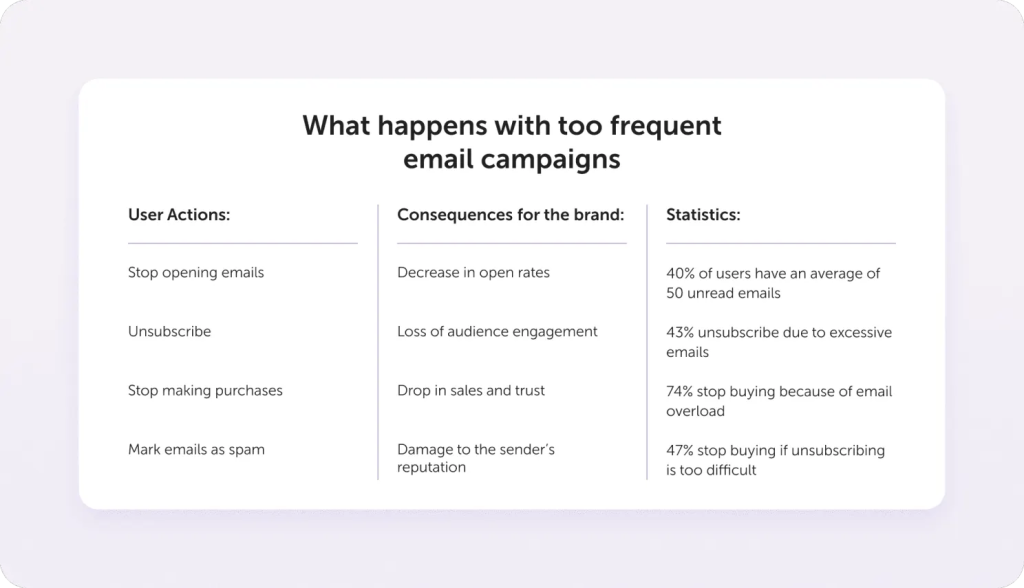
Source: Altcraft
However, keep in mind that with Apple’s Mail Privacy Protection inflating open rates, clicks have become the more reliable engagement indicator. A recipient clicking through demonstrates genuine intent and interest, far more valuable than an automated open from Apple’s server.
For Salesforce Marketing Cloud (SFMC) teams, this means shifting reporting conversations away from volume-based success.
A journey that sends fewer emails but generates sustained engagement is strengthening reputation, even if it looks smaller on a campaign calendar.
2. Recency and momentum
Reputation is heavily weighted toward recent behavior. A list that performed well six months ago but is now cold is actively hurting your sender reputation.
This is where many Salesforce Marketing Cloud (SFMC) teams struggle. Legacy journeys continue to send because they were “approved,” not because they are still earning engagement. Monitoring recency by segment, not just globally, is essential. Treat recent engagers as reputation accelerators, whereas suppress or only carefully requalify long-term inactive audiences on your list.
3. Complaints, unsubscribes, silent signals
Spam complaints are obvious red flags; however, silent signals are often more dangerous:
- Rising unsubscribes after the key sends
- Declining engagement in welcome journeys
- Sudden drops in response timing.
Bounce rates need close, ongoing attention.
Sudden blocks may be content-related (links, domains, RBLs), while gradual blocks usually stem from declining engagement, list quality, or long-term reputation damage. High 421/4xx bounces indicate that mailbox providers are unhappy with volume, cadence, engagement, or complaints. If ignored, throttling often escalates to blocking.
Missing or misconfigured SPF and DKIM commonly trigger 550-level blocks.
Beyond a top-line metric, bounce responses carry diagnostic signals in their codes that reveal specific sending issues. Any sudden increase, especially from a single mailbox provider, should prompt an immediate review of logs to pinpoint and correct the underlying cause.
4. Cross-team handoffs and follow-through
Reputation is not owned by marketing alone. In B2B, especially, handoffs to sales and service directly affect customer perception. A lead that engages deeply with marketing but waits weeks for a sales response generates negative downstream signals.
Aligned KPIs between marketing and sales are reputation safeguards.
Monitor Salesforce Marketing Cloud (SFMC) sender reputation beyond dashboards
One mistake teams make is relying solely on Salesforce Marketing Cloud (SFMC) reporting. While useful, ESP metrics show only part of the picture.
Mailbox providers already tell you how they perceive your domain through tools like Google Postmaster and Microsoft SNDS. Ignoring these is like ignoring system logs while debugging production issues.
Monitoring reputation requires combining:
- Salesforce Marketing Cloud (SFMC) engagement and journey data
- Mailbox-provider feedback
- List health and validation insights
- Behavioral trends over time, not just per campaign
The goal is not more dashboards, but better interpretations of more relevant data. There is no single score that defines SFMC sender reputation. It has to be assessed across multiple signals and platforms, since reputation can vary significantly from one mailbox provider to another.
How to set up Google Postmaster Tools to monitor reputation
If a significant portion of your audience uses Gmail or Google Workspace, you need a direct view into how Google evaluates your sending behavior.
Here are the steps for setting up Google Postmaster Tools:
- Go to postmaster.google.com and sign in using any Google account, since the account itself does not need to be the same address you send marketing emails from.
- Add the exact domain you use to send emails, not your ESP’s shared domain.
- Follow Google’s verification flow and add the single DNS record (typically a TXT record) that Google provides, which is required to prove that you own and control the domain.
- Confirm the DNS change and complete verification, knowing that this is the only technical setup step required to activate Google Postmaster Tools.
- Continue sending emails normally to Gmail and Google Workspace users, as Postmaster Tools only begins showing data once Google sees enough real sending activity.
- Check Postmaster Tools regularly, since Google does not push alerts or notifications, and the responsibility to monitor reputation sits entirely with you, the sender.
- Use Postmaster Tools specifically to understand how Google views your domain, because Gmail spam complaints are not reported back to ESP dashboards.
- Monitor reputation trends over time rather than expecting immediate answers.
- Use the insights from Postmaster Tools to validate whether your authentication, consent practices, and engagement levels are keeping you in Google’s good standing.
Similarly, use Yahoo Sender Hub to monitor domain/IP reputation, spam complaint data, and authentication visibility for your Salesforce Marketing Cloud (SFMC) traffic to Yahoo/AOL. Register your SFMC sending IPs in Microsoft SNDS to monitor reputation signals for Outlook/Hotmail/Live.
In SFMC itself, you then correlate those external signals with internal metrics (bounces, blocks, opens, clicks, complaints) per domain to understand where issues originate.
Michael Ko, cofounder & CEO of Suped, wisely reminds that the difference in DMARC implementation among receivers is “a known factor in deliverability.”
For example, smaller ISPs, such as Comcast and SBCGlobal, may reject emails.
As he explains, “The fact that Gmail, Yahoo, and Microsoft are not seeing these issues suggests their DMARC validation processes might be more lenient or forgiving, or they simply have better internal whitelisting for Salesforce Marketing Cloud (SFMC) IPs. Alternatively, these larger providers might have different processing mechanisms that prevent the DKIM signature from being stripped or corrupted.”
How to respond to negative reputation signals
When Postmaster / Sender Hub / SNDS shows a poor or declining reputation, treat it as an incident and change Salesforce Marketing Cloud (SFMC) behavior immediately. To begin with:
1. Slow down and narrow your sending
When reputation signals turn negative, the very first priority is to immediately reduce risk and stop further damage while you assess what’s going wrong. To that end:
- Reduce volume, especially to the affected domain (Gmail/Yahoo/Microsoft) and pause any non-essential or low-engagement campaigns.
- Prioritize highly engaged segments (such as recent openers/clickers) and avoid emailing long‑inactive subscribers during recovery, particularly to the problem domain.
Look for honeypot indicators in your database. Go through your contact list and identify addresses that open every email but never click through or respond, especially if the email address looks unusual. These are often spam traps or security monitoring systems that can damage your reputation.
2. Tighten audience and list hygiene in Salesforce Marketing Cloud (SFMC)
Use the recovery window to thoroughly clean and refine your audience, leaving only the safest, most permissioned recipients active. Suppress or remove:
- Chronic soft bounces and recent hard bounces.
- Addresses with recent spam complaints.
- Very long-term inactives (no opens/clicks for X months, tuned per program).
- Ensure all sources feeding Salesforce Marketing Cloud (SFMC) are confirmed opt‑in and not adding risky addresses (role accounts, obvious traps, purchased lists).
In Salesforce Marketing Cloud (SFMC), contacts can be deleted from Contact Builder → All Contacts if they exist in a List or Data Extension. When Contacts exist only in All Contacts (with no DE or List), create a Mobile Filtered List using Contact Builder attributes to isolate them, then use that list as the source for deletion. For recurring cleanup or compliance needs, automate the process by refreshing the filtered list and triggering deletion via the Marketing Cloud REST API using the list’s External Key.
3. Fix authentication and configuration
A reputation decline is also a good moment to re-check that your technical foundations are correctly configured and consistently passing across mailbox providers:
- Confirm that the domains and IPs used in Salesforce Marketing Cloud (SFMC) have correct SPF, DKIM, and DMARC, and that Postmaster/Sender Hub/SNDS show them as passing consistently. (Proper setup means SPF, DKIM, and DMARC should each explicitly show a pass. Inspect headers.)
- Maintain only one SPF text record, avoid duplicate DMARC entries, and watch for domain hosts that auto-append domain names.
- In Salesforce Marketing Cloud (SFMC), confirm you are using the correct authenticated sending domain (Admin > From Address Management, Sender Authentication Package settings).
Keep in mind that new domains or recent changes can take 24-48 hours to authenticate fully, especially before DMARC begins passing.
4. Improve your email content
Reputation issues are often triggered by how messages are perceived, so reviewing recent messaging patterns helps uncover what may be frustrating recipients:
- Review recent sends that preceded the reputation drop: subject lines, frequency, and targeting that might have led to spam complaints.
- Reduce frequency for borderline-engaged users, avoid deceptive subjects, and ensure clear unsubscribe options to minimize “Report spam” clicks.
- Ensure your email design is functional across all devices and clients; broken rendering can trigger spam complaints just as quickly as poor content.
- Keep image file sizes as small as possible; large image files slow load times, creating suboptimal user experiences that mailbox providers penalize.
- Avoid emails that are entirely one large image with minimal text, as these often land in promotions folders because providers can’t analyze the content semantically.
Building Salesforce Marketing Cloud (SFMC) sender reputation through replies
Two-way communication signals trust to the mailbox providers. Encourage replies in your welcome sequence and throughout your program. For example, instead of directing prospects to a booking link, ask them to reply first to start a conversation.
Below is another example from Hard Jewelry.

Source: For more detailed insights on how content affects deliverability, dig into Kickbox’s blog post.
5. Carefully re‑warm after stabilization
As reputation indicators improve, the focus shifts from containment to rebuilding, requiring a measured and closely observed approach to resuming normal sending patterns:
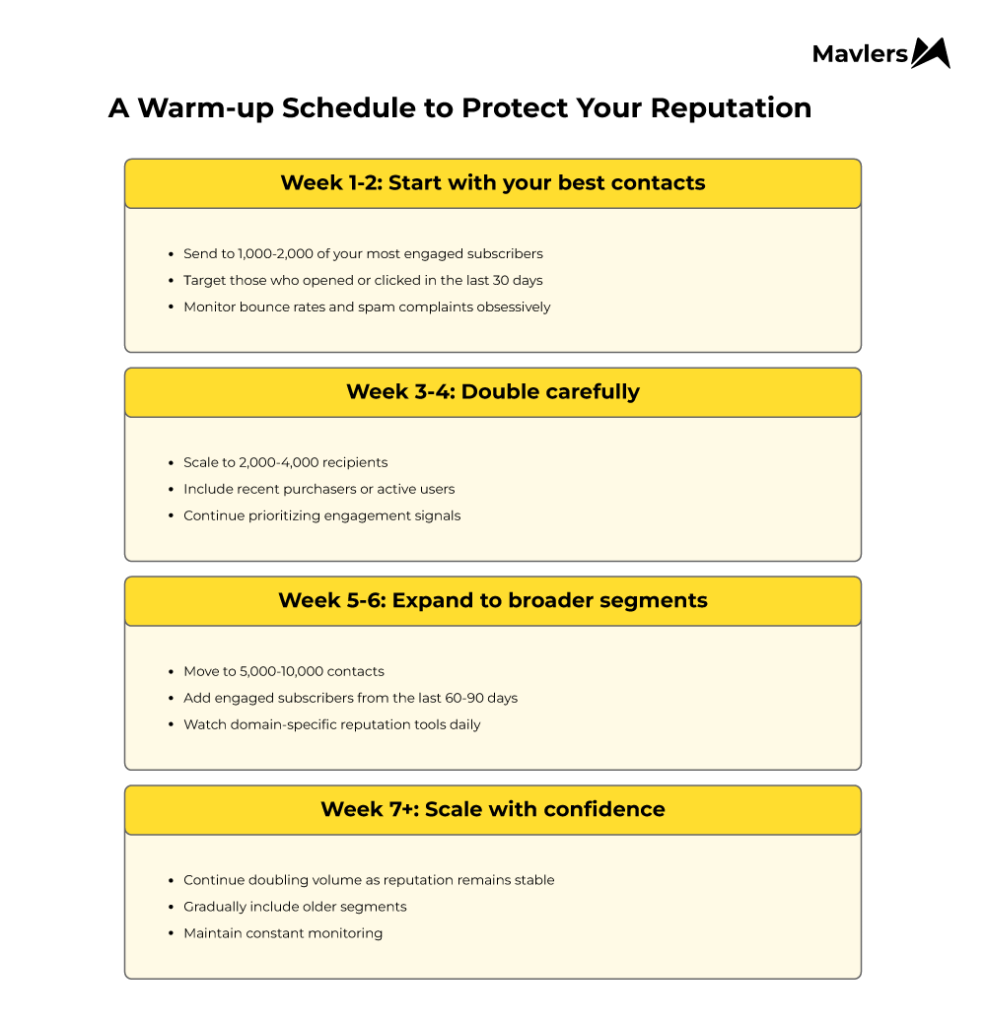
- Gradually scale the volume again using an IP/domain warm‑up style ramp (small engaged cohorts first, then expand).
- Early sends should be natural and useful. Confirmation emails, early access messages, or newsletters help establish steady sending before major campaigns.
- Continue monitoring both Salesforce Marketing Cloud (SFMC) metrics (bounces, blocks, opens, clicks, and complaints by domain) and the external reputation dashboards daily through the recovery period.
Below is a warm-up approach for a list size of 50,000 that you can use in Salesforce Marketing Cloud (SFMC). The exact numbers may vary based on your total database size. But the principle remains: start with quality, prove your value to mailbox providers, then scale systematically.
Reinforce Salesforce Marketing Cloud deliverability, with the help of Mavlers’ SFMC expertise
As a quick recap, here’s how you manage reputation in Salesforce Marketing Cloud (SFMC):
- Focus on engagement quality, not volume: Clicks, replies, and meaningful interactions matter more than open rates, especially with privacy tools inflating opens.
- Monitor recency and momentum: Recent engagement drives reputation.
- Track both obvious and silent signals: Complaints, sudden unsubscribes, declining engagement, and bounce patterns reveal hidden reputation risks.
- Use external reputation tools: Google Postmaster, Microsoft SNDS, Yahoo Sender Hub, which provide domain/IP-specific insights beyond Salesforce Marketing Cloud (SFMC) dashboards.
- Treat reputation drops like major incidents: Dial down on sending, prioritize engaged segments, clean your audience, and verify authentication (SPF, DKIM, DMARC).
- Improve content and user experience: Avoid broken templates, excessive images, misleading subject lines, and ensure clear unsubscribe options.
- Re-warm gradually after stabilization: Resume sending with small, high-quality cohorts before scaling to larger segments.
Treat every drop in engagement, every bounce, and every complaint as a conversation worth listening to, and use it to recalibrate before things snowball.
Start with your most engaged contacts, scale carefully, and never stop watching the signals.
Over time, these disciplined habits turn a fragile Salesforce Marketing Cloud (SFMC) sender reputation into one that earns trust from both subscribers and mailbox providers alike.
Want the complete reputation management playbook? Our ebook, Driving Higher & Meaningful Engagement in Salesforce Marketing Cloud (SFMC): The Science of the Send, covers Einstein implementation for engagement monitoring, bounce management automation, authentication validation workflows, and IP reputation recovery protocols in depth.
Download the ebook to get the complete operational framework.