Lifecycle marketing
 Customer data management
 Email campaign production
 Search marketing
 CMS development
 Who we are
 How we work
 Case studies
 Testimonials
 Salesforce Marketing Cloud
 Braze
Braze HubSpot
 Marketo
 Pardot
 DataBricks
 Snowflake
 HighTouch
 RudderStack
 Segment by Twilio
 Videos

For years, Google Tag Manager (GTM) has been the go-to tool for marketers for a seductive promise it offers-Complete control over every tracking and analytics script on their website without touching a single line of website code.
Yes, GTM simplifies tag management. But it often creates an unintended problem: website performance degradation.
When multiple heavy scripts load simultaneously through GTM, they compete for browser resources during page rendering. The result is slower load times and increased blocking scripts. Which gets reflected as declining performance scores in speed test tools like GTmetrix and PageSpeed Insights.
Why is that more than a technical concern?
In a digital-first ecosystem, website speed is no longer just a developer concern; it directly impacts marketing performance, both organic and paid. And when Google regards page experience as a ranking factor, speed has to carry the weight of user behavior with a page and financial performance of paid campaigns.
A slow page creates a poor first impression, leading to a high bounce rate, which tells Google your page is not meeting user needs.
Page speed is also a major component of the “Landing Page Experience” metric in Google Ads. It determines your Quality Score. A low Quality Score means you pay more per click (higher CPC) to get the same ad position as competitors and inflates your cost-per-acquisition.
Despite the website speed being such a critical KPI, most marketing teams inadvertently sabotage their own performance by overloading GTM with heavy tracking scripts.
We recently encountered this issue while auditing the performance of a client’s high-traffic marketing website. The site’s GTmetrix score had dropped below Grade B due to script bloat from multiple analytics and advertising tools running through GTM.
By challenging the industry-standard “GTM-only” approach and implementing a deliberate delayed-loading strategy within a Next.js framework, we could help the website achieve a 100% GTmetrix performance score—without losing any analytics or tracking data.
Let’s unpack the exact approach used in that next.js performance optimization project and show how you can apply the same strategy to move closer to a 100% GTmetrix score.
Understanding the role of Google Tag Manager (GTM)
To track customers and their interactions with your web pages, you need to add snippets of code or tracking scripts, known as tags. It is necessary for your website to send data to marketing and analytics tools like GA4.
Before GTM, developers had to embed tags into the HTML of websites. But now, you can use GTM to install tags on your website and still not be required to modify website code every time you put a new tag.
GTM sits between the tag and the website and remotely pushes all of your tracking codes onto your website.
Instead of embedding multiple scripts directly into the website’s codebase, teams add a single GTM container script or JavaScript code snippet to the site. That container then manages and deploys all the tags configured inside the GTM dashboard.
Through GTM, these tags can easily connect a website with various marketing and analytics platforms, including:
- Google Analytics
- Google Ads
- Facebook Pixel
- Hotjar
- CRM and marketing automation platforms
GTM uses built-in listeners to detect user interactions such as page views, clicks, form submissions, or other custom events. When those interactions occur, the corresponding tags fire and send data to the connected marketing platforms.
For marketing teams, this sets up a centralized and efficient way to manage tracking infrastructure without ringing up developers for every small change. It’s free, it’s powerful, and it makes deployment a breeze.
However, over time, GTM containers accumulate a large number of third-party scripts. Each one adds its own performance overhead.
When GTM bloat becomes a performance bottleneck
During a recent website speed test on GTmetrix for a client’s marketing website, one issue became immediately apparent: the site’s declining GTmetrix performance score was not caused by poor frontend code or inefficient hosting. The script bloating inside the Google Tag Manager container was the culprit.
Like many growth-focused websites, the client relied on a large stack of third-party tools to track user behavior, attribution, and engagement. Following common industry practice, their team consolidated all tracking scripts into a single GTM container to simplify deployment and management.
Sure, the setup simplified tag management. But the byproduct was several hidden performance bottlenecks that affected the site’s GTmetrix grade and website loading speed.
1. Heavy JavaScript payloads from third-party tools
Tools like Factors.io, HotJar, Swan, and the Facebook Pixel added massive weight to the initial page load.
Result:
When multiple third-party tools load at the same time, the browser must process several large JavaScript files simultaneously. In absence of JavaScript loading optimization, this creates–
- A cascading chain of network requests.
- Parser-blocking scripts.
- Render delays that severely impacted Core Web Vitals.
2. Synchronous script execution through GTM
GTM fires all tags simultaneously on page load. Many analytics and marketing tools fire at the same moment and compete for browser resources during the “Critical Rendering Path.”
Result:
- Bloated Total Blocking Time (TBT)
- Elevated Largest Contentful Paint (LCP)
- Delayed page interactivity
As a result, the website’s GTmetrix speed test results showed elevated blocking times and a declining performance score.
3. The GTM consolidation myth
The common belief that “It’s better to have all scripts under GTM for easy management.” proved to be counterproductive from a GTmetrix optimization and performance standpoint
From a governance perspective, GTM simplifies deployment and allows marketers to manage tracking without modifying code.
Result:
Every third-party script running through GTM, a single synchronous container makes GTM a choke point. The container itself becomes a bottleneck. Instead of scripts loading quickly in parallel, they queue up behind GTM, making your entire page slower with every new tag you add.
The client’s GTmetrix and PageSpeed Insights scores reflected the damage
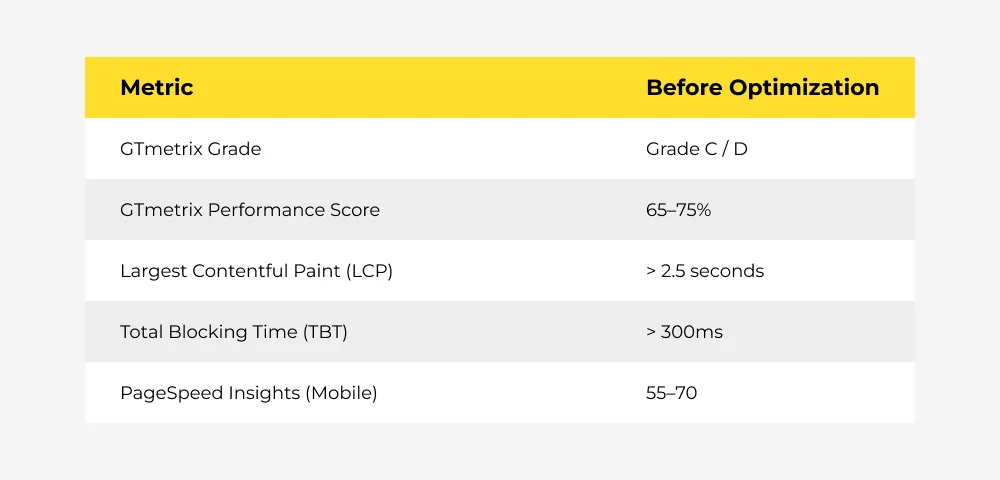
This challenge highlighted an important question:
How can marketing teams keep their tracking infrastructure intact while achieving strong performance scores in tools like GTmetrix?
The solution lies in rethinking how and when scripts load, a key part of effective Next.js performance optimization.
The strategy: Decoupling and intelligent loading
Rather than continuing with a GTM-only approach, Mavlers’ engineering and marketing teams collaborated to architect a new script-loading hierarchy focused on Next.js performance optimization.
The core hypothesis: Not every script needs to fire at page load, and not every script belongs inside GTM.
Performance-first script loading strategy
1. Auditing every script in GTM
The first step in the GTmetrix performance optimization process was a detailed audit. We audited each script inside the GTM container and evaluated it based on:
- Criticality — Does the user experience break without it?
- Timing requirement — Does it need to fire within the first second?
- Performance cost — How much JavaScript weight does it add?
The audit showed that several scripts, Factors.io, HotJar, Swan, and Facebook Ads Pixel, were non-critical during the initial page load. Identifying these scripts was a key step in JavaScript loading optimization and helped isolate the elements responsible for slowing down the site.
2. Removing non-critical scripts from GTM
We removed four heavy scripts from the GTM container:
- Factors.io
- HotJar
- Swan
- Facebook Ads Pixel
Only GA4 and Google Ads conversion tracking remained in GTM because they require early initialization for attribution accuracy.
3. Triggering scripts from Next.js with deliberate delay
Instead of relying on GTM’s page-load trigger, we moved the removed scripts into our Next.js codebase and implemented a controlled delayed-loading strategy.
Using dynamic script injection, we configured these tags to load 3–5 seconds after the initial render, 3–5 second delayed loading strategy. This allows the page to fully render before loading non-critical scripts.
Why 3–5 seconds works: The average user does not interact with meaningful page elements within the first 3 seconds. The typical time spent on a page is well over 10 seconds. By loading tracking scripts within the first 5 seconds, they are fully operational before any meaningful user action occurs. This captures all the behavioral and attribution data they need without impacting the critical rendering path.
4. Optimizing script placement
Next, we repositioned the Non-critical scripts within the document structure.
Instead of loading inside the <head>, which blocks rendering, they were injected after the main content became interactive. This allows the browser to prioritize visible elements and user interaction before processing analytics scripts.
5. Validating data accuracy post-migration
A critical concern when moving scripts outside GTM is data loss. We ran parallel tracking for two weeks to validate:
- HotJar session recordings matched expected volume.
- Factors.io visitor identification remained accurate.
- Facebook Pixel events fired correctly for all conversion types.
- Swan engagement metrics showed no discrepancy.
The result: zero data loss with performance gains.
6. Rigorous performance testing and validation
Post-implementation, we ran comprehensive performance audits across:
- GTmetrix (multiple geographic test locations).
- Google PageSpeed Insights (mobile and desktop).
- Chrome DevTools Lighthouse.
Every test confirmed the performance gains were consistent and stable.
Across all environments, the improvements in GTmetrix performance score and overall website speed remained consistent. A heads up that the Next.js performance optimization techniques were both stable and scalable.
The results: Perfect scores & Grade A on GTmetrix
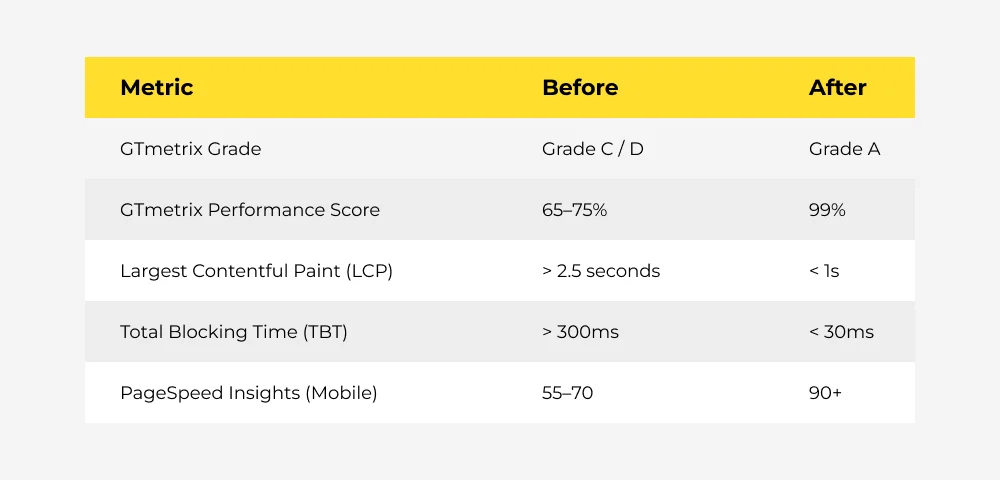
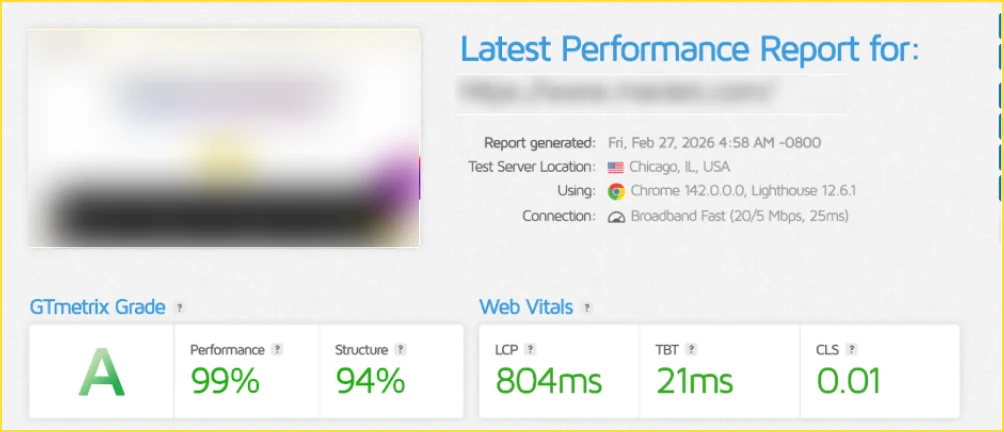
The business impact
1. Faster page loads improved conversions
Reducing render-blocking scripts lowered bounce rates and improved lead capture performance.
2. Stronger SEO performance
Improved Core Web Vitals helped strengthen search visibility and page experience signals.
3. No compromise on tracking or attribution
All marketing tools continued to capture user behavior and conversion data accurately.
4. Better control over script execution
Moving non-critical scripts into the application layer allowed the team to manage performance more precisely while retaining GTM for governance.
5. A replicable framework for any marketing website
Any marketing team running a Next.js, React, or modern JavaScript framework website can apply this strategy to improve performance without losing tracking capabilities.
Final Thoughts on how to improve GTmetrix performance score
Having all scripts under GTM is the easy way out — but it is not the best-case scenario when you need top performance scores and reduced website load times.
This case study proves that you don’t have to sacrifice marketing intelligence for website speed.
For performance-sensitive websites, a more surgical approach is to:
- Audit scripts based on importance and timing.
- Remove non-critical tools from GTM.
- Load them through application code with controlled delays.
- Optimize script placement within the document.
- Validate data accuracy after implementation.
For our client, this approach delivered
- 100% GTmetrix performance score
- Grade A rating
- Zero tracking data loss
Optimize your performance today
Mavlers helps marketing teams build high-performance digital ecosystems that don’t compromise on tracking or analytics. If script bloat is holding your rankings back, let’s talk.