Lifecycle marketing
 Customer data management
 Email campaign production
 Search marketing
 CMS development
 Who we are
 How we work
 Case studies
 Testimonials
 Salesforce Marketing Cloud
 Braze
Braze HubSpot
 Marketo
 Pardot
 DataBricks
 Snowflake
 HighTouch
 RudderStack
 Segment by Twilio
 Videos
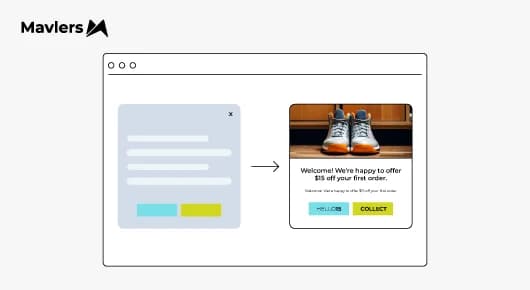
As a marketer working for a brand/business, you must have encountered the following scenarios.
You visit a website, are halfway through a product description or blog post, and are actually interested, when suddenly a pop-up slams onto your screen, asking for your email.
You close it without reading, not because you find pop-ups unnecessary, but simply because that one felt like noise.
Now let’s look at a different scenario; you’ve browsed a few products, read a guide, and are considering investing in something.
And then, out of the blue, a clean form appears, “Would you like a quick comparison checklist to help you decide faster?”
Now this feels organic and helpful, rather than an interruption.
This, fellow professionals, is the core shift happening in conversion design right now.
Simply put, bad pop-ups interrupt, while good pop-ups intercept intent and add value.
And in the era of zero-click behavior, where users skim faster, bounce quicker, and make snap decisions, this difference is everything.
Why popups tend to fail and why it’s not because people hate them!
If you were to read Reddit threads or Quora questions about pop-ups, you would uncover a common sentiment echoing consistently: “Pop-ups ruin UX.” “They feel desperate.” “They hurt conversions.”
When you dive deeper, you begin to notice the hidden, underlying pattern.
Most of these objections aren’t about pop-ups per se; they’re more about bad timing, irrelevance, and being shown generic offers.
Browsers don’t object to being offered value; instead, they dislike being interrupted before they’re ready and seeing the same message regardless of what they’re doing.
This is why form conversion optimization today isn’t about adding more overlays. It’s about designing micro-experiences that align with user intent.
On that note, let’s dive into the basics of designing high-converting pop-ups and forms.
Start with the objective/goal in mind, not the pop-up!
One of the smartest lessons from modern conversion design is pretty simple. Never design the pop-up first; begin by clarifying the objective first!
Sit down with a pen and paper on your favorite office bean bag and ask yourself the following questions;
~ Are you growing an email list?
~ Driving first purchase?
~ Recovering abandoning visitors?
~ Or, offering content upgrades?
~ What action do I want this user to take?
~ What value am I offering in exchange?
~ Who is this message for, and when should it appear?
Once you have clarity on this, each goal should shape the offer, trigger timing, form length, and the messaging tone.
It’s important to note that high-converting pop-ups work not because they are “decorative” or easy on the eyes, but because they are purposeful!
Get down to selecting the right pop-up type and know when to use it
Now, as each wine calls for a different pairing of cheese, each objective calls for different pop-up formats. Cease to worry, no-code tools make deploying all of them super easy.
- Lightbox pop-up
A classic modal overlay, this one is perfect for when you have something specific and valuable to offer, such as an ebook, a coupon, or an exclusive deal.
This can be least disruptive when triggered based on user behaviour.
2. Slide-in pop-up
This one is great for times when you need to create subtle engagement, as it slides in from the corner (yep, true to its name!)
It feels a lot less disruptive than full overlays and is pretty awesome for newsletter sign-ups, small incentives, or content upgrades.
3. Top/Bottom bar
Easily the least disruptive, this one stays unobtrusively on a fixed bar on the screen. This can be a great fit for times when you need to pitch low-commitment actions, send reminders, or use subtle CTAs.
4. Full-screen welcome mats
A word of caution here, use this sparingly, for instance, when you need to make major announcements, launch campaigns, or promotions that demand full attention.
However, they are definitely not ideal for casual offers, as they can come across roadblocks.
5. On-click pop-ups
This can be triggered when a visitor clicks on a specific button or link. It can be the perfect pop-up choice when the CTA itself promises something, such as “Get the checklist!” and a form pops up.
How to create a pop-up that converts (Minus the code!)
So, with most no-code builders, you go through five core steps, and all of them shape how high your conversion rate will be.
- Pick your builder
We suggest that you choose a tool with a drag-and-drop editor that offers templates you can customize, targeting and trigger logic, built-in analytics, and A/B testing.
Also, you should never need to manually code HTML, CSS, or JavaScript, as the platform handles all that work.
2. Define your goal
As discussed earlier, you need a clear understanding of the objectives of the pop-ups you plan to send. Such as capturing emails, driving first purchase, and recovering abandoned carts, each objective should influence the offer, headline, and CTA of the pop-up.
3. Customize your template
While templates are starting points and indeed save your time, the content must be purposeful, with a punchy, benefit-driven headline, supporting text that highlights the value, a single, strong CTA, and, of course, minimal form fields (usually just email).
We got a pro tip for you, always keep the images relevant, not just decorative. The whole point is that visuals should support the message, not distract viewers from it.
4. Set triggers and display rules
Now this is where high-converting pop-up design intelligence happens. Trigger logic includes time delay (after X seconds), scroll depth (after 35–60% scroll), exit intent, on-click or page-specific trigger, and frequency caps (show no more than once per session).
So, custom display rules for specific pages, devices, or traffic sources ensure relevance and prevent annoyance.
5. Publish and test
Before hitting publish, it’s always a good decision to preview on desktop and mobile. Remember to check triggers, then go live and measure performance.
An insight into the best no-code pop-up & form builders for high-converting designs
When you move from theory to actual execution, leveraging the right no–code tool makes all the difference.
These platforms let you create, target, trigger, and optimize pop-ups and forms without developers, and each has pros and cons depending on your goals, budget, and funnel complexity.
Below are the most relevant options you may consider;
An all-in-one marketing suite (pop-ups, email, and automation), this comes with the following pros;
~ Built-in drag-and-drop editor & templates
~ Strong integration with email automation & campaigns
~ Various trigger types (scroll, exit, delay)
~ One platform for forms, popups, SMS, and funnels
You might want to explore some of its cons as well;
~ Popup builder isn’t as advanced as standalone tools, fewer advanced personalization options
~ Larger plan costs if you need full automation + ecommerce features
Pricing (As of 2026)
~ Free tier: Create up to 1 popup (up to 1,000 monthly views)
~ Paid plans start from ~$19/month (Starter) with forms & popups included
~ Full suite (Marketing Automation ~$59/mo; Ecommerce ~$119/mo) expands targeting & funnel features
It can be the right fit for you if you seek simplicity plus email marketing, pop-up, funnel automation all in one place, which is ideal for SaaS trial capture and e-commerce list growth.
2. OptinMonster
Quite a decent choice for advanced targeting and personalization for high-traffic sites, it can be great for brands with higher traffic volumes or needing deep personalization and advanced funnel triggers, especially e-commerce with abandoned cart recovery pop-ups.
Let’s now look at some of its brownie points;
~ Very powerful exit-intent, scroll, and inactivity triggers
~ 700+ templates & behaviors
~ Integrates with Klaviyo, Mailchimp, CRMs, etc.
~ Excellent split testing
As there is another side to every coin, let’s explore its flipside as well;
~ Pricing can be expensive for small teams at higher tiers
~ Some reviews note billing/plan communication and occasional support delays
Pricing (2026 estimates)
~ Basic ($7/month billed annually) includes scroll, lightbox, bars, and inline forms
• Plus ($19/mo) adds A/B testing & advanced integrations
• Pro ($29/mo) adds exit-intent & revenue attribution
• Growth ($49/mo) full suite including advanced targeting, onsite retargeting & e-commerce triggers
3. ConvertFlow
A good choice for building personalized funnel logic, pop-up, and multi-step conversion flows, it’s ideal for segmented SaaS onboarding flows or personalization layers on product sites.
Pros
~ Combines pop-ups, sticky bars, quizzes, embedded forms, and flows
~ Excellent conditional logic & personalization
~ Works natively with email and ecommerce platforms
Cons
~ Free plan limited until you publish campaigns
~ Can be feature-rich for smaller/basic use cases
~ Free plan: Build & preview unlimited funnels (no live campaigns yet)
~ Paid plans unlock live campaigns, pricing varies by traffic & features (free to start, with upgrades required to publish)
4. Poptin
Poptin offers accessible, budget-friendly pop-ups with decent triggers and its a good choice for teams that want simple pop-up solutions at an affordable price without heavy segmentation needs.
Pros
~ Drag-and-drop popup editor
~ Good basic triggers, including exit-intent, delays
~ Integrations via Zapier
Cons
~ Fewer advanced targeting options than premium tools
~ Less robust analytics than higher-end options
~ Free plan available (with limits)
~ Paid plans starting around ~$20/month (varies by feature)
5. POWR Popup Maker (Budget alternative)
Ultra-lightweight or very low budget usage, POWR Pop-up Maker is great for teams when budget is the biggest constraint and your pop-up strategy is entry-level (e.g., simple newsletter capture).
Pros
~ Super affordable
~ Ideal for basic email capture and simple triggers
~ Easy integration with Google Analytics, Zapier
Cons
~ Very basic compared to other builders
~ Not ideal for complex personalization
~ Free forever with limitations
~ Starter around ~$4.83/month (annually)
The road ahead
On that note, if you are looking for the best low-code, no-code landing page builders, we recommend reading ~ The Ultimate Guide to No-Code & Low-Code Landing Page Builders.